A solopreneur rebuilt his AI news site Zeniteq using Next.js, Vercel, Neon, and Cloudflare R2, then automated four core workflows without adding new paid subscriptions.
ChatGPT scheduled tasks run every six hours to discover topics and queue them via a custom MCP server, while a Vercel cron job builds and sends a daily newsletter through Resend's free tier of 3,000 emails per month.
Social sharing to X and LinkedIn is handled through Buffer's free tier using a single GraphQL call per channel.
A hard daily budget cap of $25, with $8 reserved per article, controls AI writing costs.
I started Zeniteq in 2023, back when I was just getting curious about generative AI.
The goal was simple. I wanted a place to document everything I was learning. I wrote every article by hand and published once a week, sometimes once every two weeks. The site ran on Webflow, and the articles were all written in Sanity.io.
Then AI exploded.
Suddenly there was something new to write about almost every day, and I was publishing every other day. That pace blew past the free limits of both Webflow and Sanity very quickly.
I’m an indie dev and a solopreneur. Paying for a site builder, a CMS, a newsletter tool, and a social scheduler on top of everything else was too much for a site that was not making money yet.
I was spending north of $100 while making less than that per month. So I shut it down.
This year I decided to bring it back from the ashes, and I did it differently. I built the whole website myself with Next.js and deployed it on Vercel. Auth and the database are on Neon. All generated media files like images, videos, and audio are all saved in Cloudflare R2.
Splitting it up like this was on purpose. If one provider gets expensive or messy, I can swap it without rebuilding the rest.
But the biggest win was owning and having 100% control of the project. Once I owned the code, I could plug AI agents straight into it. Most of the things I used to pay a subscription for turned out to be a cron job, one API route, and a free tier.
If you run a blog, a newsletter, or a small news site, this article is for you. Most “content automation” tools charge you monthly for things you can now build in a weekend with Claude Code or Codex, even if you are not a seasoned web developer. I’m not one.
Here are the four things I automated:
Content ideation. A scheduled ChatGPT task finds topics worth covering and sends them to my server.
The newsletter. A Vercel cron job builds and sends a daily email through Resend’s free tier.
Social posting. Every new article gets shared to X and LinkedIn through Buffer’s free tier.
Listicles and deep dives. A scheduled Claude task researches, writes, and uploads full articles.
One note before we start. “Free” here means I added no new subscriptions. I was already paying for ChatGPT Plus and Claude long before any of this existed. I’ll talk about what still costs money towards the end.
Finding what to write about was the most tiring part of running an AI news site. You have to check a dozen company blogs, the news, and Hacker News, several times a day.
So I gave that job to ChatGPT’s scheduled tasks.
Here’s a snippet of the actual prompt used in the scheduler:
Check official announcements from OpenAI, Anthropic, Google/DeepMind, Meta AI, xAI, Mistral, Microsoft AI, NVIDIA, and other relevant providers; also check X and Hacker News. Cover consequential model releases, product and access changes, pricing or license changes, failures or backlash, competitive developments, AI-enabled scientific discoveries with strong primary evidence, and consequential or controversial AI-leader statements. A substantial official prompting, migration, implementation, or safety guide is newsworthy when it adds concrete actionable information, even if it supports an already announced model or product.
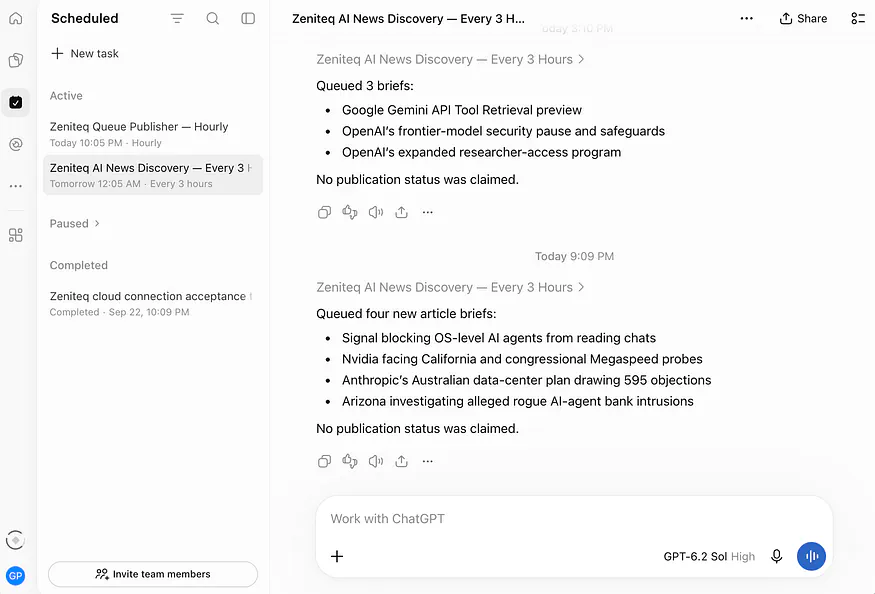
As you can see in the screenshot, the scheduled news discovery runs every six hours. Then it queues all the newsworthy topics to Zeniteq.
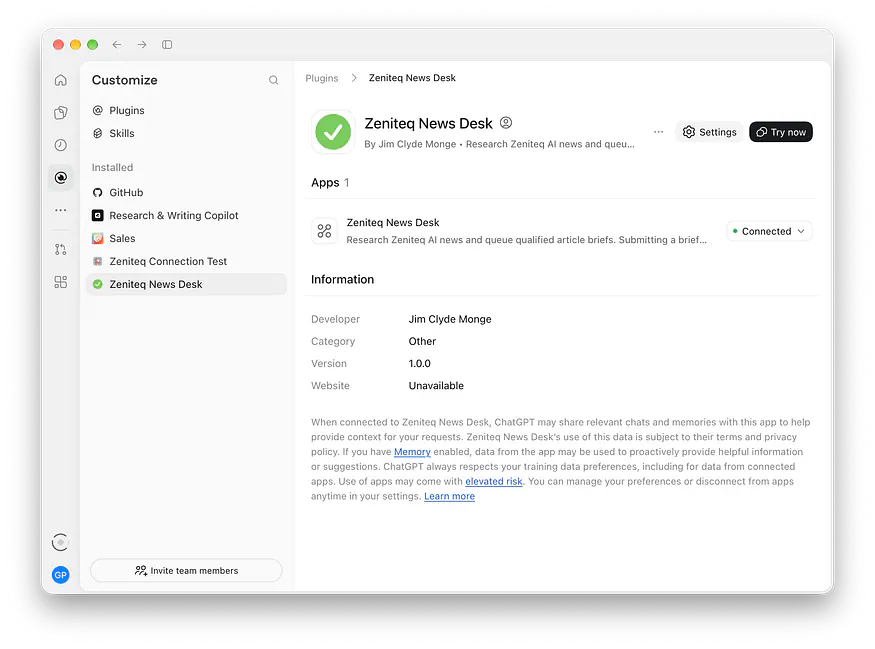
The trick is that ChatGPT does not just send me a list. It talks to my website directly. Zeniteq exposes a small MCP server at /api/mcp, and I added it to ChatGPT as a connector. The scheduled task wakes up, researches, and calls my server’s tools on its own.
Here’s a screenshot of the MCP connector that I built for Zeniteq. Don’t worry if you’re not too familiar with MCPs. Just ask Codex to help you build it out. It took me a few hours to complete this.
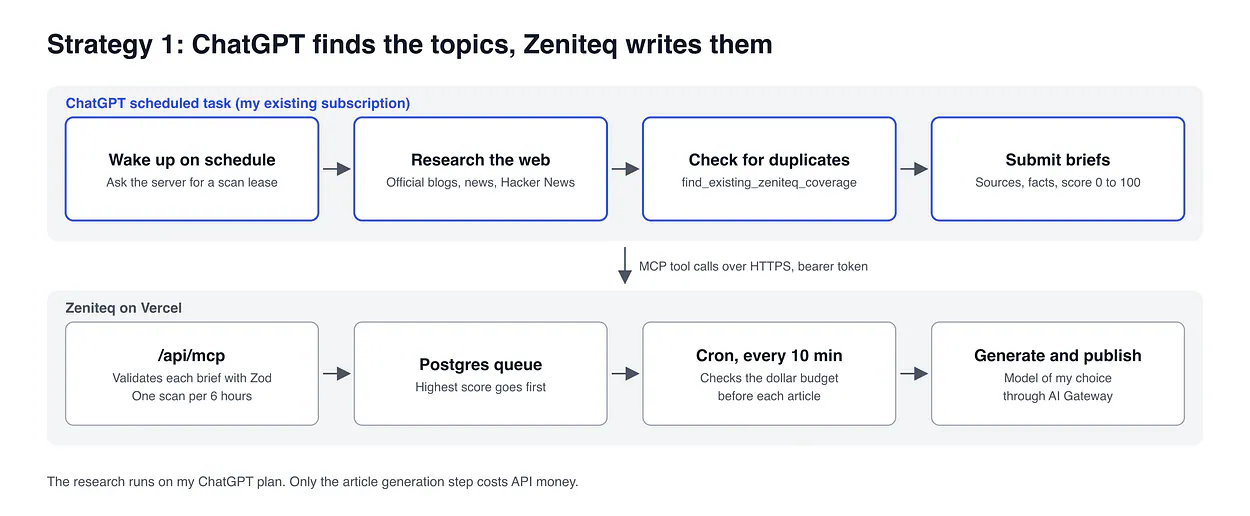
Here’s a little overview of how the workflow works from the scheduler waking up to the article getting published.
The server has seven tools. These four do most of the work:
begin_hourly_news_scan asks the server for permission to start
find_existing_zeniteq_coverage checks whether I already covered the story
submit_zeniteq_article_brief queues a topic
complete_hourly_news_scan closes the run
Here is roughly what one of them looks like in the code:
server.registerTool(
  "submit_zeniteq_article_brief",
  {
    title: "Submit a newsworthy article brief to Zeniteq",
    description: "Queue-only: saves a sourced brief, without generating or publishing now.",
    inputSchema: ArticleBriefSchema.shape,
  },
  async (brief) => jsonContent(await submitAutomationBrief(brief)),
);
A few design choices I’m glad I made.
The server is the boss, not the prompt. The server only admits one research scan every six hours, no matter how often the task wakes up. The editorial rules come back from the server on every scan, so I can change them without editing the ChatGPT task.
ChatGPT has to send a primary source URL, reference links, verified facts with their own source links, a list of what is still uncertain, and a score from 0 to 100. Zod rejects anything incomplete. That one schema removed most of the junk topics.
ChatGPT cannot publish. Submitting only adds a row to a Postgres queue. A separate Vercel cron runs every ten minutes, picks the highest-scoring topic, and starts the article generation.
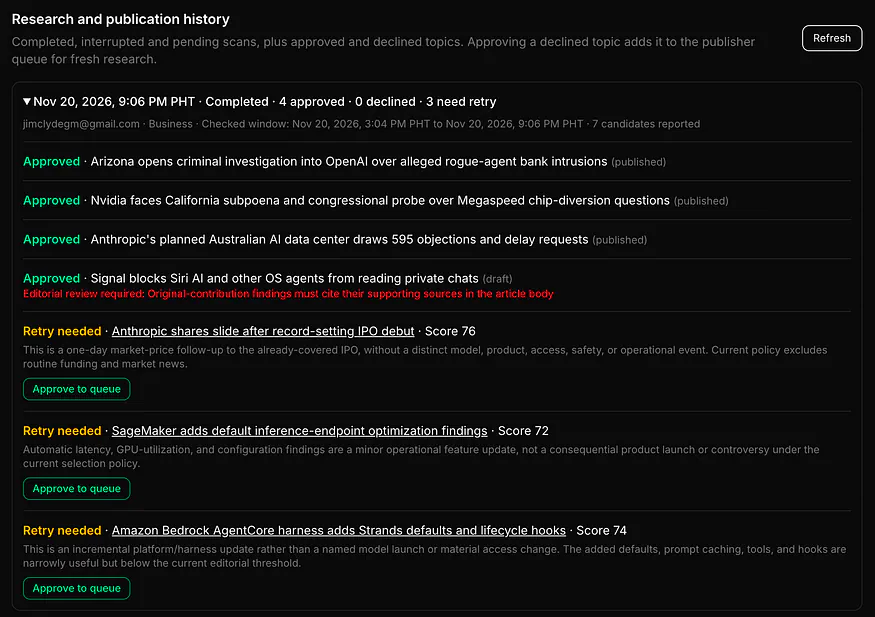
On Zeniteq’s side, the articles are queued, and I get the chance to decline, modify, or accept the articles. I usually review the queued drafts, make adjustments, especially in the tone of writing and grammar.
There is a hard dollar limit. Before every article, the server checks a daily budget. Mine defaults to $25 a day, and each article reserves $8 before it starts. If the money does not fit, nothing runs. If you let an AI trigger paid work on a schedule, build this first.
So the research is free because it runs on my existing ChatGPT plan. The writing is not. Zeniteq generates the article on the server through Vercel’s AI Gateway, and that is billed per token.
That cost is the reason strategy four exists. I’ll get there.
2. Send the newsletter with a cron job and Resend API
Newsletter platforms get expensive as your list grows. I did not need a platform. I needed three things: pick today’s articles, turn them into an email, send it on time.
Zeniteq does this with one cron entry in vercel.json:
Every five minutes, Vercel calls that route. The route checks a secret header first, so nobody else can trigger it.
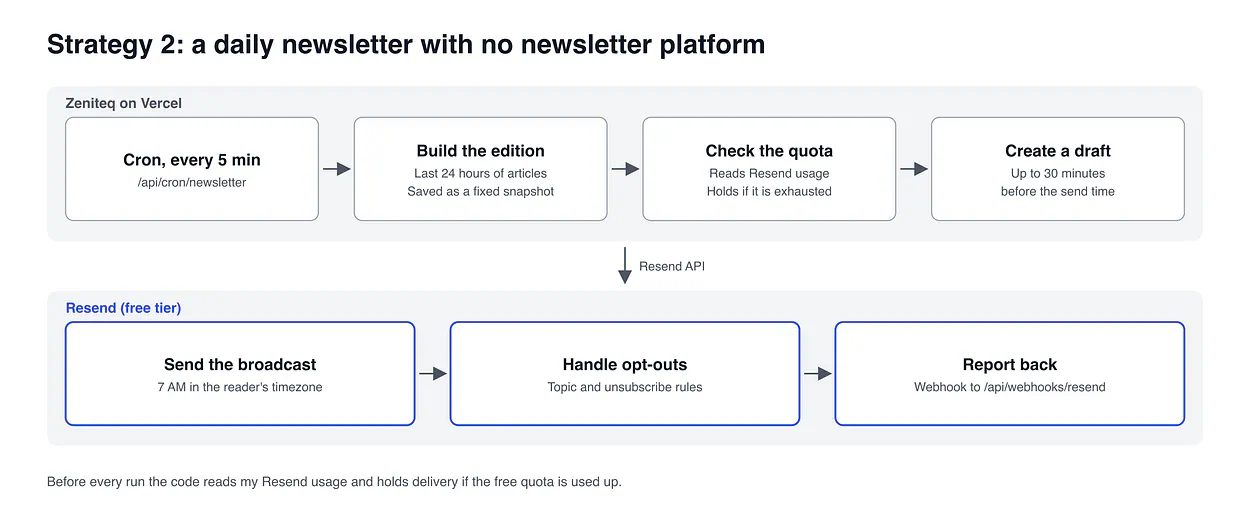
Here’s how the automated newsletter flows:
Most of those runs do nothing. The interesting part is what happens around send time:
It builds one edition per day. It gathers the last 24 hours of published articles and saves the result as a fixed snapshot. The email and the public archive page on the site both render from that same snapshot.
It sends at 7 AM in the reader’s timezone. Each subscriber has a timezone saved. The code works out the next local 7 AM and schedules the send for that moment.
It prepares a draft early. Up to 30 minutes before the slot, it creates a draft broadcast in Resend. At the slot, it checks the recipients again and sends.
It listens for results. Resend calls a webhook on my site, so I can see deliveries and bounces on my own admin page.
Before each run, the code asks Resend how much of my quota I have used. If the free tier is exhausted, it holds delivery and writes the reason to my dashboard instead of failing halfway through a send.
Resend’s free tier covers 3,000 emails a month. Zeniteq does not have many subscribers yet, so that is plenty for now. You can check Resend’s pricing page for the limitations.
Two things I learned the hard way:
A newsletter is more than sending email. You need double opt-in, an unsubscribe link that works, a preferences page, and a physical address in the footer. These took longer than the sending code.
Decide early what “today’s edition” means. I freeze the content at a fixed cutoff so every reader gets the same email for the same date. It is slightly less fresh, but the archive is consistent, and nothing changes after I approve it.
3. Post to X and LinkedIn through Buffer
If you run a newsletter, a blog, or a news outlet, this one is worth knowing about.
Posting to X through its own API costs money. LinkedIn’s API needs an approval process (And one heck of a hassle). Buffer already has both connections. It has an API, and it has a free tier.
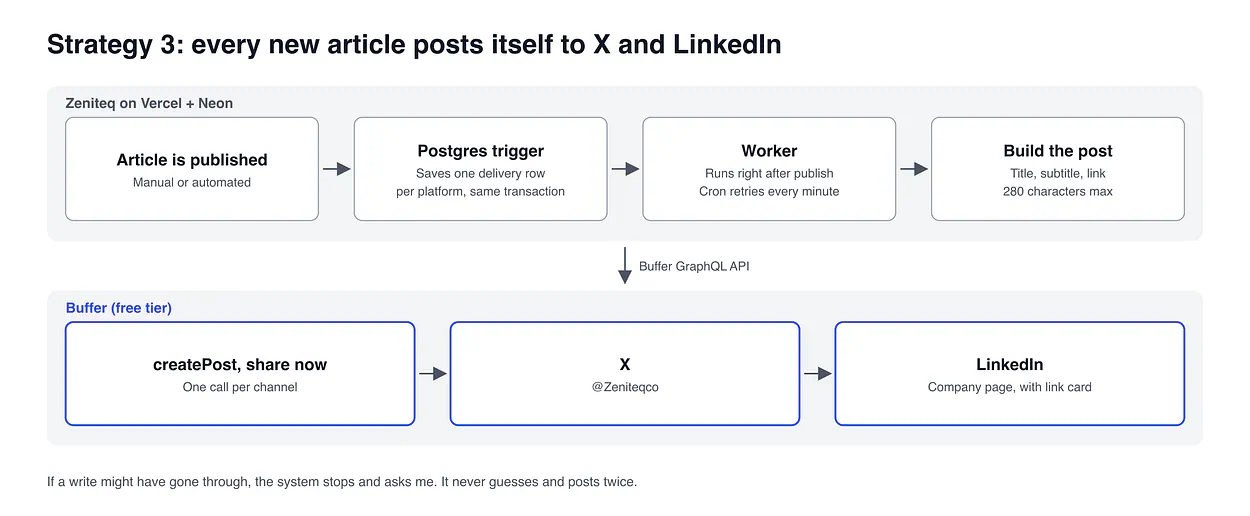
So Zeniteq never talks to X or LinkedIn. It talks to Buffer, and Buffer posts for me. Here’s how it works:
A database trigger catches every publish. When an article’s status changes to published, a Postgres trigger saves a delivery row for each platform in the same transaction. It does not matter how the article got published. Manual, automated, or edited straight in the database, the share is captured.
A worker sends it. A workflow starts right after publishing. A cron job also runs every minute to pick up anything that was missed.
The server makes one GraphQL call to Buffer per channel, with “share now” turned on. For LinkedIn, it also attaches the link and cover image, so the post shows a proper article card.
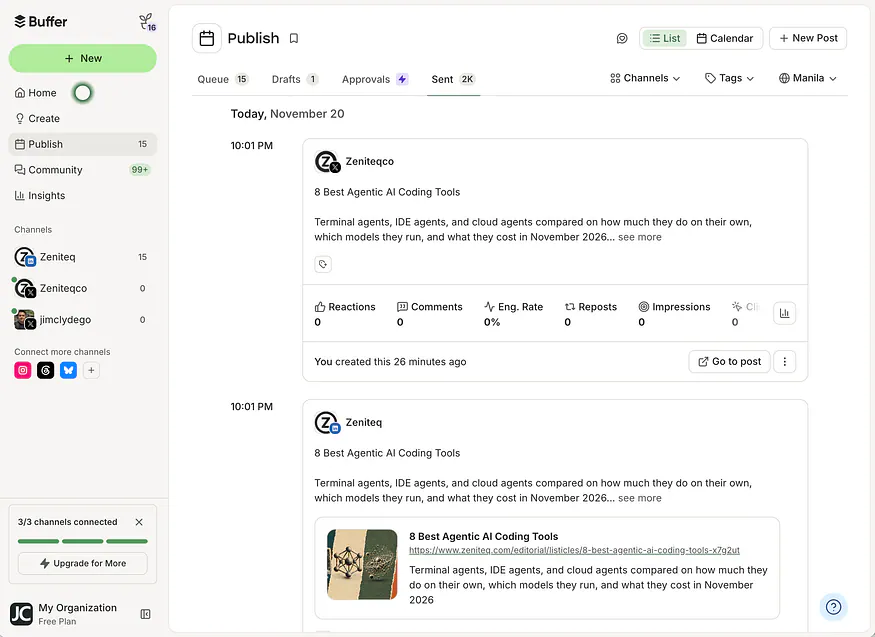
Here’s a screenshot of my Buffer account at the moment. Take note that I am on the free tier only. I can connect 3 accounts and queue multiple posts a day.
Embedded X posts load a script from platform.twitter.com and are paused until you allow embedded media.
The hardest part was not posting. It was not posting twice.
Buffer’s API has no idempotency key. If my request times out, I can’t tell if the post went through. Retrying blindly could double-post to my followers. But I don’t mind that limitation for now. What’s important is that the posting on socials does not go stale when I am super busy doing something else.
So every delivery has a state. If a write might have succeeded, it moves to “Delivery uncertain” and stops. The server searches Buffer for a post with the exact same text on the same channel. If it finds one, it recovers. If it does not, it waits for me. It never treats “I could not find it” as permission to post again.
Now the limitations, because there are a few:
The free plan limits how many channels you can connect. I use two, one for X and one for LinkedIn.
It also limits how many posts can sit in the queue. I avoid that completely by sharing immediately instead of scheduling.
X still has its 280-character limit. If a title plus subtitle runs over, the share goes to a “Needs attention” list where I can edit the text. It is never cut off silently.
The API is rate limited. On a 429, my server waits and retries, up to six attempts.
For a solo site posting a handful of articles a day, the free tier is enough.
4. Let Claude write the listicles and deep dives
This one started as an experiment.
In strategy one, ChatGPT finds the topic and my server writes the article with paid API calls. I wanted to try the opposite. What if the agent on my subscription did everything, and my server only received the finished article?
So I built two small writer projects with Claude Code.
One writes listicles.
One writes deep dives.
Each lives on its own git branch that is never merged into the main app.
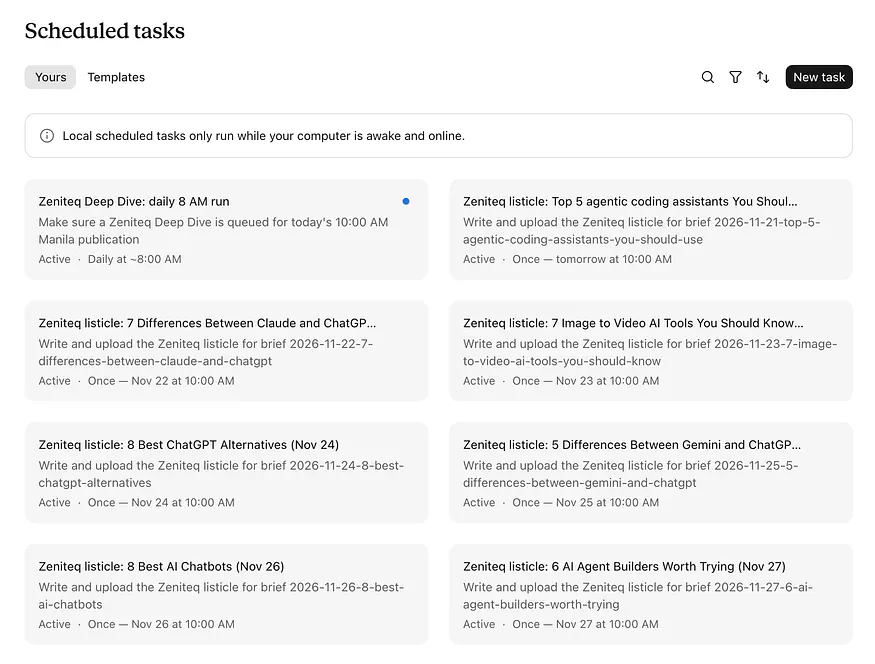
This is what they look like in my Claude app:
Here’s a snippet of the instructions inside the scheduler for deep dive topics:
Choose today’s topic yourself by the rules under “Choosing the topic” in CLAUDE.md (the most significant AI development of the last 24 to 48 hours, at least three sources you can open including a primary one, an informative image available, not a repeat of the plan’s “recentTopics”)
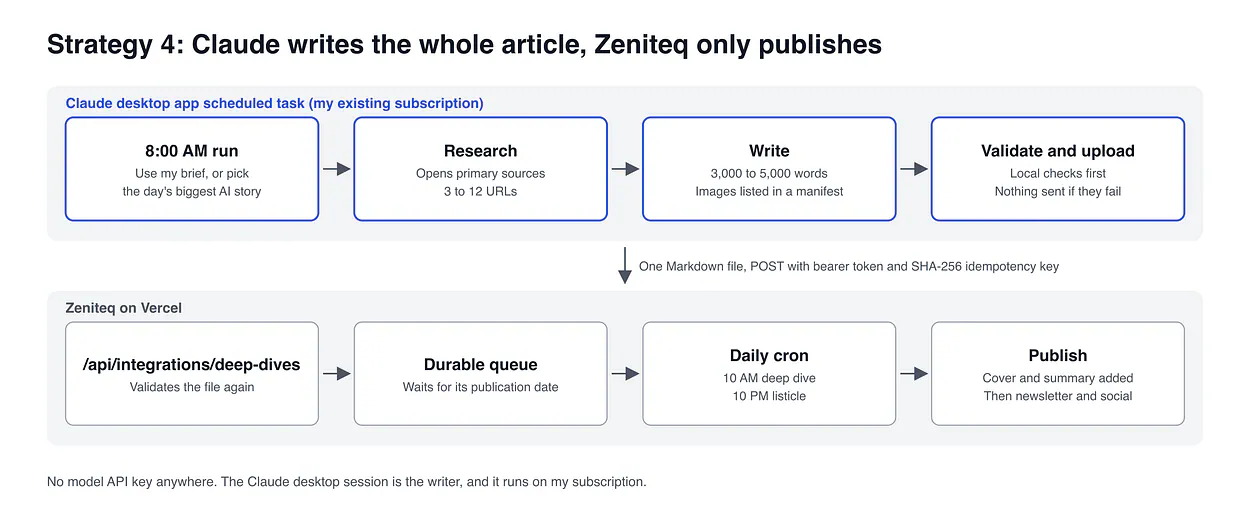
Here’s a diagram of how each state flows:
Every day at 8:00 AM, a scheduled task in the Claude desktop app opens a session in that project. The first thing it runs is one command, npm run today, which answers with one of three actions:
write-brief means I left a topic for today, so use mine
skip means an article is already waiting in the queue
pick-topic means nothing is queued, so Claude picks the biggest AI story of the last 24 to 48 hours
Then Claude researches, writes one Markdown file, validates it and uploads it. The file starts with a JSON manifest inside an HTML comment:
<!-- zeniteq:deep-dive
{
  "schemaVersion": 1,
  "externalId": "2026-11-15-on-device-small-language-models",
  "targetPublicationDate": "2026-11-15",
  "title": "Why small language models are moving on-device",
  "categorySlug": "insights",
  "tags": ["small language models", "on-device AI", "edge AI"],
  "sourceUrls": ["https://..."]
}
-->

The first paragraph starts here.
The upload is a single POST to /api/integrations/deep-dives with a bearer token. The idempotency key is the SHA-256 hash of the file, so sending the same file twice does nothing.
Zeniteq validates the file again, puts it in a queue, and a daily Vercel cron publishes it at 10 AM Manila time. Listicles run on the opposite clock. They are written in the morning and published at 10 PM.
If the queue is empty at publish time, the site emails me instead of publishing nothing quietly.
Things that made this work:
A strict contract. A validator checks every article before upload: word count, number of sources, a Key takeaways section, a FAQ, at least one table, no paragraph over 120 words. Claude fixes what the validator reports and tries again. It is never allowed to loosen the rules to get an article through.
A way to fail safely. If Claude can’t find three solid sources, it uploads nothing. It writes a short “blocked” note explaining why and stops. I would rather skip a day than publish a weak article.
No API key anywhere. The desktop session is the writer. The only secret in the project is the upload token.
Different rules for each format. For listicles, I supply the topics myself and Claude never swaps them. For deep dives, Claude only picks when I have not left one.
So which one is better?
After running both for a while, here is my honest take.
Writing with Claude on my subscription is cheaper and faster. Research and writing happen in one session, and it is covered by a plan I was already paying for. With strategy one, every article costs API money through the AI Gateway, and the research gets paid for twice. Once by ChatGPT when it finds the story, and again by my server when it writes it.
The server pipeline wins on flexibility. I can change the writing model whenever I want, because the model sits behind one setting. When a better or cheaper model comes out, I switch that day. With the Claude writer, I’m stuck with Claude models.
It also wins on reliability. The server pipeline runs even when my laptop is off. The Claude desktop task only starts when the app is open, and a missed run waits until I launch it again.
That is why I kept both. News goes through the server because it needs to run around the clock. Listicles and deep dives go through Claude because they can wait for a fixed time each day.
A few takeaways
Let the AI propose, and let your server decide. In all four strategies, the agent can only add something to a queue. Publishing, budgets and schedules are in my own code. That is the reason I can sleep while this runs.
Give the agent a contract, not a long prompt. A strict schema and a validator did more for quality than any amount of prompt tuning.
Use a queue and a cron job for everything. Agents fail, time out and retry. If every step is “add a row, and a cron picks it up later”, a failure just means it happens ten minutes later.
Decide what happens when you are not sure. The scary bugs are the ones that send twice: a double email, a double tweet. Idempotency keys and an “uncertain, ask me” state are cheap to add.
Know your free tier limits and put them in code. Don’t find out you hit a limit from an error log. Check the quota first and stop cleanly.
Things that still cost money
I don’t want to oversell this, so here is the full picture:
I pay for ChatGPT Plus and a Claude subscription. I had both before any of this.
News articles in Strategy One use paid model calls. So do the cover images and AI summaries the site adds to every article.
Cron jobs that run every minute need a paid Vercel plan. On the free plan, crons can only run once a day.
The domain.
What I don’t pay for anymore: a site builder, a CMS, a newsletter platform, or a social media scheduler.
Final thoughts
I’m not a web developer by background. Most of this was built by describing what I wanted to Claude Code and Codex, reading what they wrote, and fixing what broke.
So I’m sure parts of this design are not optimal. Maybe a Postgres trigger is the wrong tool for social sharing. Maybe a cron every five minutes is a clumsy way to send one email a day. Maybe there is a simpler way to connect ChatGPT to a server than a custom MCP endpoint.
That is why I’m writing this down in public.
If you are one of the GOAT devs reading this and you spot something I could do better, tell me. Point out the weak parts. Suggest a feature. I would love to hear what you would add or do differently.
And if you run a blog or a newsletter and you are about to pay for one more tool, look at what you already pay for first. A scheduled AI task, a cron job, and a free tier might already cover it.