There are more ways to train an AI model than most beginners expect, and they ask for very different things. One takes a webcam and five minutes. Another takes a rented rack of GPUs, a few billion words of text, and a weekend of debugging. Picking the wrong one is the most common way people waste a month (and a cloud bill).
We compared five approaches using their official documentation, open-source repositories, and the research papers behind them, as of November 2026. For each one, we looked at what it needs in three areas: data, compute, and skill.
This guide is for beginners and builders who want a model that does something specific: sorts photos, answers in a house style, or follows a tone. The list runs roughly from least to most demanding, so it isn't a ranking. By the end, you'll know which of the five fits your data, your hardware, and your patience.
1. No-Code Training in Your Browser
Best for: Beginners, teachers, and makers who want a working image, sound, or pose classifier today.
The gentlest way in is a browser tool like Google's Teachable Machine, which lets you train a model to recognize your own images, sounds, and poses without writing code. You group examples into classes ("ripe banana" and "green banana"), press train, and test the result on new examples right away. The whole loop takes minutes.
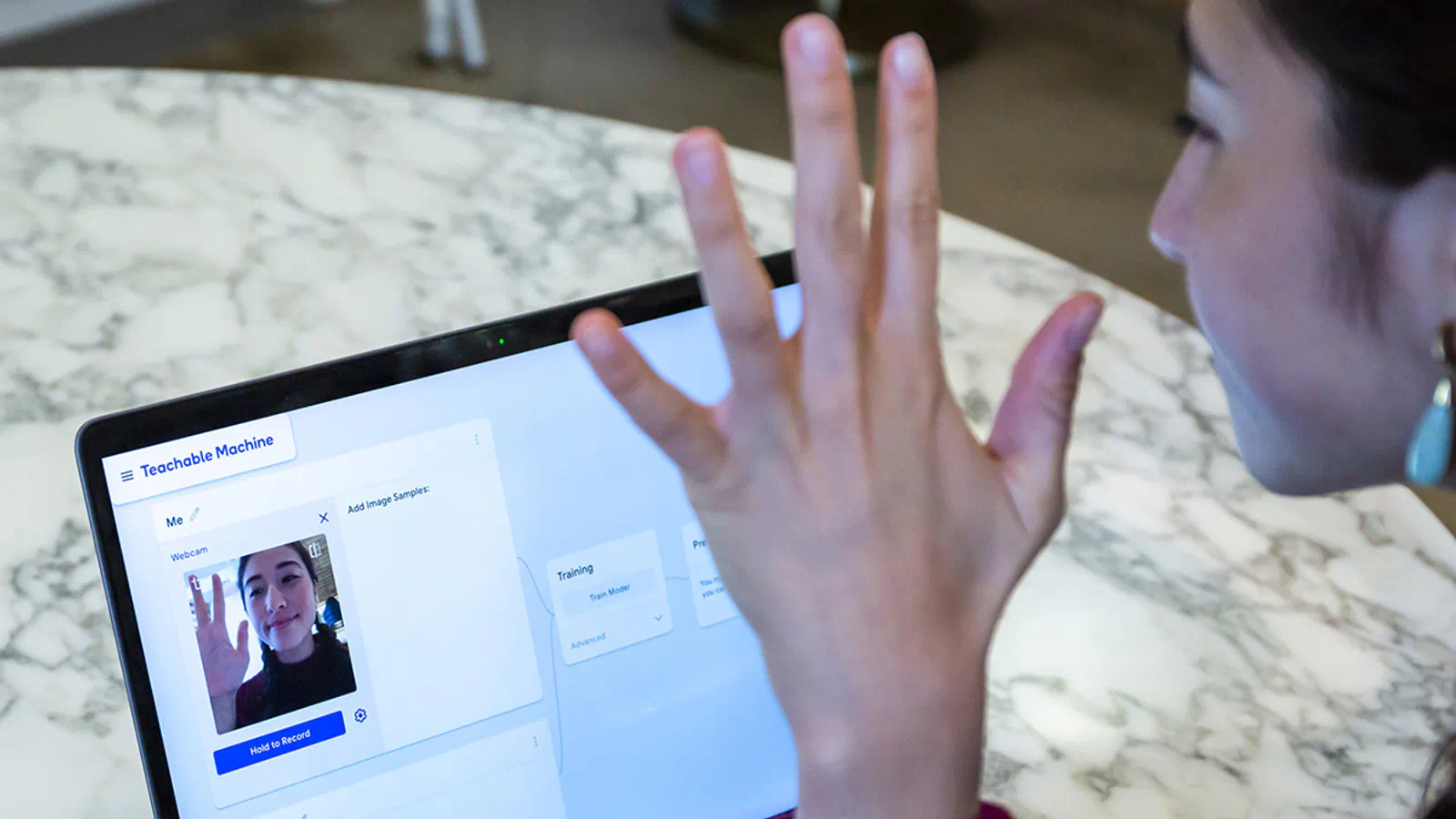
Under the hood, it uses TensorFlow.js to train and run the models in your web browser, so you don't need a GPU or a cloud account. What you'd normally have to learn (data loaders, training loops, learning rates) is hidden behind three steps.
What it gives you for very little effort:
- Three input types: Images, short sound recordings, and body poses
- Live capture: Record examples from your webcam or microphone, or upload files
- On-device option: Run it entirely on your computer, so webcam and mic data don't leave it
- Export: Download the model or host it online for a site or app
- Hardware targets: Export formats for Coral and Arduino projects
The strongest use case is a quick prototype. Say you run a small shop and want a kiosk that tells two products apart, or you're a teacher showing a class how classification works. You can collect 50 photos per class with a webcam, train, and see where the model gets confused, all in one sitting. Google's own tutorials include a "Bananameter" that judges whether a banana is ripe, which gives you a feel for the scale of problem this handles well.
The exported models are real TensorFlow.js models that run anywhere JavaScript runs, and the project's export panel includes code snippets for JavaScript, Java, and Python. That makes it a reasonable first step for a hobby app.
The ceiling is low, though. You can classify things into categories, and that's it. You can't build a chatbot, generate text, or customize a large language model this way. Accuracy depends heavily on how varied your examples are: train only on photos from your desk lamp and the model may fail in daylight. Before you build anything public on it, try the model on examples captured somewhere else, by someone else.
2. Supervised Fine-Tuning
Best for: Builders who have a few hundred to a few thousand good examples of the exact answers they want.
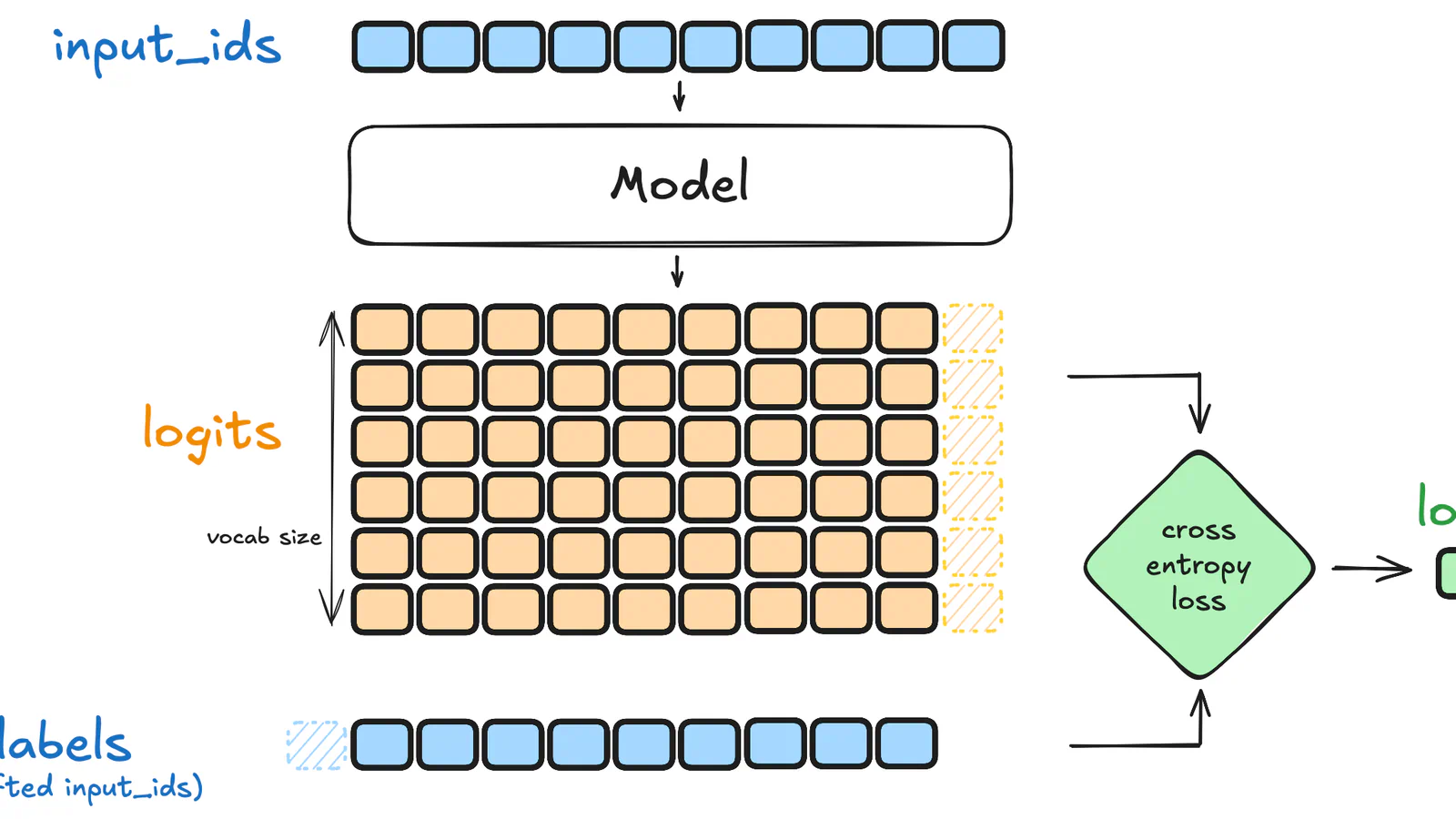
Supervised fine-tuning (SFT) takes a model that already understands language and shows it many examples of the input and the output you want. Andrej Karpathy put it plainly in his nanoGPT notes: fine-tuning is no different from training, except you start from a pretrained model and use a smaller learning rate (the size of each correction step). The model keeps its general knowledge and picks up your format, tone, or task.
Hugging Face's TRL library is a common place to start. Its quick start fine-tunes Qwen3 0.6B on the Capybara dataset, a small multi-turn chat set, in a few lines of Python.
What the data looks like in TRL's SFTTrainer:
- Conversations: A list of messages with user and assistant roles, and the trainer applies the chat template for you
- Prompt and completion pairs: One input, one ideal answer
- Completion-only loss: On by default for prompt-completion data, so the model learns from the answers and ignores the prompts
- Assistant-only loss: One setting to train only on assistant replies in a chat
- Packing: Puts several short examples into one sequence to train faster
SFT shines when you can write down what "good" looks like. A support team can turn 1,000 resolved tickets into prompt and answer pairs. A legal-tech builder can teach a model to always return a clause summary in the same five-field layout. In both cases the target is clear, so a direct example beats a clever prompt.
It's also quicker than people expect. The nanoGPT repo notes that fine-tuning on a small dataset can take just a few minutes on a single GPU. For a small open model, a rented GPU for an afternoon is often enough.
The catch is data quality. The model copies what you show it, typos and bad habits included, so 500 clean examples usually beat 5,000 messy ones. You also need some Python and a GPU with enough memory to hold the whole model plus its training state, which gets expensive fast as models grow (that's the problem LoRA, next, was built to solve). SFT is weak at teaching new facts; if your goal is "know our latest price list," retrieval from a document store is usually the better fit. Before you start, write 20 examples by hand and check that two people on your team agree they're good answers.
3. Parameter-Efficient Fine-Tuning With LoRA
Best for: Builders who want to customize an open model on one consumer or rented GPU.
LoRA (Low-Rank Adaptation) is the most popular member of a family called parameter-efficient fine-tuning. Instead of updating every weight in the model, it freezes the pretrained weights and adds small trainable matrices to each layer. Think of it as a small add-on that teaches a big model one new skill while the original stays untouched.
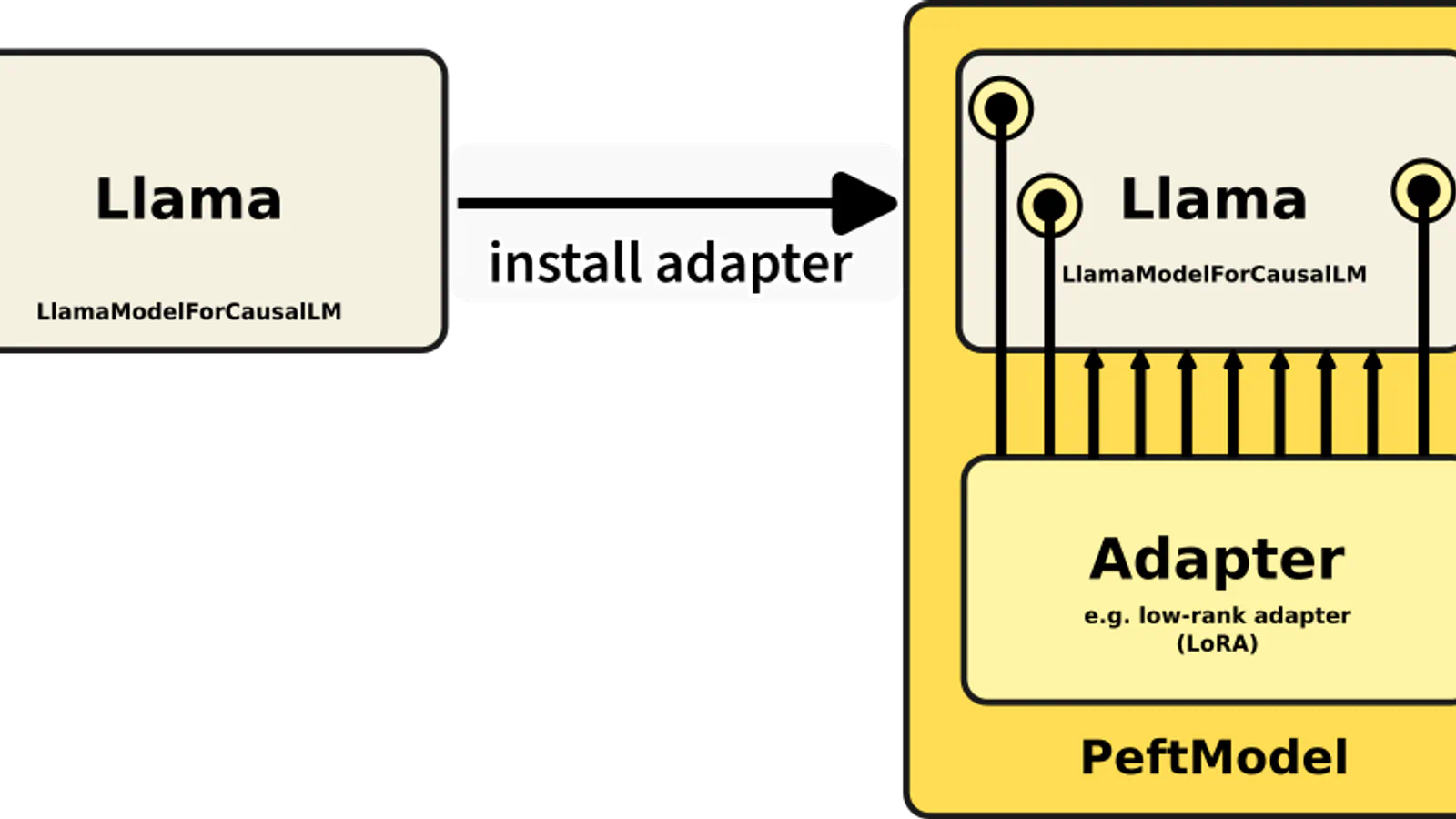
The savings are large. In the original 2021 paper, the authors report that compared with fully fine-tuning GPT-3 175B, LoRA cut trainable parameters by 10,000 times and GPU memory by 3 times, with quality on par or better on the models they tested.
Why builders like it:
- Lower memory: Fits fine-tuning jobs onto hardware that full fine-tuning can't use
- Tiny files: You save and share the small adapter, not a full copy of the model
- No speed penalty: The paper reports no extra inference latency, because the adapter can be merged into the weights
- Swappable skills: Keep one base model and load a different adapter per customer or task
- Wide support: Hugging Face's PEFT library works with Transformers, Diffusers, and Accelerate
Hugging Face describes PEFT's goal as making it possible to train and store large models on consumer hardware while keeping performance comparable to a fully fine-tuned model. TRL's SFT trainer also has built-in PEFT support, so the same dataset from the previous section works with a few extra lines of config.
A realistic scenario: an agency wants a writing assistant per client. With full fine-tuning, that's one full model copy per client. With LoRA, it's one shared base model and a small adapter file each, which is far easier to store and serve. The same trick is common in image generation, where people train a LoRA on a few dozen pictures to teach a model one style or one product.
LoRA has trade-offs of its own. You still need the same clean, labeled data as SFT, and you still need to know your way around Python and a training config. It adds settings to tune, like the rank (roughly, how big the add-on is), and a poor choice can underfit. For a big shift in behavior, full fine-tuning can still win. Check that your base model's license allows the use you have in mind, and test the merged model on cases it didn't see in training.
4. Preference Tuning With RLHF and DPO
Best for: Teams that can judge which of two answers is better but can't easily write the perfect answer.
Preference tuning teaches a model what people prefer instead of what to say word for word. The classic method, reinforcement learning from human feedback (RLHF), has three core steps: start with a pretrained language model, gather data and train a reward model, then fine-tune the language model with reinforcement learning.
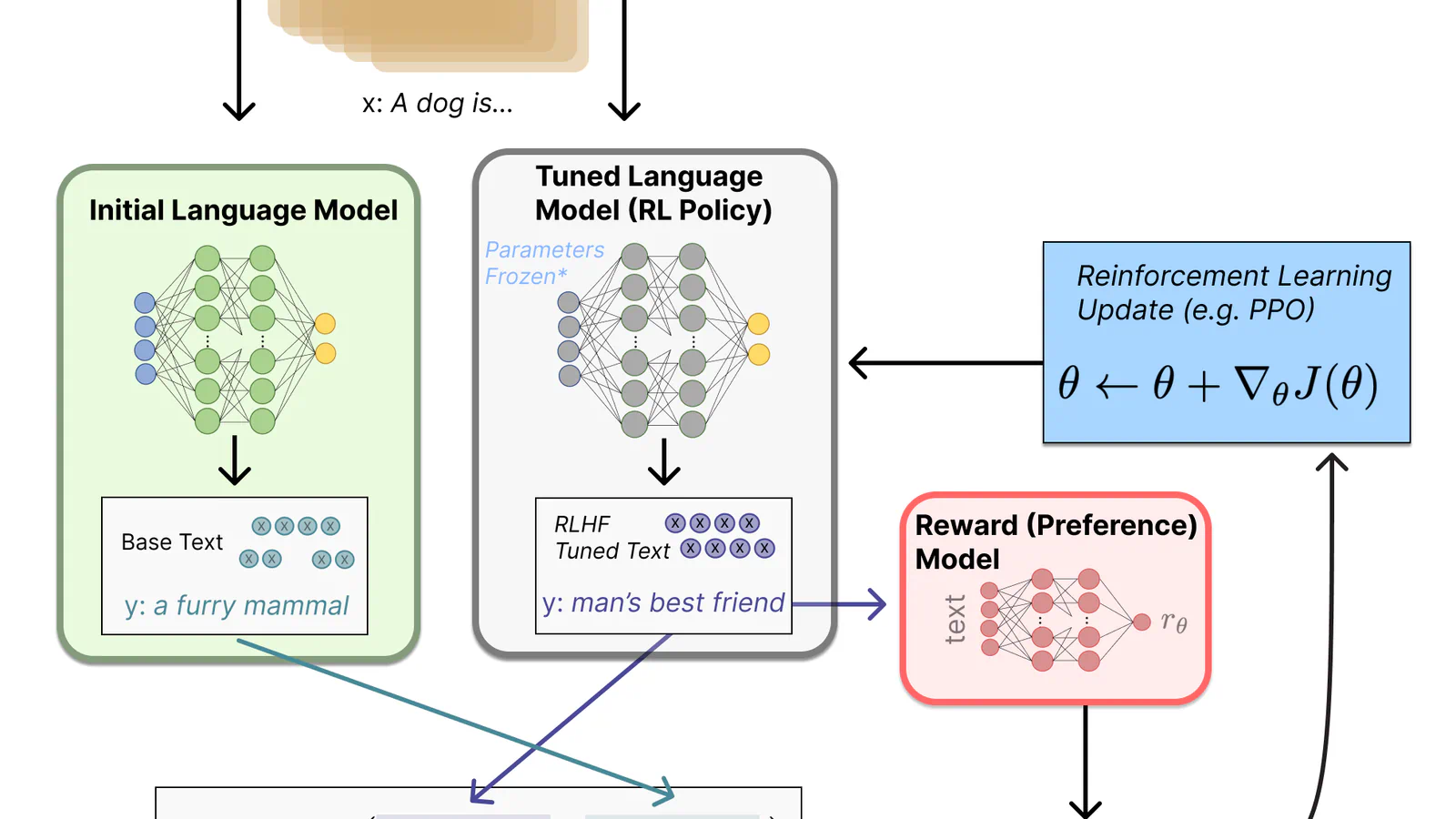
In practice, human annotators rank several answers to the same prompt. Hugging Face's explainer says rankings work better than raw scores, because people's scores are uncalibrated and noisy. A reward model learns from those rankings, and an algorithm called PPO nudges the main model toward higher rewards. A penalty keeps it from drifting so far from the original that it starts writing gibberish to game the reward.
Direct Preference Optimization (DPO) is the simpler route most builders take now. It skips the separate reward model and the reinforcement learning loop. Its authors describe DPO as stable, performant, and computationally lightweight, and TRL's quick start trains Qwen3 0.6B on the UltraFeedback preference dataset.
What the data looks like for DPO:
- Prompt: The question or instruction
- Chosen: The answer people preferred
- Rejected: The answer people liked less
- Format: Plain text or chat-style messages, as in TRL's preference dataset examples
This approach fits jobs where quality is a judgment call. A writing tool might want replies that are warmer, shorter, or safer. Nobody can write one perfect reply, but a reviewer can pick the better of two in seconds. Most teams run SFT first so the model already follows the format, then use DPO to polish tone and choices.
Frequently Asked Questions
5 questions
1What is the easiest way to train an AI model?
The easiest way to train an AI model is a no-code browser tool like Teachable Machine. You collect examples with a webcam or microphone, press train, and test the model in minutes with no coding or GPU.