
ByteDance just released Seedance 2.5, the upgraded version of its widely used AI video model.
Seedance 2.0 already made a lot of noise earlier this year. Some creators loved it because the videos looked cinematic without needing too much work. Others were more skeptical because, like most powerful AI video models, it raised the usual questions about training data, likeness, and how fast this space is moving.
Now Seedance 2.5 takes that same foundation and pushes it further. It now supports native 30-second video generation, native 4K output, up to 50 multimodal reference assets, better continuity, improved audio-video sync, and more control over longer scenes.
Topview AI has already added Seedance 2.5, so I spent the past 24 hours testing the model to see how much of the upgrade there is.
In this article, I’ll go through what’s new with Seedance 2.5, how it compares to Veo 3.1, Kling 3.0 Pro, Runway Gen-4, and Midjourney, and how to use it inside Topview.
What’s New in Seedance 2.5?
It has only been a few months since Seedance 2.0 was released, but ByteDance clearly had more planned for the model.
Seedance 2.5 focuses on the areas where most AI video models get annoying: too short lengths, inconsistent characters, terrible lip syncing, blurry details, and too much manual stitching when you’re aiming for a multi-scene video.
Here are the main upgrades:
- Native 30-second video generation: Seedance 2.5 can create longer clips without forcing you to stitch several short generations together.
- Native 4K output: The model can generate sharper videos from the base output, which helps with product shots, close-ups, textures, and repurposing content for different formats.
- Up to 50 multimodal reference assets: You can give the model more context through images, videos, audio, product references, character references, or style direction.
- Better continuity: Characters, products, backgrounds, and camera movement are more likely to stay stable across longer scenes.
- Improved audio-video sync: Useful for avatar videos, product explainers, UGC-style ads, tutorials, and short videos where the motion needs to match sound or speech.
- More control over scenes: Seedance 2.5 supports more guided workflows, including edited regions and staged layouts, so the model is not relying only on a text prompt.
- Better fit for ads and story-based videos: The longer output makes it more practical for product videos, mini stories, cinematic scenes, beauty clips, fashion content, and branded assets.
Okay, that’s quite a lot of major upgrades. There’s actually a bunch more new features you need to know. Check them all in this Seedance 2.5 spec sheet.
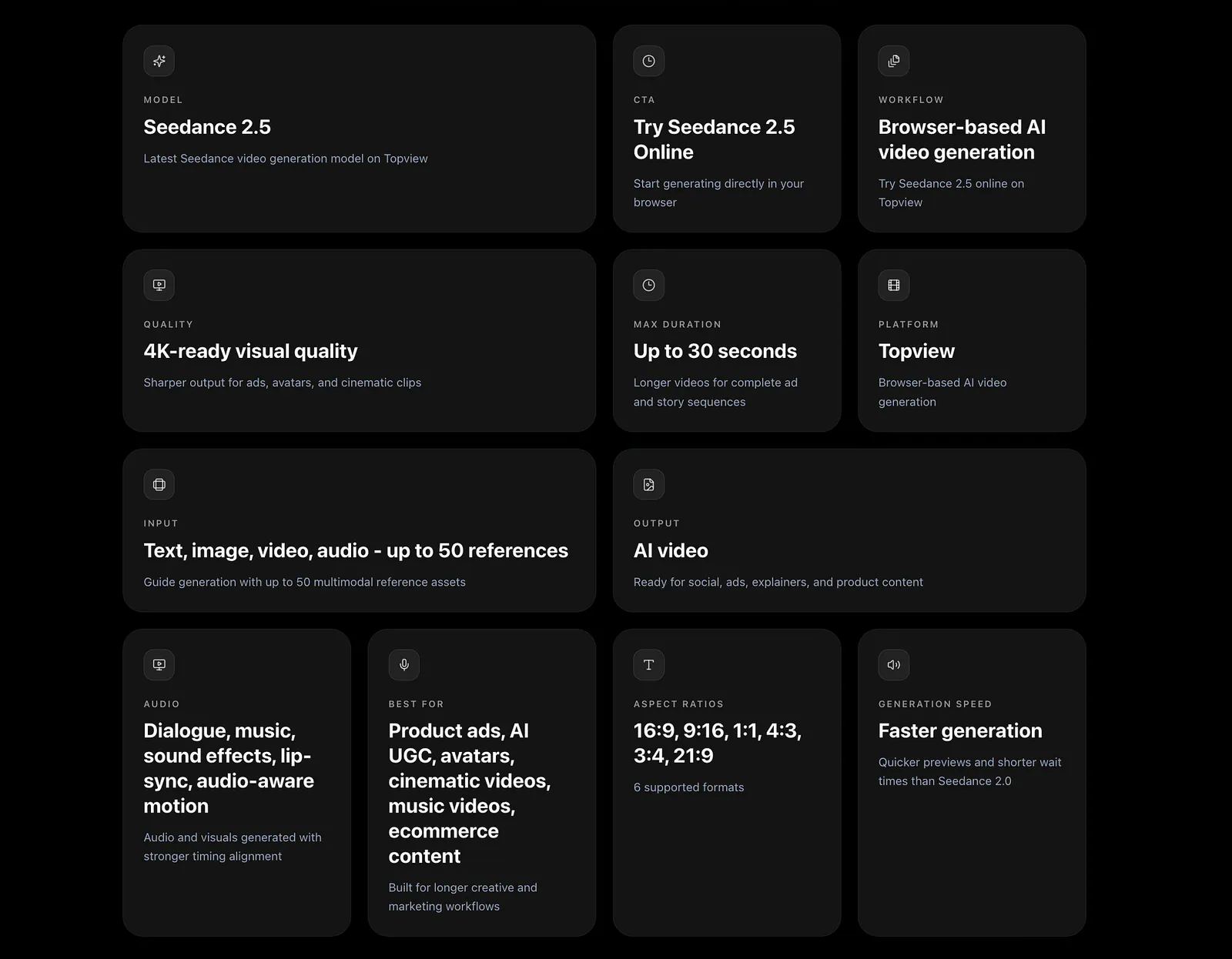
Seedance 2.5 specifications. Image by Jim Clyde Monge
The 30-second output is probably the biggest upgrade in practice.
5-second or 10-second videos were okay, but a 30-second clip can actually carry an idea. You can show a product reveal, a person using it, a close-up, and a final shot in one video.
It also reduces the amount of cleanup work. You do not need to generate five separate clips and hope the character, lighting, and product design stay the same across all of them.
The 50 reference assets are just as useful for branded content. A normal prompt can get you a good-looking video, but it may not match your product or visual direction. References give the model more to follow, so the result has a better chance of landing closer to what you wanted.
How Seedance 2.5 Compares to Other Video Models
Seedance 2.5 is coming out at a very crowded time.
Google has Veo 3.1. Kling has Kling 3.0 Pro. Runway has Gen-4. Midjourney is still one of the strongest and most capable tools for creating image references, even if it is not a native video model in the same way.
Seedance 2.5 does not win every category, but it is one of the strongest options if you care about longer clips, 4K output, and reference-heavy workflows.
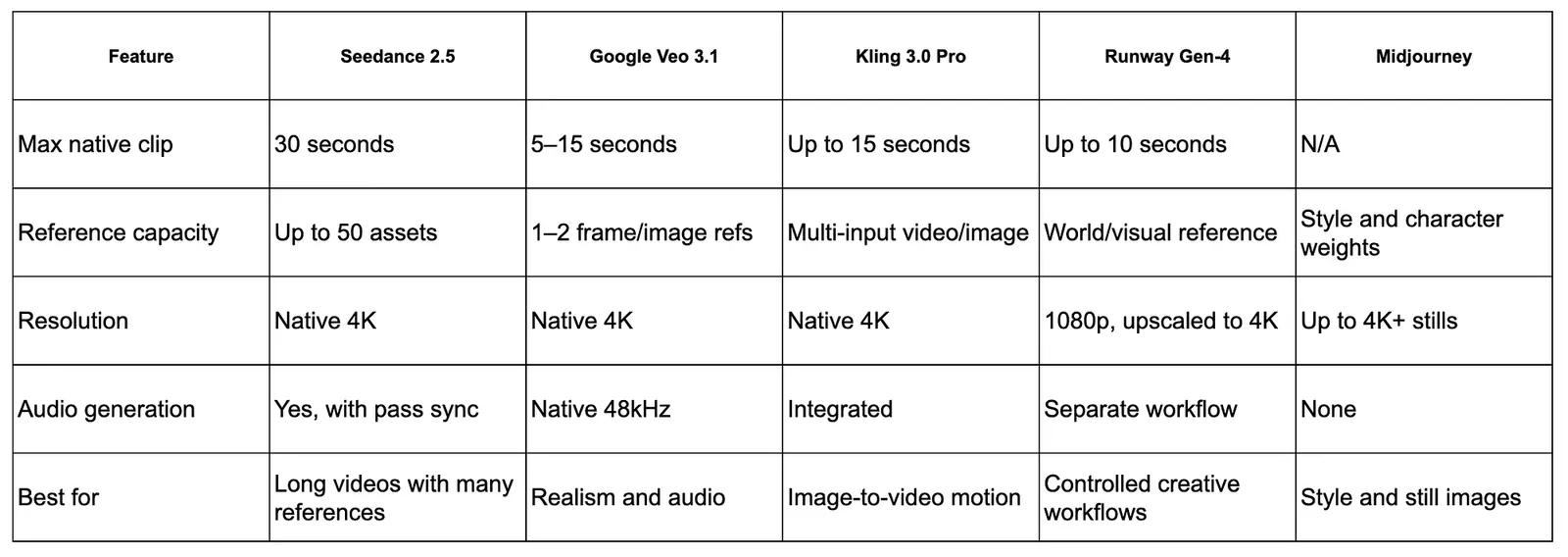
Seedance 2.5 comparison with other video models. Image by Jim Clyde Monge
- Seedance 2.5 vs. Google Veo 3.1: Veo 3.1 is still better for realism, natural movement, physics, lighting, and audio-heavy scenes. Seedance 2.5 makes more sense when you need longer clips, native 30-second generation, and more reference control for products, characters, or brand assets.
- Seedance 2.5 vs. Kling 3.0 Pro: Kling 3.0 Pro is great for image-to-video, especially when you already have one really good image. Seedance 2.5 is better when the project has more moving parts, like product shots, packaging, lighting references, brand colors, and lifestyle scenes.
- Seedance 2.5 vs. Runway Gen-4: Runway Gen-4 has the better editing workflow, especially for teams that need revisions, style control, and a more production-like interface. Seedance 2.5 has the edge on raw output, with native 30-second clips and native 4K generation.
- Seedance 2.5 vs. Midjourney Video: Midjourney Video is a good choice when you already have a beautiful image and want to animate it with simple motion. Seedance 2.5 is the better fit when you need longer native clips, more reference assets, and a more complete video workflow inside Topview AI.
How to Access Seedance 2.5 in Topview AI
Topview AI is an AI video platform for product videos, AI ads, avatar videos, UGC-style clips, social media content, and marketing assets.
To get started, head over to Topview’s AI Video tab and select the correct video model.
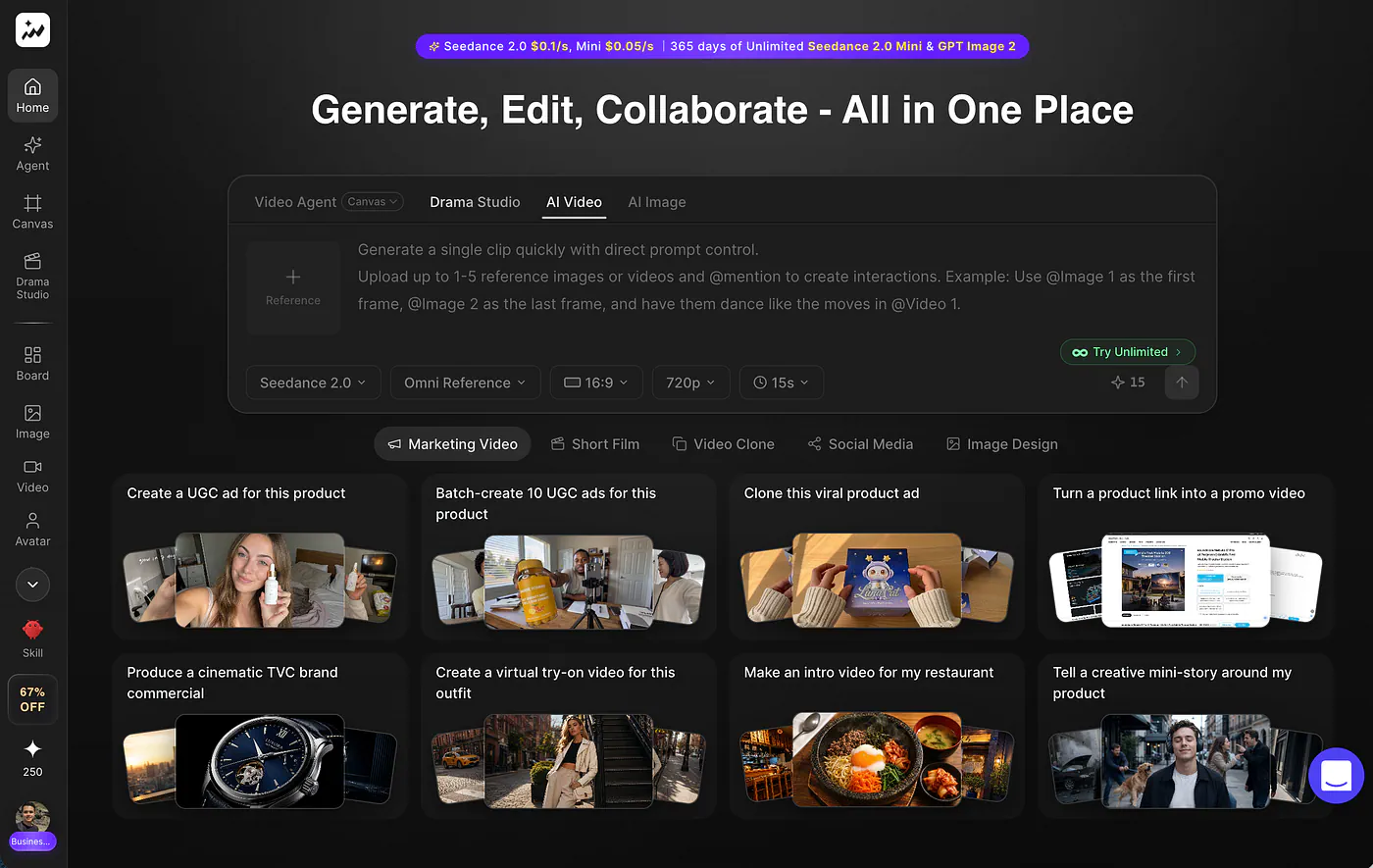
Topview AI video screen. Image by Jim Clyde Monge
What I like about Topview is that it is not just a single prompt box. It has different workflows depending on what you are trying to create. You can make videos from prompts, product links, scripts, images, avatars, and references.
Now that Seedance 2.5 is available inside Topview AI, you can use it directly from the video generator dashboard.
You can start with text only, but references help a lot.
If you are creating product videos, upload the product photo, packaging image, brand colors, and any style reference you want the model to follow. If you are creating a character scene, upload the character image and moodboard.
That is where Seedance 2.5 feels more useful than a basic text-to-video model. You are not asking it to guess everything from a paragraph.
Example videos with Seedance 2.5
Prompt: Cinematic montage in a dreamy, filmic style: A beautiful young woman with wavy dark hair and a white linen outfit walks through vibrant sunlit streets of old Havana, then transitions into surreal minimalist geometric rooms with dramatic lighting and floating panels. Intercut with intense close-up of a soccer player’s eyes and a powerful kick on a Champions League ball in a packed night stadium. Smooth, emotional, high-end commercial cinematography, 4K, natural motion, golden hour and dramatic shadows.
Loading this video connects to Vimeo, which receives device and connection data and may use cookies or similar storage.
The camera choices, motion, lighting, and pacing all work together in this video. What surprised me most was that it came from one simple prompt. No heavy shot breakdown. No complicated prompt stack. Just a clean idea, rendered in 4K, with 30 seconds of footage that feels usable.


