
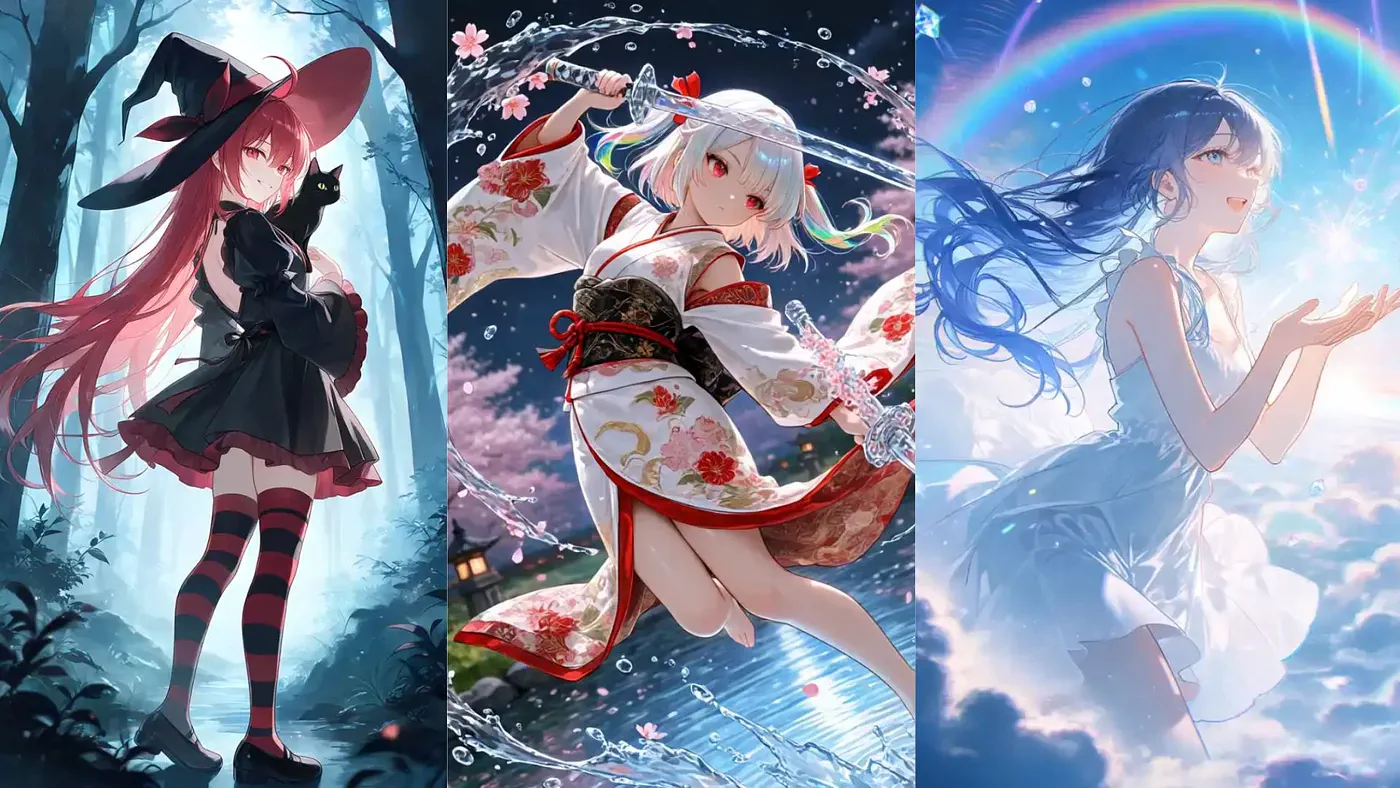
Anime has always been one of the hardest styles to recreate with AI image generators. It looks simple from the outside because anime uses cleaner lines, flatter colors, and more stylized faces than realistic images. But once you actually start generating anime art, you quickly realize how sensitive the style is.
I know how annoying it is to spend hours tweaking prompts just to get an anime character’s eyes looking right, or how to avoid the limbs and fingers looking like a plastic-looking mess.
I have tried a bunch of AI image generators that offer custom LoRAs, but PixAI and SeaArt AI have emerged as two of the biggest platforms right now.
Let’s break down how they actually stack up so you can decide which one is worth your time.
PixAI vs SeaArt Quick Comparison
If you mainly want to create anime characters, original characters, VTuber assets, manga-style visuals, or long-term character projects, PixAI is the better place to start.
It is more focused on anime image generation, LoRA workflows, character consistency, and model discovery for anime creators.
If you want a broader AI art platform that can handle anime, realism, 3D, image editing, animation, and general creative experiments, SeaArt AI makes more sense.
The simplest way to think about it:
- Choose PixAI if anime is the main project.
- Choose SeaArt AI if anime is only one part of a wider creative workflow.
- Choose PixAI as a SeaArt alternative if you feel SeaArt is too broad and you want a more anime-focused workspace.
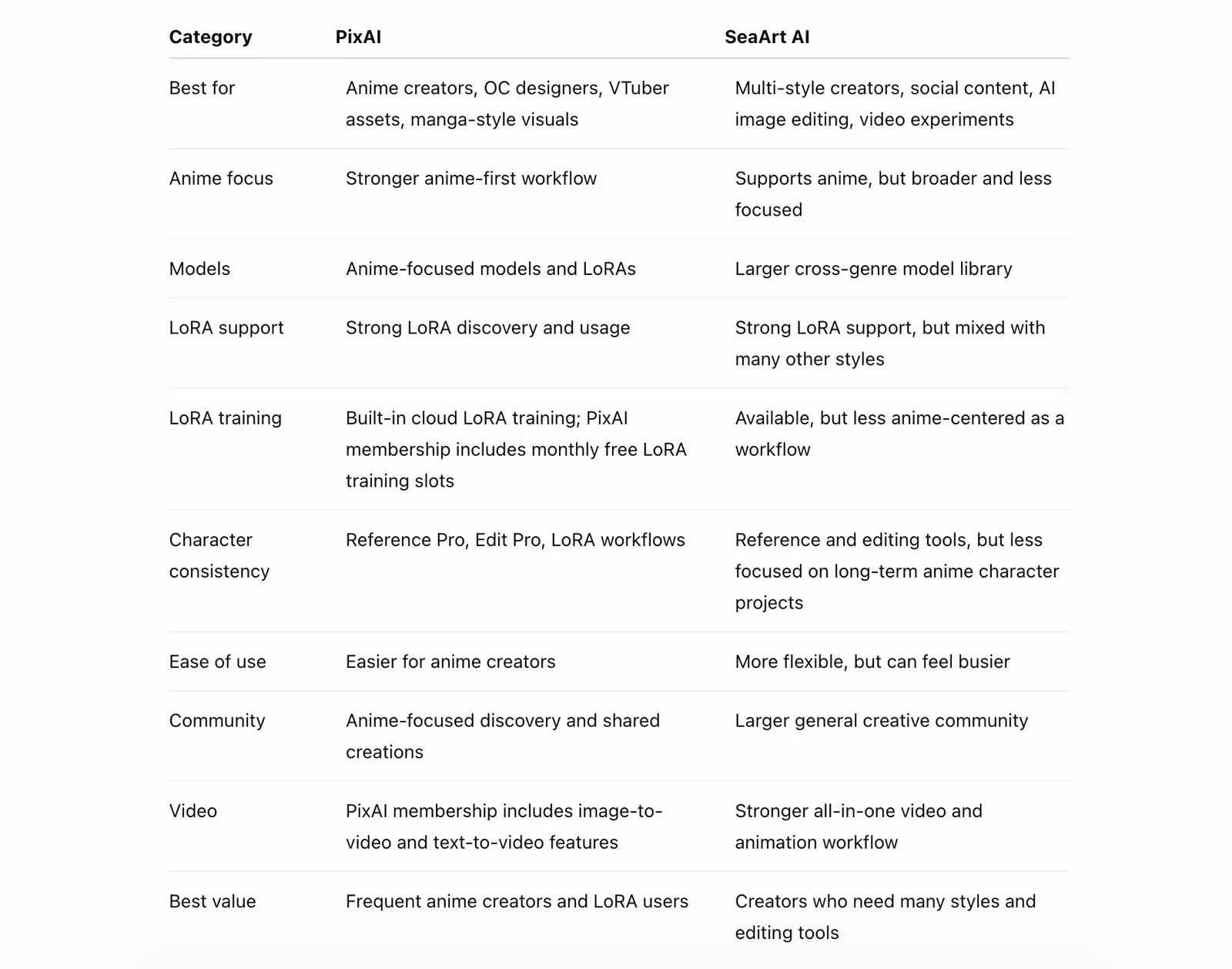
PixAI vs SeaArt comparison table
The table gives the quick answer, but the real decision depends on how you create.
PixAI’s Anime Image Generation
PixAI is an AI anime art generation platform built around Stable Diffusion models, LoRAs, and a community gallery. It is not trying to be a general-purpose image generator for every possible style.
The platform is clearly built for people who want to generate anime characters, manga-style visuals, VTuber concepts, wallpapers, and original character designs.
That focus is probably the biggest reason why PixAI works so well for anime.
A lot of AI image generators can create anime-style images, but they often feel like general art tools with a few anime models added on top. PixAI feels different. The models, prompts, LoRA system, and gallery all point toward the same use case: creating better anime-style images faster.
Core advantages of PixAI:
- Hyper-specialized anime models: PixAI’s custom models, including the Tsubaki series, are designed for anime-style rendering instead of general image generation.
- Character consistency: Tools like Reference Pro help preserve the same character across different poses, outfits, and angles.
- Cloud LoRA training: You can train custom character or style LoRAs directly inside the platform without setting up Stable Diffusion locally.
- Prompt Helper: PixAI can turn simple natural language into more detailed tag-based prompts that work better for anime models.
- Anime-focused community: The gallery, models, and shared LoRAs are easier to browse when your goal is specifically anime art.
To get started with generating images, create an account, then go to the Generate tab. This is where you describe the image you want to create. From the same page, you can adjust the model, image size, resolution, aspect ratio, number of outputs, and other generation settings.
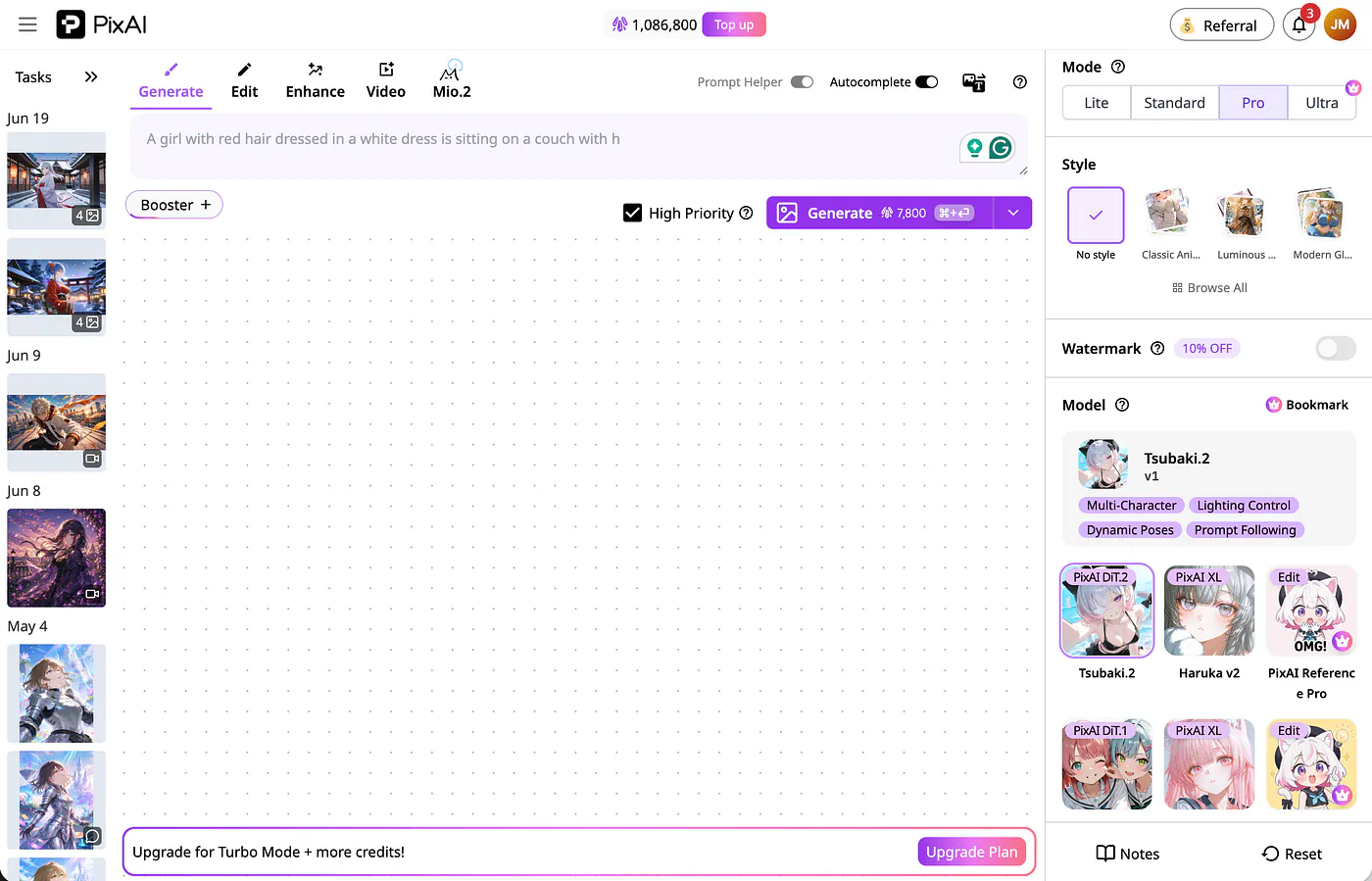
PixAI image generation dashboard. Image by Jim Clyde Monge
You can also switch models by clicking the More Models button. This opens a modal screen with hundreds of custom models to choose from. You can browse anime checkpoints, character LoRAs, style models, and other presets depending on the look you want.
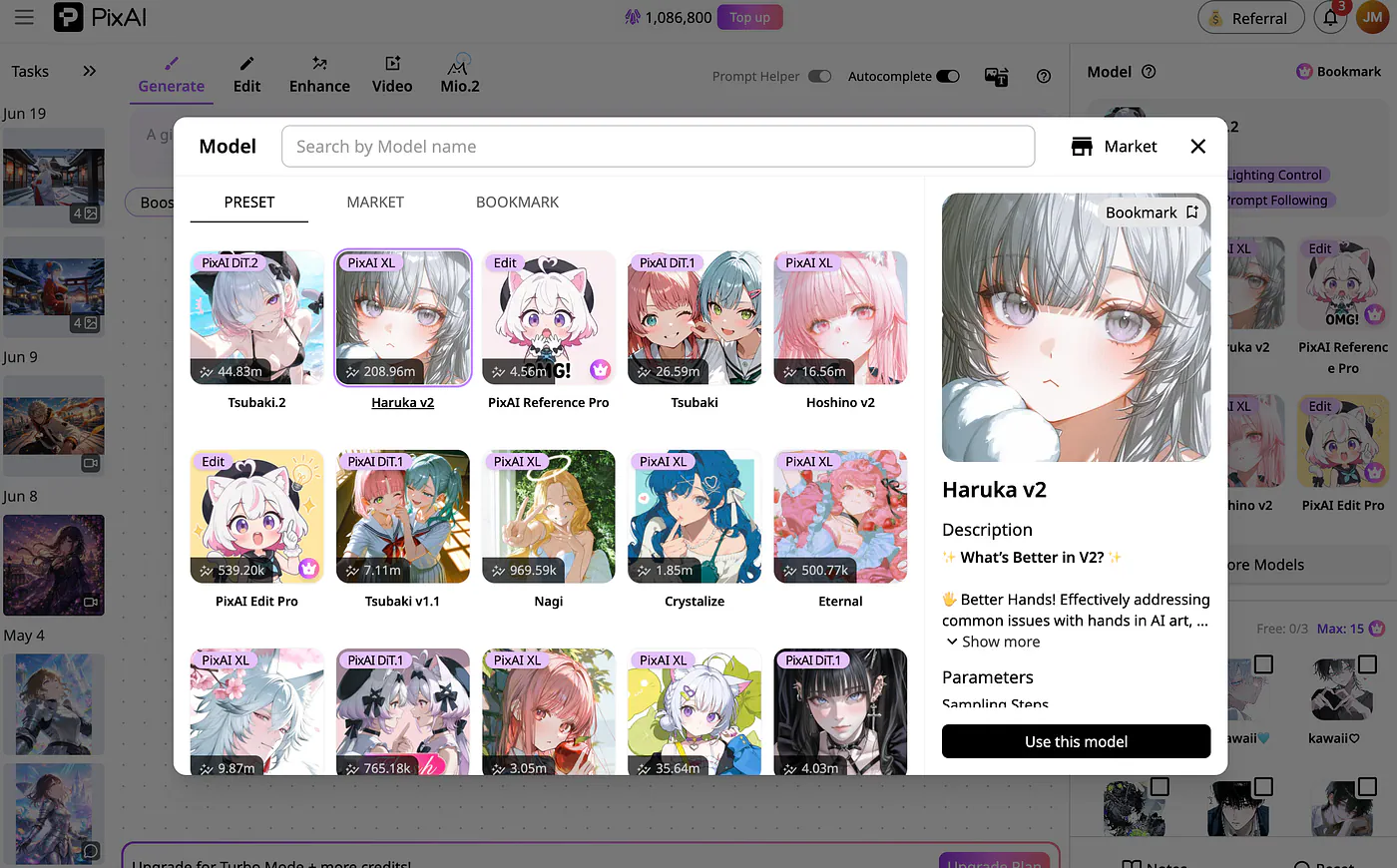
PixAI LoRA list. Image by Jim Clyde Monge
You are not prompting from scratch every time. You can pick a model that already understands the type of anime output you want, then use LoRAs and references to push the image closer to your target.
The free plan includes daily credits, while paid plans add benefits like unlimited Turbo Mode, video generation features, Chat Editing, Reference Pro, Edit Pro, monthly free LoRA training, more LoRAs per generation, private model uploads, and credit bonuses.
There is also a creative toolbox section that’s a great way to bring your ideas to life faster.
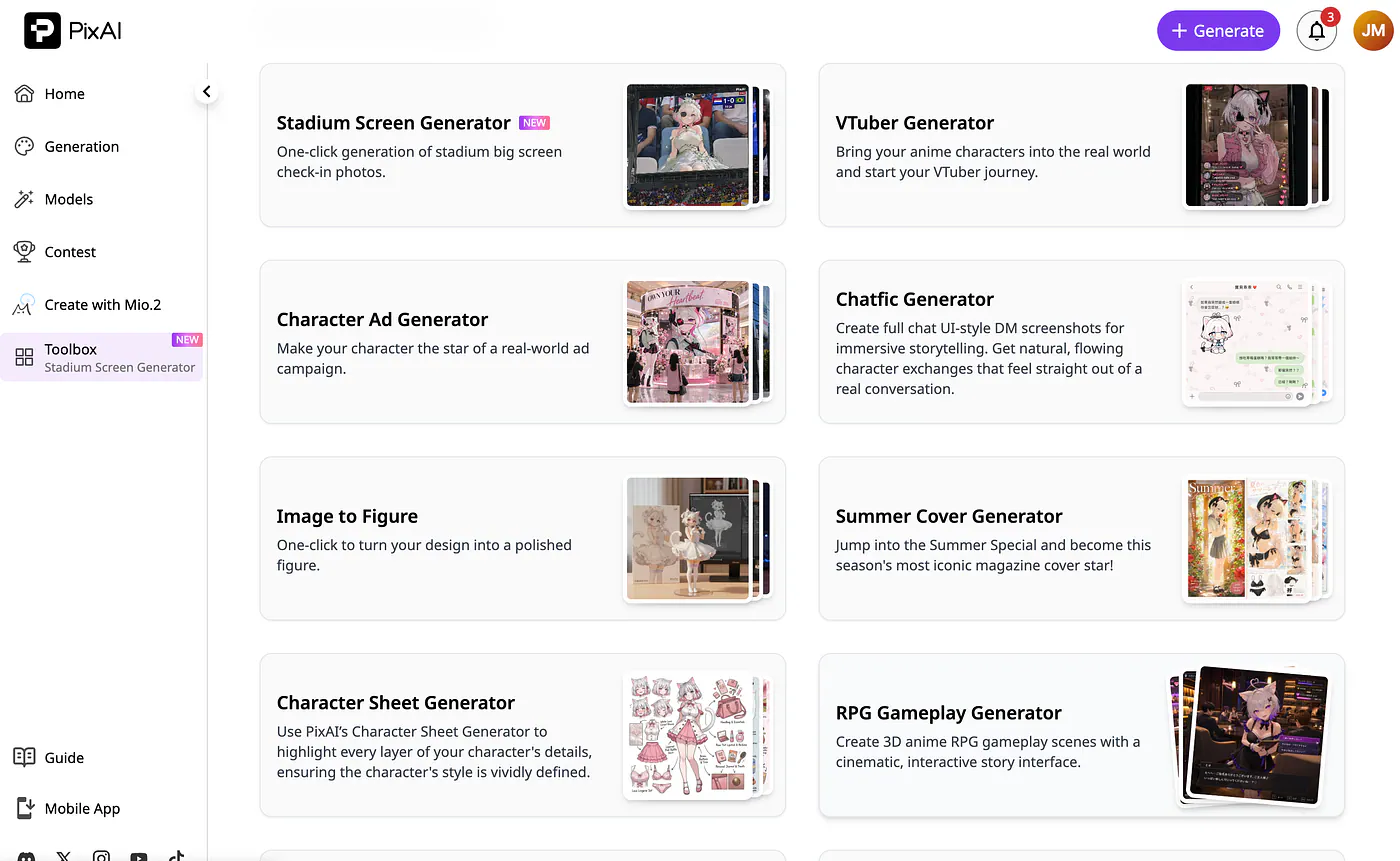
PixAI image generation tools. Image by Jim Clyde Monge
Open the Toolbox tab in the left menu, and you’ll see tools like a character sheet generator, an ad generator, etc.
SeaArt AI Anime Image Generation
SeaArt AI takes a broader approach.
It is an all-in-one AI creative platform built around the Stable Diffusion ecosystem. You can use it for anime, but you can also use it for realistic portraits, 3D semi-realistic art, fantasy posters, cyberpunk scenes, product visuals, oil-painting styles, and AI video.
SeaArt is not as anime-focused as PixAI. Its strength is versatility.
Key features of SeaArt AI:
- Cross-genre styling: SeaArt supports anime, realism, 3D, fantasy, cyberpunk, oil painting, photography, and many other styles.
- Advanced studio controls: It includes tools like ControlNet and Img2Img for guiding poses, sketches, depth, and image structure.
- AI animation and video: SeaArt can animate static images and generate short videos from text or image inputs.
- Massive model library: The platform has a large collection of community checkpoints and LoRAs across many visual categories.
- Creative tools suite: It includes face swap, background removal, smart erasing, inpainting, and upscaling.
- Interactive Cyberpub: SeaArt also has an anime AI chat hub where you can create or interact with AI personas and generate images through conversations.
SeaArt’s image generation dashboard is also easy to understand.
The prompt box is front and center, while the image settings are on the left panel. You can adjust the model, image size, aspect ratio, generation mode, and other parameters before creating the image.
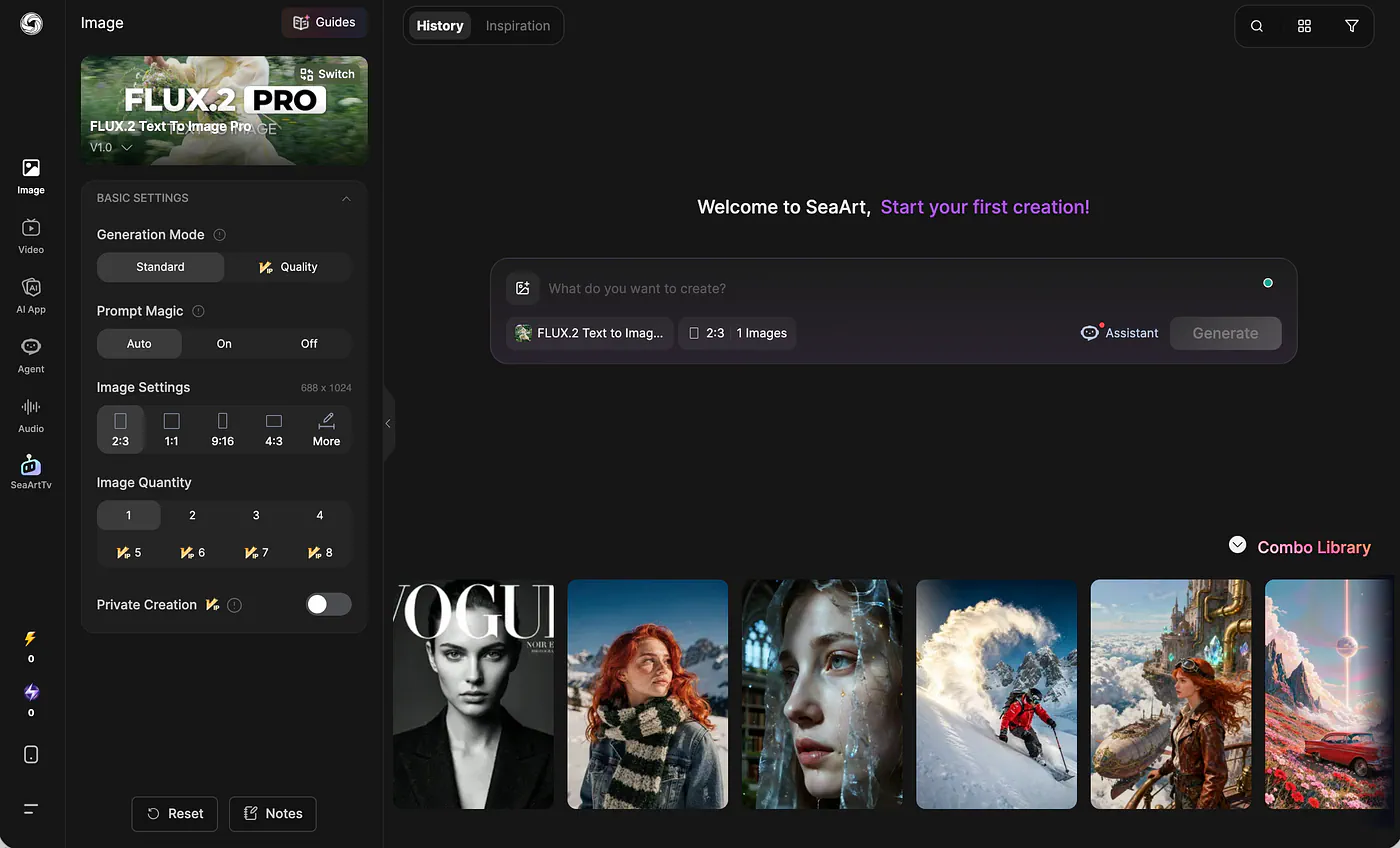
SeaArt image generation dashboard. Image by Jim Clyde Monge
You can also select from hundreds of models. The difference is that SeaArt’s model library is much broader. There are anime models, but they are mixed with realism, 3D, fantasy, portrait, and experimental models.
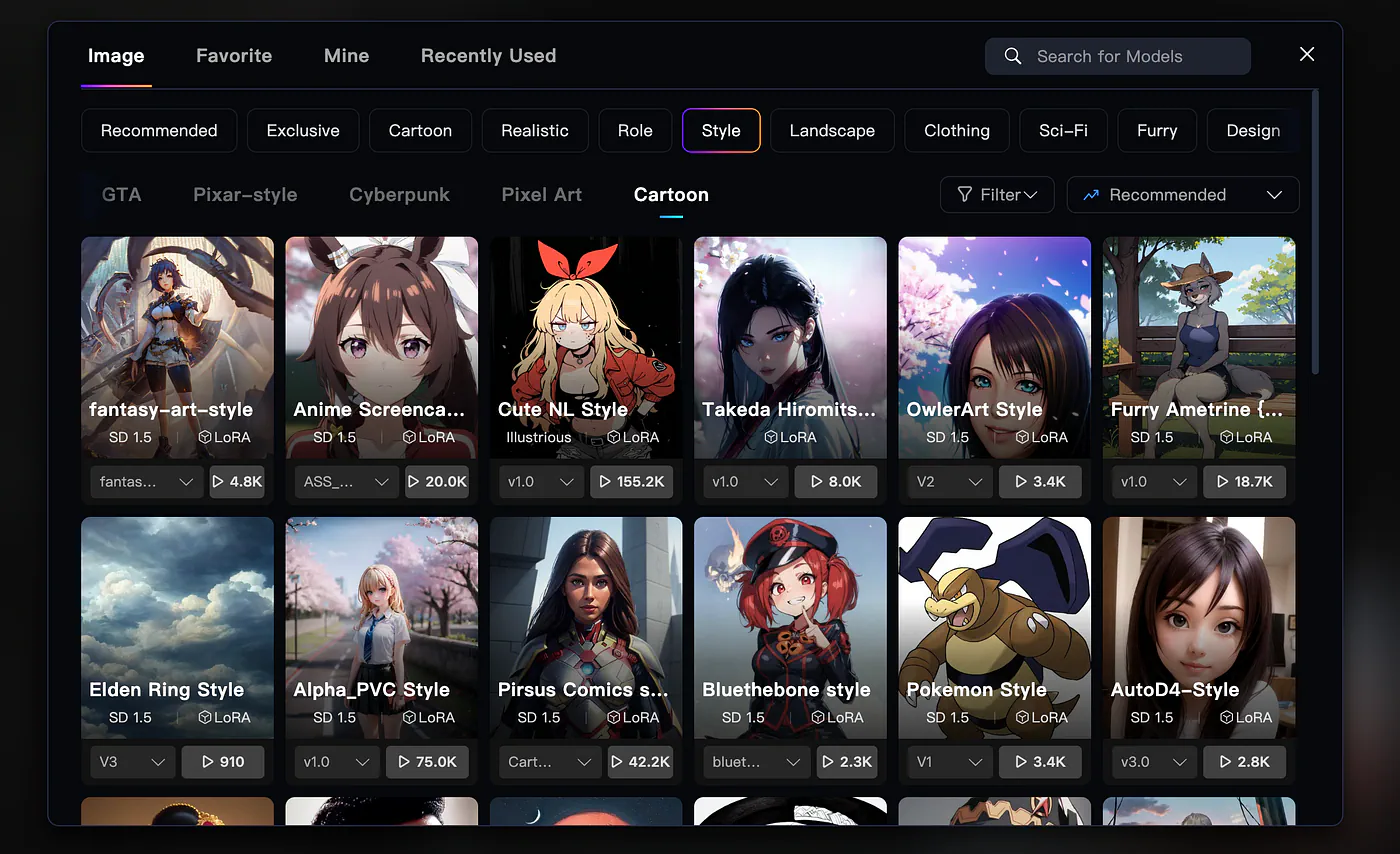
SeaArt image models list. Image by Jim Clyde Monge
So if you are looking for a very specific anime style, you may need to test more models before finding the right one. PixAI feels more direct for anime.
Sample Image Generation
So if you are looking for a very specific anime style, you may need to test more models before finding the right one. PixAI feels more direct for anime. SeaArt gives you more freedom, but also more noise.
Here is the first prompt I used:
Prompt: A vibrant romantic comic-style fantasy poster of a beautiful woman bathing in a vintage bathtub filled with thick golden honey. The honey is rich amber, glossy, sticky, and viscous, with slow drips over the tub, strands stretching from her hands, visible swirls, and glowing translucent reflections. She looks elegant and dreamy, partially immersed, with loose beautiful hair and a relaxed playful expression. Around the tub are open honey jars, a honey-covered wooden dipper, honeycomb pieces, golden drops, and warm candlelight. The scene feels whimsical, luxurious, romantic, and theatrical
Image generated with PixAI
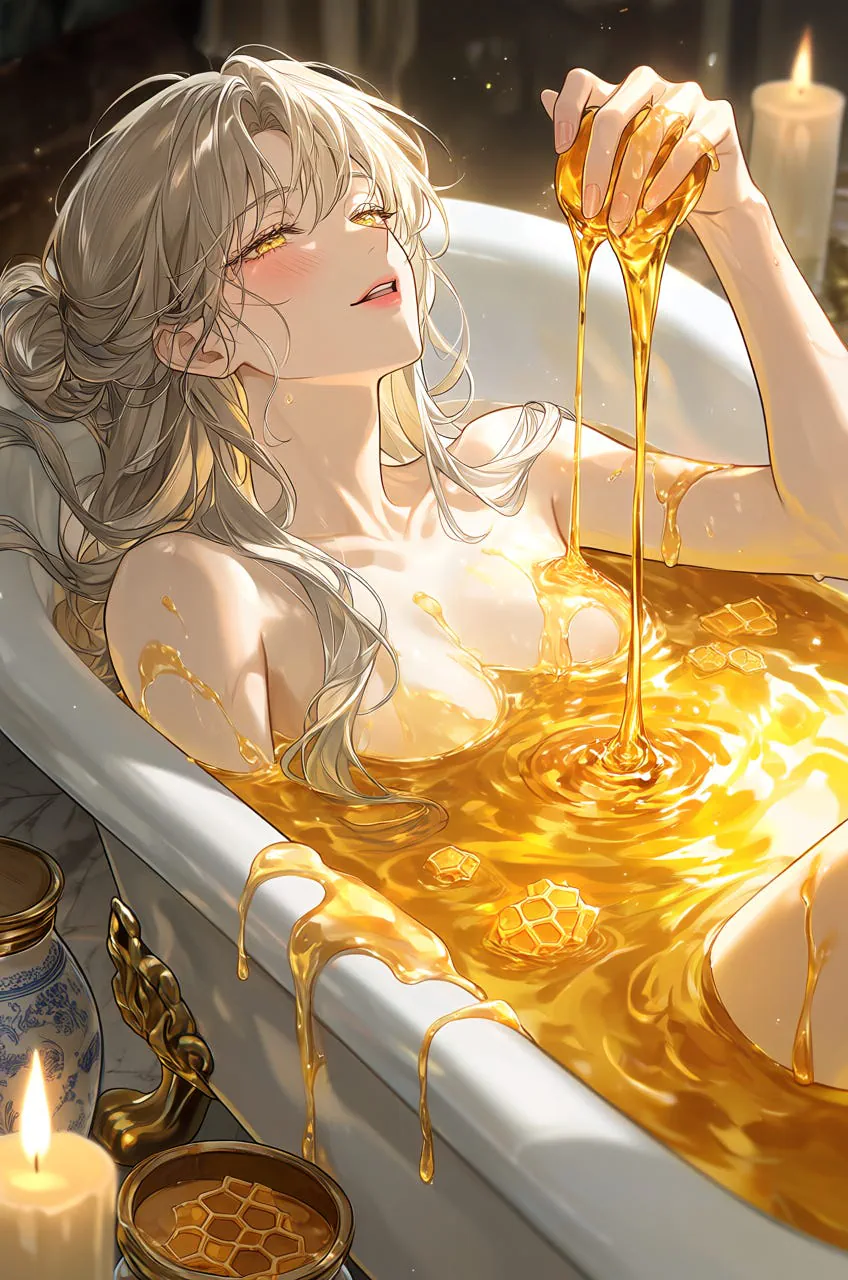
Right image generated with SeaArt AI
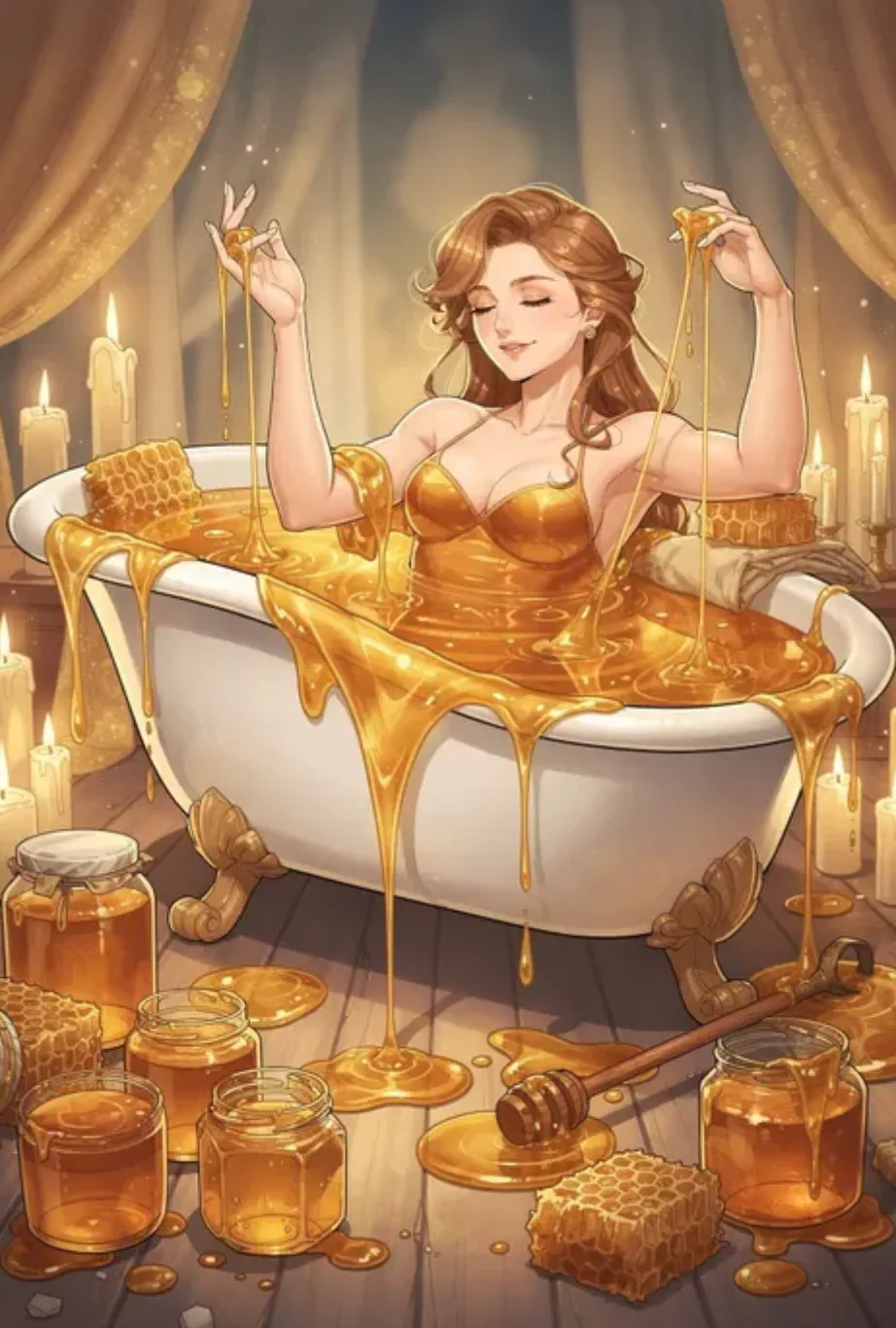
Both images looked really good, especially with the way the honey drips from the bathtub. The thick amber texture, glossy reflections, and warm lighting were handled well by both tools.
But for anime aesthetics, I still prefer PixAI’s result.
PixAI rendered the character in a way that felt closer to an anime illustration. The face, objects, colors, and overall composition looked more like something I would expect from an anime-style poster.
SeaArt’s result was also good, but it leaned more toward general digital art. It looked beautiful, but not as anime-specific.
Let’s do another one.
Prompt: Lum, solo, close-up, dynamic angle, retro 1980s anime illustration. A beautiful girl with green-aqua hair, blue eyes, tiny yellow horns, and small pointy ears, wearing a detailed kimono. She has a cute face, soft eyeshadow, realistic skin texture, and a melancholic expression with slightly squinting eyes. She is surrounded by floating lanterns in a dark void, with glowing light particles drifting around her. Dramatic lighting, pale delicate colors against a deep black background, high contrast, flat colors, sharp line art, detailed background, official-art feel, wallpaper composition, high detail, anime screencap aesthetic.
Image generated with PixAI
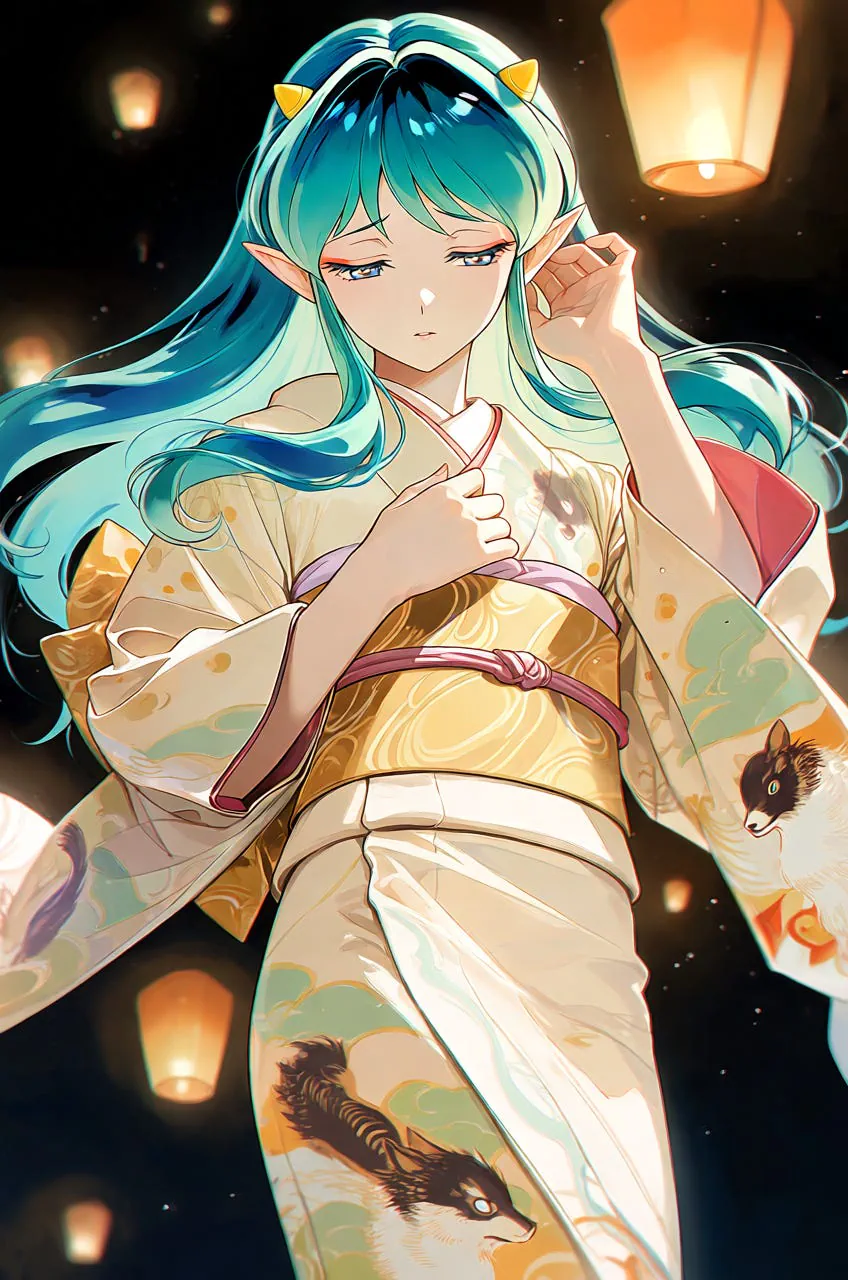
Right image generated with SeaArt AI
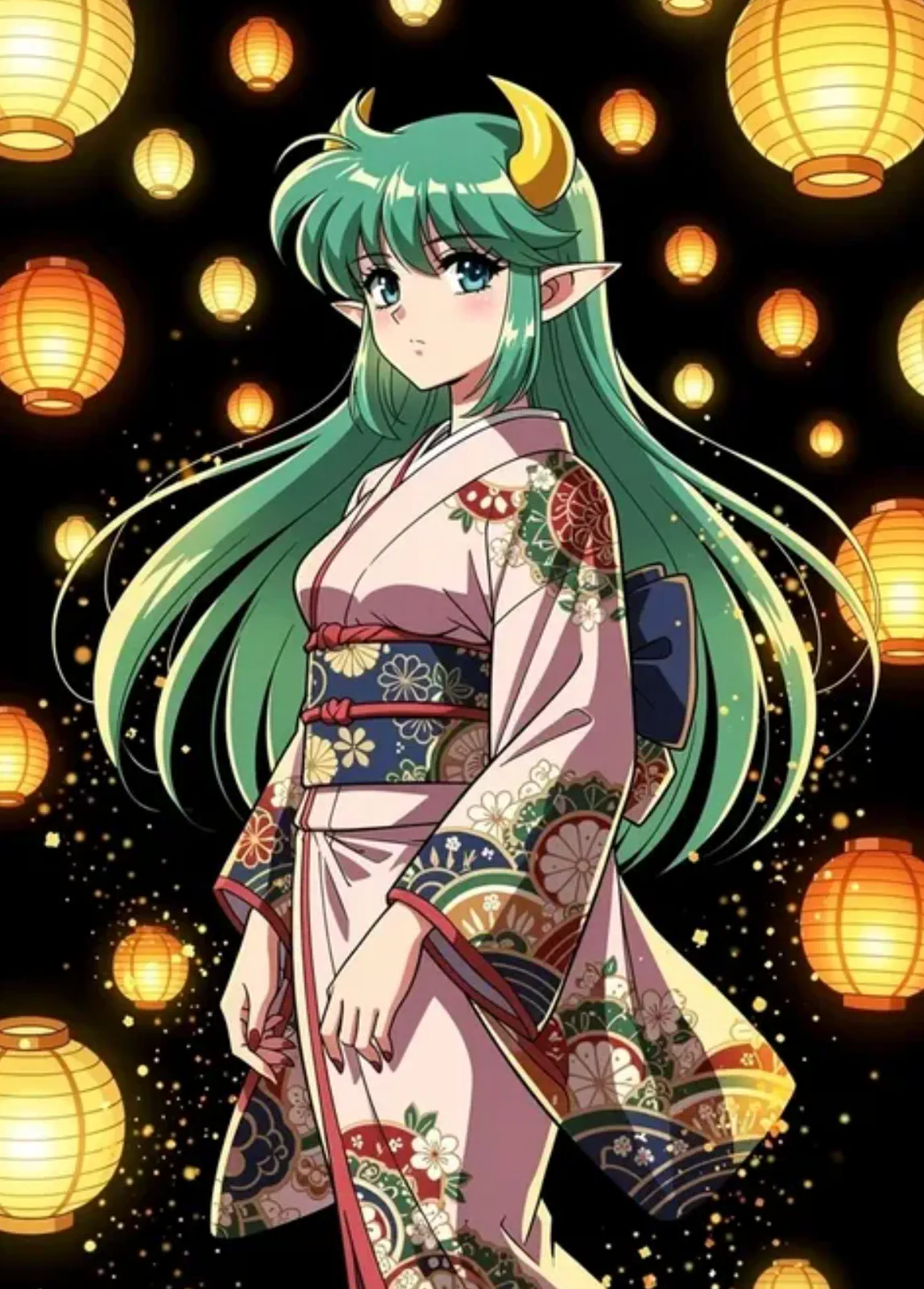
For this example, I wanted to see which tool could capture a retro anime style. I am interested in this because I want to do a project where I create an anime series with a 90s anime aesthetic.
PixAI produced the cleaner anime character. The face, line art, and composition were closer to the style I usually want from an anime image generator.
But I also liked SeaArt’s result because of its grainy tone. It captured more of that old TV texture, which helped the image feel closer to a retro anime frame.
So this one is more mixed.
What Makes PixAI Better than SeaArt?
PixAI is better than SeaArt for anime creators because it is more focused.
Everything about the platform feels built around anime generation: the models, LoRAs, prompt tools, references, and community outputs.
But if you want animation, video generation, image cleanup, face swap, background removal, and broader style experiments, SeaArt is more useful. It gives you more tools in one place.
But for pure anime image generation, I would still choose PixAI.
Final Thoughts
I went through what PixAI and SeaArt AI are, how their workflows differ, and where each platform makes more sense for anime creators. I also compared their strengths and limitations, then tested both tools with the same prompts so you can see how they actually perform for AI anime image generation.
My final take is that PixAI is the better choice if your main goal is anime art, original characters, LoRA workflows, and character consistency. SeaArt AI is still a strong option if you want a broader creative platform with more editing, animation, and cross-style tools. But for pure anime image generation, I would personally start with PixAI.
AI image generation tools are becoming more interesting because they are no longer just for creating random images from prompts. You can now build characters, test art styles, train LoRAs, generate reference sheets, create posters, and even turn still images into videos. That means you can basically create the starting point for a short anime-style project in an afternoon.
This is also why I like platforms like PixAI. They make these workflows easier for people who just want to move fast, experiment with ideas, and have fun with AI tools and models without setting up everything manually.
What do you think about this PixAI vs SeaArt comparison? Do you think there is a better anime AI generator I should compare next? Let me know in the comments.
Sources
- PixAIeap.pixai.art
- SeaArt AIseaart.ai
- Jim Clyde Mongemedium.com


