OpenBMB and ModelBest announced the open-source MiniCPM-OCR series on October 31, 2026, with two distinct jobs in mind. MiniCPM-OCR 1.0 is a 1.3-billion-parameter model for document parsing and information extraction. MiniCPM-OCR Jev is a separate 2-billion-parameter model that evaluates whether OCR output matches the source image, according to the release announcement.
That separation is the useful part for document-AI builders. A team can evaluate the new parser, add Jev to an existing OCR workflow, or combine both. Adopting the quality-control model does not require replacing the engine already extracting the text.
The technical documentation also reveals an important boundary: recognition, page layout and correctness assessment are separate stages. A strong result in one stage does not automatically validate the others.
Two Models With Different Responsibilities
The project repository describes MiniCPM-OCR 1.0 as a document-parsing model and Jev as a region-level correctness evaluator.
| Model | Size | Input and role | Documented coverage |
|---|---|---|---|
| MiniCPM-OCR 1.0 | 1.3 billion parameters | Recognizes content from document images and supports structured extraction | Chinese and English text, tables, formulas, charts, seals and key-information extraction |
| MiniCPM-OCR Jev | 2 billion parameters | Compares an image with its OCR result and returns a quality score from 0 to 1 | Text, formulas and tables |
The coverage difference matters. MiniCPM-OCR 1.0 can recognize seals and turn chart content into tables, but the repository’s stated Jev evaluation scope is text, formulas and tables. Builders should not assume every parser feature has a corresponding documented quality check.
Jev is also an evaluator, not a correction engine. Its score can help route a result toward acceptance, another recognition attempt or human review. The surrounding application still needs to implement those decisions.
I’d treat that separation as a useful design choice: teams can change their review policy without changing how documents are initially recognized.
MiniCPM-OCR 1.0 Uses a Multi-Stage Parsing Pipeline
MiniCPM-OCR 1.0 is based on MiniCPM-V 4.6. Its standard architecture combines a SigLIP vision encoder with a Qwen3.5 language model, using the accompanying Transformers 5 integration, according to the technical guide.
The complete document parser includes more than that recognition model. It combines MiniCPM-OCR 1.0, the PP-DocLayoutV3 layout model and the minicpmvocr SDK.
The documented workflow has four stages:
- Read the input. The SDK accepts PDF, PNG and JPG files, converting PDF pages into images.
- Find the layout. PP-DocLayoutV3 identifies document regions and reading order. The SDK crops those regions.
- Recognize each region. Crops go to the MiniCPM-OCR 1.0 inference service, with recognition requests handled concurrently.
- Assemble the document. The SDK combines the results into Markdown in reading order, converts OTSL table representations into HTML and preserves formulas as LaTeX.
That division explains how the system reconstructs a page containing paragraphs, equations and tables. The recognition model processes individual regions; the SDK handles page-level organization and output assembly.
The SDK and inference service use separate Python environments and can run on different machines. Operationally, that lets builders separate layout processing and document assembly from the hardware serving the recognition model.
Region Prompts and Direct Field Extraction
Applications that already produce document crops can call the recognition service directly. The guide specifies prompts including Text Recognition:, Table Recognition:, Formula Recognition:, Seal Recognition: and Chart to Table:.
Those prompts select different recognition tasks. Table output can require SDK postprocessing, while formula output needs complete LaTeX content and structure. The guide also advises checking for truncation when the service returns finish_reason as length.
Key-information extraction takes another route. A caller can submit an image with instructions to extract named fields, such as a receipt’s store name and amount, into JSON. Full-document Markdown is not required first.
For a narrow receipt-processing application, I’d start by evaluating that direct extraction path. It avoids asking the system to reconstruct an entire document when the application needs only a few fields. Whether it is sufficiently accurate still depends on the actual receipts and fields involved.
What the Published Benchmarks Measure
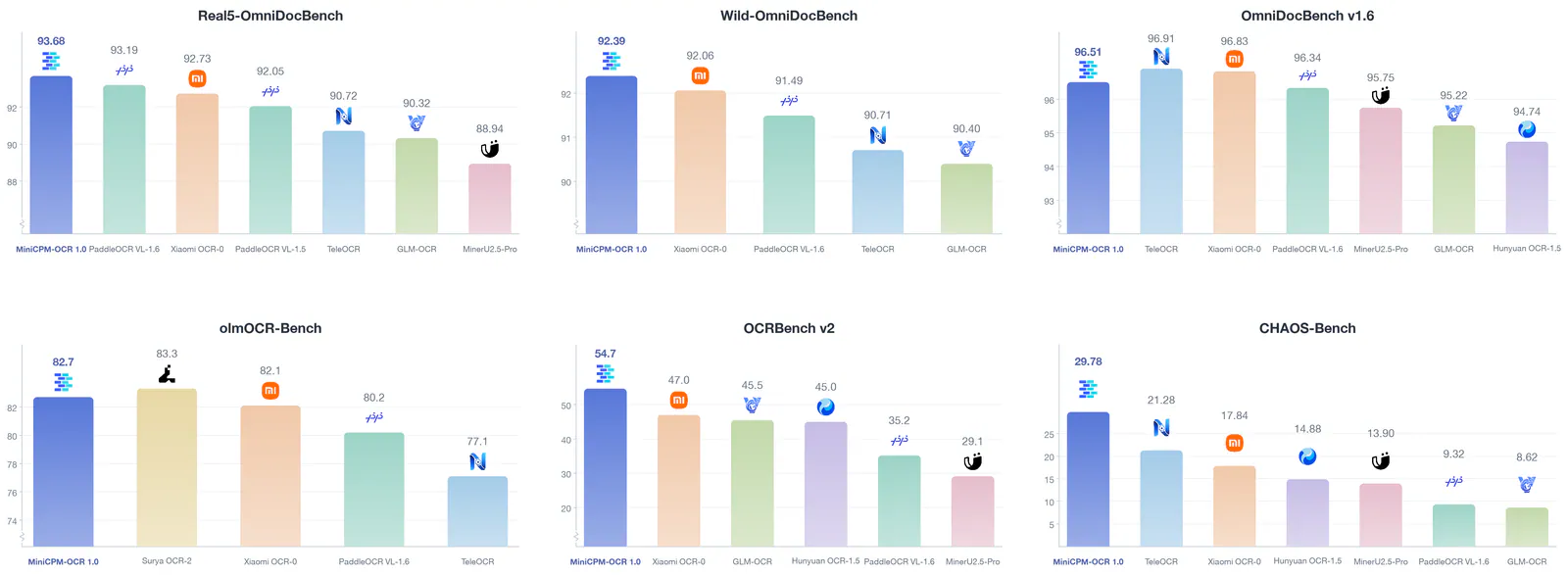
The project reports a 93.68 score on Real5-OmniDocBench and 54.7 on OCRBench v2 for MiniCPM-OCR 1.0. It also reports a 55% improvement in end-to-end processing efficiency with DSpark decoding acceleration. These are vendor-reported results from the model documentation, not independently reproduced measurements.
The scores describe different evaluations and should not be read as interchangeable accuracy percentages. Likewise, a throughput improvement is not a deployment estimate without matching hardware, backend, precision, workload and acceleration settings.
For Jev, the repository reports an AUROC ×100 of 93.6 on JevOCRBench. It also reports a range of 91.9 to 93.4 when evaluating outputs from four parsers:
- MiniCPM-OCR 1.0
- GLM-OCR
- PaddleOCR-VL-1.6
- Xiaomi-OCR-0
That cross-parser evidence supports the release’s integration angle: Jev was evaluated on more than its companion model’s output. It does not establish how well it will perform on every OCR engine or document collection.
AUROC measures how well scores distinguish correct results from incorrect ones across possible thresholds. A reported value of 93.6 on the ×100 scale is not a claim that 93.6% of automatically accepted results are correct. The accuracy of accepted results depends on the threshold and the documents being processed.
Jev’s Practical Value Is Selective Review
Jev takes an image and its corresponding OCR result, then assigns a quality score between 0 and 1. The release announcement calls it an “AI quality inspector,” while the repository describes its role more precisely: identifying reliable results and locating regions that need review.
Frequently Asked Questions
3 questions
1Can Jev Work With Another OCR Engine?
Yes. The project reports evaluations using outputs from four parsers, including GLM-OCR and PaddleOCR-VL-1.6. Performance on a particular application still needs validation.