
At this point, you’ve probably heard about the term “vibe coding.”
This is usually associated with the idea of building apps and websites with zero coding and just a series of instructions for a coding agent.
So that makes everyone a developer now… right?
Wrong.
There are a lot of things involved in software development that cannot be crammed into a few text prompts.
Sure, traditional programming is dying. Vibe coding is extremely dangerous. The real advantage now belongs to developers who combine AI with real engineering judgment.
In this post, I want to explain the difference between traditional coding, vibe coding, and agentic coding from the perspective of someone who has been building software for years.
I’ll also share my personal thoughts on which workflow I use and prefer.
Before I get into the details, I figure it is important to share my background and experience. I’m a software developer with over 12 years of experience. The majority of my work experience is in C++. You can verify my professional certification on Credly or check all my certifications on my LinkedIn account.
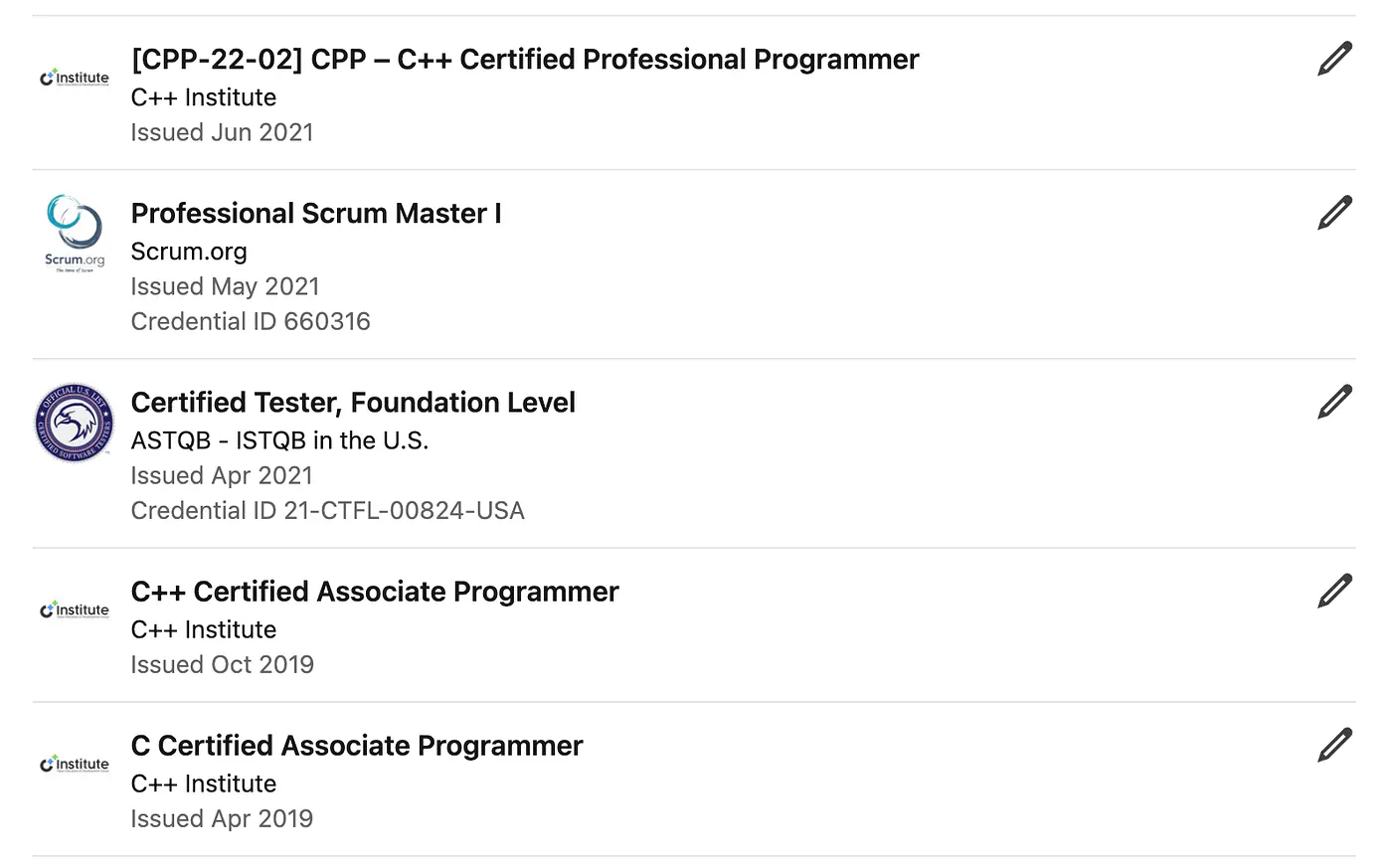
Jim Clyde Monge credentials as a software developer
I’m not bragging here. I just want to make the point that I’m not sharing made-up arguments or copying and pasting AI slop.
Alright, let’s get into the details.
Traditional coding
Let’s start with an example.
In my early years as a software developer, from around 2014 to 2020, before coding agents became widely used, I used to code mostly by hand.
One of my projects back in Japan, while I was working for a popular laptop brand, was a Windows device driver release automation system.
The way it works is pretty simple: when a new version of the device driver is ready, the system triggers a remote build, performs automated tests, extracts the release package, prepares all necessary documents, and notifies the component owner to handle the official release to the market.
Yes, that may sound pretty simple, but the actual project took a team of 5 members around 3 months to complete.
Off the top of my head, this is what our timeline looked like:
- Planning + documentation: 2 weeks
- MVP preparation: 2 weeks
- Building the actual system: 6 weeks
- Testing + bug fixes: 1 week
- Deployment + handoff: 1 week
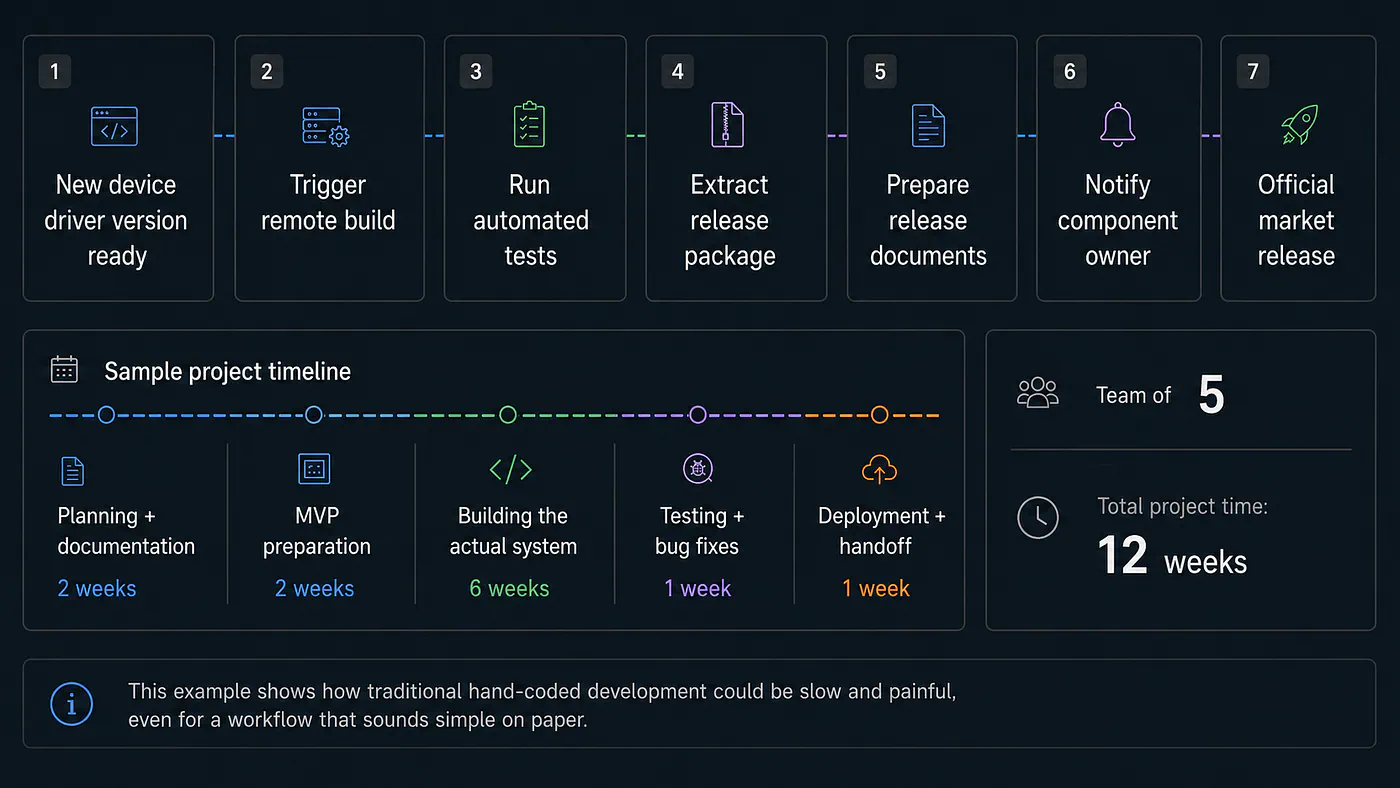
Sample project timeline done with traditional programming
That is the painful part of traditional coding.
It gives you full control, but it is slow. You need to plan the architecture, write the code, test the behavior, fix bugs, prepare documents, and make sure the whole system does not break when someone else uses it.
We spend one hour in our daily meeting making sure everything and everyone is in sync with the progress and what our next move will be.
There is another side to traditional coding that people do not talk about enough: human error.
I remember a few years back when I handed over a project to a junior developer, and he accidentally committed the .env.local file to a public repository. That file contains API keys, database URLs, private credentials, or other sensitive values.
That was a huge and serious security issue.
In today’s AI coding workflow, especially with models like Claude Opus 4.7, that kind of mistake is less likely to happen if the system is configured properly. Teams can now build their own harnesses, rules, checks, and subagents to improve the security and reliability of the development process.
Of course, AI will not magically remove all risks. But compared to the old way of doing everything manually, the difference is massive.
Vibe coding
If you are using tools like Lovable, Bolt, or Google AI Studio to build apps, then you already know what vibe coding is and feels like.
You have a cool idea for a piece of software, and you describe it in a prompt box. The AI then does its magic in the background before sending you a well-packaged app with both frontend and backend already implemented.
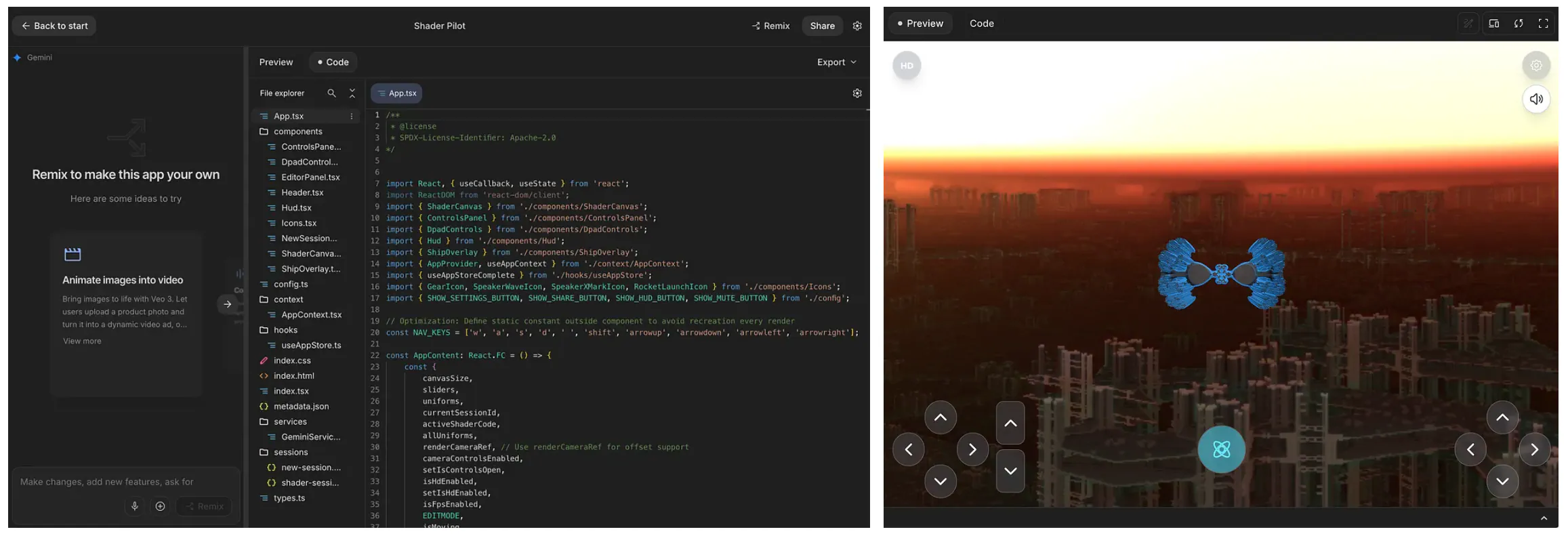
Sample Google AI Studio development dashboard and result
You want to add a new feature? Just tell the AI, and it will deliver in minutes.
You want to revise the look and feel of the app? Easy. Just describe the changes.
You want to publish your app on the internet? It is just a few clicks away.
But if I ask you, as a vibe coder with zero programming experience, would you be able to answer these questions?
- Can you choose the best database for your app between Neon, Supabase, Firebase, and MongoDB?
- What is the right CI/CD setup for your project? Something like: Warp → GitHub → Vercel?
- How do you debug a production issue when the app works on your local preview but breaks after deployment?
- What’s the best payment platform, email APIs, or file storage service for your app?
- How do you protect yourself from shipping something that looks good on the surface but is actually shit underneath?
These are just some of the questions that would startle a vibe coder who has no idea how code actually works.
You see, when building an app, you still need to understand the tools and libraries available to you. More importantly, you need to know which one fits your project best.
You cannot just delegate every decision to an AI agent and hope it makes the right call. The tendency is that it will choose whatever is easiest, most familiar, or most connected to the platform you are using.
For example, if you are using Lovable, the system will usually push you toward Supabase for the database. If you are using Antigravity, it will likely guide you toward Google’s own Firebase platform. These are not bad choices at all. In fact, both are great tools. But the problem is not the tool itself. The problem is blindly accepting the decision without understanding the tradeoffs.
AI can help you move faster, but you still need enough technical judgment to know when its choices make sense and when they do not.
And this brings us to another software development approach called agentic coding.
The hybrid workflow (Agentic coding)
I have been using agentic coding for the past 3 years.
I’ve built and launched web apps like Flux Labs AI, Zeniteq, BloggFast, and DemandHunt. I do have a dozen more ongoing and unreleased projects on my GitHub account.
I have tried most of the popular AI coding tools out there already. VS Code, Cursor, Antigravity, Warp, Codex, Claude Code, Cline, and many others.
But one thing I personally avoid is using AI coding tools that live entirely on a remote server, like Lovable, Bolt, or Emergent.
I am not saying they are terrible tools. They are good, especially for beginners or non-technical users who want to build something fast. But for hardcore programmers, I still prefer local files, local control, and direct access to the source code.
Agentic coding is different from simply asking an AI tool to generate a small block of code. It is closer to working with an AI developer inside your own project. The agent can read files, edit code, run terminal commands, inspect errors, install packages, write tests, and make changes across multiple parts of the codebase.
Here’s a diagram to make it easier to understand the difference:
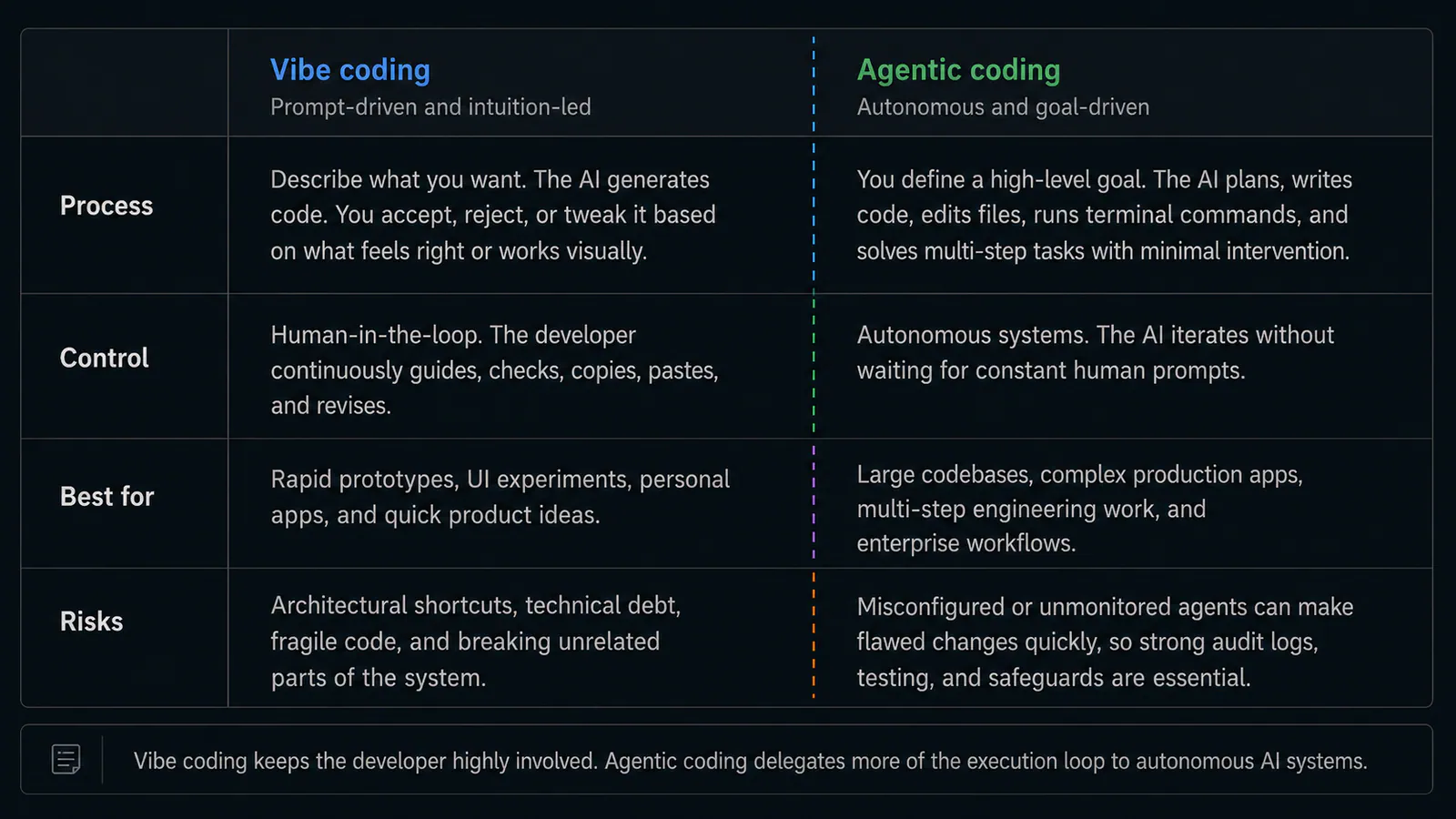
Vibe coding vs Agentic codig. Image by Jim Clyde Monge
- Vibe coding relies on intuition, natural language prompting, and rapid iteration, where the developer stays heavily involved.
- Agentic coding uses autonomous AI swarms or agents that interact with files, run terminal commands, and solve multi-step problems with minimal human intervention.
Going back to the device driver release automation project I shared earlier, if I had the chance to rebuild it today using agentic development, I strongly believe I could finish it in less than a week on my own.
Of course, I cannot guarantee that without actually rebuilding the system. But with my current knowledge of the right libraries, tools, and external services to use, plus the power of modern coding agents, the timeline would be completely different.
I also believe the quality of the code would be better than what we originally released.
Not because I suddenly became a genius developer, but because modern AI coding tools are now very good at handling repetitive implementation work, checking patterns, fixing errors, and moving across a codebase much faster than I can.
If anyone tells you not to use AI when writing code, that is bullshit.
Do not listen to them.
They are part of the last remaining group of people who still cannot swallow their pride and accept that AI is already changing how software gets built.
Which one do I prefer?
Need I say more? Of course, I prefer agentic coding (with my supervision).
I like it because I maintain control over the source code. I can add, modify, and delete files directly. I can review every change. I can run tests. I can inspect the diff. I can reject bad code before it reaches the repository.
All files stay on my local disk, which also gives me an added layer of security. I can work with my own environment, my own tools, and my own project structure. If needed, I can even switch to local model development when I lose access to the internet or when I want to test things privately.
It is also much easier to integrate with platforms like Vercel, Cloudflare, GitHub, Neon, or any service I want when I am working with local files.
I am not tied to whatever stack a remote AI app builder wants me to use.
This is what my work environment looks like:
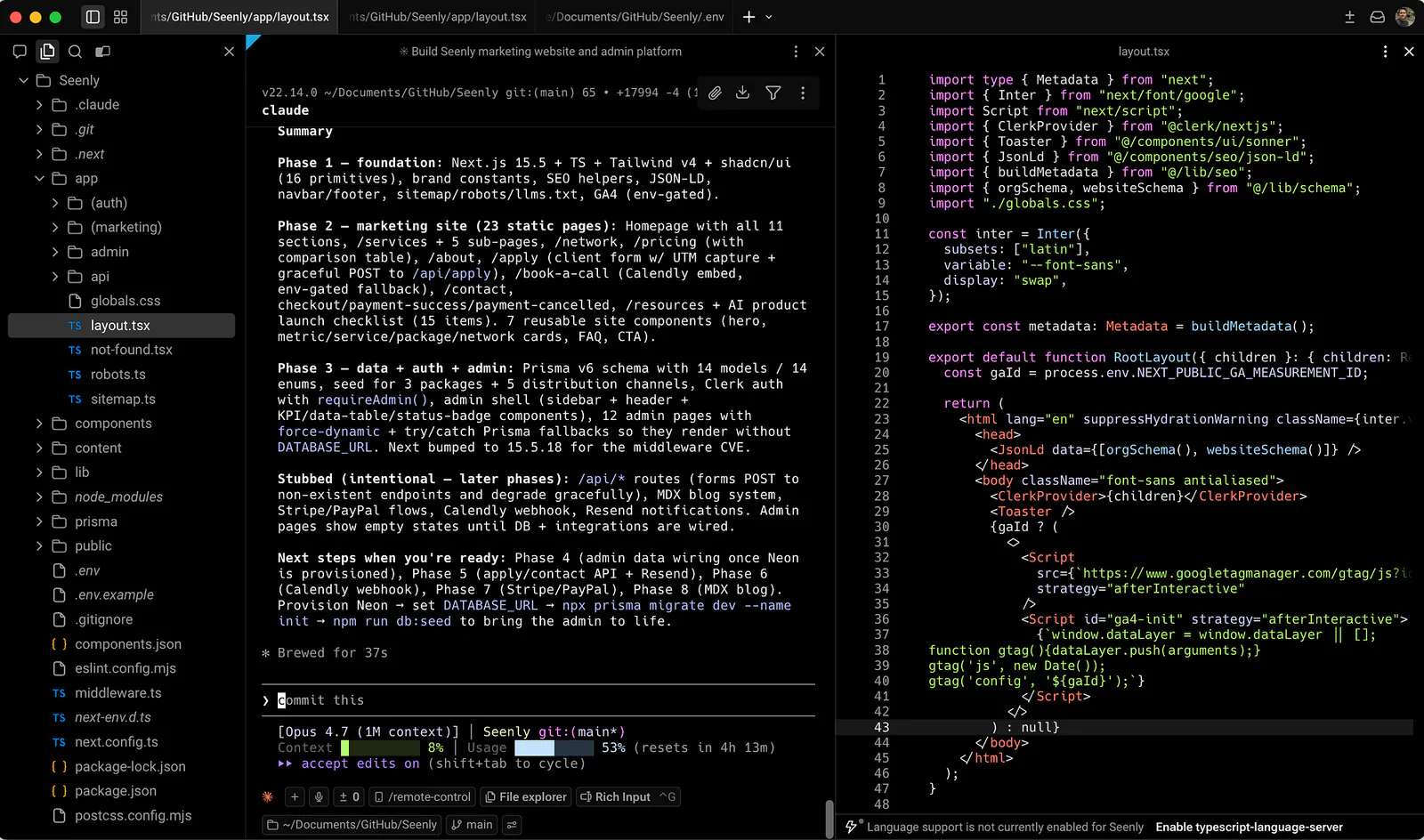
Sample coding work inside OpenAI’s Codex. Image by Jim Clyde Monge
I use Claude Code inside Warp. Claude Code with Opus 4.7 is by far one of the most reliable and capable setups I have used for code generation. I use Warp because it is fast and gives me the features I need from a modern terminal-based development environment.
If you’re interested in how I was able to run Claude Code inside Warp, check out this guide that I wrote a few days ago:
My Ultimate Claude Code SetupI also love using Codex because OpenAI’s GPT 5.5 model is generous when it comes to token limits. Whenever I run out of tokens in Claude, I switch to Codex.
One downside of Codex, though, is that it consumes so much memory. It can slow down my machine pretty fast, especially on larger projects. This is another reason why I still prefer a terminal-based environment like Warp. It feels lighter, faster, and easier to control.
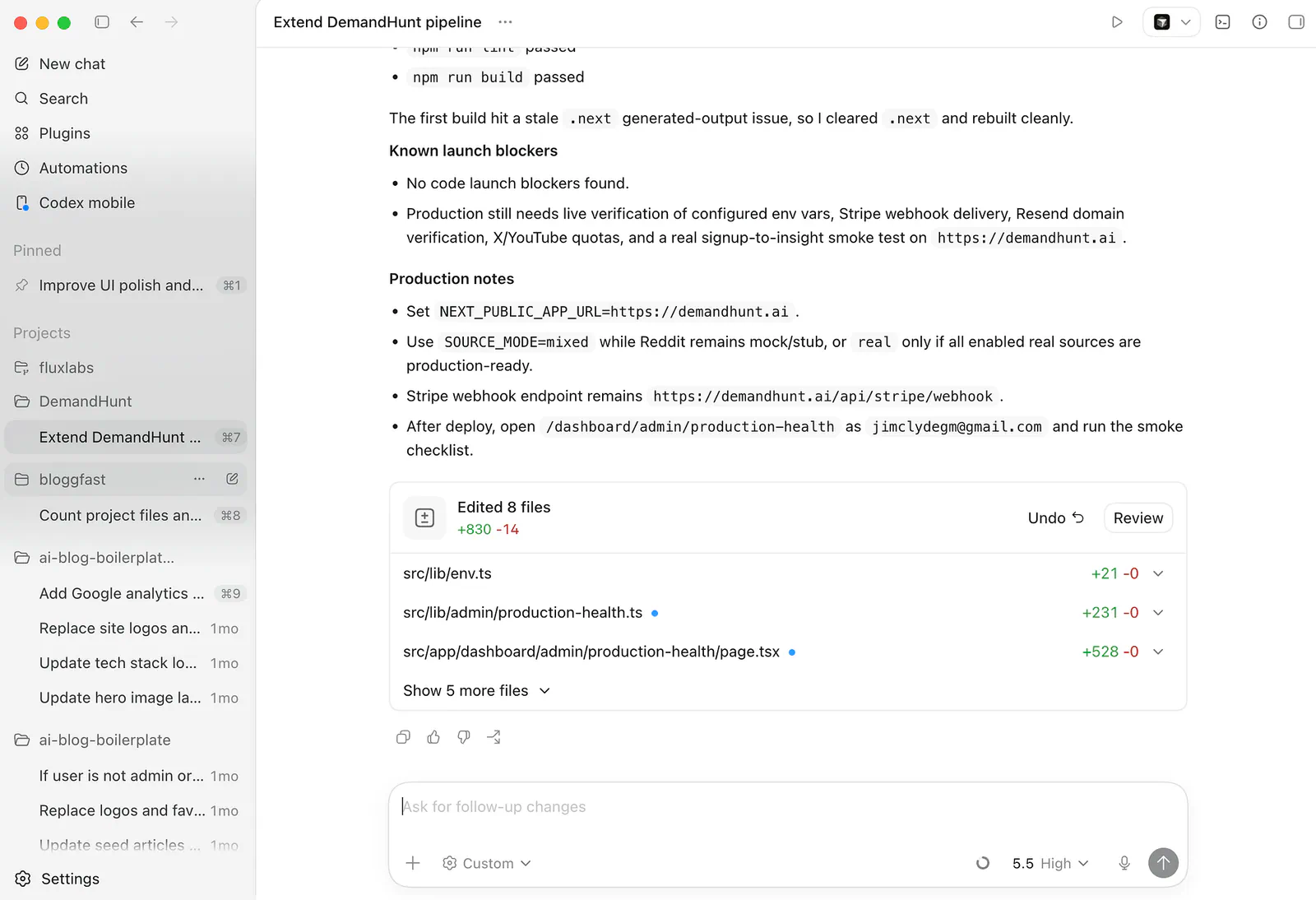
Sample coding work inside OpenAI’s Codex. Image by Jim Clyde Monge
Of course, you are free to explore other AI development tools like Google’s Antigravity, Cline, Cursor, or VS Code. There are a lot of them out there, and each one has its own strengths.
For reliable context retention, I also recommend taking advantage of the CLAUDE.md file. I have already talked about how to set it up in one of my previous articles. You can learn more from here:
When To and Not To Code with AI
After everything I said, I think it is fair to ask: when should you actually code with AI?
My simple answer is this: use AI when you already understand the direction of the project, the tools involved, and the kind of output you expect. Do not use AI as a replacement for thinking. Use it as a force multiplier.
AI coding tools are extremely good when you need to move fast. For example, if you are building a prototype, an MVP, a landing page, or an admin dashboard, then AI can save you a ridiculous amount of time. These are the kinds of tasks where the structure is already known. You know what the app should do. You know what files are likely involved. You know how to test if the output works or not.
By the end of it all, you still need to review the output.
The AI can write the code, but you still own the result. If the app breaks in production, it is not the AI explaining it to the client. It is you. If the payment flow fails, if the database leaks data, or if the app has broken permissions, you are the one responsible.
Do not blindly use AI for critical parts of the system like authentication, payments, database migrations, permission logic, security rules, user data handling, and production infrastructure.
I am not saying AI cannot help with these. It can. But you should never accept those changes without inspecting them carefully.
Here are the usual problems I observed from years of experience:
- Missing validation
- Weak security rules
- Exposed secrets (.env.local is exposed)
- Bad database design
- Broken or no error handling at all
The rule of thumb is: If you cannot explain how the generated code works, do not ship it yet.
You do not need to memorize every line, but you should understand the flow. You should know where the data comes from, where it goes, what services are involved, and what happens when something fails.
Also, be careful when the AI starts changing too many files. This happens so many freakin times, especially if you’re using a weak coding model. You ask for a small fix, and suddenly it modifies ten files, adds helpers, changes dependencies, and rewrites logic that was already working.
When that happens, stop. Review the diff. Revert what is not needed.
AI coding is powerful, but only when combined with a real engineering discipline. Prompting is not enough.
So when should you code with AI? Use it when it helps you move faster without making you blind.
When should you not code with AI? Do not use it when you are not ready to take responsibility for what it produces.
That is the line for me.
Final Thoughts
There you have it. I just explained the difference between traditional coding, vibe coding, and agentic coding from how I personally see it as a developer.
Traditional coding gives you the foundation. Vibe coding gives you speed. Agentic coding gives you leverage, especially when you already know how software works. The AI landscape is also changing fast, so I would still keep an eye on the daily developments and be ready to adapt when things change again.
So what exactly should you be using?
If you have zero programming skill or experience, go learn how a program works first. Learn the libraries, frameworks, services, and tools that make up a complete software application. There is no shortcut here. You cannot just give high-level instructions to an AI agent and expect things to work flawlessly. No, it does not work like that.
Spend at least 20–30% of your time learning the tech stack you are using. It will pay off later when something breaks, when the AI makes a bad decision, or when you need to understand why one tool is better than another.
Also, I am thankful for the companies pushing what technology can do. I started as a low-level engineer, but AI pushed me into higher-level engineering, and it is honestly way more fun. The transition was smooth because I already knew the fundamentals. AI did not magically make me a better developer. It just crushed a lot of the technical barriers that used to slow me down.
Thanks a lot for reading. If there are things you agree with or disagree with in this article, let me know in the comments. I would love to hear how you personally use AI coding tools and where you think this whole thing is heading.
Sources
- professional certificationcredly.com
- LinkedIn accountlinkedin.com
- Jim Clyde Mongemedium.com
- Flux Labs AIfluxlabs.ai
- BloggFastblogg.fast
- DemandHuntdemandhunt.ai
- https://generativeai.pub/my-ultimate-claude-code-setup-af8b3a8ca011generativeai.pub
- https://generativeai.pub/this-simple-claude-md-file-went-viral-with-130k-github-stars-479b9d0bad12


