I am not exaggerating when I said that Seedream 2.0 could dethrone Google’s Veo 3.1 and OpenAI’s Sora 2 as the leading video models in the market. I’ve had the opportunity to get early access to the model and was able to do sample tests with my custom prompts.
The results are mind-blowing. I’m not even sure how this is gonna go through copyright infringements because you can literally generate videos of real personalities and characters protected by IPs. In fact, the AI video of Brad Pitt and Tom Cruise brawling has already reached global headlines.
Here are the reasons why Seedance 2.0 is so popular right now:
- It allows you to combine up to 12 assets (9 images, 3 videos, 3 audio files) and text in one prompt to define exactly how your video looks, moves, and sounds.
- Generates video and audio simultaneously, providing perfectly timed sound effects, ambient noise, and accurate multi-language lip-syncing.
- Automatically breaks a single prompt into a sequence of cinematic shots (e.g., wide to close-up) while keeping characters and environments consistent.
- Accurately simulates real-world physics, such as gravity, momentum, and collisions, to prevent common AI glitches like “morphing” limbs.
It also supports “Video Extension” to lengthen clips and “Subject Replacement” to swap characters or objects in existing footage without changing the background.
How to try Seedance 2.0
Today, you can now use Seedance 2.0 on platforms like Pollo AI.
Head over to the AI Video generation dashboard and set the video model to Seedance 2.0. You can adjust several parameters like the aspect ratio, duration, and resolution.
Press enter or click to view image in full size
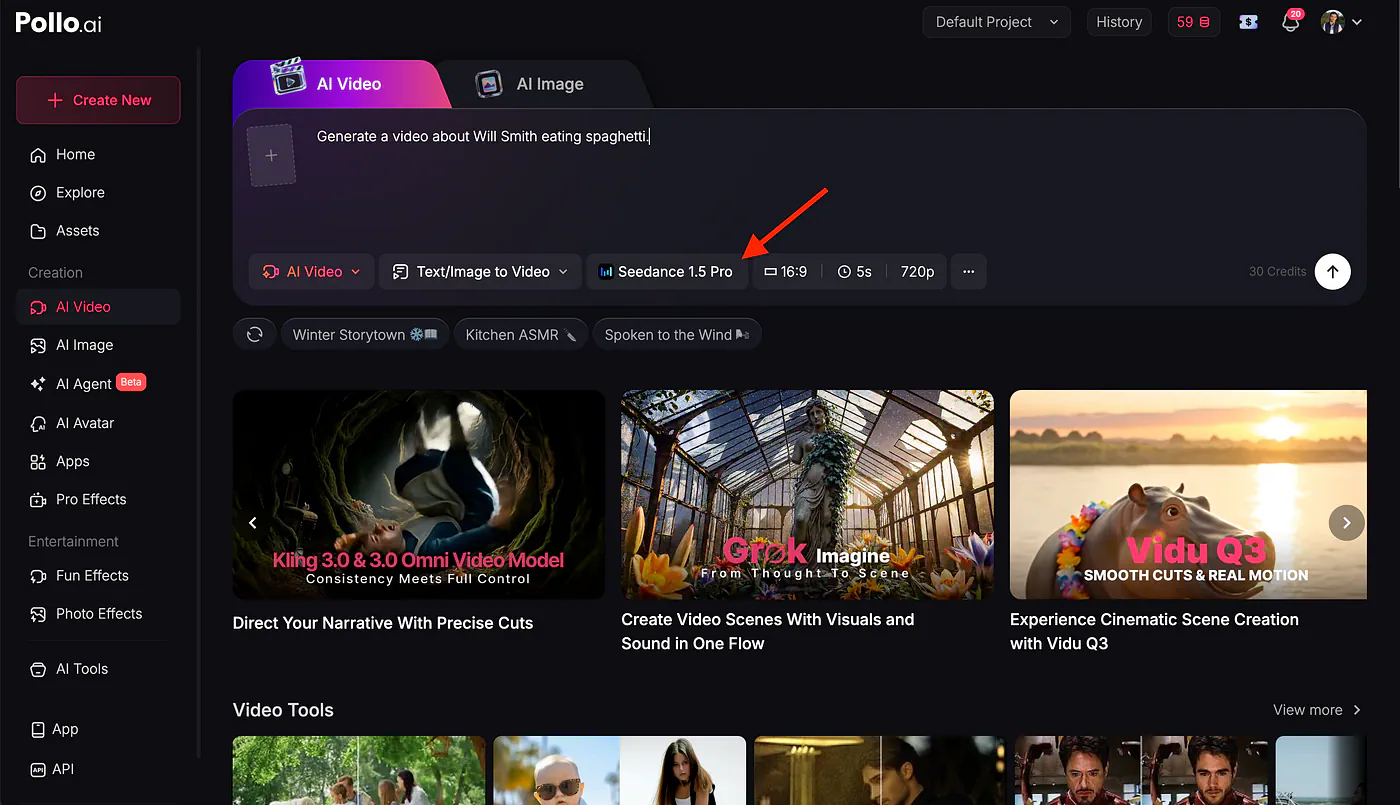
Now, let’s do an example. Here’s the famous Will Smith eating spaghetti prompt.
Prompt: Generate a video about Will Smith eating spaghetti.
Awesome! The consistency and physical accuracy feel like this technology shouldn’t exist.

You can continue working on the generated clip by using it as a reference to generate another AI media or stitch it with another video.
More interesting and hilarious prompts you can try:
Propmt #1: michael jackson dancing while stealing burgers in a mac donalds, several cuts, people are trying to chase him, action scene, singing with funny voice, movie scene, funny
Propmt #2: classic animation in the style of Disney, a friendly white wolf is playing with a beautiful blonde cute young woman in the snow, different cuts. Suddenly they fall into an ice cavern and find a skeleton with a map in the hand
Propmt #3: Will Smith fighting a spaghetti monster, epic action film scene, different cuts, 80s movie scene
Right now, only a handful of platforms have support for Seedance 2.0, and the API access isn’t available for public access yet.
How does the model achieve this level of consistency?
One of the most difficult tasks for most AI video models is getting visually consistent results in different angles.
For example, if you want to do a multi-scene video of a handbag, the AI needs to ensure that the details remain identical from the first second to the last, eliminating flickering and unwanted object morphing.
Here’s an example, here’s the image input:
Press enter or click to view image in full size

Sample product input for Seedance 2.0
Here’s the final video:
Just look at how realistic and detailed the close-up shots are. The model uses advanced spatial-temporal logic to ensure that faces, clothing, and environmental details do not change between frames. This makes it ideal for professional storytelling where “character drift” is unacceptable.
This is also an incredibly powerful tool for creating professional-grade marketing content and product demos.
Quick Storyboarding
Aside from generating basic videos and marketing assets, Seedance 2.0 also proves to be helpful in storyboarding.
The model possesses a deep cognitive understanding of narrative. It doesn’t just generate a clip; it understands the “why” behind the scenes. By interpreting complex storyboards and detailed text prompts, it can generate sequences that follow a logical plot progression, making it the perfect tool for filmmakers and advertisers.
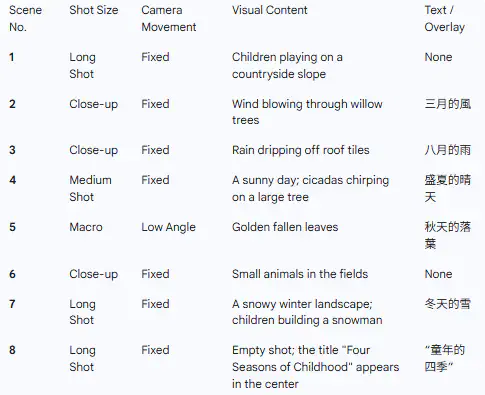
Take the two inputs below. One containing a table of scenes with all the details of the shot size, camera movements, and visual content. Optionally, you can add text overlays to the video.

Sample prompt for Seedance 2.0
Prompt: Based on the shooting script of the feature film shown in @Image 1, and referring to the shots, camera angles, movement shots, scenes and dialogues in @Image 1, create a 15-second soothing opening sequence about “The Four Seasons of Childhood”.
This is incredibly powerful for movie producers and independent animators. Instead of spending weeks sketching frames or paying for expensive pre-visualization software, creators can rapidly prototype an entire short film or commercial pitch in an afternoon.
You can easily test different lighting setups, swap camera angles, or block out complex action sequences before ever setting foot on a physical set.
When composing your text prompts, remember these tips:
- Mention Assets: Use
@Image1or@Video1in your prompt to link references. - Director Speak: Use technical camera terms like “dolly-in” or “pan” for better control.
- Front-Load: Put your most critical details in the first 10 words.
- Short Bursts: Stick to 5–8 second clips to prevent character “morphing.”
- Negative Prompts: Explicitly list “flickering” or “extra limbs” to clean up the output.
Final Thoughts
As I mentioned above, Seedance 2.0 is a highly controversial video model because of how many IPs it breaks. Still, getting your hands on this tech is dangerously fun. Props to Pollo AI for successfully hosting it and not crashing despite the overwhelming global demand.
I don’t even need to run comparison tests against Veo 3.1 or Kling 3 because the differences are quite obvious. Seedance 2.0 excels in almost all aspects of video generation.
Now, as a developer, what I am really looking forward to is the API access. Right now, it’s not clear which platform is best to use or how much the model costs. But for now, let’s all just have fun using it to generate awesome AI videos!
Sources
- Pollo AIpollo.ai
- https://vimeo.com/1168777189?fl=pl&fe=vlvimeo.com
- https://vimeo.com/1169089650?fl=pl&fe=vlvimeo.com
- https://vimeo.com/1169092094?fl=pl&fe=vlvimeo.com