
It has been a couple of months since Seedance 2.0 was announced. For a model with this much hype behind it, the public release took longer than expected.
The reason was obvious pretty fast. Seedance 2.0 was getting attention for being extremely good at generating realistic people, recognizable characters, and scenes that looked uncomfortably close to real film footage.
It is a unified multimodal audio-video generation system with text, image, audio, and video inputs.
The model started reaching global headlines because the renders were not just clean or “cinematic.” They were convincing in a way that made people nervous. Clips styled around faces like Will Smith, Tom Cruise, and Keanu Reeves spread for that exact reason.
In this guide, I’ll show how filmmakers can take advantage of this video model without putting too much focus on prompt engineering.
Let’s get started.
What Seedance 2.0 actually is
Technically, Seedance 2.0 is a native multimodal audio-video generation model. ByteDance says it uses a unified audio-video joint generation architecture rather than generating a picture first and slapping sound on later.
Press enter or click to view image in full size
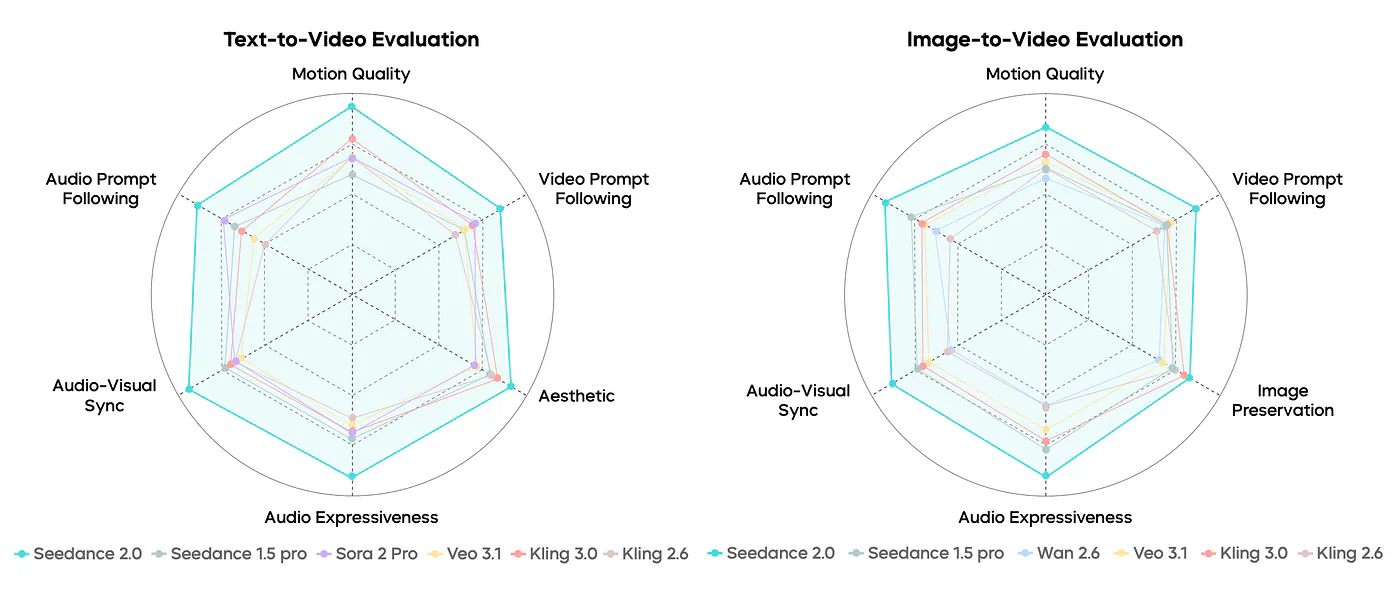
Overall performance comparison across T2V and I2V tasks. Seedance 2.0 achieves comprehensive leading performance over all competing models across every evaluated dimension in all three generation tasks.
Officially, it supports four input modalities, direct audio-video generation from 4 to 15 seconds, and native 480p and 720p outputs. On the open platform side, ByteDance says it can work from up to 9 images, 3 video clips, and 3 audio clips as reference inputs.
Here are more of its core features:
- Reference-based generation and editing: supports subject control, motion control, style transfer, special effects, video editing, and video extension.
- Strong prompt adherence: it is designed to follow complex instructions, long scripts, multi-shot directions, and storyboard-style inputs more accurately than earlier versions.
- Better realism and physics: it emphasizes stronger human motion modeling, temporal coherence, and cross-frame consistency.
- Cinematographic reasoning: it can handle shot planning, camera movement, shot sequencing, and narrative pacing.
- High-fidelity audio-video generation: it generates synchronized audio and video together, including dialogue, ambient sound, sound effects, and background audio.
- Character and scene consistency: it performs well at maintaining subject identity, action logic, style consistency, and plot continuity.
- Professional use cases: it is positioned for advertising, film/TV effects, game animation, commentary videos, and other production workflows.
- Output range: it supports 4 to 15-second clips with native 480p and 720p output.
Here’s how it compares to the previous version:
Press enter or click to view image in full size
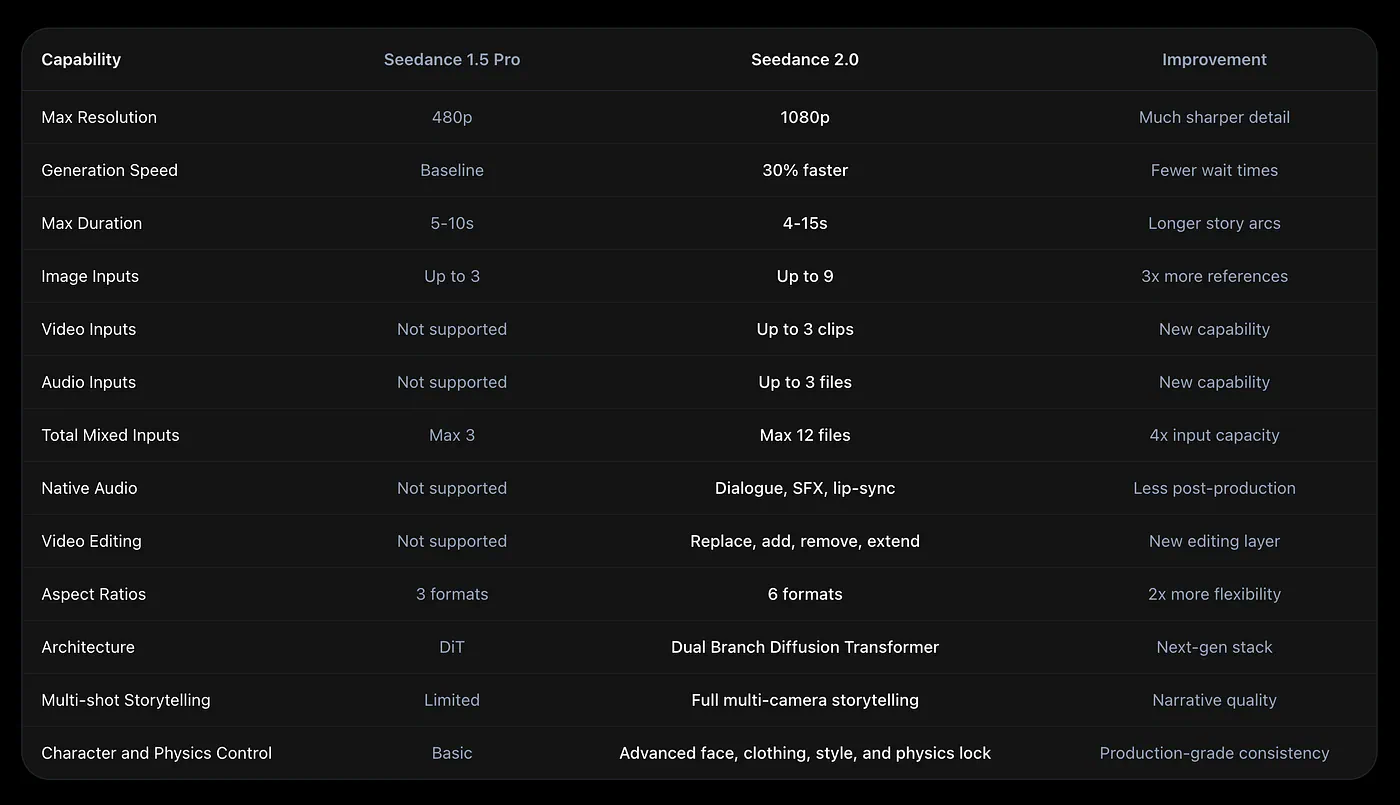
Seedance 2.0 improvement of capabilities over previous version
According to the leaderboard from Arena.AI, the model beats some of the best video models available in the market, including Google’s Veo 3.1 and OpenAI’s Sora 2.
Press enter or click to view image in full size
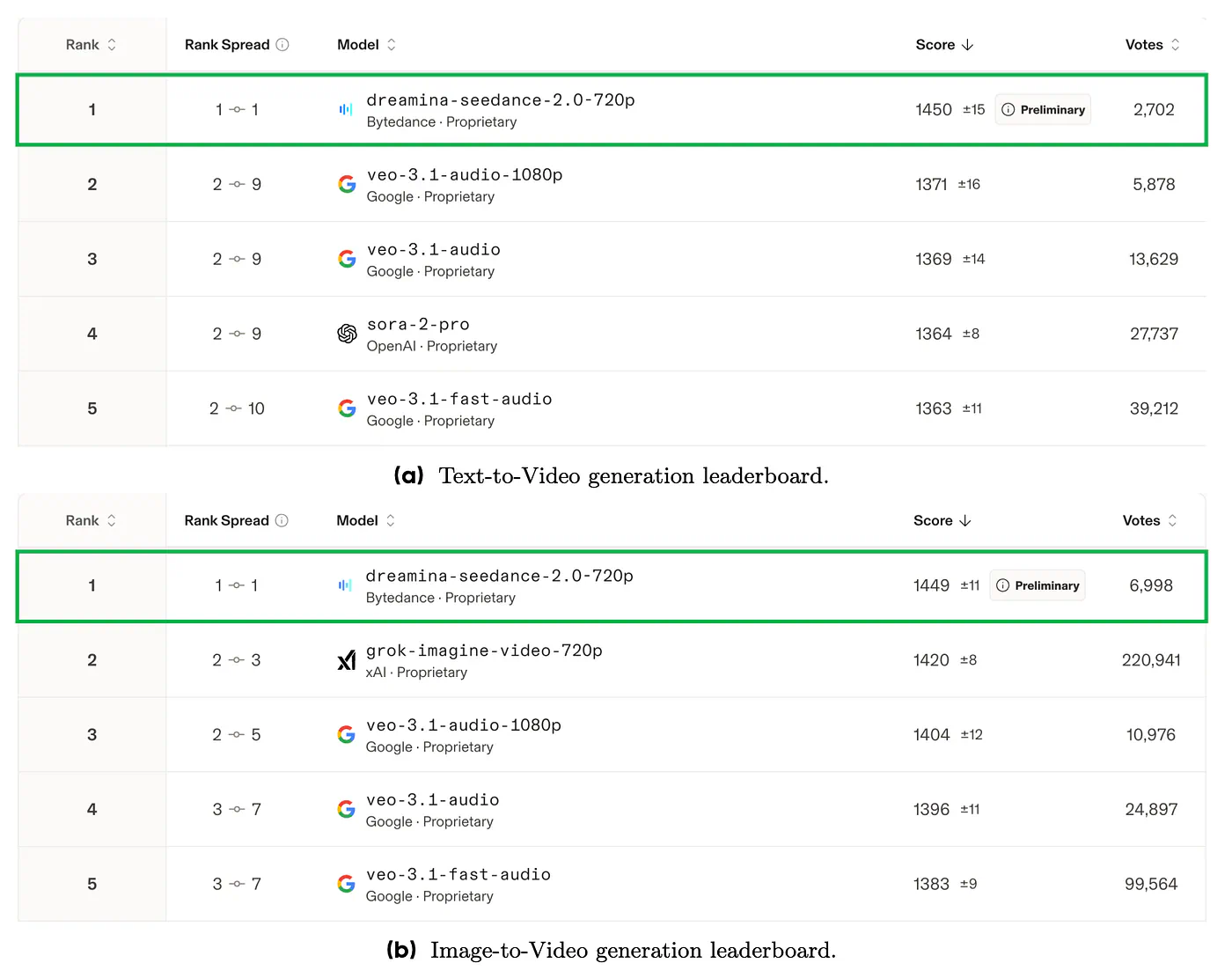
How Seedance 2.0 stacks up against the competitors
I can vouch for these results because I personally tried using them on some of my projects, and Seedance 2.0 blows the competitors out of the water.
Where to test Seedance 2.0?
There are now multiple ways to try Seedance 2.0, especially since ByteDance has made the model available through its public-facing ecosystem and API access points.
One of the best platforms offering Seedance 2.0 video generation right now, and the one that I personally recommend, is Topview AI.
Press enter or click to view image in full size
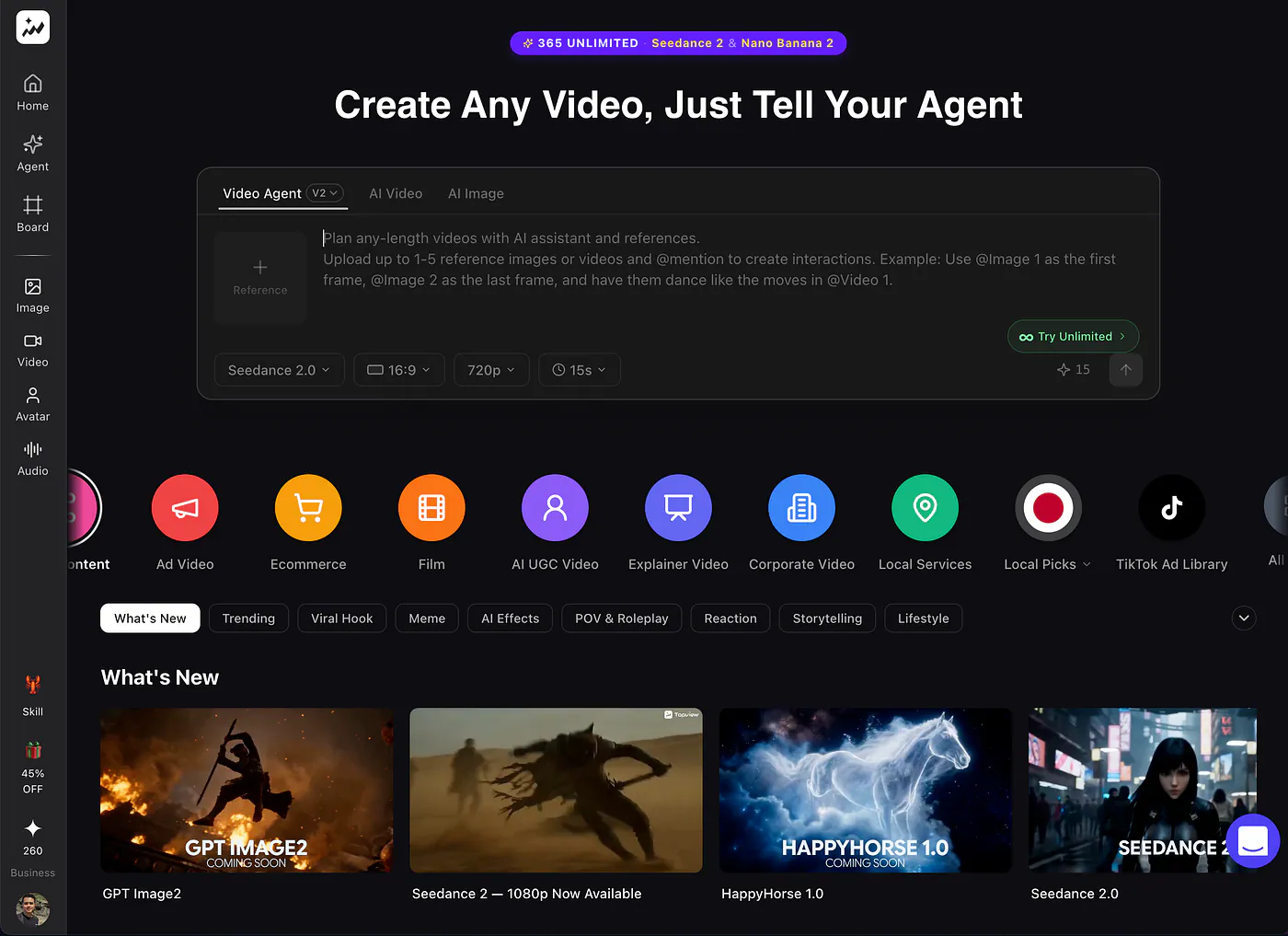
Creating AI videos on Topview
Topview is an AI video agent and an all-in-one video workspace, which is a better fit for filmmakers and teams that want to do more than run one-off prompt tests.
It lets users work with multiple video and image models in one interface, and its product positioning is clearly built around real production tasks: generating videos from prompts, templates, product images, or reference videos instead
On the pricing side, Topview offers 365 days of unlimited access to Seedance 2.0 for users on the Business Annual and Ultra plans. The new Ultra plan is clearly positioned as the most cost-efficient option for creators generating at scale, with two flexible ways to use Seedance 2.0:
- A credit mode for priority processing
- An unlimited mode for year-round generation.
The company also plans to offer an unlimited GPT Image 2 access for 365 days.
A Filmmaker’s Guide to Seedance 2.0
Before diving into the specifics, here’s what this section covers:
- shot continuity
- camera motion
- realism
- sound quality and sync
These four areas are where Seedance 2.0 starts to feel less like a prompt tool and more like something directors can actually use.
Let’s begin with shot continuity.
This is usually called “character consistency,” but I’ll use “shot consistency” here because we are not only talking about whether the character stays the same. We are also talking about whether the model remembers the environment, the scene layout, and the visual details that need to be carried across multiple shots.
To generate a sample video, open the AI video generator tool in Topiew and set the model to Seedance 2.0. Upload the reference photos and describe what the scene is going to be.
Press enter or click to view image in full size

Press enter or click to view image in full size

Sample input images for Seedance 2.0
Prompt: Create a multi-shot late-night diner conversation of two characters John and Olivia in a restaurant. The scene should feel intimate and restrained, with the dialogue centered on an unspoken turning point in their relationship.
Press enter or click to view image in full size
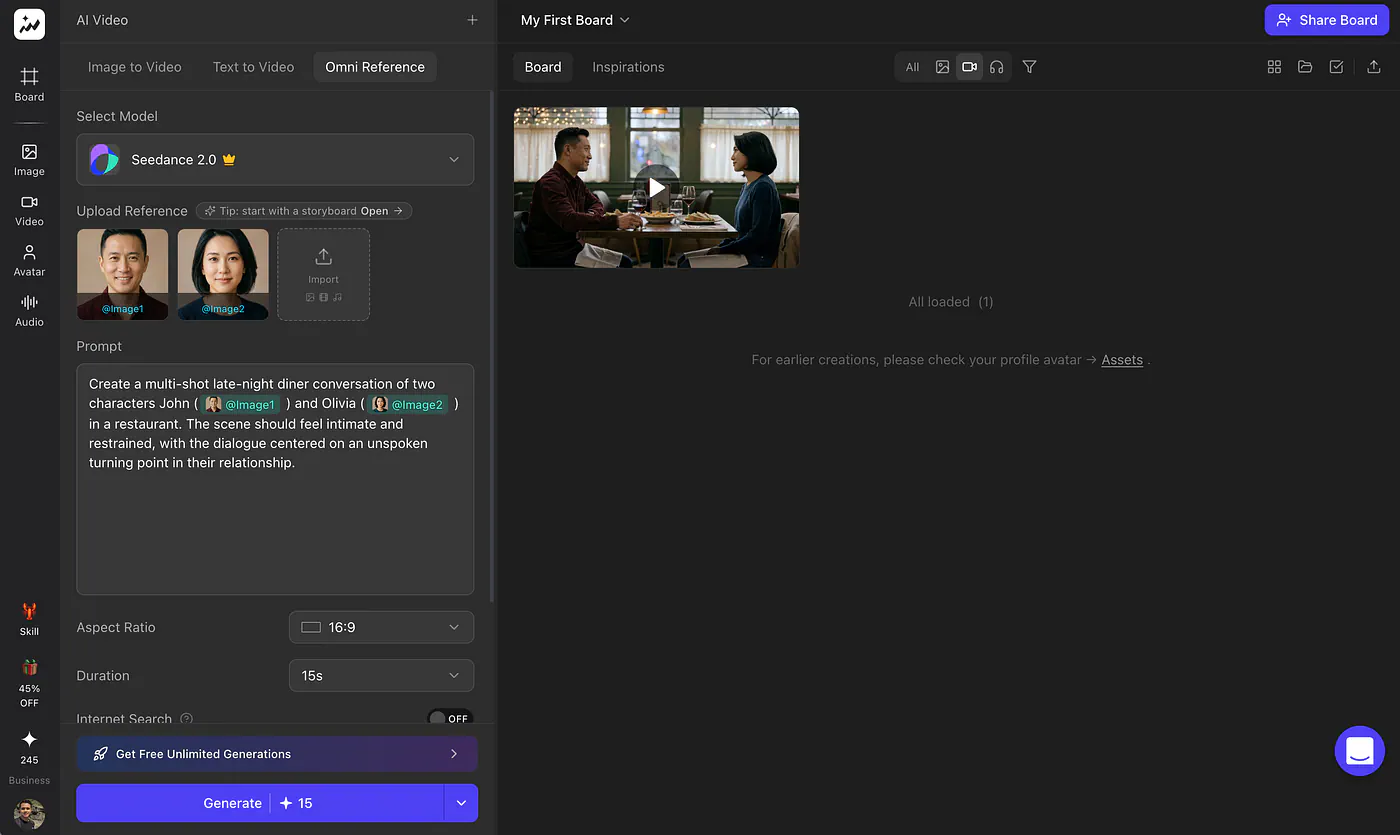
AI video generation with Seedance 2.0 on Topview
Make adjustments to the parameters like the video length, aspect ratio, and the resolution. Seedance 2.0 on Topview is able to generate up to 1080p!
Once the video is done generating, it will appear on the right side of the screen. Here’s what the sample video looks like:
Sample output AI video with Seedance 2.0
First of all, just look at how incredibly realistic the output is. The facial expressions, the texture of the skin, the hair, the clothing, all of it feels surprisingly convincing.
What I also really liked was the camera work during the dialogue exchange. The scene moves with intention. The camera shifts angles and adjusts the zoom in a way that feels deliberate, which gives the conversation a more cinematic rhythm.
Even more impressive, the dialogue itself feels on point even though I never explicitly told the model what the characters should say. That says a lot about how well Seedance 2.0 understands scene context.
Let’s do another example using a pure text prompt:
Prompt: Original mecha stealth action scene. On a high-altitude platform in a futuristic industrial city, a mecha ninja and a heavy-armored enemy engage in a final showdown on the eve of a storm. The character charges at high speed, draws a blade, leaps, and lands. Cameras use low-angle tracking, lateral movement, slow motion, and ultra-wide-angle shots. Neon lights pierce through the rain, strong reflections on metal surfaces, intense impact sensation, resembling the climactic battle in a season finale. Strong hook in the first 2 seconds, stable subject, smooth action, cinematic composition, realistic lighting, epic atmosphere, intense emotion, high-definition details.
Sources
- Arena.AIarena.ai
- Topview AItopview.ai
- Topviewtopview.ai
- GPT Image 2topview.ai
- https://vimeo.com/1185152781?fl=pl&fe=vlvimeo.com
- https://vimeo.com/1185159863?fl=pl&fe=vlvimeo.com


