

I recently read this piece from Shreyas Naphad, “If You Understand These 5 AI Terms, You’re Ahead of 90% of People,” and had fun reading it.
As an AI enthusiast and a technical writer who’s been writing about AI for more than five years now, I’m already familiar with all five terms. But then I thought, hey, there are more AI terms people should know, including some newer ones.
So I wrote this piece to share eight more terms and explain them in the best non too technical way I can. The next time you hear or read about them, you’ll know what they mean and why people are talking about them.
Let’s start.
1. Harness
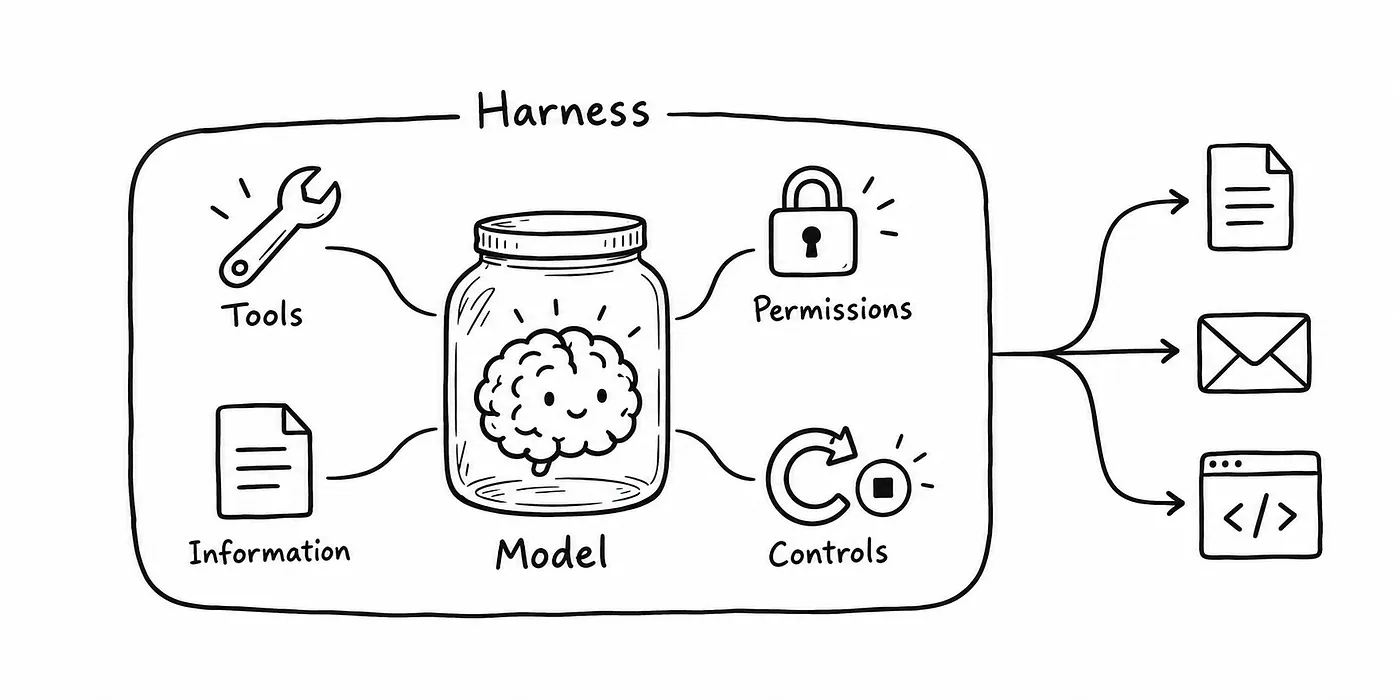
A raw model is a brain in a jar. It can think. But on its own, it cannot open Slack, send an email on your behalf, or even know when to quit.
A harness is the software around the model that lets it do those things. It gives the model access to tools and information, manages permissions, and controls when it should retry, stop, or ask you for help.
Harness
A simple way to describe it is:
Agent = Model + Harness
For a coding agent, the harness provides tools to read files, edit code, and run tests. It also manages the instructions and feedback the model receives.
Two apps can use the same model and still perform differently because their harnesses give it different tools, instructions, and ways to check its work.
That’s why the software around a model matters so much. OpenAI’s article on harness engineering describes how its team built an environment where Codex could write code, run checks, and respond to feedback.
When you compare AI tools, look at how they help the model complete your task, and which model they use.
2. Agents
An agent can take multiple steps and use tools to complete a task.
For example, you could ask one to help resolve a refund. With the right access, it could find the order, check the refund policy, prepare a request, and ask for your approval before submitting it.
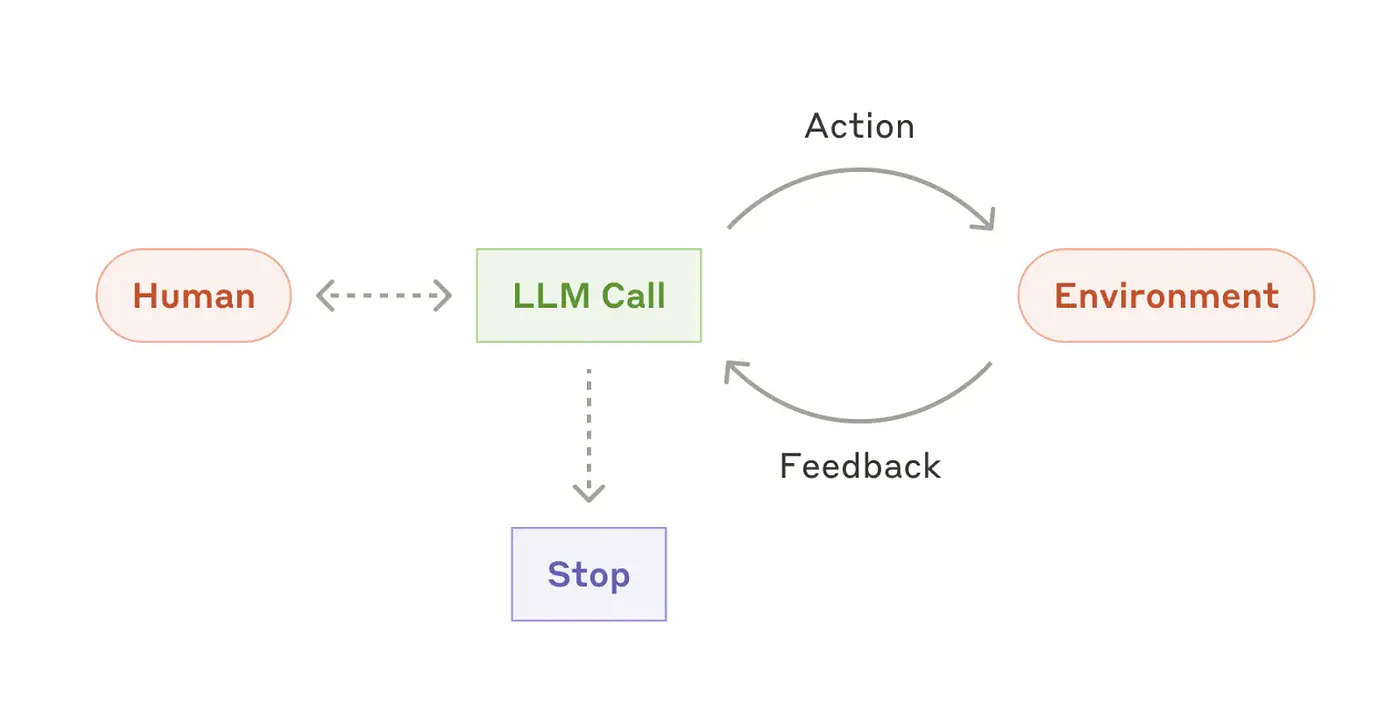
The basic process is: plan, act, check the result, and decide what to do next. Anthropic’s explanation of agents describes how these systems use feedback to guide their next actions.
The diagram below shows an autonomous agent using tools based on environmental feedback in a loop.
Autonomous agent
Think of an agent as an assistant with a to-do list and permission to use certain software. You give it the goal, and it works through the steps.
What it can finish depends on its tools and permissions. An agent that can only browse the web has different abilities from one connected to your email, files, and calendar.
Before using one, check what it can access, what it can change, and when it needs your approval.
3. MCP (Model Context Protocol)
MCP is basically the USB-C for AI.
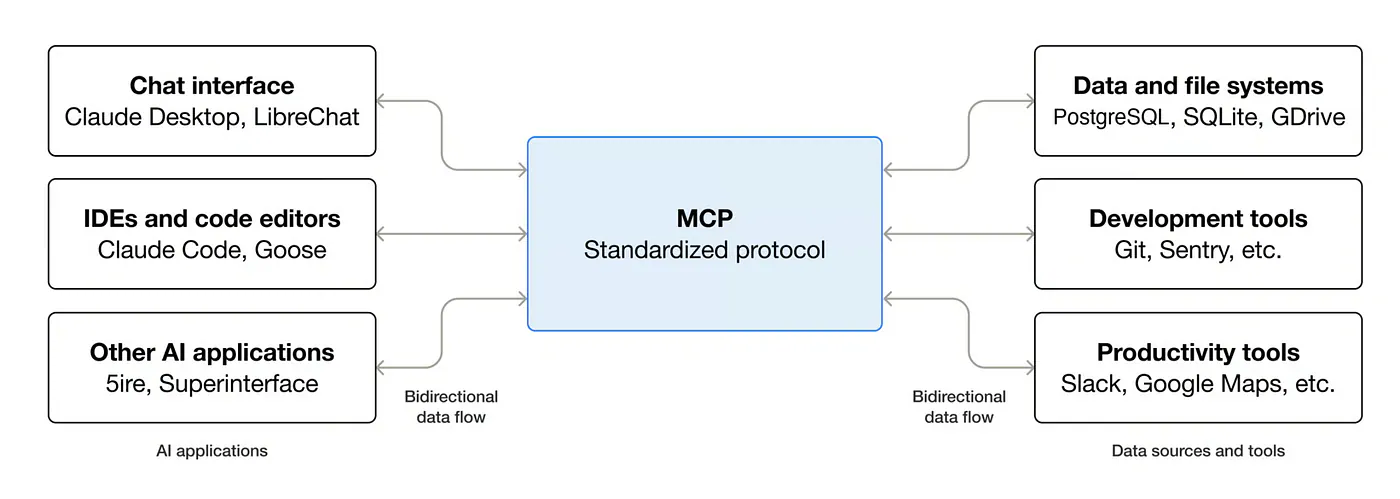
It gives AI apps a standard way to connect to tools and data sources.
Without a shared standard, developers often need to build separate integrations for different AI apps. MCP lets them build a connection that multiple compatible apps can use.
An MCP server makes certain tools or information available to an AI app. For example, it could let an assistant search company documents or create an issue in a project management tool.
MCP (Model Context Protocol)
The MCP documentation explains how these connections work.
The USB-C comparison helps explain the shared standard, but there’s still some setup involved. The AI app must support the connection, and you need to grant the appropriate permissions.
If a product says it supports MCP, check which services you can connect and what the assistant can do through them.
4. Loop engineering
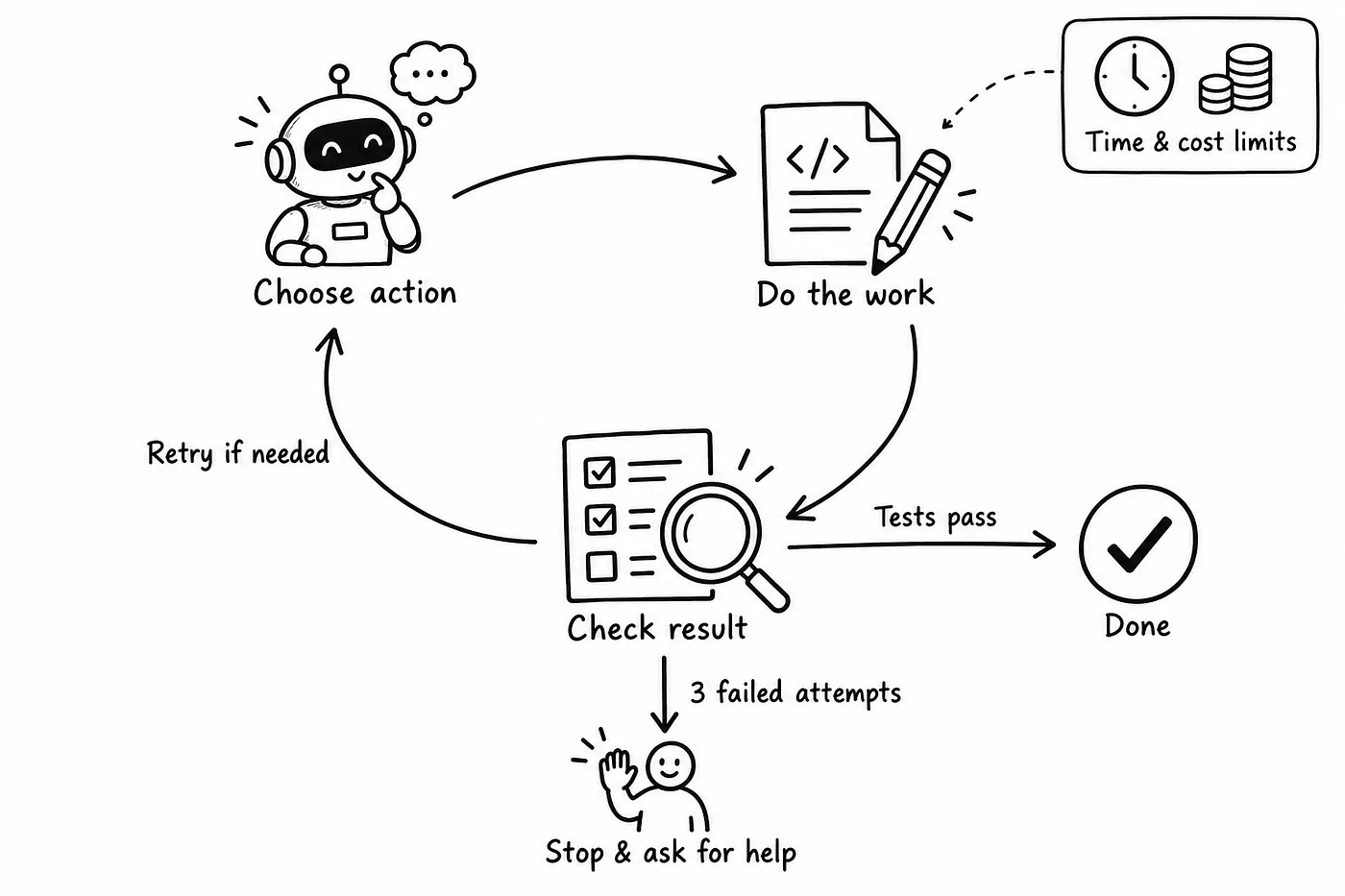
An agent often works in a loop: choose an action, perform it, check the result, and try again if necessary.
A coding agent might edit a file, run a test, read the error, and make another change.
That process becomes a problem when the agent keeps repeating an unsuccessful action or stops before the task is complete.
Loop engineering means designing how that cycle works, including how the agent receives feedback and decides whether to continue. It’s an emerging area of agent development discussed in research on loop engineering.
Loop engineering
You need to answer questions such as:
- What counts as finished?
- How many times can the agent retry?
- How much time or money can it spend?
- When should it ask for help?
- Who or what checks the result?
For example, you could require a coding agent to pass specific tests before reporting success. You could also tell it to stop after three failed attempts and explain the problem.
The harness provides the tools and controls. Loop engineering helps determine how the agent uses them repeatedly to finish the work.
5. Skills
A skill is a saved recipe an agent can follow when a task matches.
For an expense report, that recipe might explain which fields to include, how to group expenses, and what to do when a receipt is missing.
In the Agent Skills format, the instructions live in a SKILL.md file. The package can also include scripts, templates, and reference documents. Anthropic’s Skills documentation explains the format.
You can add custom or template skills on Claude from the Skills tab.
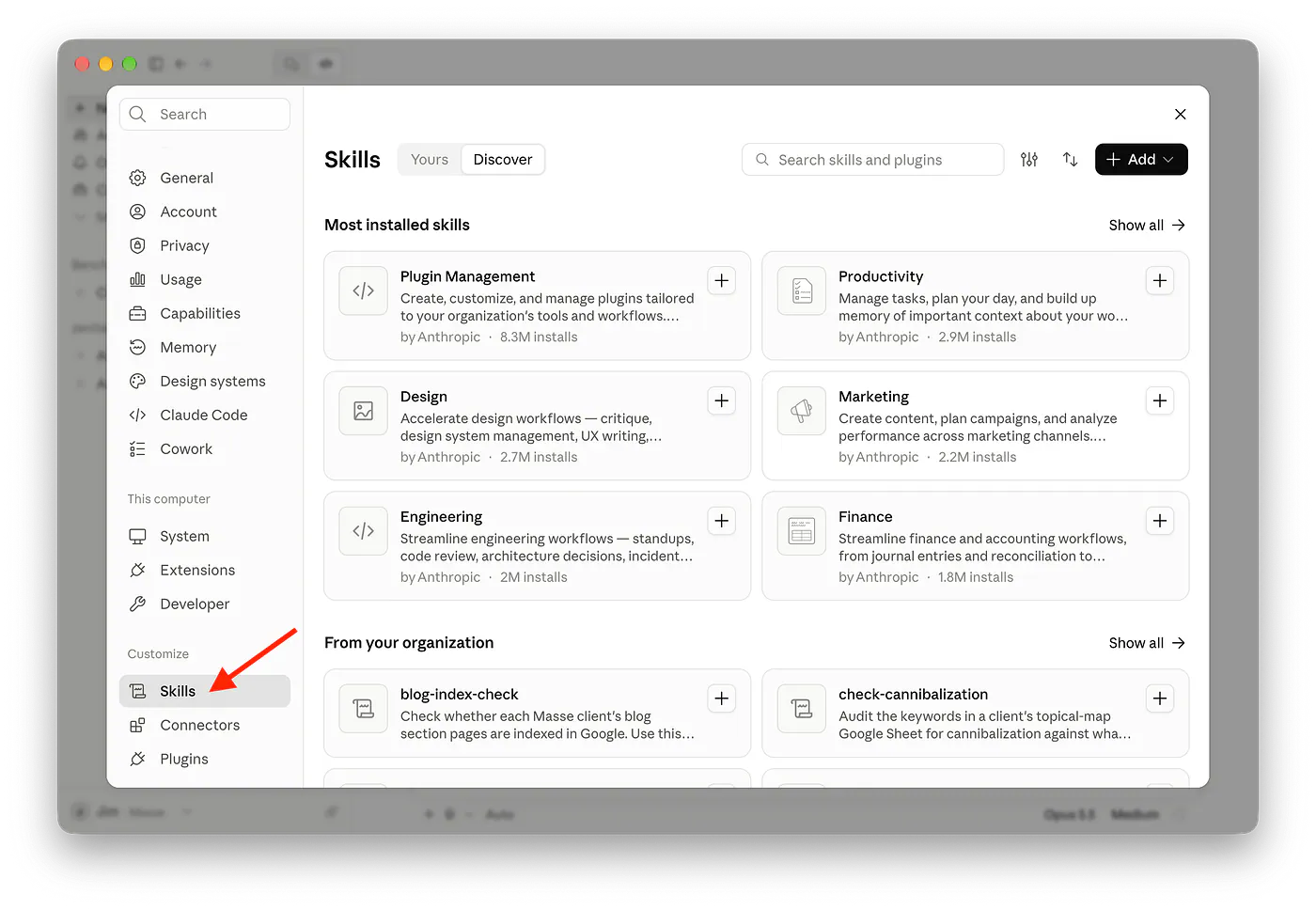
Skills page in Claude
In ChatGPT, you can add skills on the Customize page.
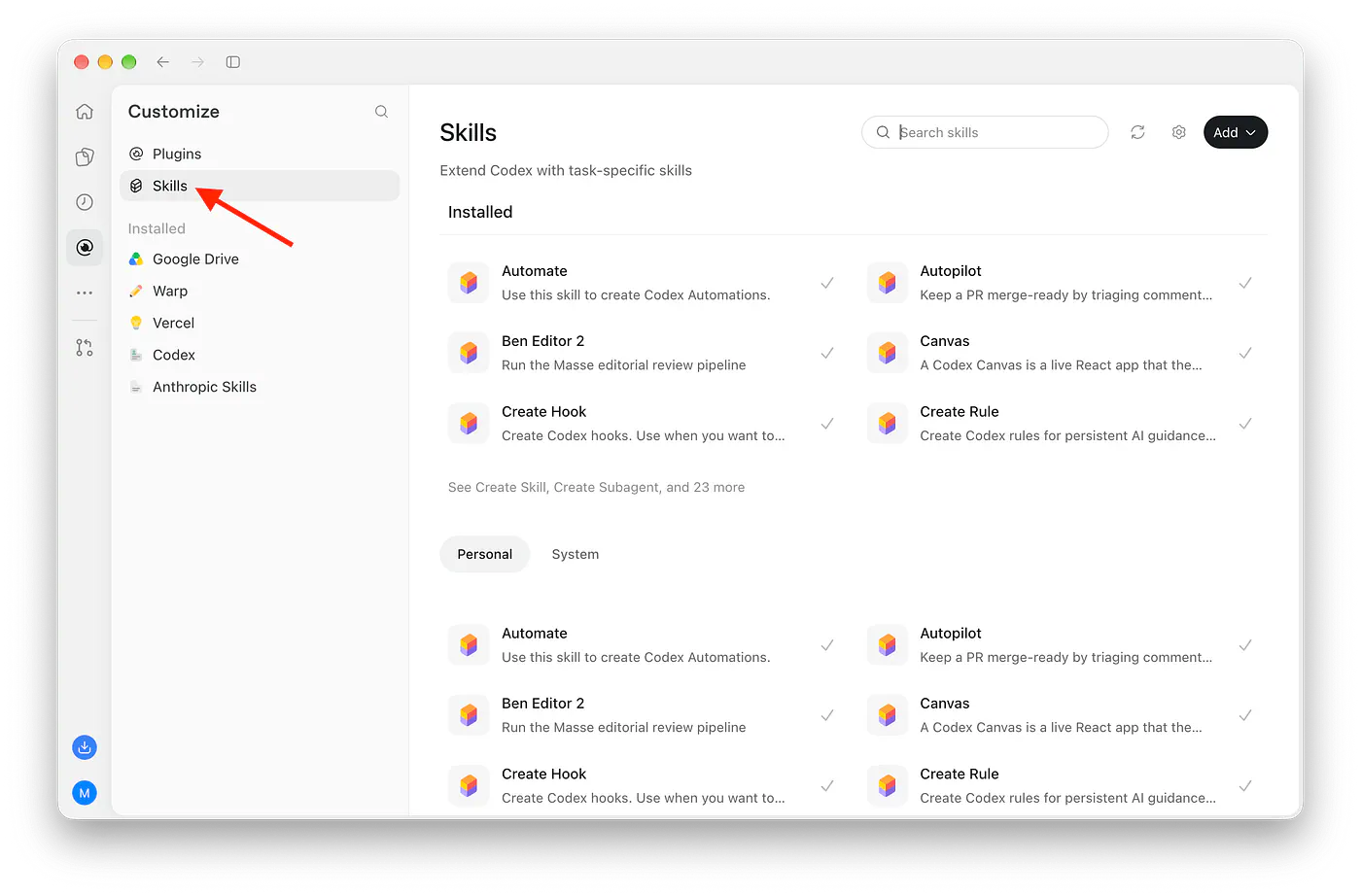
Skills page in ChatGPT
The agent initially sees the skill’s name and description. When it identifies a relevant skill, it loads the detailed instructions. That means it doesn’t need to read every procedure before every task.
MCP gives the agent access to tools and data. Skills explain how to perform particular jobs with them.
For example, a connection might let an agent access your spreadsheets. A skill could tell it how to prepare your company’s monthly sales report.
You write the procedure once, then reuse it instead of explaining the whole process in every chat.
6. GEO/AEO
This one is not about building agents. It’s about being found by them.
People used to Google and click ten blue links. That’s SEO, or Search Engine Optimization.
Now they ask ChatGPT, Claude, Perplexity, or Google’s AI Overview and read the answer. Fewer clicks.
- GEO (Generative Engine Optimization): It focuses on whether AI-generated answers mention your business, cite your content, or recommend your product.
- AEO (Answer Engine Optimization): It focuses on making content useful for direct answers, including search engine answer features and AI assistants.
SEO = “rank on page one.”
GEO/AEO = “be the source the AI quotes.”
The terms overlap, and companies don’t always draw the same distinction between them. Microsoft’s guide to AEO and GEO covers both approaches.
For example, someone might ask an AI assistant, “What’s a good accounting tool for a small business?” If you sell accounting software, you’d want your product considered in that answer.
Clear explanations, accurate product details, and reliable sources can help make your content useful. None of these guarantees that an AI assistant will mention it.
If you run a website or business, you may want to check whether AI answers include you, alongside your search rankings and traffic.
7. Computer Use
Computer use lets an AI system interact with a screen by clicking, typing, scrolling, and selecting items.
It works roughly like this:
Screenshot → decide what to do → click or type → check the screen again.
That’s how an agent can fill out a form or complete a task through a website’s interface.
Most of the popular AI chatbots like ChatGPT, Claude, Perplexity, or Grok already support Computer Use. In ChatGPT, you can enable this feature under the Integrations menu on the Settings page.
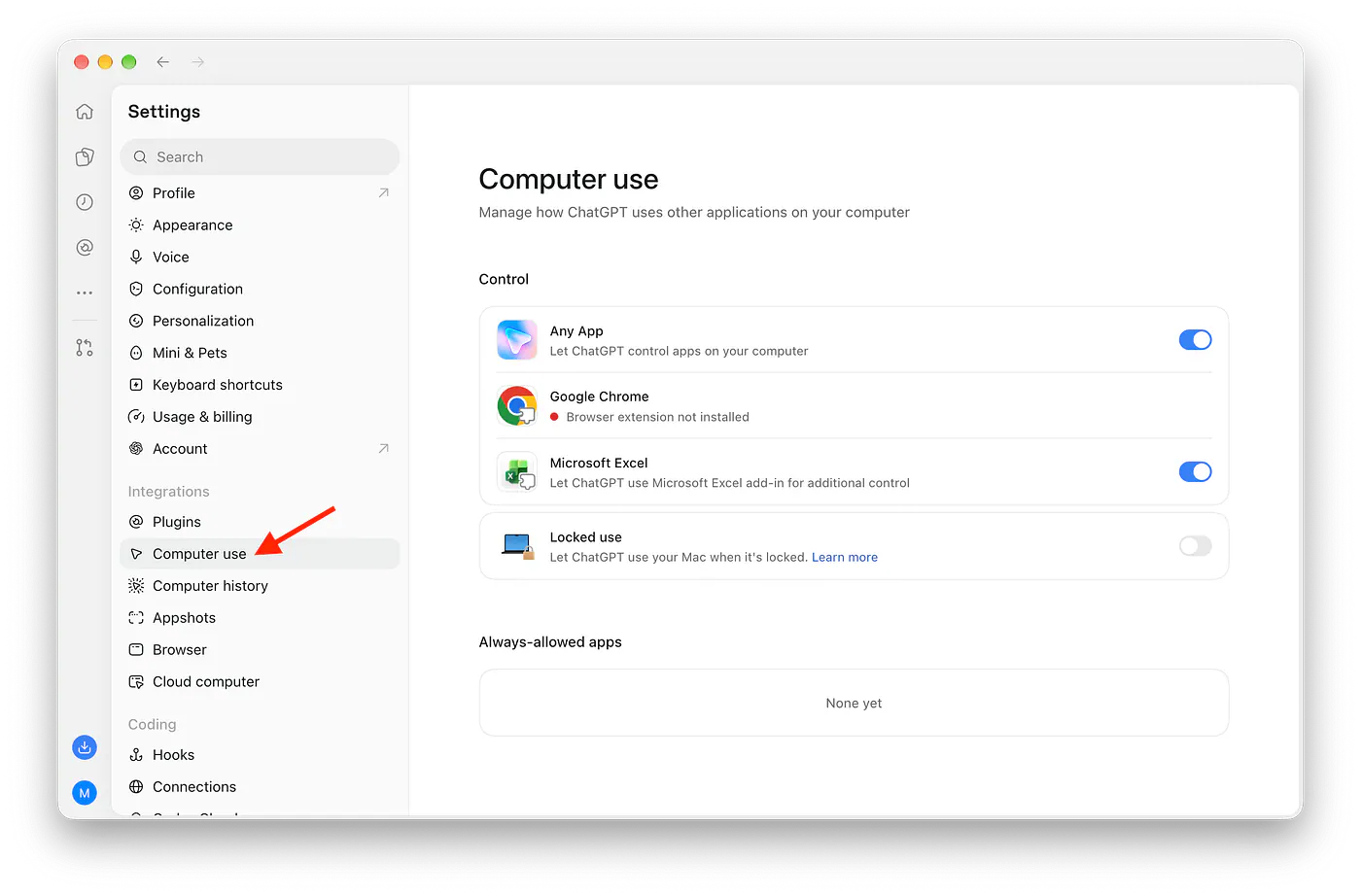
Computer Use page in ChatGPT
Computer use is helpful when an app doesn’t offer a suitable API. An API lets software exchange information and perform actions directly. With computer use, the agent works through the buttons and fields you would use yourself.
For example, an agent could enter details into a booking form even without a dedicated connection to the booking service.
It can also click the wrong button, misread a page, or get stuck. Check what it can access and review important actions, especially purchases, submissions, and account changes.
8. AGI/Superintelligence
AGI, or artificial general intelligence, generally refers to AI that can perform a broad range of intellectual tasks at a level comparable to humans.
That could include learning unfamiliar subjects, solving different types of problems, and applying knowledge across areas.
Researchers disagree about the exact definition and how to test for it. Google DeepMind’s Levels of AGI framework offers one approach based on how broadly capable a system is and how well it performs.
Superintelligence goes further. It refers to AI that would substantially outperform humans across a broad range of intellectual tasks.
A basic way to remember the distinction is:
- AGI: broadly capable AI, often described in terms of human-level performance.
- Superintelligence: broadly capable AI that exceeds human performance.
Being excellent at one task doesn’t establish either capability. A system might write strong code or solve difficult math problems and still struggle with other work.
When a company uses these terms, check what it means by them and what its system has demonstrated. That will tell you more than the label alone.
And in case you missed it, the US government officially renamed AI to “Superintelligence.” You can learn more about the backstory in the article below:
Trump Wants To Rename Artificial IntelligenceI hope you learned something new in this post.
The next time you hear about a company that says its product has agents, you can ask what specific tasks they are designed for. If it supports MCP, you can check which apps it connects to. If an agent can use your computer, you’ll know to ask what it can access and when it needs your permission.
You’ll also have an easier time following AI news. A headline about AGI or superintelligence will make more sense when you understand what those words mean and why their definitions are still debated.
The next time you come across these terms, you’ll understand the explanation and be able to decide whether the tool or idea is useful to you.
That’s about it. Welcome to the top 10%.
Sources
- Shreyas Naphadmedium.com
- If You Understand These 5 AI Terms, You’re Ahead of 90% of Peoplepub.towardsai.net
- harness engineeringopenai.com
- Anthropic’s explanation of agentsanthropic.com
- MCP documentationmodelcontextprotocol.io
- loop engineeringarxiv.org
- Anthropic’s Skills documentationanthropic.com
- Microsoft’s guide to AEO and GEOabout.ads.microsoft.com
- Levels of AGI frameworkdeepmind.google
- officially renamed AI to “Superintelligence.”forbes.com
- https://generativeai.pub/trump-wants-to-rename-artificial-intelligence-120599248cbdgenerativeai.pub


