
Claude is finally back. I’ve been using Opus 5.5, and it’s been really great so far. Basically, everything I ask it to do, it does pretty much flawlessly without me needing to babysit and steer constantly. It’s also much cheaper than Fable 5.1.
Anthropic released Opus 5.5 two days ago. Since then, my X feed has been sharing all sorts of technical and creative ways to use the model. Some are asking it to draw an animation frame by frame. Others are building interactive lessons, designing websites, or even showing its integration with Blender.
In this post, I’ll share eight of my favorite use cases and some ideas for what you could do with the model. You can also try them yourself with Claude Opus 5.5 and the tools used in each example. Have fun!
1. Animating Stories With JavaScript
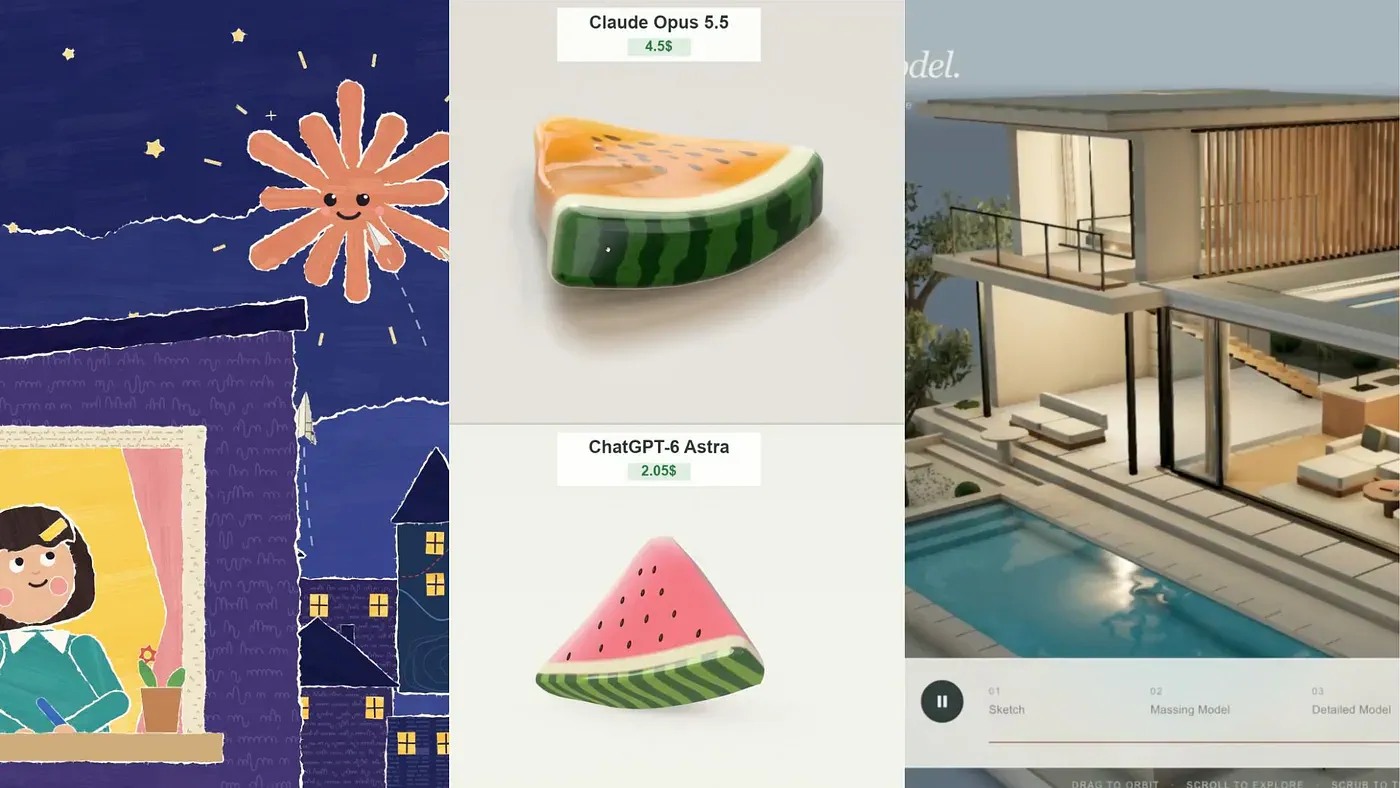
One user, Kevin Ngo, asked Opus 5.5 to create a 28-second animated story where each frame is created with JavaScript.
The hand-drawn style animation features a starry night town, paper airplanes, a smiling star-like creature, a girl writing at her window, and responses visualized as dogs and tea, blending cut-paper aesthetics with code-generated motion.
Another creator asked Claude to animate its own life, from day zero to the present, using JavaScript brush strokes and no image or video model.
It still baffles me how this model that is not capable of generating images or videos is able to create such amazing videos. It does not require any image input, so you just need to be really creative with your prompt.
2. Building Interactive Apps That Explain a Concept
In another example, Ryan Sael asked Opus 5.5 to build an interactive lens lab that explains camera focus. Turning the focus ring shifts the glass elements, and a plane of sharp focus moves through the scene as you adjust it.
The whole app took one hour and 26 minutes in a single run and cost $25.66 through the API. Expensive? It’s not. Trust me, this level of app would’ve cost me hundreds of dollars to build with Fable 5.1 or GPT 6 Astra.
I’d like to see more lessons like this, such as a music theory app where you drag notes and hear the chord change, or a sorting visualizer you can pause and reshuffle.
3. Generating and Animating 3D Objects
Techartist built an interactive web experience called “Architect’s Model” that turns a rough 2D sketch into a finished 3D house. It’s built entirely in Three.js and TSL, with Opus 5.5 writing the code.
You can orbit the model, scroll, and scrub through four stages: the initial linework, the basic massing, the added detail, and the completed building. Scrubbing backward is the awesome part, because you can see exactly which decisions produced the final shape.
2102503719762018434For architects and engineers, this could be a great way to present a concept to clients. Most clients have trouble reading plans, but they can drag a slider. Just don’t mistake it for CAD. There are no real dimensions, structural data, or anything you could build from. It’s a presentation layer on top of the actual design work.
Another creator made a stretchy jelly slice and compared it with an Astra version. They preferred Opus for its color, glossy surface, and the way the slice folds and jiggles after release.
One tip if you try this: TSL is new and still changing, so pin your Three.js version and paste the docs into context. Otherwise, the model will reach for APIs that no longer exist.
4. Designing Websites With 3D Elements
This example shows off Claude Opus 5.5’s coding strengths.
Viktor Oddy’s 12-minute video tutorial walks through building high-end 3D interactive websites step by step, with the kind of dramatic visuals and motion effects that he says usually cost around $50k.
This is a big threat to platforms like Lovable, which is popular for building beautiful web designs with AI. Who needs them when you can just tell Claude to build a beautiful app directly inside your IDE?
5. Working Inside Blender
This is probably the most intriguing use case for me. Creating motion videos, interactive apps, or games inside Claude is already amazing, but having it work inside Blender or After Effects is another level of coolness.
Alex Albert from Anthropic highlighted Opus 5.5’s new ability to generate professional-quality stop-motion claymation videos in Blender from a single prompt on claude.ai.
The model plans the scenes, renders the frames, checks the output, and assembles a roughly 20-second animation. That’s a good look at how agentic Claude has become.
I’d expect a few errors when you try this yourself, since Blender’s Python API changes between versions. But I’m definitely trying it.
6. Creating Brand Presentations
I’ve talked about AI-powered presentation generators many times before, and apps like Gamma, Plus AI, and NotebookLM are usually the ones I recommend.
But guess what? It looks like Claude could be at the top of that list with Opus 5.5.
The deck Yahyavision shared has a cohesive futuristic look, with a custom interlocking logo, the tagline “Every AI Agent, One Index,” website mockups, app icons, and a teal and cyan palette that includes Electric Lime and Cerulean Blue.


