
It does not take much to get an LLM feature working. One provider, one API key, one model, done.
Keeping that setup clean as the system grows is a different story.
A second provider gets added. Some requests need to go to different models. Failures need fallbacks. Costs need limits. Teams want usage visibility. Security wants audit logs. Before long, model access is no longer a thin integration. It becomes a platform problem.
From my own experience working with AI systems, I would not build around a single model provider unless the use case is extremely narrow. I usually switch between models from OpenAI and Anthropic depending on the task, response quality, and cost. Once you start working that way, you need a reliable gateway sitting between your application and the model providers.
Bifrost is one way to handle that orchestration.
It is an AI gateway that provides a single OpenAI-compatible API in front of many providers, while also adding the things teams usually end up building around those providers anyway: routing, failover, semantic caching, virtual keys, observability, and governance controls.
What Bifrost actually is
Bifrost is a gateway layer for AI traffic. You put it between your application and your model providers, then send requests through one interface instead of wiring every provider directly into the app.
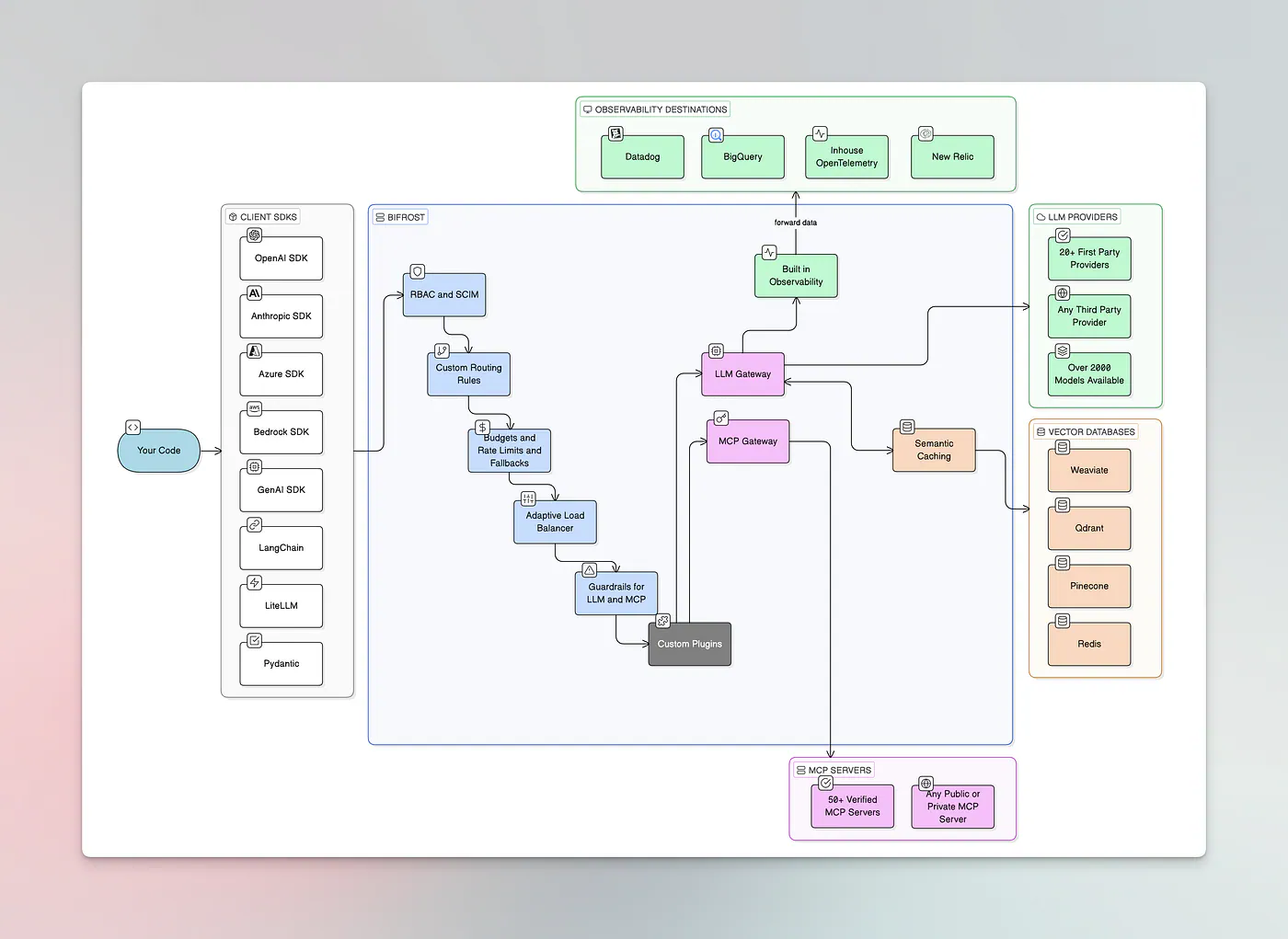
Bifrost infrastructure
Instead of spreading retry logic, provider selection, key management, cost controls, and monitoring across multiple services, those things can live in one place.
Bifrost’s overview page calls out fallback, weighted load balancing, routing, virtual keys, semantic caching, observability, Prometheus metrics, and OpenTelemetry support as part of the open-source feature set.
So the short version is this:
- your app talks to Bifrost
- Bifrost talks to model providers
- the routing and control logic lives in the gateway instead of your app code
That is the basic idea.
How to Set Up Bifrost Locally
If you just want to see how Bifrost works, the local setup is the easiest place to start.
The command is simple:
npx -y @maximhq/bifrost
If you need a specific transport version, use this command:
npx -y @maximhq/bifrost --transport-version v1.3.9
That starts the HTTP gateway locally on port 8080 by default. The setup page also documents flags such as -port, -host, -log-level, -log-style, and -app-dir.
Once the service is running, open the web interface at http://localhost:8080. The UI is used for provider setup, live configuration updates, request logs, metrics, analytics, virtual keys, and governance-related controls.
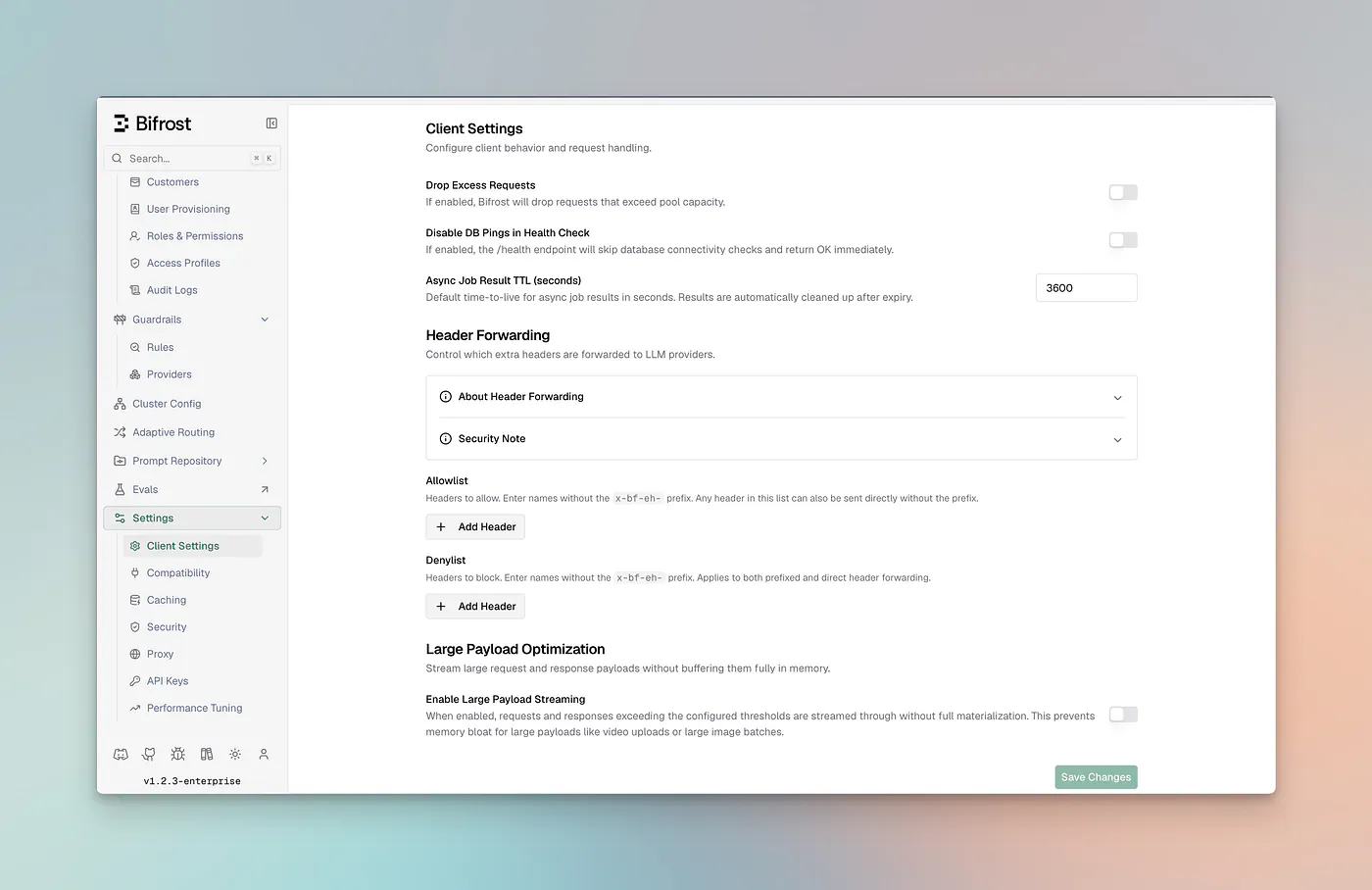
Bifrost localhost UI
After that, you can send a first request through the standard chat completions endpoint:
curl -X POST http://localhost:8080/v1/chat/completions \
  -H "Content-Type: application/json" \
  -d '{
    "model": "openai/gpt-4o-mini",
    "messages": [{"role": "user", "content": "Hello, Bifrost!"}]
  }'
If local setup is only the first step, there is also a Docker path in the same guide. For teams that need clustering, private networking, stronger governance, or larger production deployment options, the enterprise docs and product pages go further than the local and Docker setup.
Why AI gateway show up later than people expect
A lot of teams do not start by asking for an AI gateway.
They start by shipping a feature.
The gateway becomes necessary when the loose ends pile up. One provider has an outage. Another provider has a better model for a certain task. Internal teams need usage controls. Security asks for logs and permissions. Engineering wants fewer custom branches in the application code.
That is why the feature list matters less than the grouping behind it. Bifrost is trying to cover four areas that usually get handled in separate ways:
- traffic management
- governance and budgets
- observability
- deployment and availability
Read it that way, and the product makes more sense.
Unified API, but not just a unified API
The OpenAI-compatible surface means existing code can often stay mostly the same while the gateway handles provider routing behind the scenes. It maintains compatibility with SDK ecosystems and frameworks such as OpenAI, Anthropic, LiteLLM, LangChain, PydanticAI, Bedrock SDK, and Google GenAI.
That helps with migration, but the more useful part is what comes after migration.
Once your application talks to one stable endpoint, you can change routing decisions without rewriting the app every time the provider mix changes. You can move traffic, add fallbacks, or apply controls at the gateway layer instead of touching every service that makes model calls.
MCP support and tool control
Bifrost also has an MCP gateway side.
It can act as both an MCP client and server, connect to external tool servers, and expose tools to clients such as Claude Desktop. The same section also mentions tool filtering, OAuth support, tool execution controls, and agent mode.
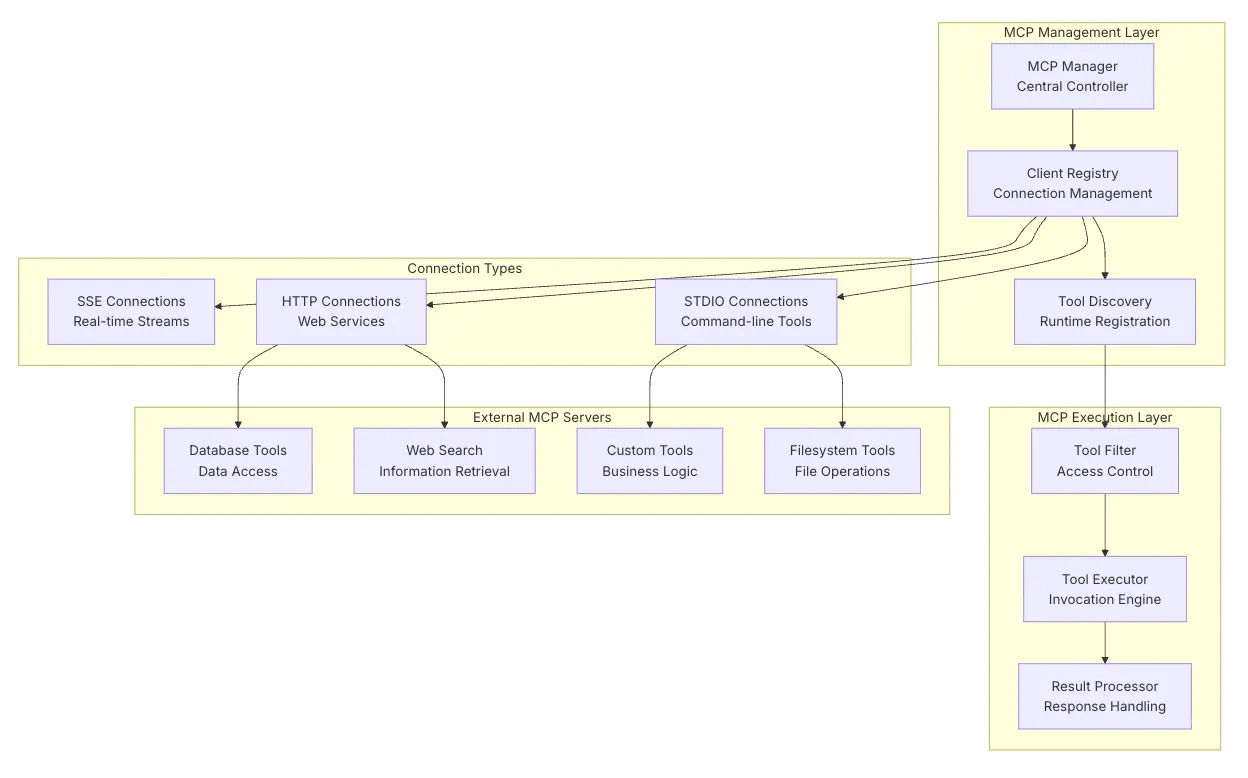
Bifrost MCP architecture
For many teams, the hard part is no longer just model access. It is tool access: which tools are available, who can use them, and what approval or security checks sit in the middle. Bifrost’s MCP features suggest it is trying to be relevant not only for model routing, but also for tool-facing agent systems.
For enterprise readers, that may be one of the more important sections of the product.
50x faster than LiteLLM
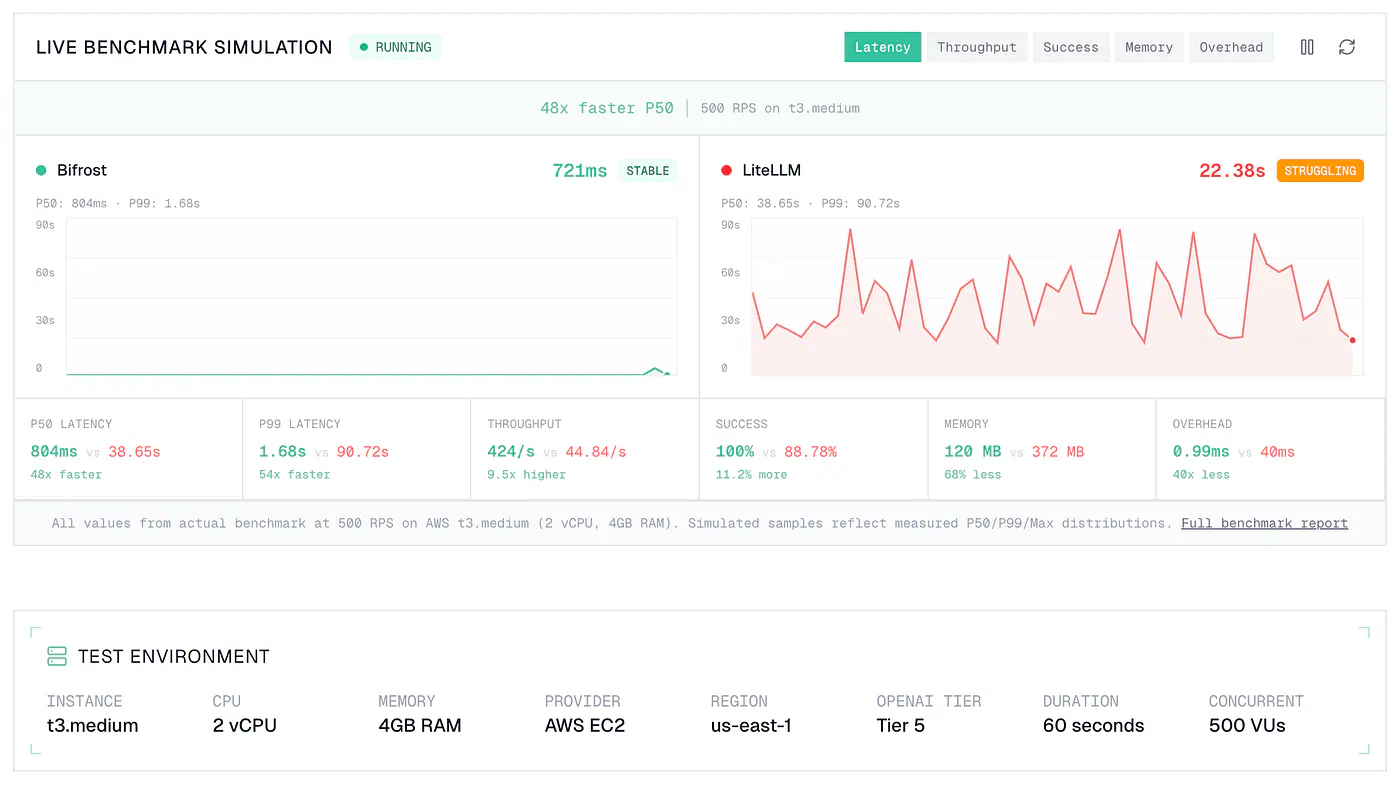
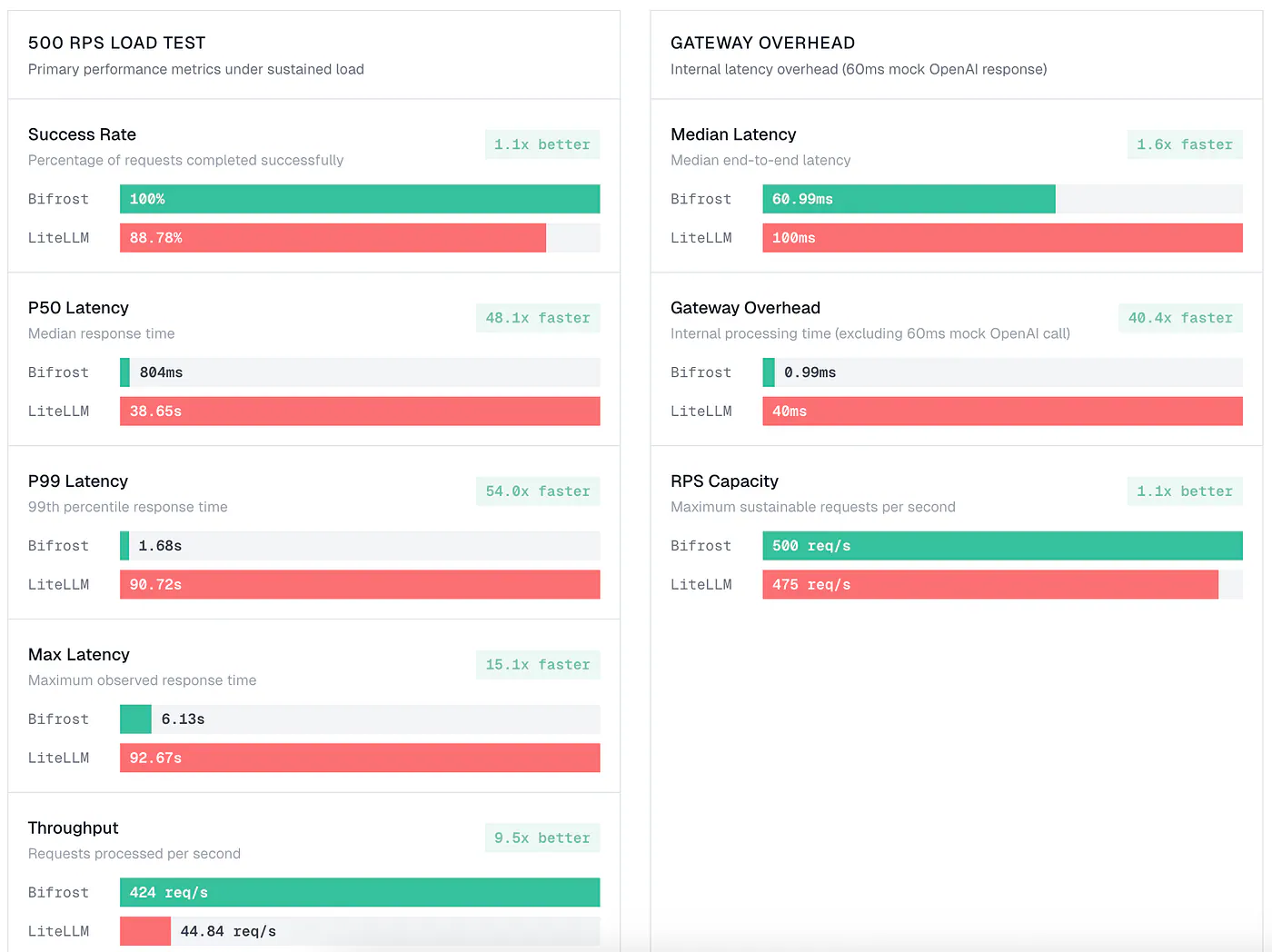
The GitHub repo describes Bifrost as “50x faster than LiteLLM,” and the benchmark page gives the numbers behind that claim.
Bifrost performance comparison with LiteLLM
In the published 500 RPS test on AWS t3.medium, the benchmark page reports a 100% success rate for Bifrost versus 88.78% for LiteLLM. It reports P50 latency of 804 ms versus 38.65 s, P99 latency of 1.68 s versus 90.72 s, and max latency of 6.13 s versus 92.67 s. The same page also reports throughput of 424 req/s versus 44.84 req/s and peak memory of 120 MB versus 372 MB.
There is also a gateway-overhead section and a higher-throughput stress section.
Bifrost performance comparison with LiteLLM


