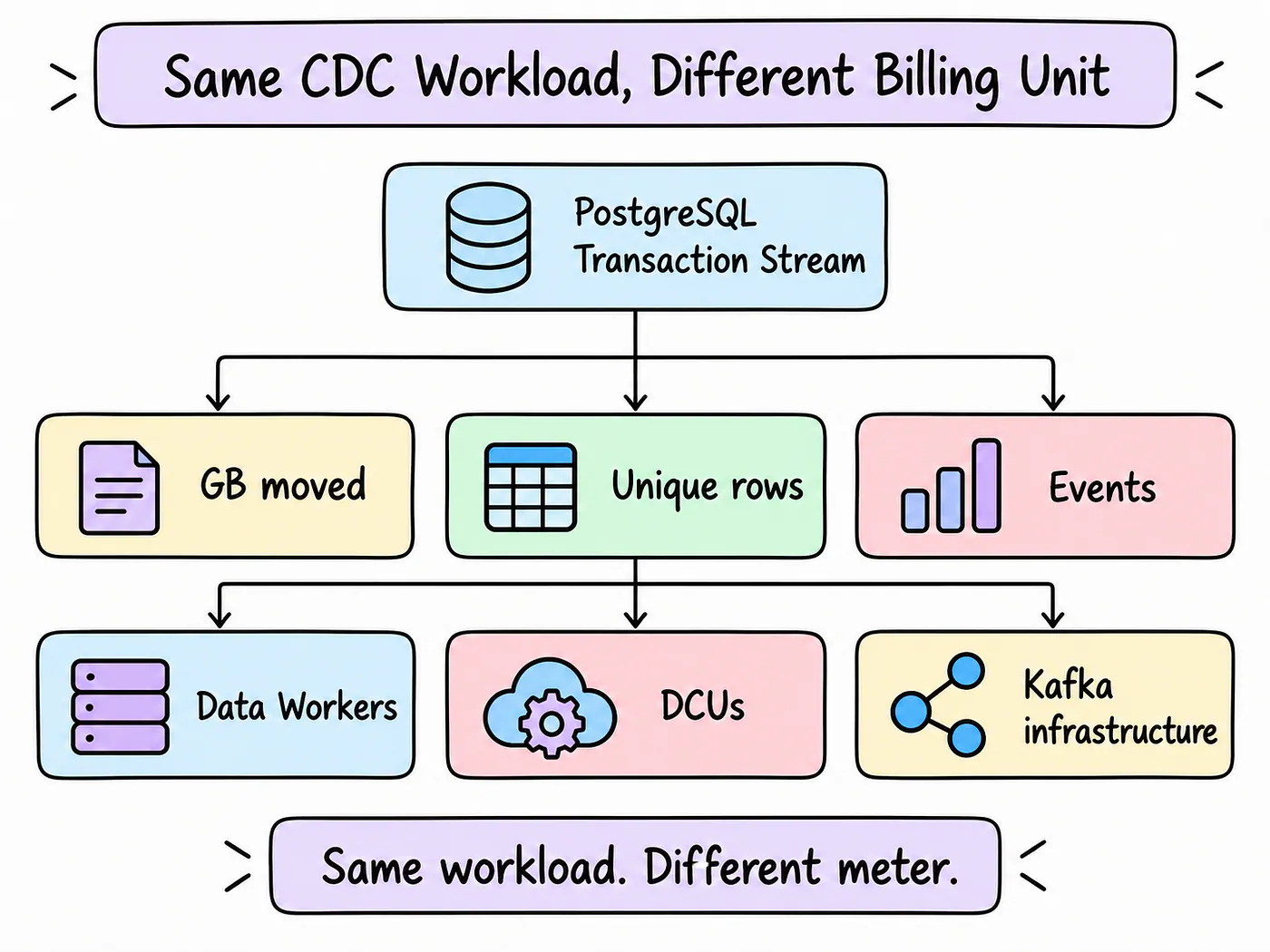
The most predictable CDC pricing comes from a billing unit your team can actually estimate. That could be the amount of data moved each month, the number of rows that change, or the processing capacity your pipelines need. Your team’s ability to forecast those numbers helps determine which pricing model will give you a predictable bill.
The tools in this article charge in several ways:
- Volume-based: Estuary and Google Cloud Datastream
- Capacity-based: Airbyte Pro
- Compute-based: AWS DMS
- Event-based: Hevo
- MAR-based: Fivetran
- Multi-dimensional: Confluent Cloud
- Self-managed: Debezium
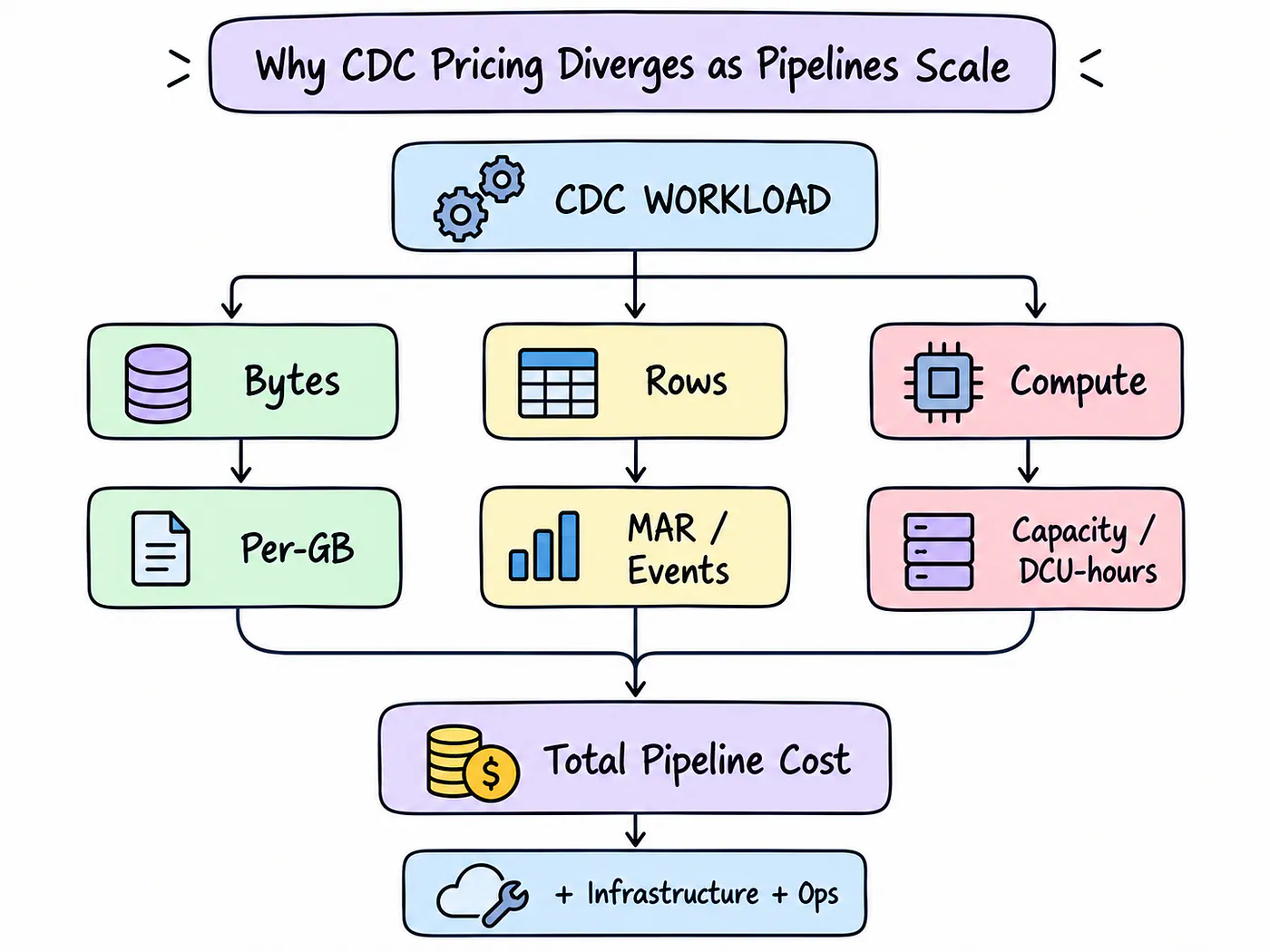
For high-volume pipelines, those billing units can have a bigger effect on your budget than the quoted starting price. Costs can grow with data volume, active rows, events, processing capacity, compute usage, or the infrastructure needed to run the pipeline.
Predictable pricing doesn’t necessarily mean cheap pricing. An expensive service can still be straightforward to budget for. Predictability means you can estimate how much more you’ll pay as your workload grows, using measurements you can collect from your own pipeline.
Estuary’s cloud pricing is based on data movement and connector task hours. It doesn’t use MAR pricing, and managed CDC doesn’t require a separate Kafka stack. Teams already tracking data volume can use those measurements as a starting point for their cost estimates.
What Makes CDC Pricing Predictable?
A vendor can publish a simple rate and still leave you with several unanswered questions about the monthly bill.
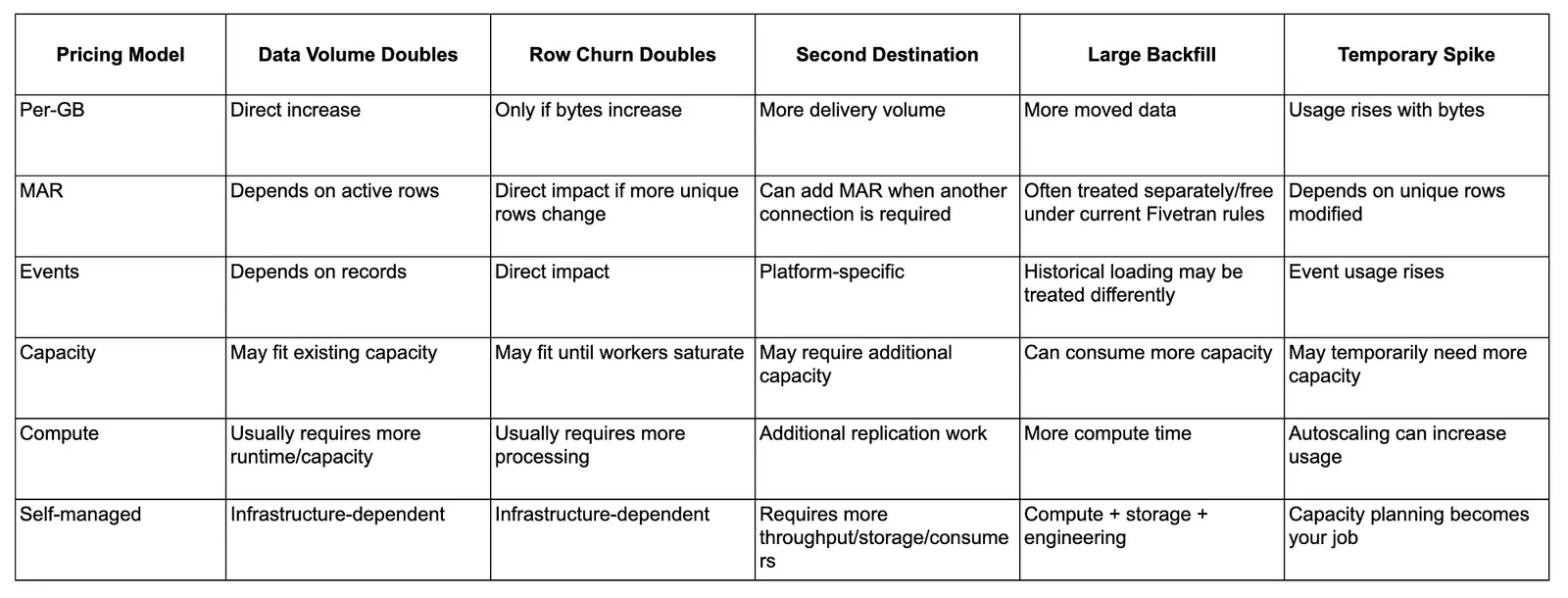
Suppose a PostgreSQL database generates 500 GB of changes this month. Next month, transaction volume doubles, Snowflake is added as another destination, and one large table needs a backfill. How much will those changes add to the bill?
The answer depends on which parts of that workload the vendor charges for. Doubling transaction activity, adding a destination, and loading historical data can affect separate charges, even though they all belong to the same pipeline.
With volume pricing, you start with the bytes processed. MAR pricing depends on how many distinct rows change during the month. Event-based pricing counts inserts, updates, and deletes. Capacity-based pricing can stay the same through an increase in traffic, up to the point where the existing capacity can no longer handle the work.
Compute-based services also respond to processing demand. A traffic burst can push a serverless CDC service into higher capacity, even when total monthly volume stays close to normal. The monthly average alone won’t show how much capacity the service used during that burst.
These questions help expose where the bill could change:
- How closely does spending follow the amount of data ingested?
- What happens when more distinct rows change?
- Does adding a destination create additional charges?
- Are initial loads and backfills priced separately?
- How are traffic spikes handled and billed?
- Does the tool require Kafka, storage, monitoring, or other infrastructure services?
Teams run backfills when they add destinations, fix transformations, recover from failures, and support new use cases. These operations belong in the budget alongside regular CDC traffic, especially when a backfill needs to run while the pipeline is already busy.
Estuary’s guide, How to Evaluate Change Data Capture (CDC) Solutions, recommends testing backfills along with traffic bursts, destination slowdowns, and backlog recovery. Those tests show how costs and performance change during work that a steady stream of database updates won’t expose.
How We Evaluated the Tools
Each vendor presents its pricing differently, so comparing the numbers on their pricing pages requires some care. A per-GB rate, a worker quote, and a monthly starting price describe different things.
We started by identifying what each vendor meters: data size, rows, events, connector operations, or infrastructure capacity. That gave us a way to connect each pricing model to the workload measurements a team would need.
We then looked at the architecture, common use cases, and discussions on platforms such as Reddit. Those discussions can point to unexpected charges or maintenance problems engineers have encountered, but they remain individual accounts.
A reported price increase doesn’t explain another team’s likely bill without the workload and contract details behind it.
Our evaluation covered:
- Pricing models
- Price transparency
- Performance under heavy loads
- Backfill handling
- The cost of multiple destinations
- Infrastructure requirements
Quick Comparison of CDC Pricing Models
The table below shows each tool’s pricing model, the usage that drives its cost, and the billing details to check before estimating a larger workload.
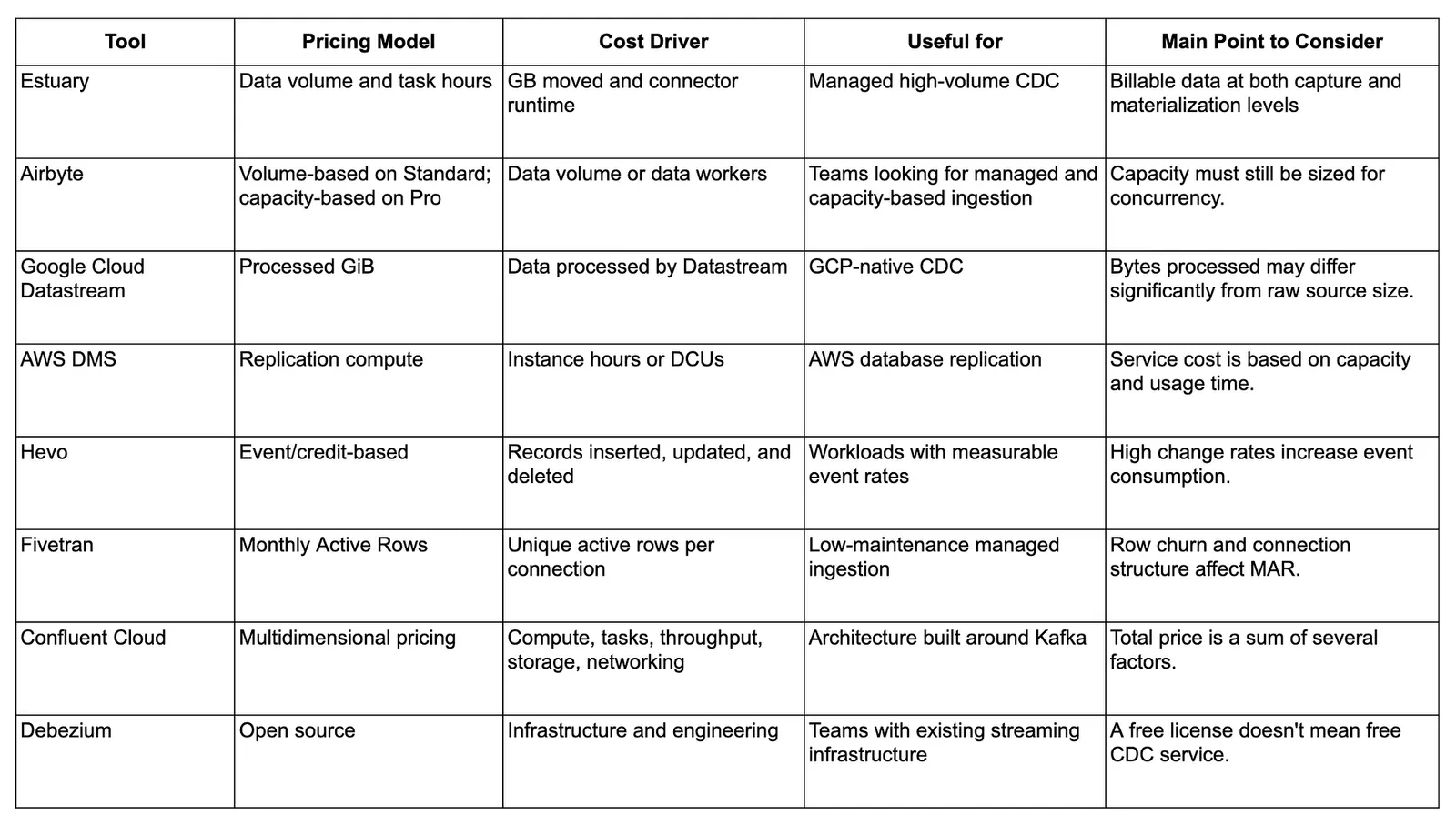
Several of these tools don’t bill primarily by GB. Even the volume-based services can measure bytes at different stages, so a single “$ per GB” column would leave out details that affect the comparison.
CDC Tools With Predictable Pricing at Scale
The tools below charge for different parts of a CDC workload. Each section explains what goes into the estimate and what can change as the pipeline grows.
1. Estuary
Best for: Managed CDC at high volumes where data volume is easier to forecast than row-level activity.
Estuary charges $0.50 per GB captured and $0.50 per GB delivered to each destination. When 1 GB enters Estuary and 1 GB is delivered to one destination, the data usage portion of the bill is $1. Both capture and delivery need to be included in the calculation.
Connector pricing depends on the number of active connector instances. The first six active instances cost around $100 per month each. Additional connector instances cost $50 per month, prorated based on usage. Captures and materializations both count as connector instances. BYOC and private cloud deployments use annual pricing plans and involve additional infrastructure costs.
The basic calculation is: Data usage + connector instance usage
A data engineer can monitor both parts from the pipeline’s usage and configuration. Doubling billable GB while keeping the same connector setup doubles the data usage charge. Twice as many database updates, however, won’t necessarily produce twice as many bytes. Update count alone doesn’t tell you the volume Estuary will bill for.
Estuary separates source capture from destination delivery:
Capture → Collections → Materializations
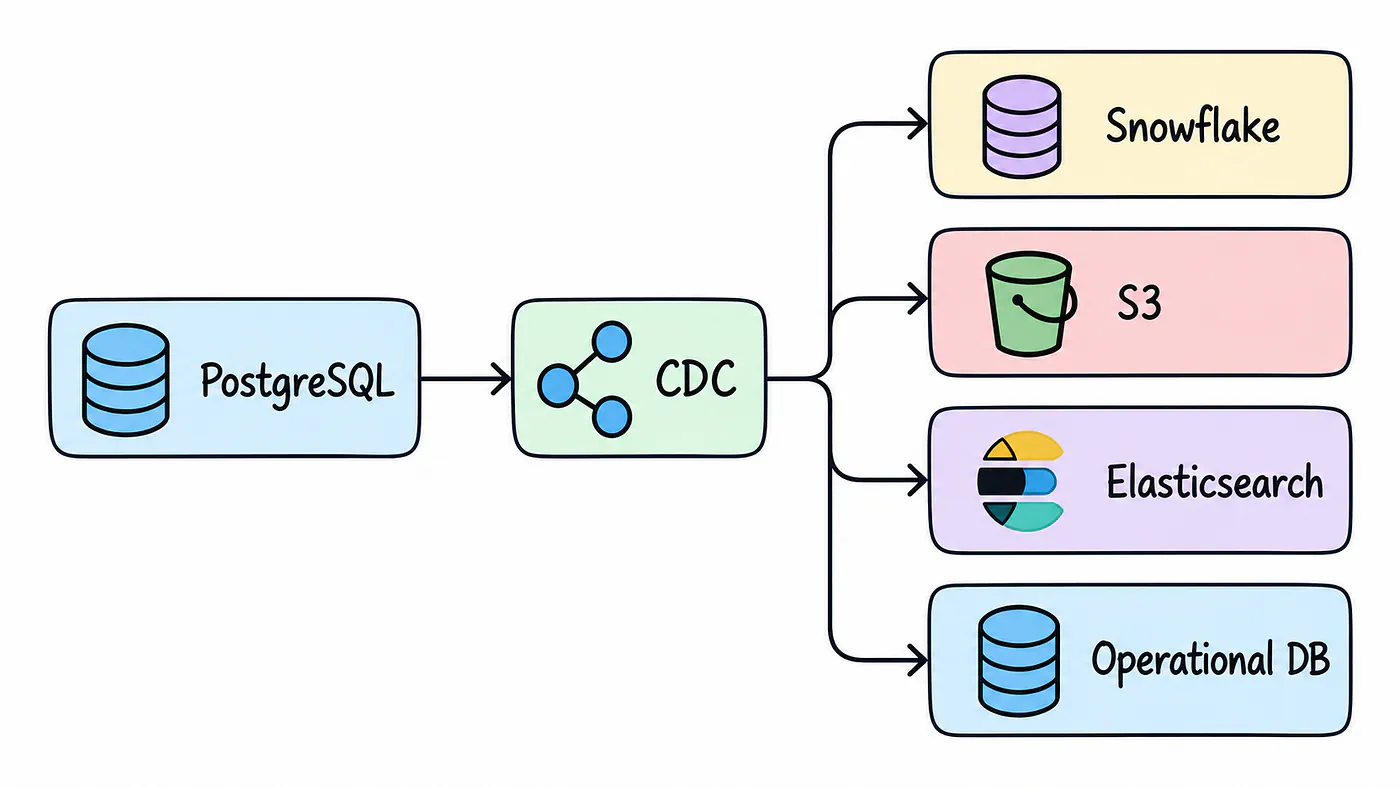
A capture brings data into collections, which can supply multiple destinations. Suppose PostgreSQL needs to feed Snowflake, S3, and an operational database. The source doesn’t need to be read separately for each destination. Additional materializations can use the data already captured into Estuary.
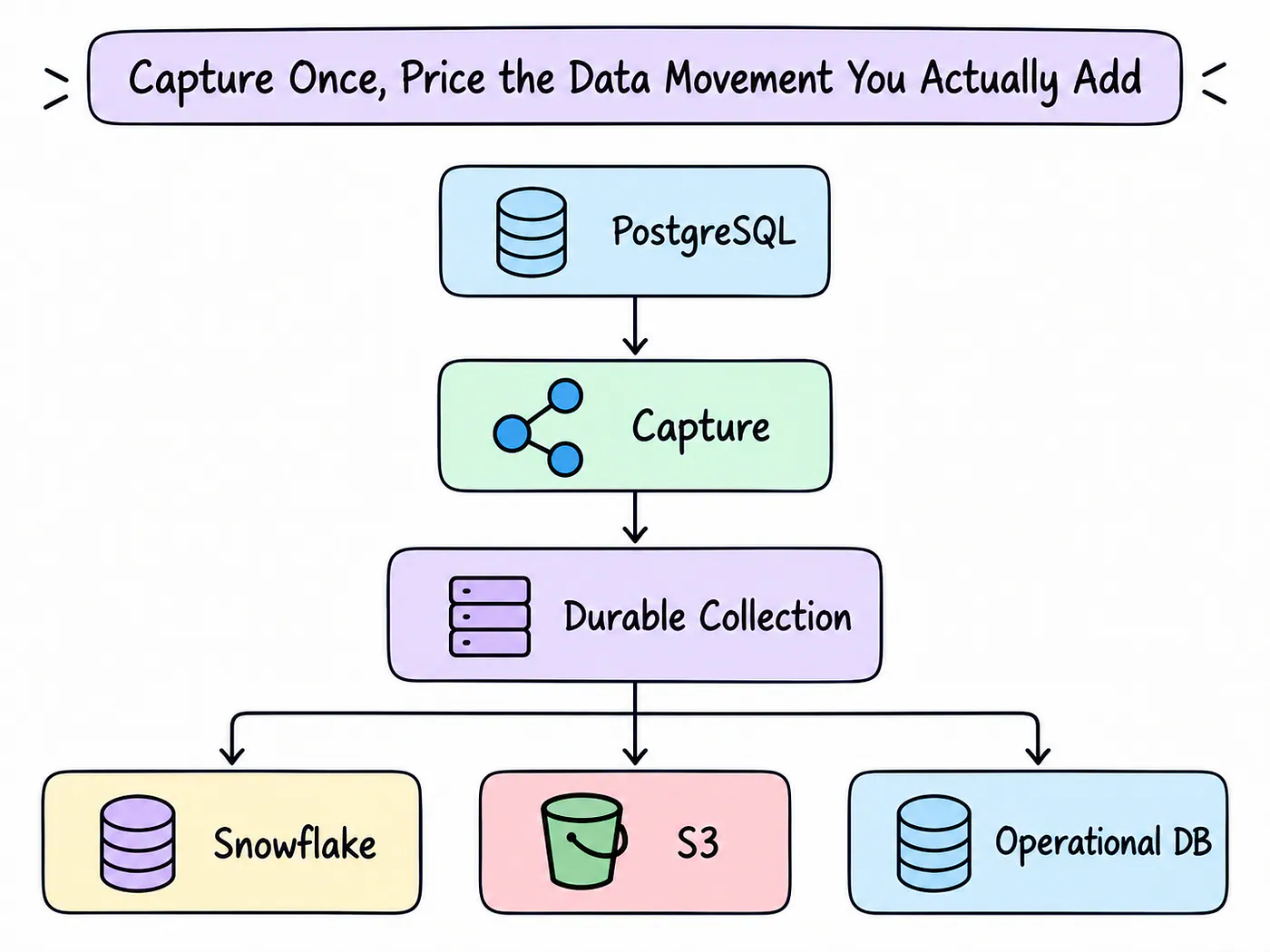
Each destination still adds delivery volume, but adding one doesn’t require another historical extraction from the production database. Your estimate can account for that delivery and its connector without treating every new destination as a separate source ingestion job.
Teams using Estuary’s managed CDC also avoid operating Kafka, Kafka Connect, and the associated connector infrastructure themselves. That removes a set of infrastructure and maintenance responsibilities from the pipeline budget.
Estuary customers report savings from their own deployments. Xometry reports reducing data integration expenses by more than 60% with pay-as-you-go pricing. Glossier reports cutting integration costs by 50%, without unexpected fees. Cosuno reports that its pipeline cost 50% less than its previous Fivetran-based solution.
Reddit discussions also mention rising Fivetran costs and Estuary as an alternative. Those conversations show why some engineers prefer volume-based billing, but I wouldn’t use reported Reddit savings as reliable evidence for another team’s budget.
Estuary has fewer connectors than some competitors, so check the actual sources and destinations your pipeline needs. Private and BYOC deployments also bring additional contract and infrastructure considerations. The public cloud pricing calculation won’t cover every deployment arrangement.
Not ideal for: Teams that require sources or destinations outside Estuary’s connector catalog, or teams that need general-purpose SaaS ELT more than CDC.
2. Airbyte
Best for: Teams that want a choice between usage-based and capacity-based pricing.
Airbyte offers two main pricing models. Standard is a fully managed, volume-based product. Airbyte Pro uses data workers for capacity-based pricing. One data worker can handle approximately three simultaneous syncs, depending on the pipelines being run.
Under Pro, a temporary increase in data volume can stay within the capacity you’ve already paid for. That extra traffic doesn’t automatically add a per-GB charge, which can help with workloads that regularly have busier periods.
Additional workers become necessary once concurrent jobs or more demanding pipelines exceed that capacity. Two workloads moving similar amounts of data can have different worker requirements because their jobs overlap differently.
Forecasting therefore involves estimating how much processing capacity the pipelines need and how many syncs will run at once. Monthly data volume alone won’t answer either question.
Airbyte Pro is quote-based. The pricing page explains how the capacity model works, but a dollar estimate requires a quote based on the workers your workload needs.
Airbyte also offers a self-hosted option. Your engineering team takes responsibility for running the platform, so infrastructure and maintenance become part of the calculation alongside any software costs.
In an r/dataengineering discussion, some engineers described self-hosting as cheap and easy. Others reported maintenance and reliability issues. Another user reported substantial annual savings from running Airbyte on Kubernetes.
Those experiences reflect different operating environments. Self-hosting can reduce software spending, while the work of keeping the platform available and its connectors reliable remains with your team.
Not ideal for: Teams that want little operational involvement and don’t want to manage capacity sizing, self-hosted infrastructure, or connector reliability.
3. Google Cloud Datastream
Best for: GCP projects looking for managed CDC with volume-based pricing.
Google bills Datastream by GiB processed. Volume tiers reduce the price per GiB as usage increases. Historical backfills are billed separately, with the first 500 GiB per month free under Google’s current pricing page.
The processed GiB on the bill won’t always match the size of the source data. Google’s documentation notes that internally processed data can be two to five times larger than the actual data for many use cases.
An estimate based only on source bytes can therefore miss a substantial part of the charge. You need to establish how much processed data your workload produces before applying the listed per-GiB rate.
Datastream’s own billing is based on processed volume, but a complete GCP pipeline can use other paid services. Cloud Storage, BigQuery, Dataflow, and networking may all contribute costs, depending on where the data goes and how it’s transformed.
Include those services in the same estimate. A clear Datastream rate won’t account for the separate processing, storage, and delivery costs around it.
Not ideal for: Teams using multiple clouds, or workloads where processed-byte expansion and additional GCP services make the total difficult to estimate.
4. AWS DMS
Best for: Migration and replication workloads on AWS.
AWS DMS bills for replication capacity rather than using changed rows or changed GB as its primary pricing unit.
With provisioned DMS, you choose replication instances and pay for the resources you run. Additional log storage can also create charges when used, so the instance estimate may not cover the complete service bill.
DMS Serverless measures capacity in DMS Capacity Units, or DCUs. One DCU corresponds to 2 GB of RAM. AWS automatically adjusts serverless capacity as replication workload changes.
Traffic bursts can increase DCU usage, making the bill more dependent on processing demand over time. AWS lets you set a maximum number of DCUs, which limits how far the service can scale. That maximum also needs to support the replication performance you expect during busy periods.
Teams already running on AWS may be familiar with budgeting around capacity and runtime. Translating a forecast such as “we’ll move this many GB of CDC each month” into DMS capacity takes more work, because the data volume doesn’t directly specify the resources required.
Not ideal for: Teams that want a simple volume-based pricing calculation or a CDC service independent of AWS.
5. Hevo
Best for: Teams with a database change rate they can reliably estimate through events.
Hevo uses an event-based model. Its documentation lists record insertions, updates, and deletions after pipeline creation as billable actions. Deleted source records count as updates for billing purposes.
A PostgreSQL workload producing around 20 million change events each month gives you a baseline for forecasting consumption. The estimate depends on how consistently that activity repeats, including the jobs that update many records at once.
A bulk update touching millions of records can generate a large number of events while leaving the database’s storage size almost unchanged. Measuring database size won’t show the billing effect of that operation.
Hevo’s consumption pricing includes two details worth checking for larger workloads:
- Historical data loads are described as free, with pricing applied to changed data.
- Unit prices decrease as volume increases, and Hevo offers capacity commitments.
Hevo recommends running the workload for four or five days, calculating the average daily event count, multiplying it by 30, and allowing around 5–10% variance.
That method depends on the sample reflecting the workload you expect throughout the month. An occasional bulk update can sit outside the sampled days and materially change the result.
Stable event rates give you a repeatable estimate. Irregular update jobs and sudden increases in change activity need to be included separately, rather than assumed to fall within a small variance allowance.
Not ideal for: Workloads with fluctuating event rates, frequent large updates, or sudden surges in inserts, updates, and deletions.
6. Fivetran
Best for: Teams that want managed ingestion and can reliably forecast Monthly Active Rows, or MAR.
Fivetran uses MAR as its main measure of connection usage. Standard MAR counts distinct rows that become active through inserts, updates, and deletes during the month.
The same row can be modified many times in that period and still count as one MAR. Your table’s byte size and total number of updates therefore won’t necessarily tell you how much standard MAR it generates.
More frequent synchronization also won’t increase standard MAR simply because another sync runs. Repeated changes to the same rows remain distinct-row activity within the billing period, rather than becoming another full set of MAR with every sync.
History Mode uses a different calculation that takes changes into account. Initial historical syncs are generally free from MAR charges, and the policy introduced in March 2025 allows historical resyncs to be excluded from paid MAR under certain conditions.
Forecasting MAR gets more difficult when the set of rows being changed varies considerably from month to month.
A workload can touch far more distinct rows without producing much more data overall. MAR can increase while the monthly byte count stays close to its previous level.
Connection structure affects the calculation too. Fivetran applies its usage curve at the connection level. Two connections replicating the same source to two destinations each have their own MAR.
The 2025 shift to connection-level tiering helps explain the different outcomes reported in community discussions. One user in an r/dataengineering thread said their monthly bill doubled after the change. Another reported a small increase because most of their connectors processed more than one million MAR per month.
Those accounts describe different distributions of usage across connections. The connection count and MAR per connection explain more about the resulting bill than a broad claim that Fivetran is expensive.
According to Fivetran, the 2025 change was designed to increase prices for accounts with many similar connections and reduce prices for accounts with one large connection. As of January 2026, connections with between one and one million paid MAR are subject to a minimum connection fee. Inserts, updates, and deletes contribute to paid MAR.
Some larger customers can also use Enterprise License Agreements with a fixed annual fee. That provides another way to budget for the service where those agreements are available.
Stable distinct-row activity makes MAR reasonably predictable. Teams estimating it need visibility into which rows change and how usage is spread across connections, rather than relying only on data volume.
Not ideal for: Workloads with unpredictable distinct-row activity or many separate connections whose MAR is difficult to estimate.
7. Confluent Cloud
Best for: Businesses that already use Kafka and event streaming across their platform.
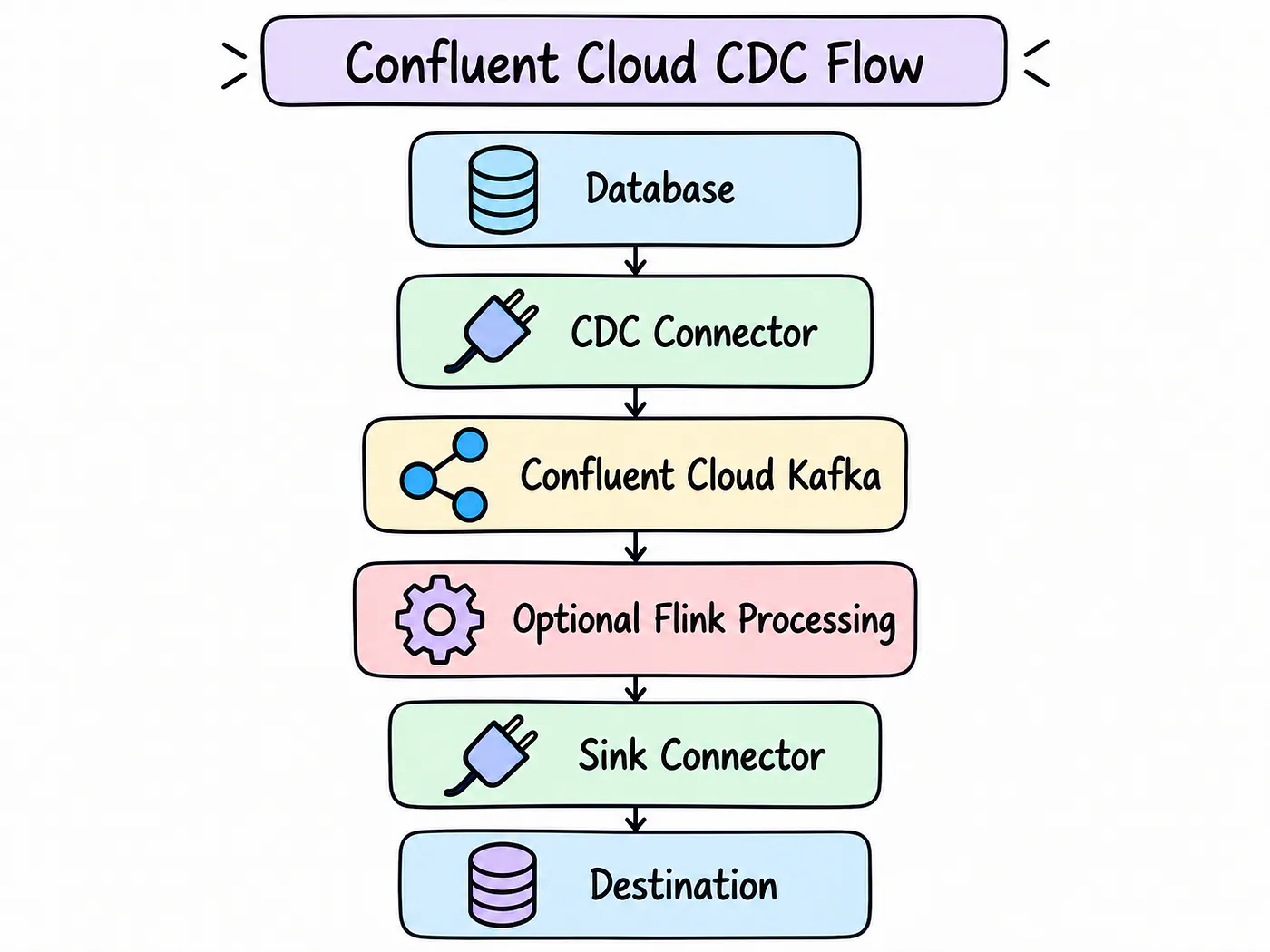
Confluent’s CDC connectors sit within a broader streaming platform. Usage-based fully managed connectors primarily charge for: