You've got a graphics card with 16 GB of memory, or a Mac with 32 GB, and you want the best local LLM that will actually fit on it. That question has a different answer every few gigabytes, and the fall releases made it messier: one new model is named after a memory size its own maker's recipes don't use.
We compared seven open-weight models using their official model cards and the download sizes Ollama lists for each build, as of November 2026. Every benchmark score here comes from the company that made the model, so read them as vendor claims, and we say which lab ran which test.
This guide is for developers and hobbyists running models on their own PC or Mac. We judged each model on four things: how much memory it really needs, how well it codes (so it doubles as a guide to the best local LLM for coding), how fast it runs on consumer hardware, and what its license lets you do. The order starts with the strongest picks for a 24 GB machine, then moves down and up the hardware ladder, so it isn't a strict ranking. If you'd rather pay per token than buy memory, our open-weight coding model comparison covers the hosted prices.
1. Qwen3.8-27B
Best for: Developers with a 24 GB GPU or a 32 GB Mac who want one model for coding, chat, and screenshots
Qwen3.8-27B is the dense 27-billion-parameter model from Alibaba's Qwen3.8 generation. "Dense" means every parameter works on every token, which makes it slower than the mixture-of-experts (MoE) models further down this list but steadier on long, multi-step jobs. It reads images and video natively, and it ships under the Apache 2.0 license, so you can build on it commercially without extra terms.
Key features that matter on your own hardware:
- Size on disk: The default Ollama build is 18 GB at Q4_K_M, with an 8-bit build at 30 GB
- Context window: 262,144 tokens natively, extendable to 1 million
- Thinking control: Reasoning is on by default, and you can switch it off per request for quick answers
- Vision: Reads screenshots, diagrams, documents, and video
- Mac builds: An MLX version at 18 GB for Apple silicon
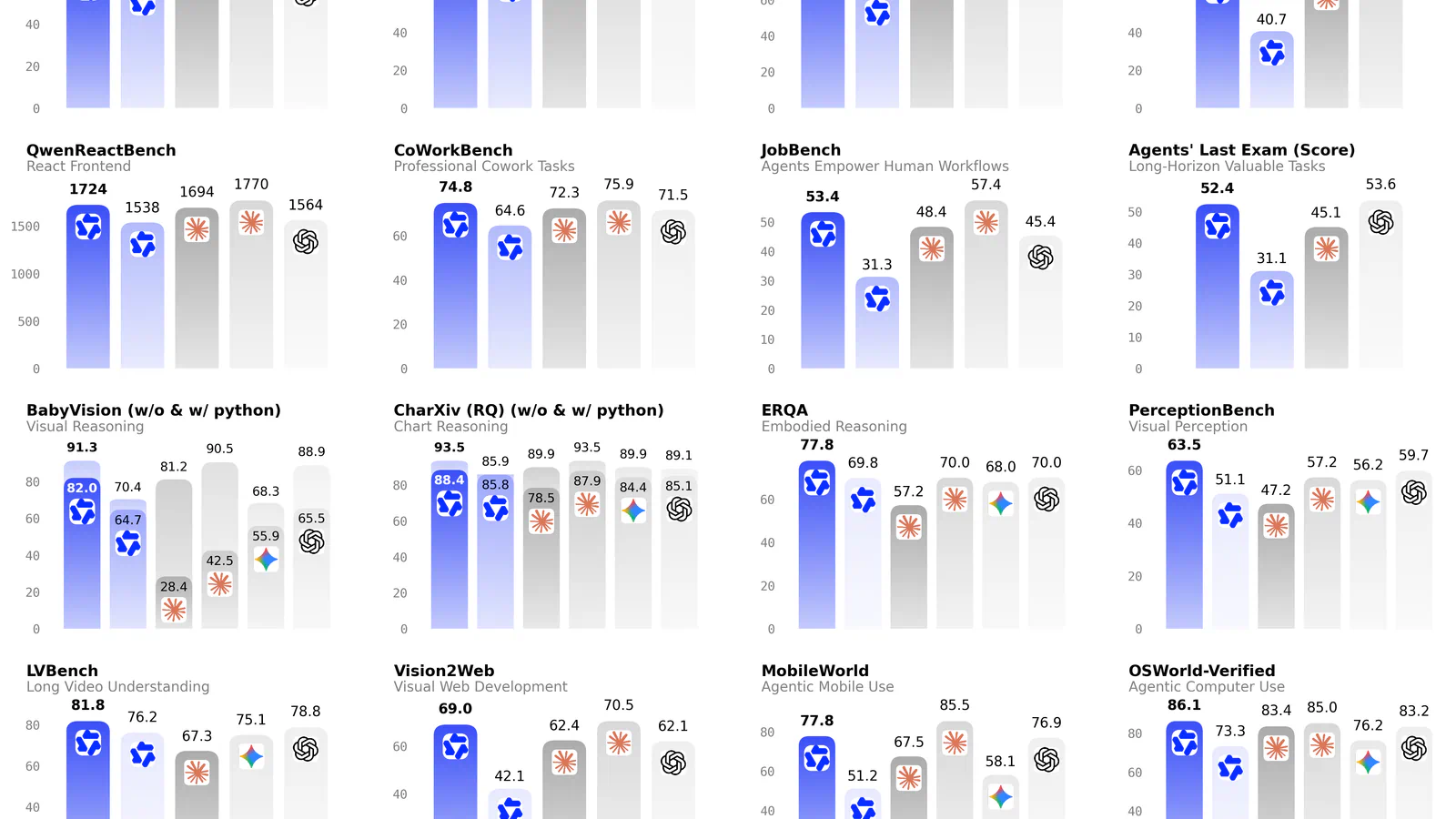
Coding is where it pulls ahead. On Qwen's own table, the 27B scores 61.7 on SWE-bench Pro, a test where the model fixes real GitHub issues, up from 53.5 for Qwen3.6-27B. Qwen ran that test inside the Claude Code agent harness, so it reflects agent-style work: reading files, running commands, and patching code. The same table lists 90.3 on LiveCodeBench v6 and 73.0 on Terminal-Bench 2.1.
That makes it the first model I'd point an agent at on a single RTX 3090 or 4090. Ask it to read a stack trace screenshot, find the bug, and patch two files, and every step stays on your machine.
The catch is memory headroom. The 18 GB file leaves about 6 GB on a 24 GB card for the context cache (the memory that grows as the conversation gets longer), so in practice you'll run a far shorter window than the card's maximum. On a 16 GB card it doesn't fit at 4-bit without spilling into system RAM, which slows it badly. Before you commit, check how much context your agent tool sends with each request; that number decides whether 24 GB is enough.
2. Devstral Small 2
Best for: Agentic coding in a terminal or IDE on one 24 GB card or a 32 GB Mac
Devstral Small 2 is Mistral's 24-billion-parameter model built for coding agents, the kind that explore a codebase and edit several files in one go. It's the December 2025 build (the 2512 in its name), and version 2 added image input on top of its predecessor. Mistral says a single RTX 4090 or a Mac with 32 GB of RAM is enough to run it.
What you get:
- Size on disk: 15 GB at Q4_K_M in Ollama, or 26 GB at 8-bit
- Context window: 256K tokens on Mistral's card
- Vision: Reads images such as a screenshot of a failing test
- Agent tools: Works with Mistral's own Vibe CLI, plus Cline and Kilo Code
- License: Apache 2.0, for commercial and non-commercial use
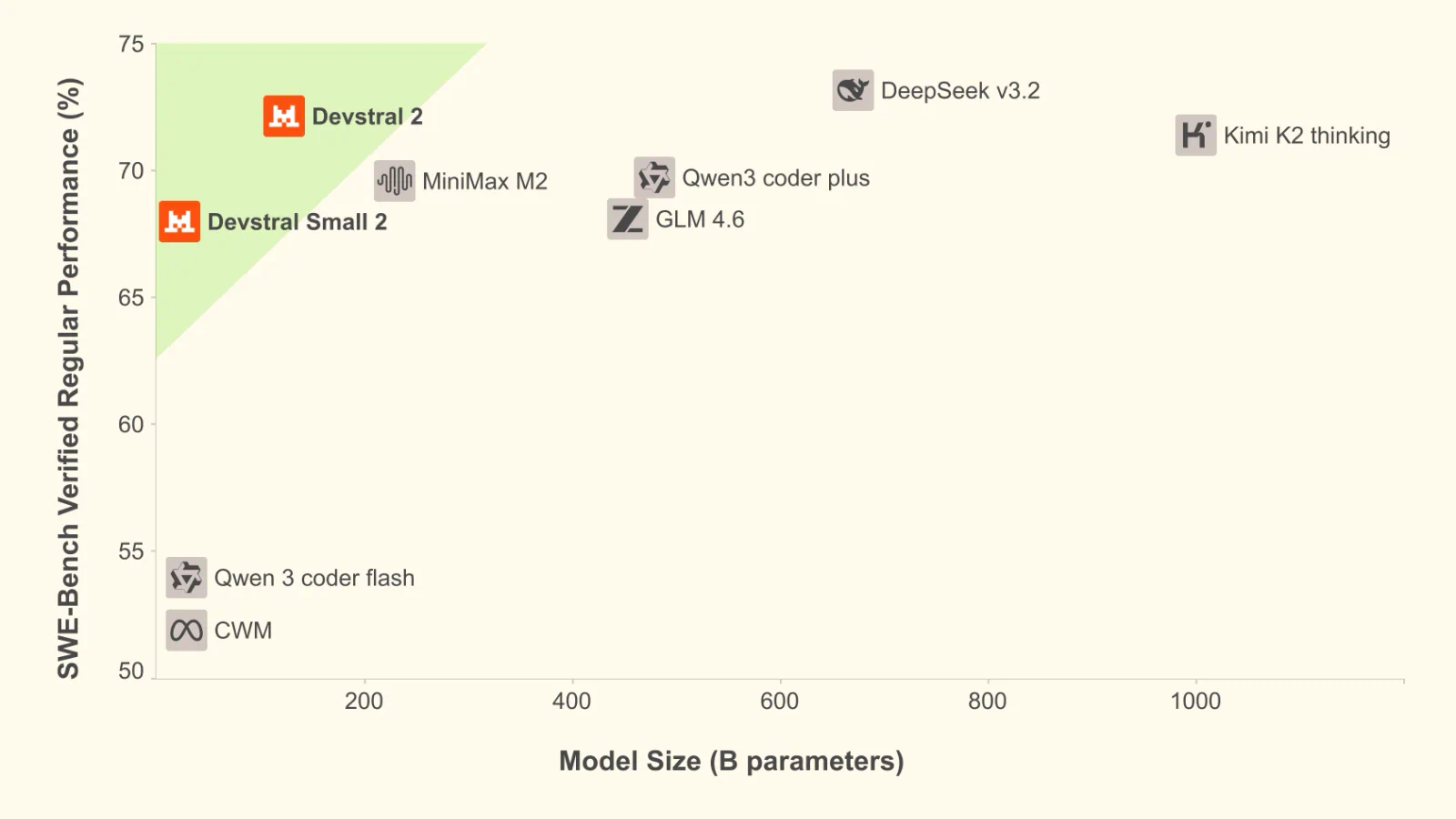
Mistral's numbers put it at 68.0% on SWE-bench Verified, level with the 355-billion-parameter GLM 4.6 in the same table. For a 15 GB download, that's a lot of repo-fixing skill per gigabyte. It also leaves you about 3 GB more room for context than Qwen3.8-27B on the same card.
It's the model to pick if your day is spent in an agent loop, such as Cline proposing a diff, you approving it, and the agent running the tests. A tight model focused on code fits that pattern well, and the vision support means you can paste in a UI bug without describing it in words.
The trade-offs show up outside the editor. Mistral's own table lists just 22.5% on Terminal Bench 2, well behind its big sibling Devstral 2, so long chains of shell commands aren't its strength. It's also close to a year old, and Mistral reports SWE-bench Verified while Qwen reports SWE-bench Pro, so you can't line the two scores up directly. Run it on a repo you know well before you trust it with a large refactor.
3. Gemma 4 26B A4B
Best for: 16 GB to 24 GB machines where quick replies count for more than peak coding scores
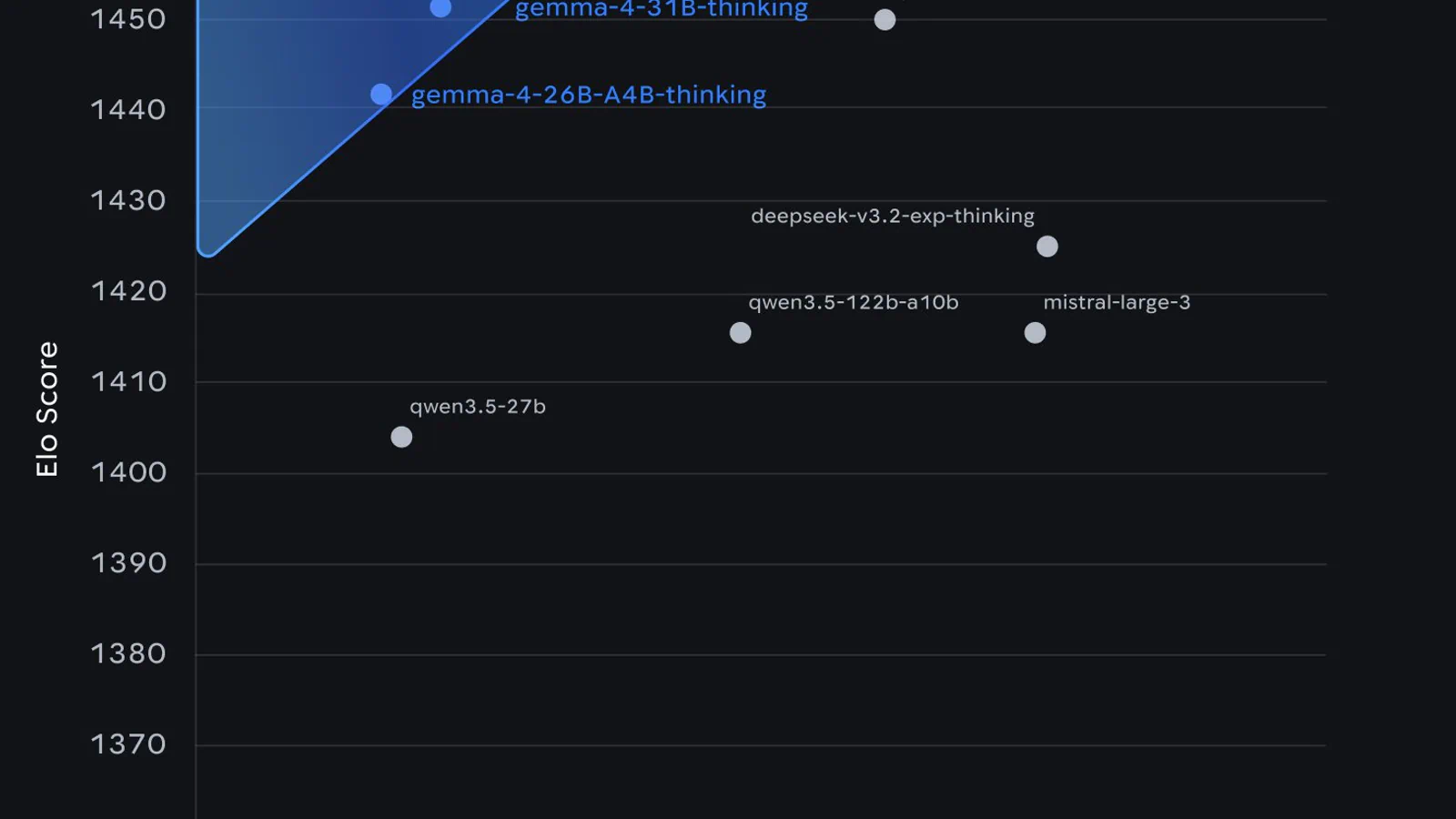
Gemma 4 is Google DeepMind's open model family, released under Apache 2.0 in five sizes from E2B up to 31B. The 26B A4B is a mixture-of-experts model: it holds 25.2 billion parameters but activates only 3.8 billion per token. A router picks a few small "expert" networks for each word, so it answers much faster than a dense model of the same size.
What it brings:
- Size on disk: Ollama's default 26B build is 16 GB, and the Q4_K_M build is 18 GB
- Context window: 256K tokens on the medium models, 128K on E2B and E4B
- Inputs: Text and images (audio only on the E2B, E4B, and 12B models)
- Thinking mode: Built-in step-by-step reasoning you can turn on or off
- Smaller siblings: The 12B at 7.7 GB and E4B at 6.6 GB for laptops
Google's table gives the 26B A4B 77.1% on LiveCodeBench v6, a Codeforces Elo of 1718, and 88.3% on AIME 2026 math problems. The default 16 GB build uses quantization-aware training (QAT), meaning Google trained the model to expect 4-bit weights, which usually costs less quality than squeezing it after training.
That speed suits a chat assistant on a 16 GB card or a 24 GB MacBook Pro, where you want answers in a second or two and the occasional screenshot read. It's also the friendliest family for mixed hardware, since the same prompts carry down to the 12B on a smaller laptop.
Coding is the soft spot. Its 77.1 on LiveCodeBench trails the 90.3 Qwen reports for Qwen3.8-27B (different labs ran those tests, so treat the gap as rough). NVIDIA's own comparison put it at 37.22 on Terminal-Bench 2.1, well behind the newer Nemotron model further down. And on a 16 GB card, the 16 GB build leaves almost nothing for context. If you have 24 GB, the dense 31B at 19 GB scores higher on Google's table (80.0% on LiveCodeBench), so compare the two before you settle.
4. gpt-oss-20b
Best for: 16 GB machines and anyone who wants OpenAI-style reasoning offline
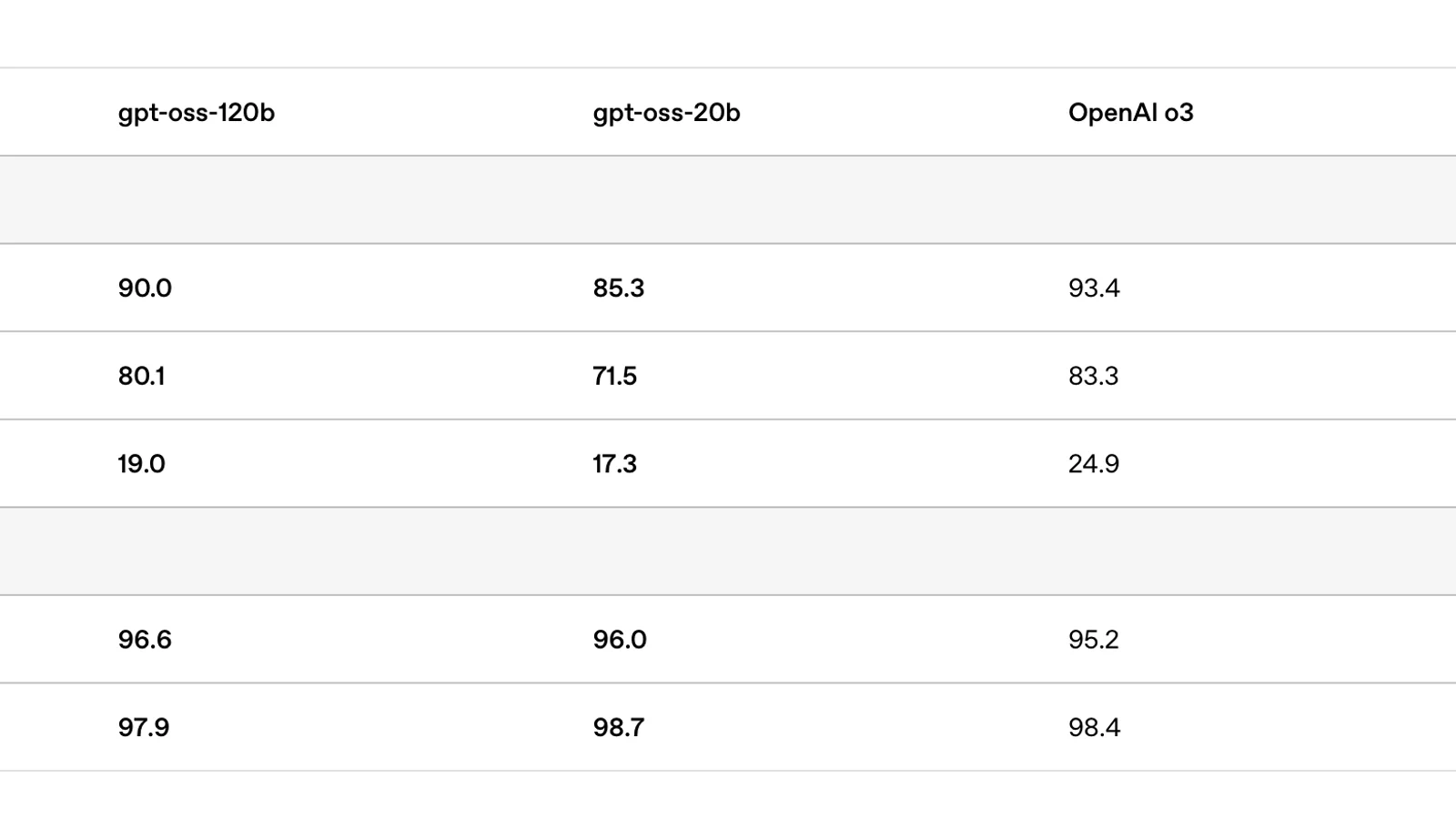
gpt-oss-20b is the smaller of OpenAI's two open-weight models. It has 21 billion parameters with 3.6 billion active, and OpenAI trained it with MXFP4 quantization (a 4-bit format) so it runs within 16 GB of memory. It's Apache 2.0, and it's the easiest model here to get running, since OpenAI's own instructions come down to one Ollama command.
Key features:
- Size on disk: 14 GB in Ollama, with a 128K context window
- Reasoning effort: Low, medium, or high, so you can trade depth for speed
- Agent tools: Native function calling, web browsing, and Python code execution
- Visible reasoning: Full chain-of-thought access, handy for debugging prompts
- Fine-tuning: OpenAI supports full parameter fine-tuning
It fits where the others are tight. On a 16 GB GPU or a 16 GB Mac, it leaves roughly 2 GB for context, which is enough for a coding chat or a short agent session. The adjustable reasoning effort is useful on slower hardware: set it to low for quick lookups and high when you want it to work through a tricky function.
There's a price for that small footprint. OpenAI says it was trained on its harmony response format and won't work correctly without it, so tools that skip the chat template will give garbled answers. It's text-only (the card lists text generation only), and its 128K context is half what most models here offer. Its big brother, gpt-oss-120b, needs a single 80 GB GPU, so there's no easy middle step up. Check that your runner applies the harmony template before you blame the model for bad output.
5. Nemotron 3.5 Bolt E4B 4GB
Best for: 8 GB laptops, mini PCs, and Jetson boards running a chat or voice assistant
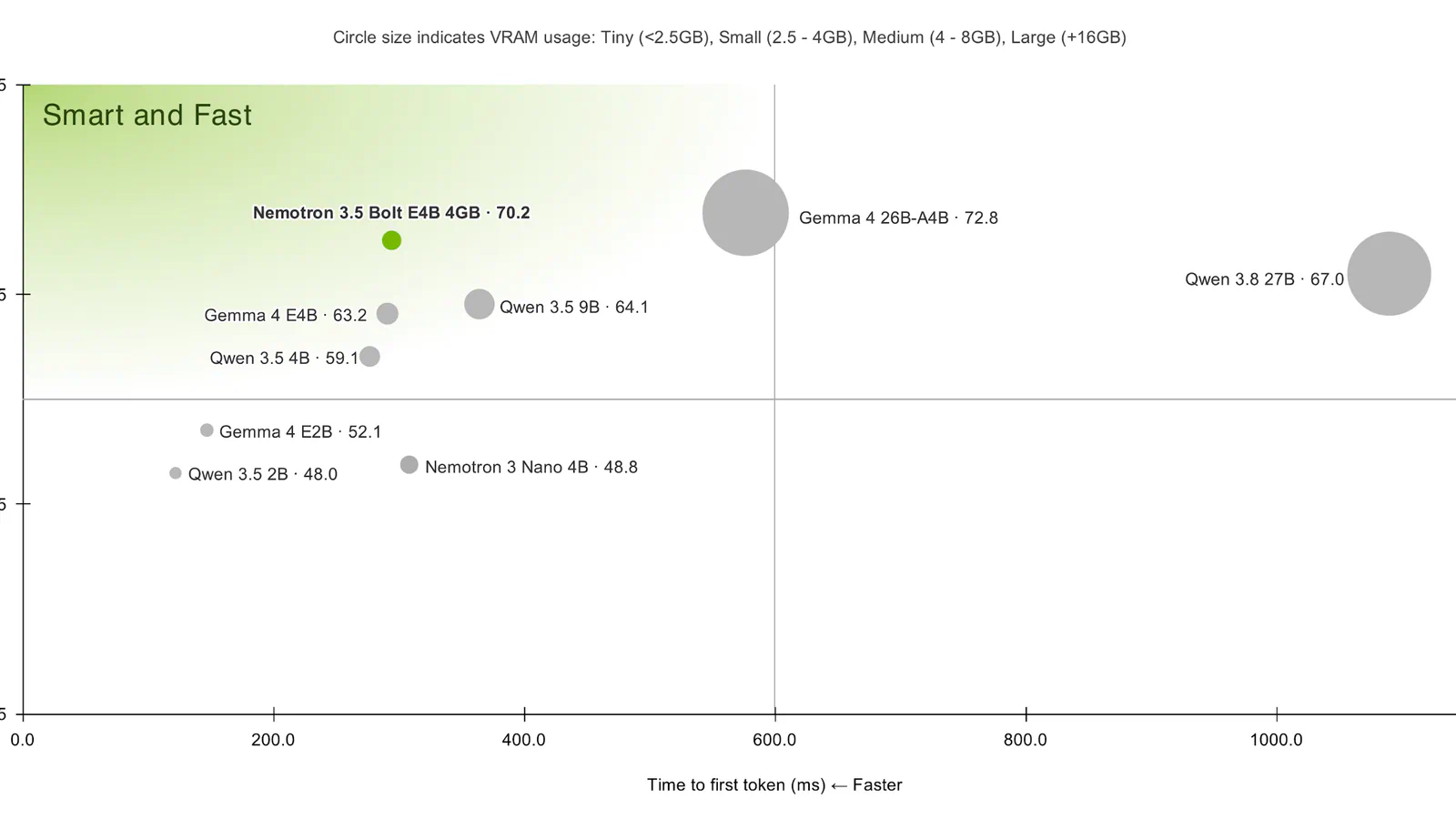
Nemotron 3.5 Bolt E4B 4GB is NVIDIA's retune of Google's Gemma 4 E4B, published on Hugging Face on October 23. It's a small model with 8 billion total parameters (4 billion effective) shipped as a single 4-bit build, and NVIDIA says it's designed for low-memory, low-latency use, leaving headroom for other apps.
What stands out:
- Precision: One Q4_K_M build, so there's no quantization choice to get wrong
- Context window: Up to 64K tokens in and 64K out
- Thinking control: On or off, plus a runtime thinking budget
- Speed add-on: A companion DFlash drafter for speculative decoding (a tiny model guesses ahead and the main model checks its guesses)
- Test hardware: NVIDIA lists Jetson Orin and Jetson Thor alongside desktop GPUs
NVIDIA's table compares 4-bit builds head to head, and instruction following is where Bolt shines: 64.00 on IFBench against 42.67 for the Gemma 4 E4B it came from, and 55.60 against 39.36 on MultiChallenge, a multi-turn conversation test. For a voice assistant or a game character that has to stick to its rules across a long chat, those are the scores that count.
The same table is honest about its limits. Qwen3.5 4B beats it on Tau2-Bench (61.74 against 52.32) and on the BFCL-v3 function-calling test (70.56 against 67.31), so for tool-heavy agents a small Qwen may serve you better. It's text-only, it isn't a coding model, and NVIDIA's summary still marks the llama.cpp recipe as pending. The license is NVIDIA's OpenMDW-1.1, which allows commercial use, layered on Gemma's Apache 2.0 terms. Read both before you ship it inside a product.
6. Nemotron 3.5 Bolt 74B-A9B 24GB
Best for: 32 GB GPUs, DGX Spark, and 64 GB-plus machines running local agents
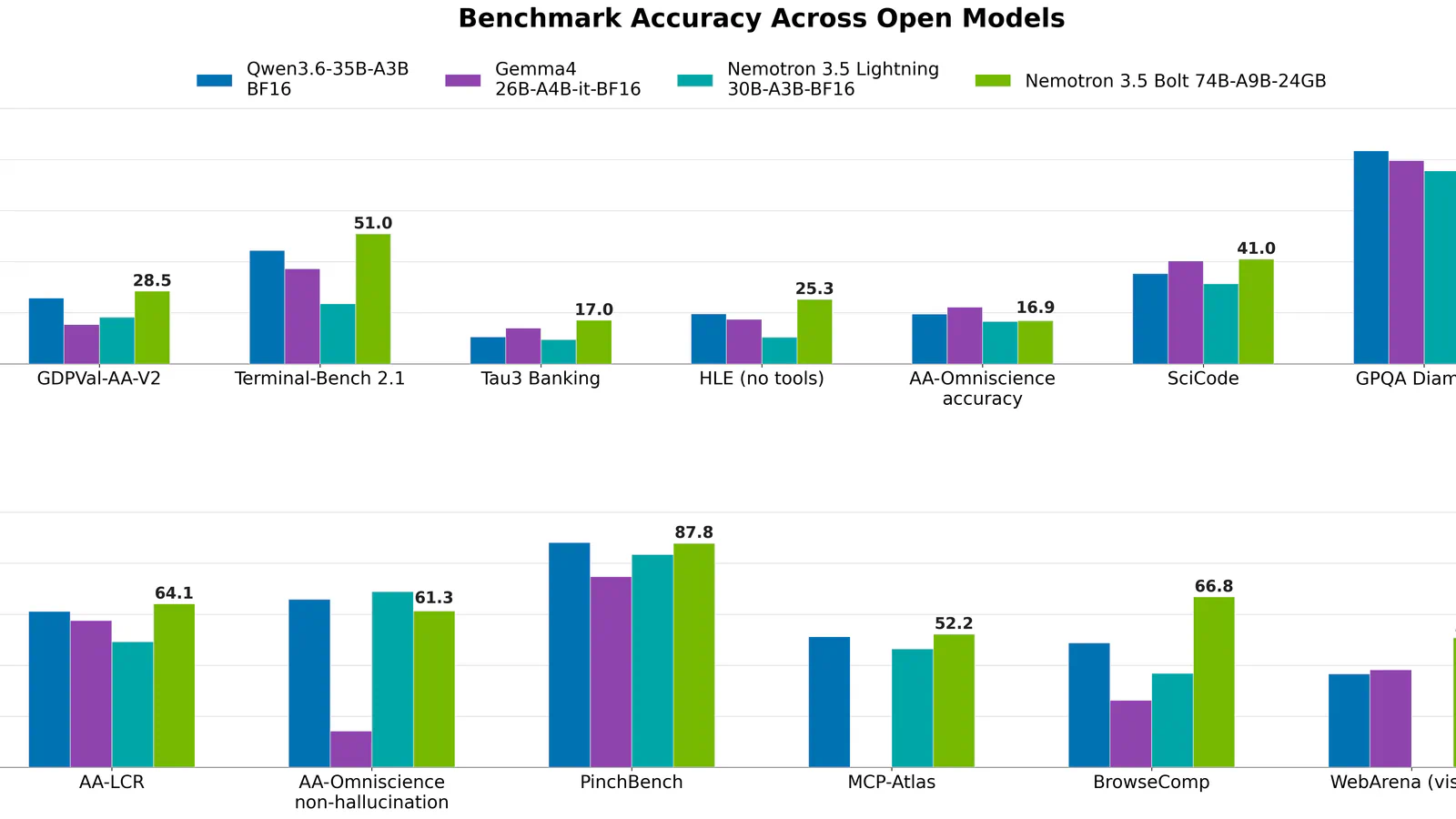
Nemotron 3.5 Bolt 74B-A9B 24GB arrived on Hugging Face on October 15. NVIDIA shrank its 120-billion-parameter Nemotron 3.5 Super VL to a 74B model with 9B active parameters, then trained it to run at 2-bit precision, so the weights fit in 24 GB. It reads text, images, and video, and it handles up to 256K tokens of context. Our Nemotron 3.5 local setup guide walks through running the wider family on a DGX Spark.
Frequently Asked Questions
5 questions
1What is the best local LLM for coding?
The best local LLM for coding on a 24 GB machine is Qwen3.8-27B, which Qwen reports at 61.7 on SWE-bench Pro. If you mostly run a coding agent inside your editor, Devstral Small 2 is the leaner pick at 15 GB.