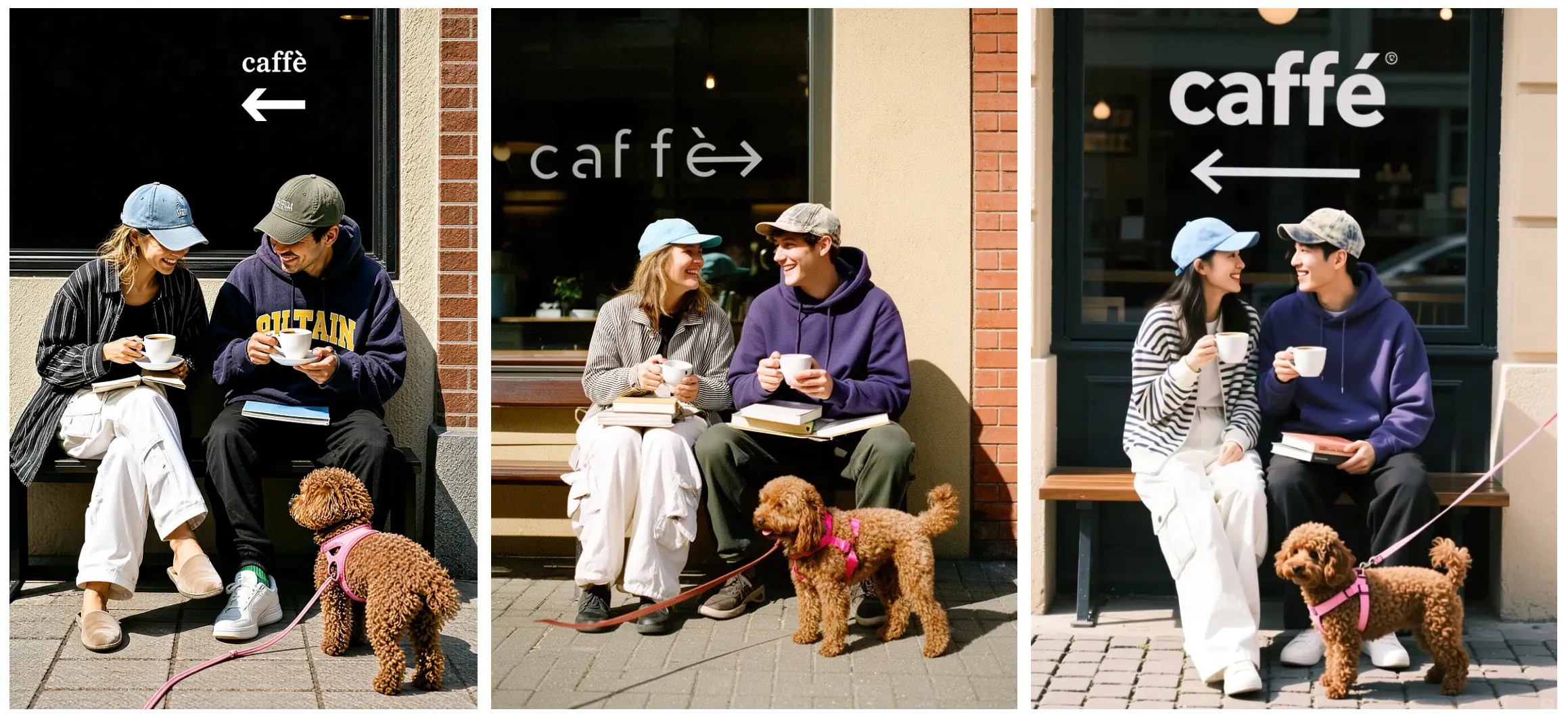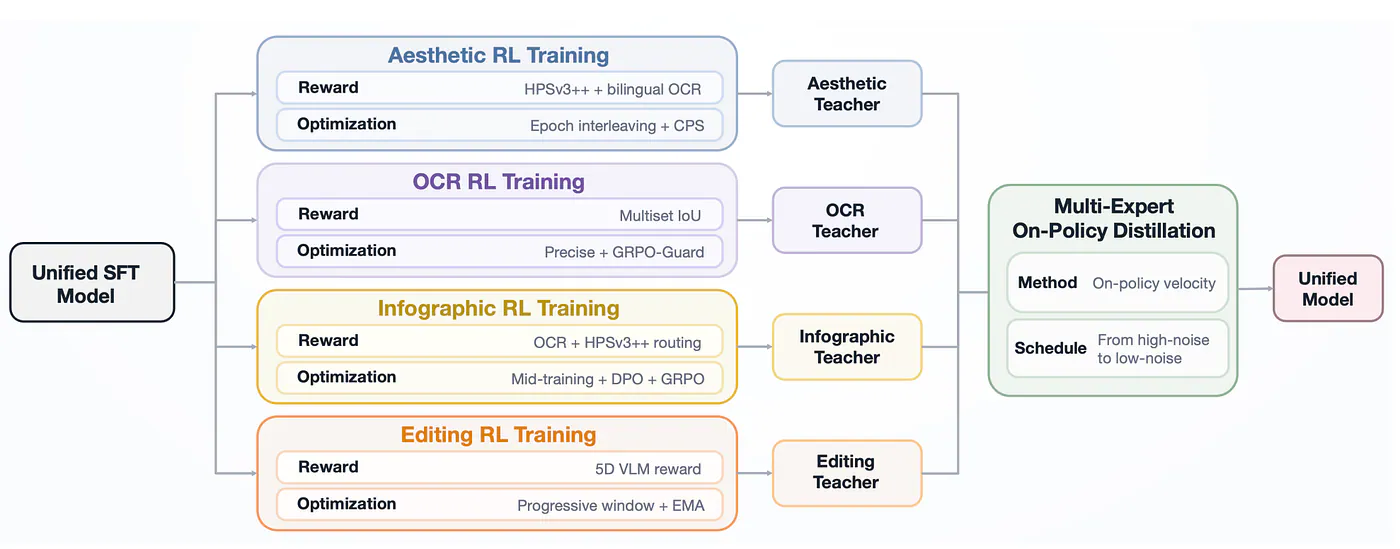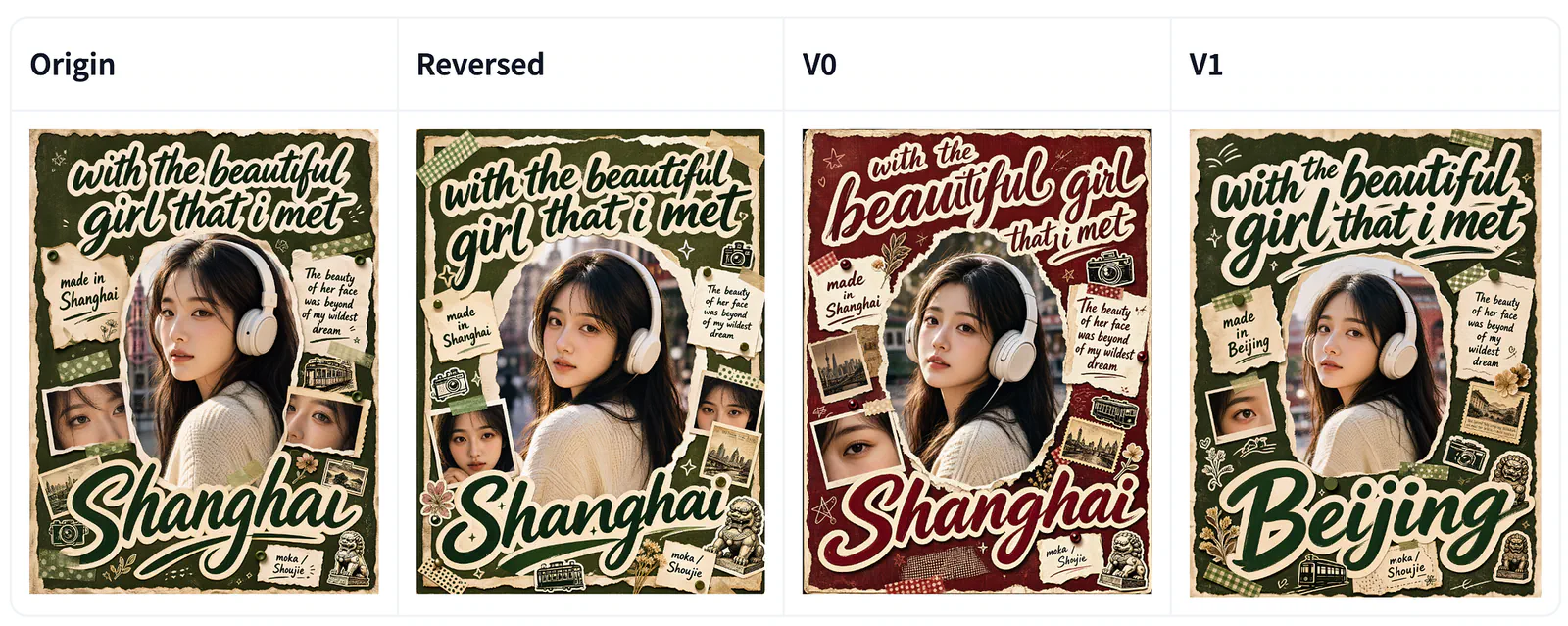
One of the biggest pains of using diffusion models, or really any open-weight image model, is trying to make a precise edit. Trust me, I’ve tried a handful of them, including models from Stability AI and the recent FLUX models from Black Forest Labs. I’ve seen firsthand how often they struggle with this.
Say you have a poster and you only want to change one line of text. The model changes it, but it also tweaks the background, alters the color profile, or adds something else you didn’t ask for.
You end up trying to fix the fix.
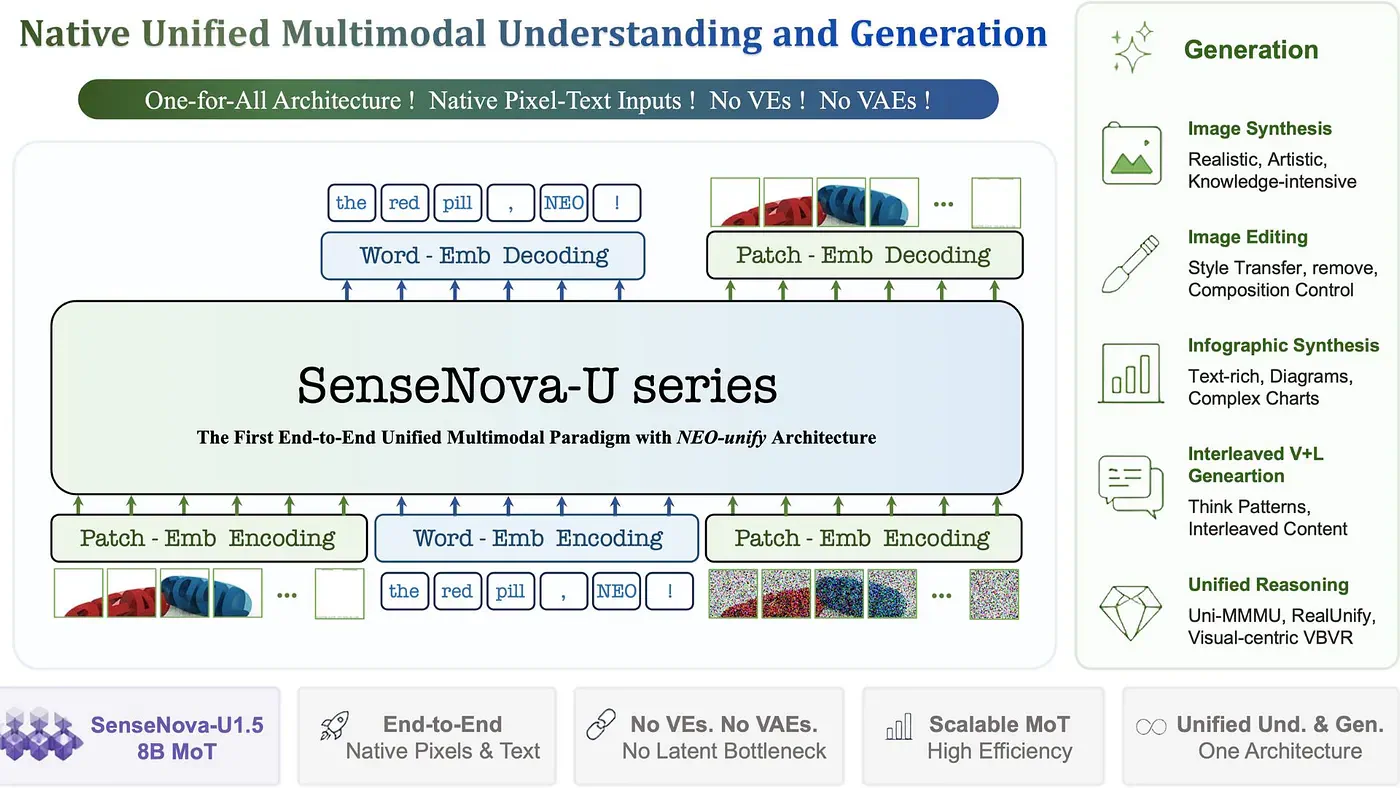
SenseNova-U1.5 is a model that takes on this problem. It brings image understanding and generation into one model, supports native output up to 4096 × 4096 pixels, and puts a lot of work into text and editing.
I wanted to look at how well it handles the little changes that usually give image models trouble.
What is SenseNova-U1.5?
SenseNova-U1.5 is a multimodal model that can work with both words and images.
You can describe a picture you want, provide an image to edit, or give it several references to guide a new composition. The same framework also supports questions and reasoning about visual content.
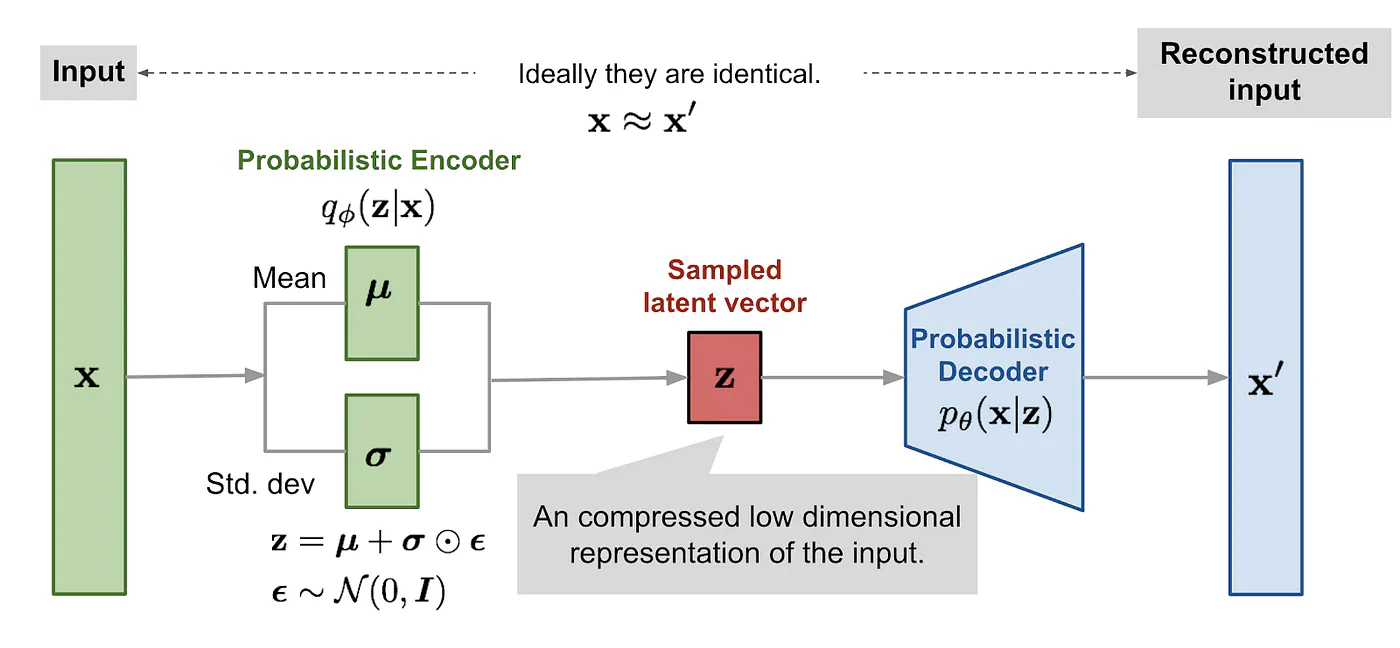
A lot of image systems use separate components for those jobs. A vision encoder reads the image, while a VAE compresses and reconstructs it for generation.
SenseNova-U1.5 removes both.
It turns small regions of the image into tokens that the model can process alongside your instructions.
Its Mixture-of-Transformers design still gives understanding and generation their own specialized parts. They share attention, so information from the image and the prompt can pass between them as the model works.
The checkpoint includes roughly 8B parameters for understanding and another 8B for generation. The generation branch is about 8.2B, so the full model is larger than the name might suggest.
We’re looking at a model with a relatively small active footprint that can produce native 4096 × 4096 images, render detailed text, and handle edits involving several references.
Later, I’ll compare its output and benchmark results with larger open models, including FLUX.2-dev 32B and Qwen-Image 20B.
The size could make SenseNova more practical to run yourself, especially if you generate and revise images often. I wouldn’t put a dollar figure on the savings without testing speed and memory use on the same hardware, though. A 4K image can still be expensive to generate.
Why combining understanding and generation is useful
Combining several reference images sounds simple until you consider everything the model needs to adjust.
The subjects might have different lighting, face different directions, or appear at the wrong scale for the new setting. Putting them together convincingly requires changes to their appearance and position.
Take the cat-and-scooter example below. It uses separate references for the cat, the vehicle, and the café setting.
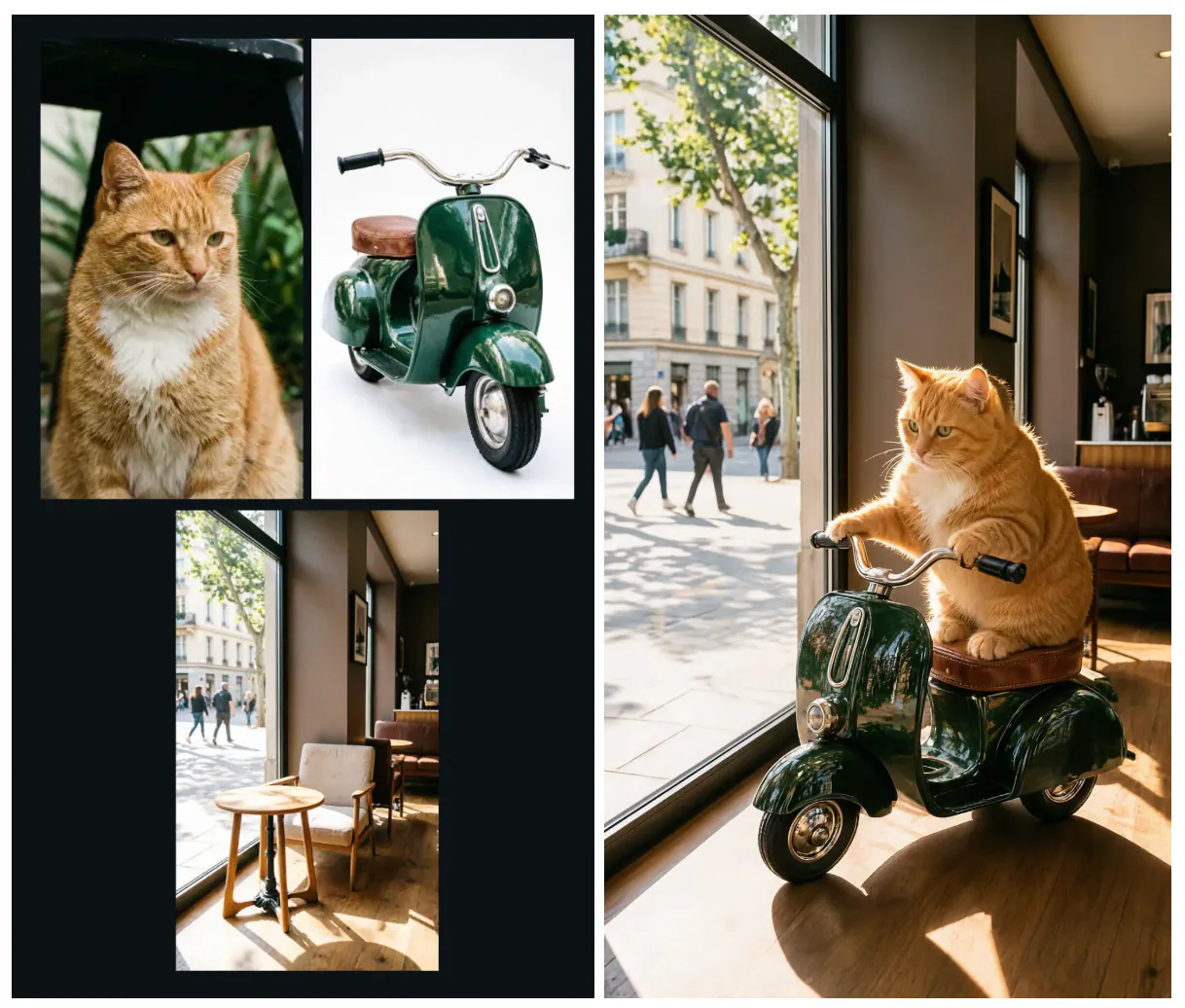
Multi-reference composition. Source: SenseNova-U1.5 examples.
Here’s the full prompt used to generate the resulting image:
Please seamlessly integrate the orange cat from the first image into the scene by the floor-to-ceiling window of the café in the third image, positioning it atop the vintage metal toy vehicle from the second image.

The specific requirements are as follows:
【Character and Prop Integration】: Extract the orange cat's signature facial features (chubby face, green eyes) and the patch of thick white fur on its chest shaped like an inverted triangle.
Adjust its pose so it is riding the metal toy vehicle from the second image: the cat's front paws should rest on the vehicle's chrome handlebars, while its hindquarters sit securely on the brown leather seat.
Ensure natural contact—including compression and physical overlap—between the cat's paw pads and the handlebars, as well as between its thighs and the edge of the saddle; the result must look organic, avoiding any artificial "sticker-like" appearance.

【Spatial Perspective Adjustment】: Adjust the toy vehicle—originally viewed head-on in the second image—to a three-quarter side view that aligns with the floor perspective of the third image.
Scale it down proportionally and place it on the wooden floor near the glass window.

【Lighting and Material Adaptation】: Strictly utilize the golden afternoon sunlight streaming in at an angle (as seen in the third image) as the primary light source.
The cat's back, ear edges, and fluffy fur outlines must feature a warm, shimmering golden rim light (backlighting effect). The dark green enameled body, metal wheel rims, and chrome handlebars of the toy vehicle must exhibit realistic sunlight highlights and reflect the faint street scene visible outside the window.
Finally, the entire vehicle (including the cat) must cast a dark shadow onto the wooden floor to the right, accurately aligned with the light source and featuring realistic soft-edged transitions.
Look at how the subjects fit into the output. The cat sits on the brown seat with its front paws reaching toward the handlebars. Sunlight catches its fur, reflects off the green bodywork, and produces a shadow across the wooden floor.
The way each element stitches together with the rest makes the result feel like a single scene. If the cat had different lighting or appeared to float above the seat, the composition would be much less convincing.
Those are the details I would inspect if I were building a workflow around reference images. A composite can look convincing in a thumbnail while the contact points or shadows fall apart when enlarged.
The shared architecture gives U1.5 a way to use information from the references throughout generation. The example shows what the model can produce under a detailed prompt; it does not tell us how often it succeeds with less carefully prepared inputs.
How SenseNova-U1.5 handles native 4K generation
I want higher resolution mainly because I often need to crop an image or use it somewhere larger. A result can look sharp in the preview and turn into a mess once I zoom in.
Portraits contain individual strands of hair and subtle skin texture. Posters add lettering, thin lines, and decorative elements that can become muddy when the output is in low resolution.
The images below combine several of those demands.
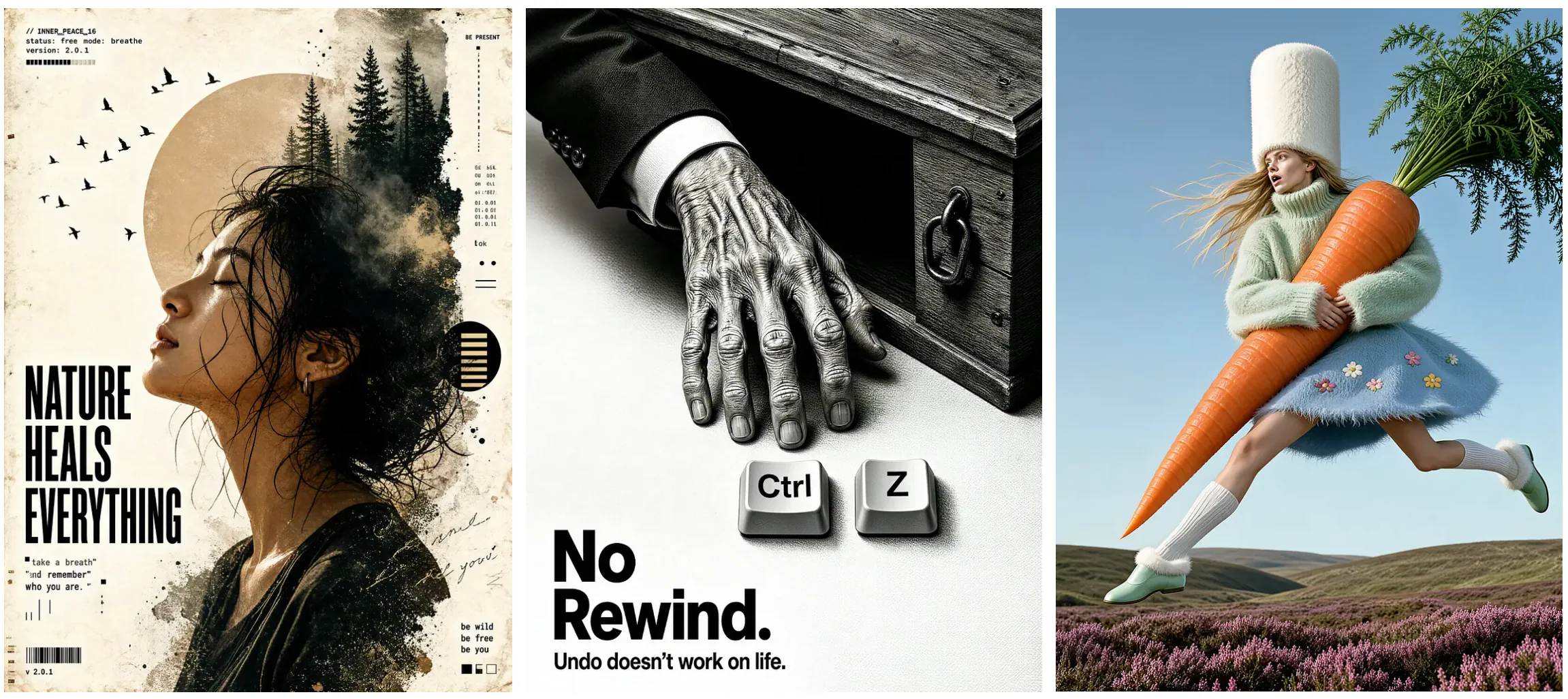
Sample images showcasing the model’s maximum generation resolution.
In the first image, there is quite a lot happening around the woman’s hair. Loose strands cross her face, while the back of her head blends into trees, mist, and scattered ink-like texture.
The large heading remains distinct from the portrait. Smaller text and graphic marks occupy the edges, leaving the face as the main subject.
This is the kind of image where I’d look closely at fine detail. Do the hair strands remain separate? Can you distinguish the tree branches? Does the smaller lettering still make sense when you enlarge it?
In the other examples, notice how sharp the details are and how beautiful the texture and the composition are.
SenseNova-U1.5 supports native generation up to 4096 × 4096 pixels. One architectural improvement helps neighboring image regions stay consistent as the model produces the final pixels.
The earlier U1 reconstructed patches independently, which could create seams or interrupted textures. U1.5 allows nearby regions to exchange information during reconstruction, helping lines and textures continue across those boundaries.
That explains the architectural improvement. Whether a particular output is ready to use still comes down to looking at the full-size image. I wouldn’t judge a 4K result from a screenshot.
Precise editing and reasoning-guided changes
For editing, I care less about whether the model can produce a beautiful replacement image. I want to know whether it can make the requested change while preserving the rest of my work.
The exhibition poster in the official examples makes that easy to inspect. The instruction changes the date, venue, and address in a small panel at the lower left.
Prompt: Please update the exhibition dates and address details within the dark blue rectangular information box in the bottom-left corner — changing “JUNE 15-JULY 30, 2024 URBAN GALLERY 123 CREATIVE WAY ARTSVILLE, USA” to “AUGUST 10 — SEPTEMBER 28, 2024 METRO MUSEUM 456 DESIGN ROAD CREATIVITY CITY, UK” while maintaining the original white and pink font styles and layout.
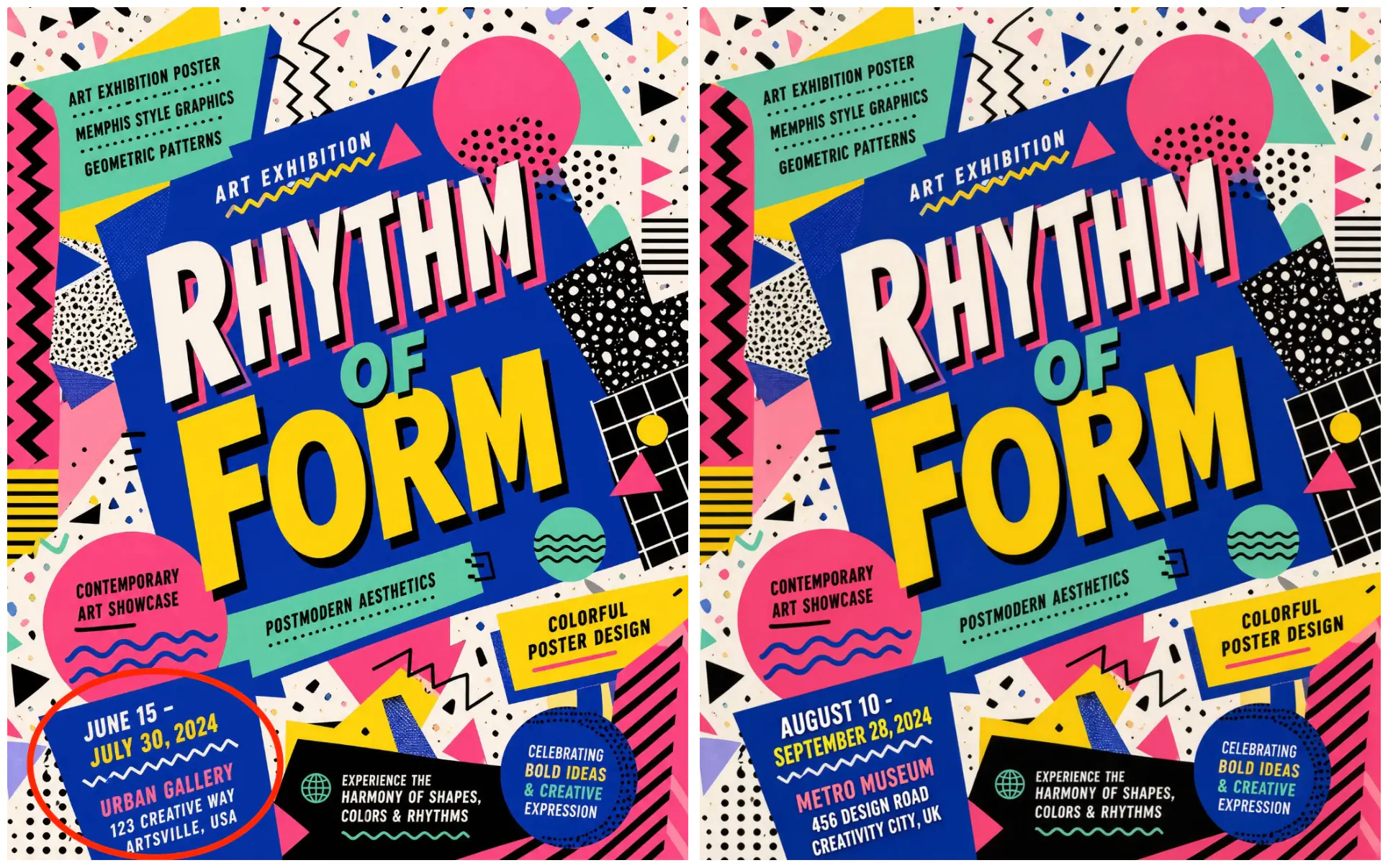
Localized text replacement. Source: SenseNova-U1.5 editing examples
The edit changes the dates, venue, and address in the lower-left information panel. The large central heading and surrounding geometric design remain visually similar.
This requires more than generating replacement words. The model has to locate the correct panel, fit the new information into its limited space, and retain the angle and visual style of the original.
More complex edits add another requirement: deciding what the requested change implies for the scene.
Moving an object can affect its shadow. Placing a subject on a seat changes its pose and the areas it covers. The cat-and-scooter composition illustrates several of these relationships at once.
SenseNova-U1.5 connects this interpretation with image generation, although these examples alone don’t establish which internal reasoning steps produced the result.
Performing the same image editing request on other open-weight image models like Stable Diffusion V3 Medium, you can see how it misunderstands the prompt.
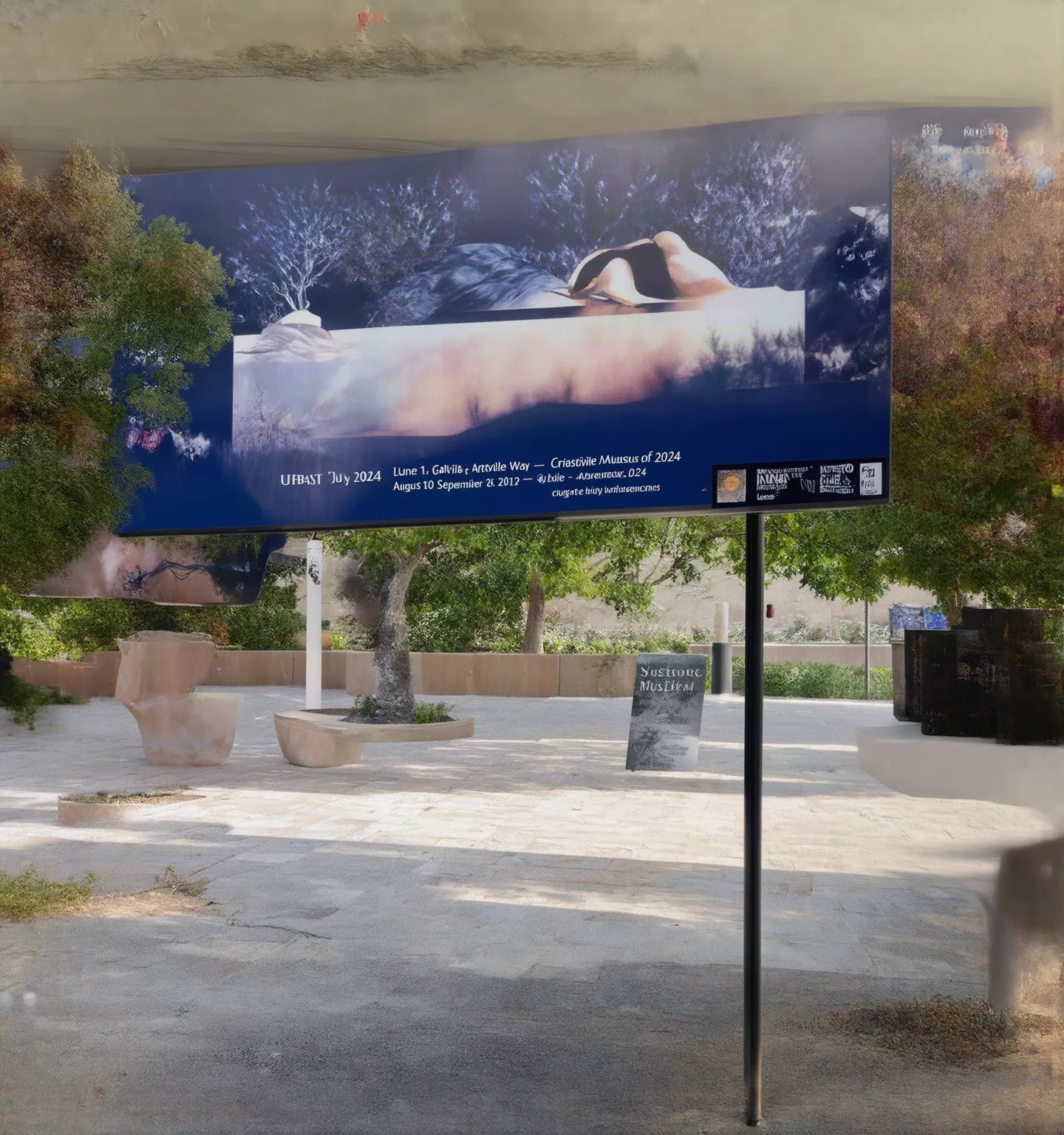
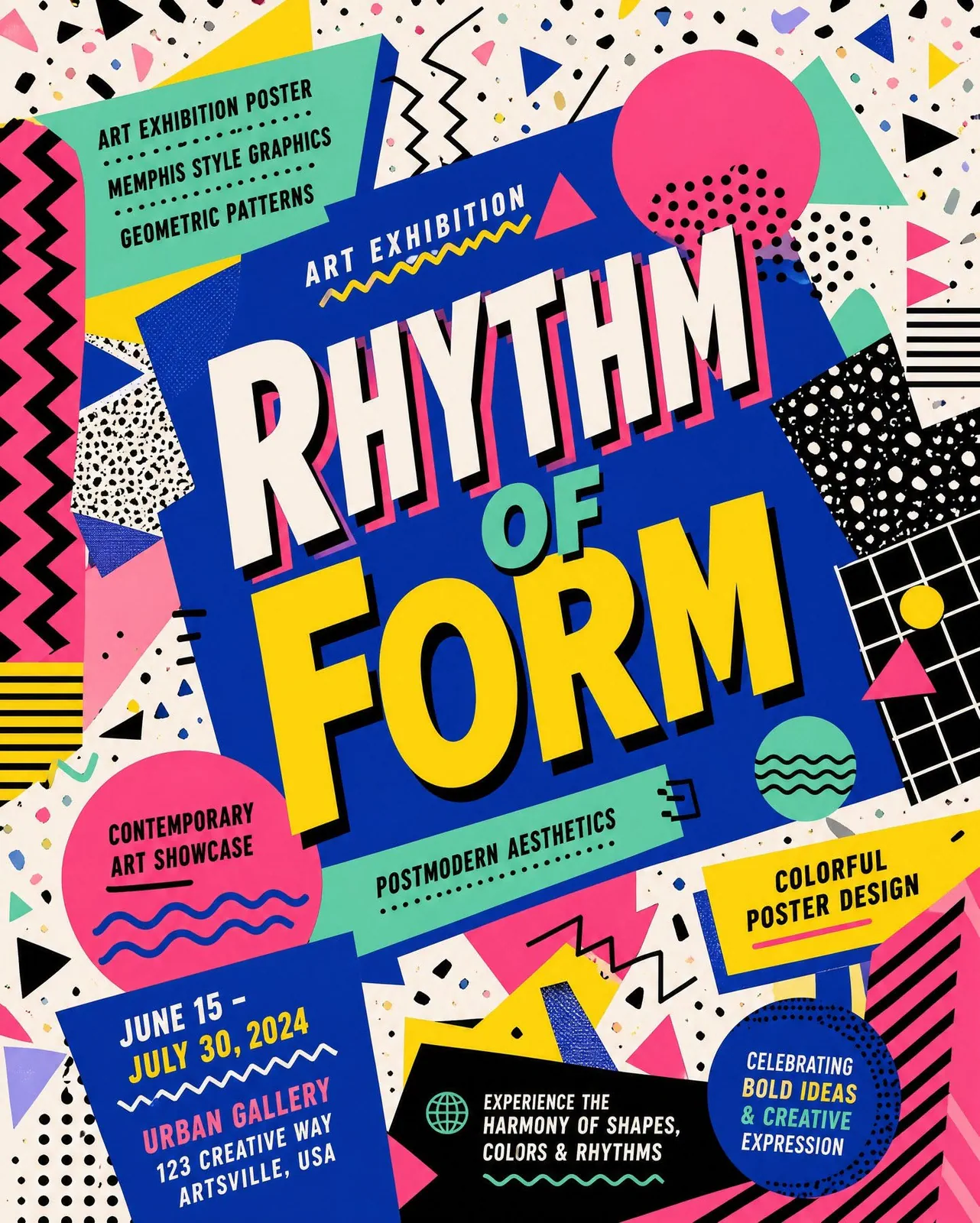
Output vs the reference image
No, I did not fake that result. Here’s a screenshot of the actual image editing on Fal AI.
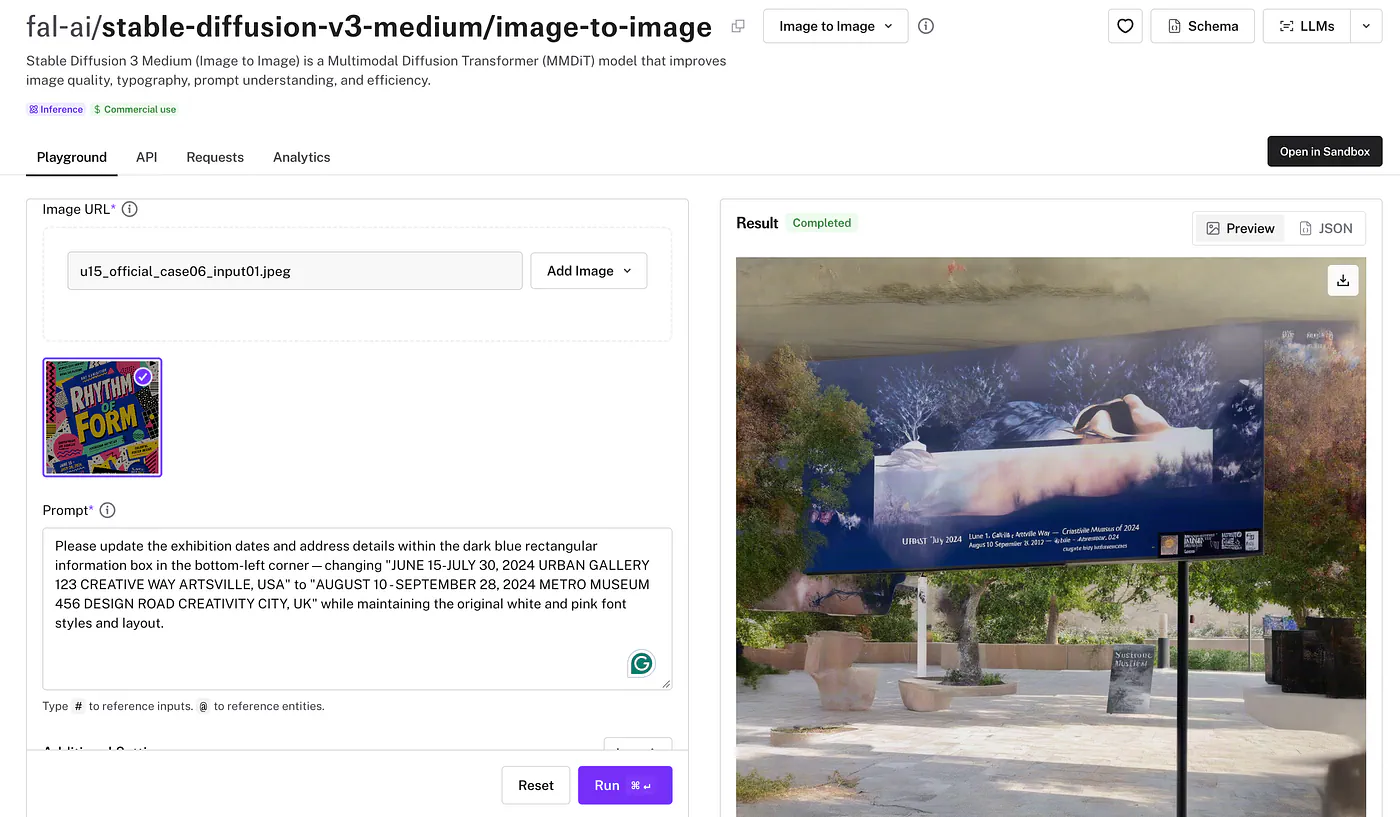
This attempt didn’t give me the edit I asked for. One result won’t settle a comparison between two models, but it shows the kind of failure I’m talking about. I wanted to update the information, and now I have another image to fix.
I’d still tell SenseNova exactly what should stay untouched. Having to spell that out is a little annoying, but it’s better than discovering afterward that the model also changed the background.
How it compares with other open models
The model size is part of why I wanted to compare these results. U1.5’s generation branch is about 8.2B parameters, while FLUX.2-dev and Qwen-Image have larger generation components.
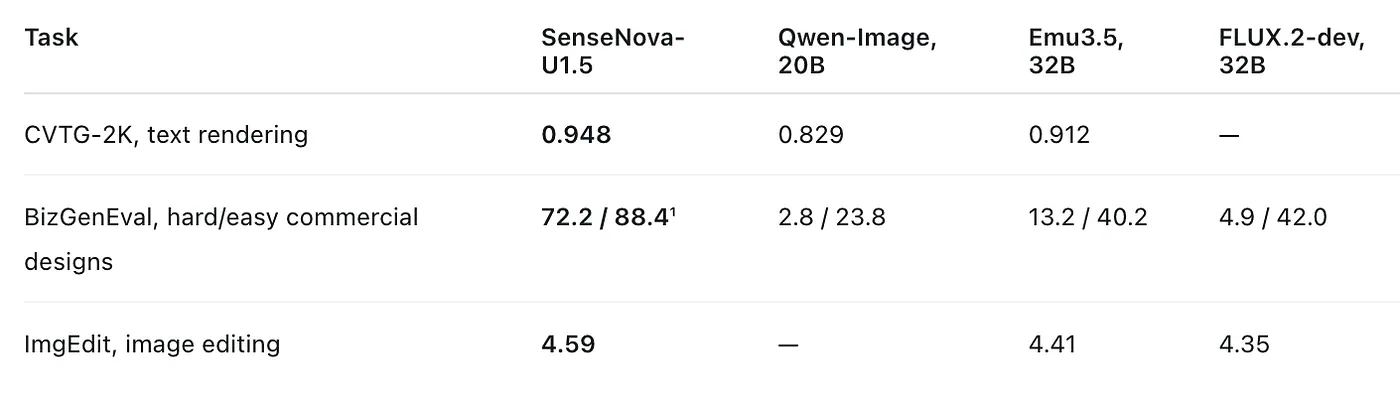
Higher is better within each row. The tests use different scales and should not be compared across rows. Results are from the researchers’ technical report. The BizGenEval result for U1.5 uses prompt enhancement; its result without that step is 51.4 / 70.2.
The typography score stands out to me. Text is one of the first things that makes a generated poster unusable, and U1.5 finishes ahead of those larger open models on CVTG-2K.
The commercial-design result is also strong, though the prompt-enhancement condition is important. U1.5 performs well without it, and the extra step improves its score substantially. That means a developer evaluating the model should test both the raw prompt and the complete recommended workflow.
For closed models, the results depend on the task. U1.5 scores 0.948 on CVTG-2K against 0.899 for Seedream 4.5 in the report. On other evaluations, proprietary models remain ahead. I would describe U1.5 as competitive in specific areas, especially typography and editing, rather than a replacement for every paid model.