
OpenAI now lists $500 in total API credit purchases as the qualification threshold for Grow, its highest paid usage tier, with an approved monthly usage ceiling of $200,000. The first figure is the purchase history needed to qualify; the second is the maximum monthly usage the tier permits.
The company’s October 6, 2026 changelog records the replacement of five paid API usage tiers with three: Build, Launch, and Grow. Organizations advance automatically as their total credit purchases reach each tier’s minimum.
How much traffic can an account support after qualifying? OpenAI’s rate-limits guide lists purchase thresholds and approved monthly ceilings, while model-level request and token limits also increase by tier. Before increasing traffic, teams need to check which constraint will actually bind their application.
Credit Purchases Unlock Three Different Monthly Ceilings
The new paid tiers have these thresholds and ceilings:
| Paid usage tier | Total credit purchases required | Approved monthly usage limit |
|---|---|---|
| Build | $5 | $500 |
| Launch | $100 | $5,000 |
| Grow | $500 | $200,000 |
Qualification depends on cumulative credit purchases. These amounts are neither monthly subscription fees nor a requirement to consume that much inference first. Under the documented rules, an organization reaches Launch when its total credit purchases reach $100 and Grow when they reach $500.
OpenAI says upgrades happen automatically, giving teams a published purchase-based route to higher quotas without having to interpret five numbered paid tiers.
Buying $500 in credits does not buy $200,000 worth of inference. It qualifies the organization for a tier whose approved monthly usage limit is $200,000. Actual API usage still incurs charges; the ceiling is not a bundled allowance. A team may therefore qualify for substantial monthly headroom without having allocated anything close to that amount in its own budget.
The jumps between tiers are uneven. Launch’s approved monthly ceiling is ten times Build’s. Grow’s is forty times Launch’s. Moving to Grow can remove a monthly usage constraint much more dramatically than the $400 difference between the two qualification thresholds might suggest.
These documented tier values do not replace an account check. Deployment decisions should use the organization’s displayed limits.
Model Rate Limits Rise at Different Speeds
A monthly usage ceiling measures how much usage an organization can accumulate over a month. Rate limits constrain how quickly it can send work to a model.
Two important measures are:
- Requests per minute (RPM): the permitted request rate.
- Tokens per minute (TPM): the permitted token-processing rate.
Even with ample monthly headroom, an application can hit a model’s short-term throughput limit. The tier name alone doesn’t identify that bottleneck.
CellCog’s documentation breakdown reproduces the following standard model limits from OpenAI’s guide. These are reported quotas, not independently measured throughput results.
| Tier | Model group | Requests per minute | Tokens per minute |
|---|---|---|---|
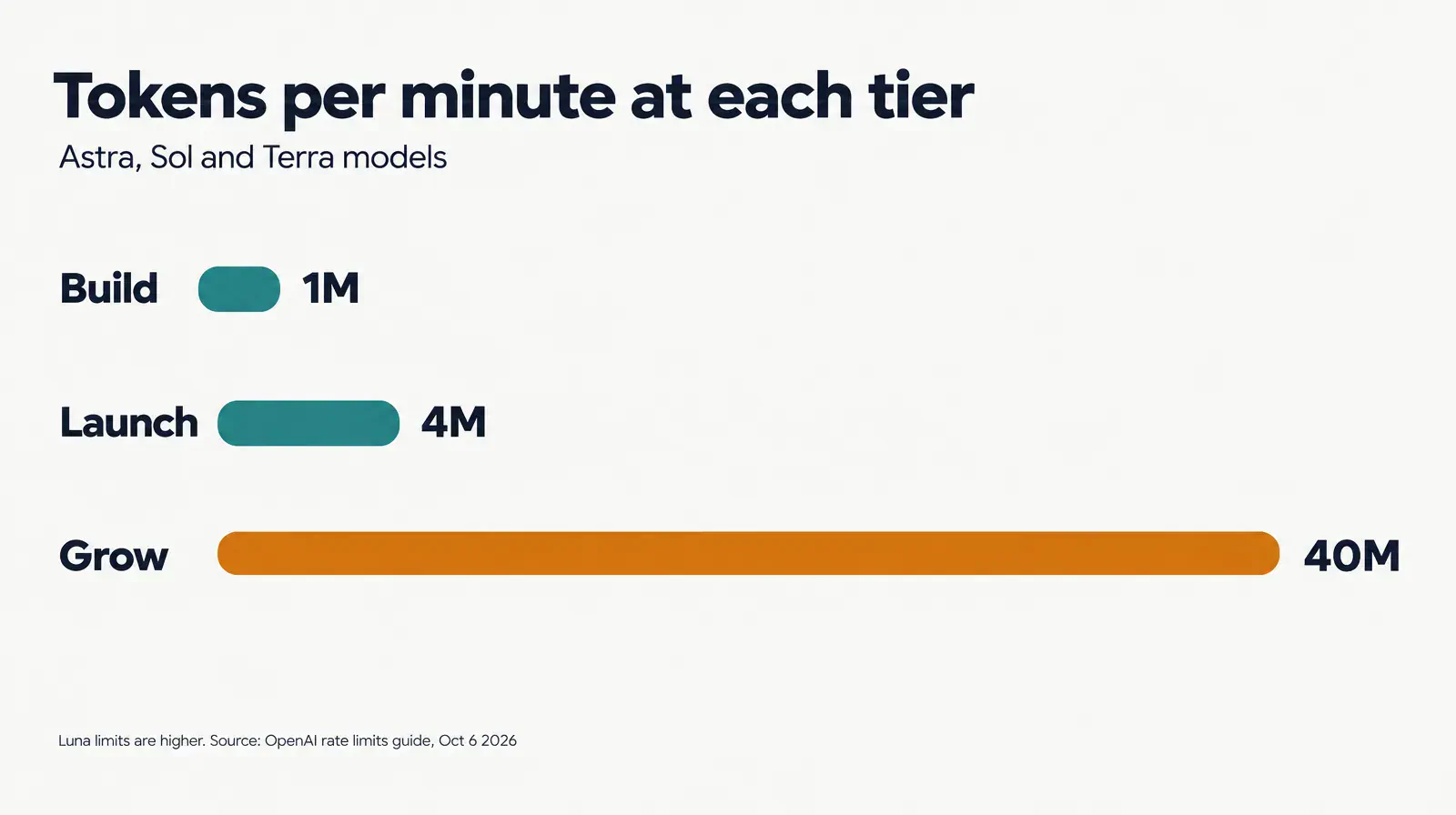
| Build | Astra, Sol, Terra | 5,000 | 1,000,000 |
| Build | Luna | 5,000 | 2,000,000 |
| Launch | Astra, Sol, Terra | 10,000 | 4,000,000 |
| Launch | Luna | 10,000 | 10,000,000 |
| Grow | Astra, Sol, Terra | 15,000 | 40,000,000 |
| Grow | Luna | 30,000 | 180,000,000 |
Request and token allowances don’t increase in parallel. For Astra, Sol, and Terra, moving from Build to Grow triples the listed RPM allowance but raises TPM fortyfold.
The upgrade’s practical value depends on the workload. An application sending many small requests may hit the request limit first. Larger prompts or longer responses may make tokens the tighter constraint. The much larger TPM increase doesn’t automatically provide the same increase in request capacity.
Luna has a different quota profile. On Grow, its listed request allowance is twice that of the other model group, while its token allowance is substantially higher. Those differences may affect capacity planning, but they don’t establish that Luna is the right model for a particular task. Quality, latency, and per-request cost still need separate evaluation.
CellCog also notes exceptions for Ultrafast mode and some long-context requests. Teams using those paths should check the limits that apply to them instead of assuming the standard table covers every constraint.
None of these quota figures demonstrates faster individual responses. They describe permitted traffic, not model latency or guaranteed application throughput.
Higher Usage Limits Are Not Lower Token Prices
This change concerns API access and capacity limits. The purchase thresholds and monthly ceilings do not, by themselves, establish a reduction in model pricing.
A lower threshold for a larger quota can make scaling easier without making an individual request cheaper. Budget forecasts still need the applicable model prices and the workload’s expected input, output, and request volume.
The provider’s approved monthly ceiling is also separate from the spending controls teams choose for themselves. CellCog’s reading of the documentation distinguishes two controls:
- Spend alerts notify teams when spending reaches a configured amount, but API traffic continues.
- Hard spend limits stop affected requests when the configured amount is reached, returning a 429 error.
Its breakdown describes spending controls at organization or project level. The usage tier defines available headroom; a team’s own controls define how much of it the team is willing to use.
For an organization that qualifies for Grow, a $200,000 approved monthly ceiling is a poor substitute for a deliberately chosen project budget, especially for unattended jobs or agent workflows.
The sensible response to a larger allowance is to revisit spending controls. A team can accept more traffic while retaining a lower financial boundary appropriate to its business.
Check Organization Limits Before Increasing Traffic
OpenAI’s documentation directs developers to their account limits, and CellCog identifies the console path as Settings → Organization → Limits. Confirm what the organization can actually use there before changing production traffic.
The public tier table explains the standard structure. A launch decision needs account-specific values, the exact models being called, and the application’s expected demand.
A useful pre-launch review should cover five checks:
Sources
- October 6, 2026 changelogdevelopers.openai.com
- rate-limits guidedevelopers.openai.com
- CellCog’s documentation breakdowncellcog.ai