Microsoft Copilot Home, Code and Autopilot: Who Gets In?
Microsoft is combining collaboration, app building and persistent agents in Copilot, but each experience has a different access timeline.
Listen
AI narration
12:24
0:00 / 12:24
AI SummaryGenerated from this article
Microsoft announced three new Copilot experiences with staggered access timelines. Home and Code are rolling out through the Frontier early-access program starting late September, with Code receiving broader availability in following weeks. Autopilot, a persistent cloud-hosted agent, expands only to private preview with no announced public launch date. Home combines chat, delegated tasks and Office document work in one interface, while Code lets users describe apps and workflows in natural language for Copilot to build. Autopilot is designed to continue working across Teams and Outlook without additional prompts. Organizations can enroll in Frontier now, though administrators control user access and features may change before general availability.
Microsoft’s new Copilot has three distinct experiences, and access to each is at a different stage. Home and Code are headed first to users in Microsoft’s Frontier early-access program. Autopilot, the persistent agent, is expanding only to private preview.
For organizations deciding what to test, the rollout details are as important as the features. In its September 25 announcement, Microsoft described a Copilot app that can help people work on documents, build small applications and delegate tasks to an agent that continues working in the cloud. It did not say all three experiences were generally available. Code has a separate plan for broader availability; Microsoft has not given Home or Autopilot the same commitment.
The Access Timeline Is Different for Each Experience
Microsoft says Home and Code will begin rolling out through Frontier in the weeks following its announcement. A more specific line puts Code’s Frontier rollout at the end of September, followed by broader availability in the coming weeks. Microsoft also plans a Code preview for Microsoft 365 Premium and Pro subscribers later in 2026.
Autopilot has a narrower path: Microsoft says it will expand to private preview at the end of September. Microsoft has not announced a public launch or a date for broad Autopilot access.
Microsoft uses “broad availability” in its Code rollout plan, but the announcement sets no precise date and does not establish that every Copilot user can open Code immediately. Tenant administrators should not expect Home to appear simply because it has been announced, either.
Frontier is a pre-release program. According to Microsoft’s Frontier administration guidance, organizations opt in, administrators control which users can access Frontier features, and those features may change before general availability. Enrollment prepares eligible users for a staged rollout; it does not override Microsoft’s release schedule.
Experience
What Microsoft Announced
Access Plan
Home
A starting point combining Chat, Cowork and Office work
Gradual Frontier rollout in the weeks after September 25
Code
Natural-language creation of apps and workflows
Work with Zeniteq
Let’s work together
We’re open to thoughtful collaborations with teams building in AI. Explore the ways we can work together.
Frontier rollout starting at the end of September, then broader availability in the following weeks
Autopilot
A persistent, cloud-hosted agent
Expansion to private preview at the end of September
These are Microsoft’s announced plans, not confirmation that a particular organization already has access.
Home Puts Chat, Cowork and Office Work Together
Home is meant to become the starting point in Copilot. Microsoft says users will be able to see recent activity, pick up work and choose between Chat for immediate requests and Cowork for tasks they want to delegate. A quick question calls for a reply; a delegated task may involve several steps and a completed deliverable.
Microsoft is also bringing Word, Excel and PowerPoint work into the Copilot experience. Its examples include drafting a brief, modeling a budget and building a presentation. The company says the result can be a real, editable Office file that stays synchronized with the corresponding app, without requiring a user to copy text into a separate document.
For teams, the proposed benefit is continuity. A colleague could edit a file while another person works beside it in Copilot, without creating a disconnected version. That is Microsoft’s description of how the experience is intended to work, not an independently established result for every workflow.
Microsoft also says Copilot will eventually route a request to Chat, Cowork or Code without requiring the user to select a mode. It labels that routing capability coming soon. Organizations should not count it among the features they can deploy with the initial Home rollout.
Code Turns a Request Into an Internal Tool
Code is for creating tools. Microsoft says a user can describe an app, tracker, dashboard, automation or workflow in natural language, and Copilot will choose an approach and build it. The intended outputs range from desktop widgets to cloud-hosted internal apps that colleagues can share.
The Code announcement says the experience uses the same underlying technology as GitHub Copilot. Microsoft still positions the products differently: GitHub Copilot supports developers’ day-to-day coding, while Code is intended to help other workers create smaller, purpose-built solutions inside Copilot. Code is not presented as a replacement for the developer tool.
Microsoft says Code runs in a sandboxed environment and can be hosted within an organization’s tenant. It has also announced Copilot Managed Runtime, hosting infrastructure for apps built across Code and other Copilot experiences; the runtime is in preview. Those are relevant deployment details, though “can be hosted” does not guarantee that every generated app is ready for unrestricted production use. Organizations still need to evaluate what an app accesses, who can share it and how its output is maintained.
Code’s access plan is the most developed of the three, though questions remain. Microsoft specifies a Frontier start at the end of September and broader availability in the following weeks. It separately promises a preview for Microsoft 365 Premium and Pro subscribers later in the year. Without firmer dates and eligibility details, these are planning milestones, not a basis for assuming Code has shipped to every user.
Autopilot Is Designed to Keep Working After You Leave
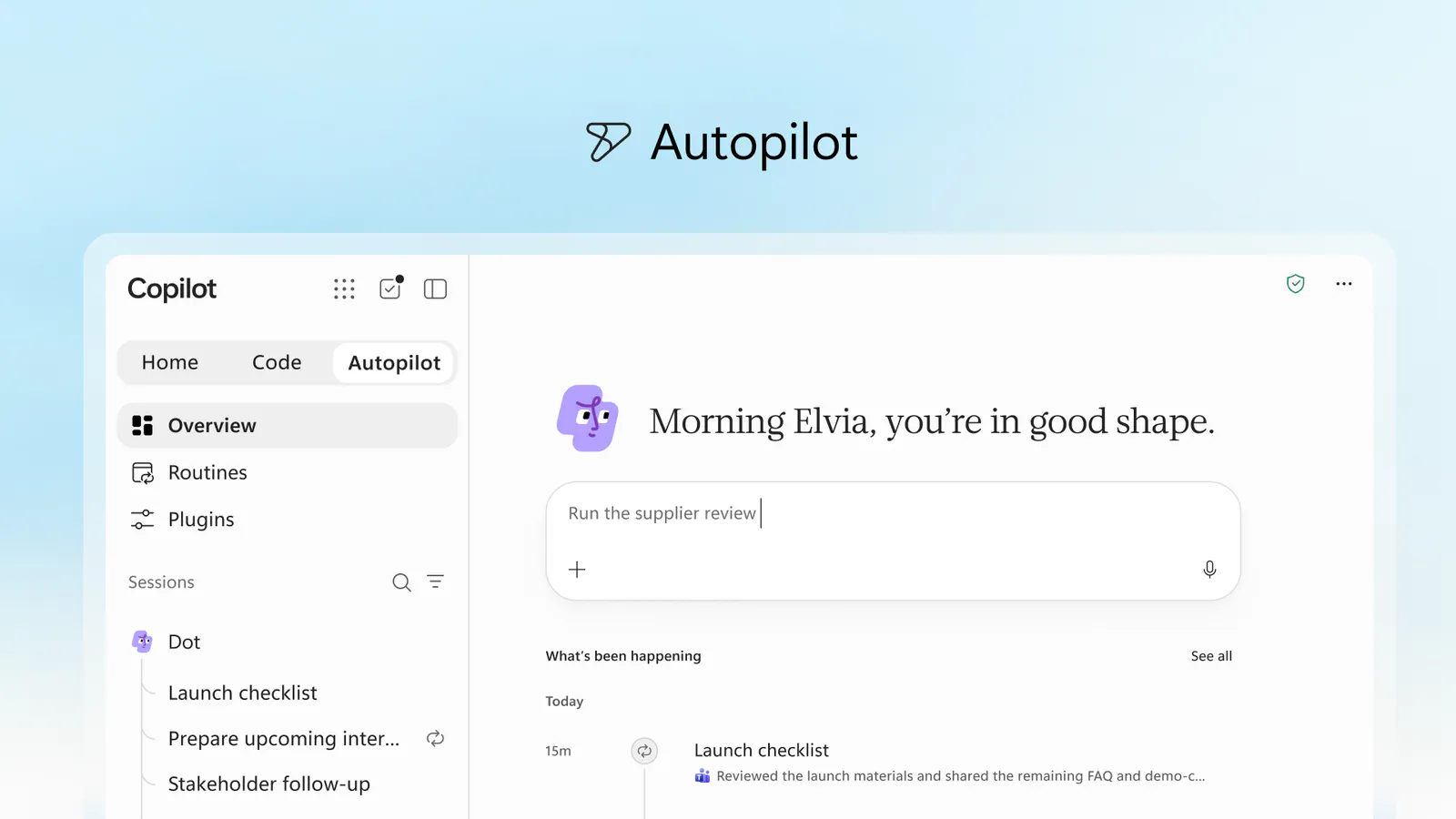
Autopilot is the largest change in behavior Microsoft is proposing, and the least broadly accessible of the three experiences. Previously called Scout, it is described as a cloud-hosted agent with a name, role and goal. Microsoft says it can watch channels, follow up on threads, perform recurring work and resume a project days later without waiting for another prompt.
Autopilot is meant to hold on to an assignment over time. Microsoft’s example is a supplier review process involving a schedule, meeting preparation and stakeholder follow-ups. That illustrates the intended scope; it is not evidence that the agent can reliably handle every step without supervision.
Microsoft says Autopilot lives in a customer’s tenant with its own identity, memory, computer and workspace. It is designed to appear in places including Teams and Outlook, with permissions, auditing and governance controls. A persistent agent may act across multiple conversations and documents, so the effectiveness of those controls in a given organization will depend on how the preview works and how administrators configure access.
Autopilot’s announced next step is an expanded private preview. It is not joining the Frontier rollout for Home and Code. Microsoft’s regional announcement repeats that distinction.
What Enterprise Teams Can Prepare Now
Organizations interested in Home or Code can prepare for Frontier without assuming either feature has appeared. Microsoft’s Frontier setup documentation says administrators can assign access to specific users rather than the whole tenant, and that eligible users need the relevant Copilot license. Feature access can also vary by subscription and role.
A small evaluation group makes sense, with a different focus for each experience. Home testing should check whether people can work with shared Office files as Microsoft describes, including how edits remain visible and synchronized. Code testing should examine generated apps, data connections, sharing and IT controls. Autopilot requires separate private-preview access; putting users in Frontier is not presented as a way to obtain it.
Frontier features are previews, and Microsoft says they can be modified, suspended or discontinued. Administrators planning a trial should check the preview terms alongside the product behavior, particularly before relying on a new experience for a business-critical workflow.
Microsoft is organizing Copilot around three kinds of work: collaborating on existing material, creating new tools and handing work to a continuing agent. The Verge’s coverage describes the redesign as a single app spanning chat, coding and agents. Whether that combination feels coherent in daily use remains to be seen as the experiences roll out.
Final Thoughts
Code may be the most consequential addition for enterprise teams to evaluate first. If employees can turn a description into a shareable internal tool, the question moves quickly from “Can Copilot build it?” to “Who owns, governs and maintains it?” Microsoft has announced a runtime and tenant-based controls, but practical answers will come from deployments, not the launch description.
Autopilot poses a further test: dependable work over time, across the places a team already communicates. Its private-preview status sets a useful boundary on expectations. The next evidence of this substantial redesign’s success will be what organizations can actually access and validate as each experience arrives.
Frequently Asked Questions
4 questions
1
Are Copilot Home, Code and Autopilot available now?
Microsoft has not announced general availability for all three experiences. Its September 25 plan puts Home and Code on gradual Frontier rollouts and Autopilot on an expanded private preview. Code has a separate plan for broader availability in the following weeks, but Microsoft did not provide a precise date that guarantees access for every user.
2
Who can get Copilot Home and Code first?
Eligible users enrolled by their organization in Microsoft’s Frontier program are first in line for Home and Code. Frontier is an opt-in, pre-release program controlled by tenant administrators; access depends on licensing, settings and Microsoft’s staged rollout. Enrollment alone does not mean a feature will appear immediately.
3
What is the difference between Copilot Home and Code?
Home is Microsoft’s starting point for Chat, delegated Cowork tasks and work with Office files inside Copilot. Code is for describing and building a small app, dashboard or workflow in natural language. Microsoft plans to connect these modes more closely, but it describes automatic routing between them as a coming feature.
4
Is Microsoft Copilot Autopilot part of the Frontier rollout?
No Frontier rollout for Autopilot was announced alongside Home and Code. Microsoft said Autopilot, its persistent cloud-hosted agent previously called Scout, would expand to private preview at the end of September. Organizations should not treat Frontier enrollment as Autopilot access or assume the agent is generally available.