
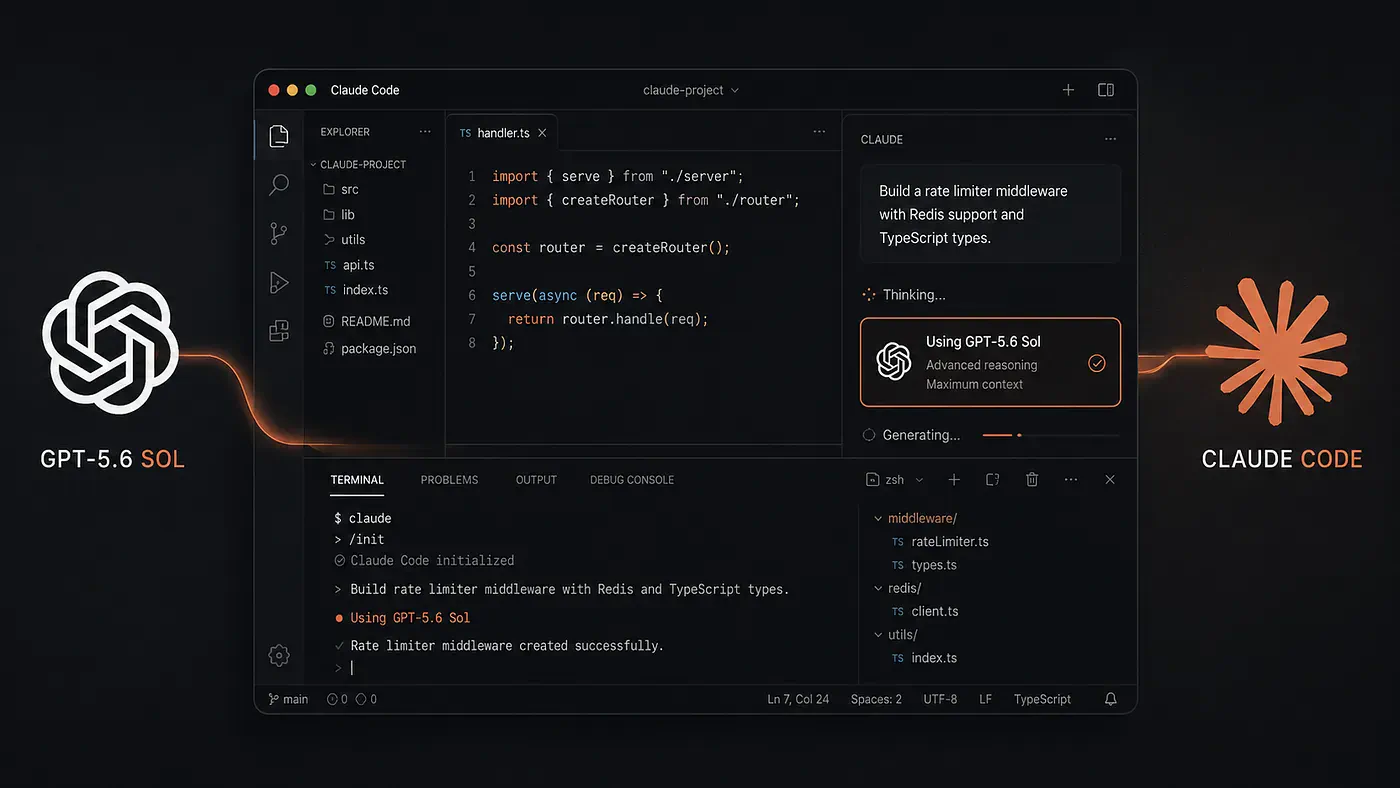
OpenAI recently dropped GPT-5.6 Sol, and it is already looking like a very capable model for agentic coding. Its release also came at an interesting time. Anthropic extended access to Claude Fable 5 twice, first through July 12 and then through July 19, while temporarily raising Claude Code usage limits.
Maybe it was demand. Maybe it was capacity. Maybe the timing was completely unrelated. Still, I can smell a little fear in Anthropic.
One thing many developers may not know is that it is possible to combine GPT-5.6 Sol with Claude Code.
Yes, you can access OpenAI’s coding model without abandoning Claude Code’s terminal interface. Depending on the method, Sol can either work beside Claude as a reviewer or replace Claude as the main model behind the session.
In this guide, I will show both approaches, explain how they differ, and go over why someone might choose this setup instead of simply running Sol through Codex.
Let’s get started.
What is new in GPT-5.6 Sol?
The biggest change for coding is not just raw benchmark performance. GPT-5.6 introduces stronger tool coordination, higher reasoning settings, and better support for long-running agent workflows.
OpenAI’s internal benchmarks show that GPT‑5.6 Sol sets a new state of the art on Terminal‑Bench 2.1.
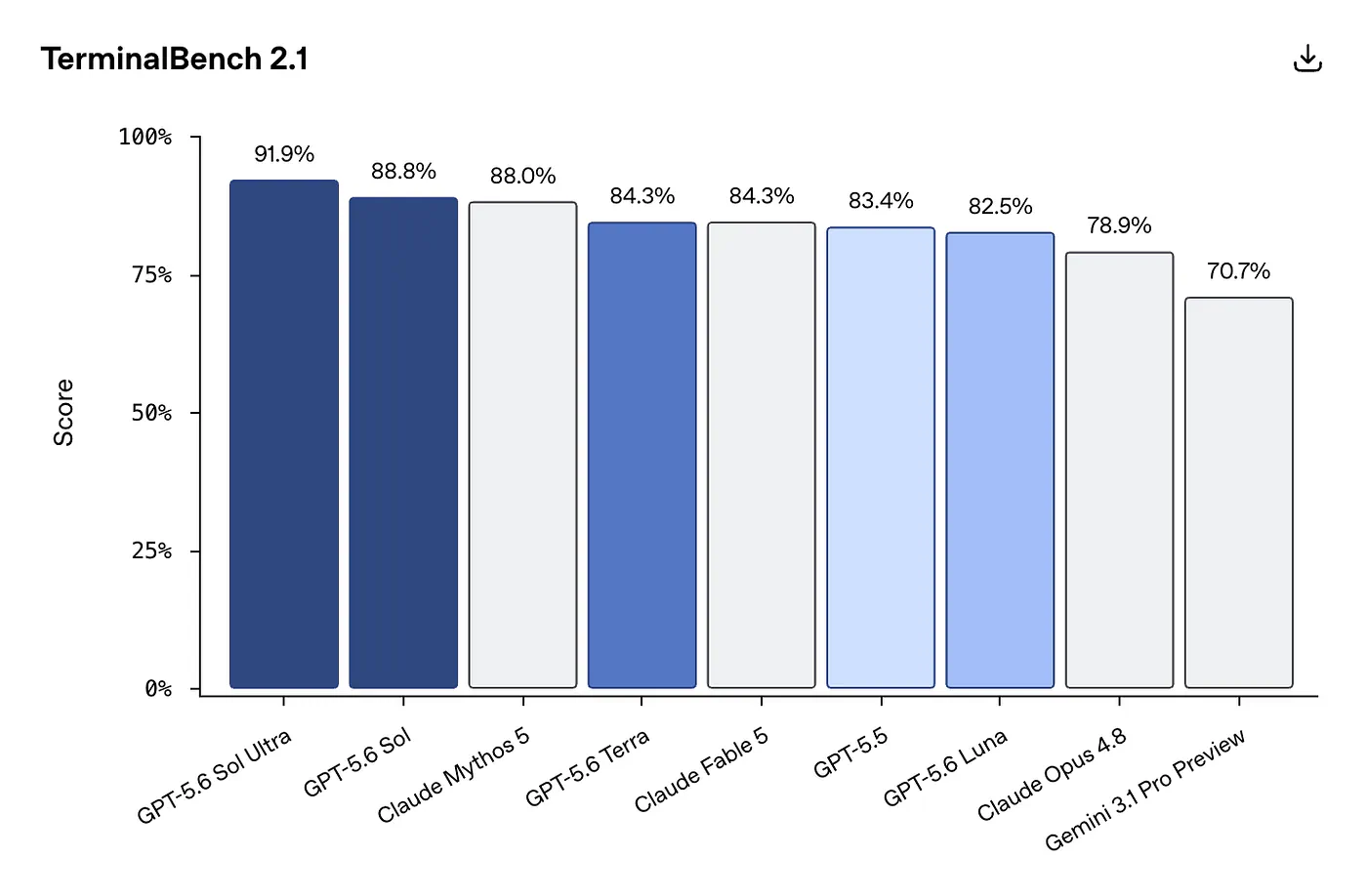
GPT 5.6 in TerminalBench 2.1. Bemchmark from OpenAI
The new max reasoning level goes beyond the previous xhigh setting. Sol Ultra goes further by coordinating four agents by default, trading higher token usage for stronger results and faster parallel investigation.
GPT-5.6 also supports Programmatic Tool Calling. Instead of repeatedly sending individual tool requests back and forth, the model can write small programs that call tools, process intermediate results, and return the final output.
For coding agents, that can reduce unnecessary round trips when searching a repository, comparing files, or processing large amounts of structured output.
How Sol compares with GPT-5.5 and Claude
OpenAI’s benchmark results show a real improvement over GPT-5.5, but the comparison with Claude is more complicated.
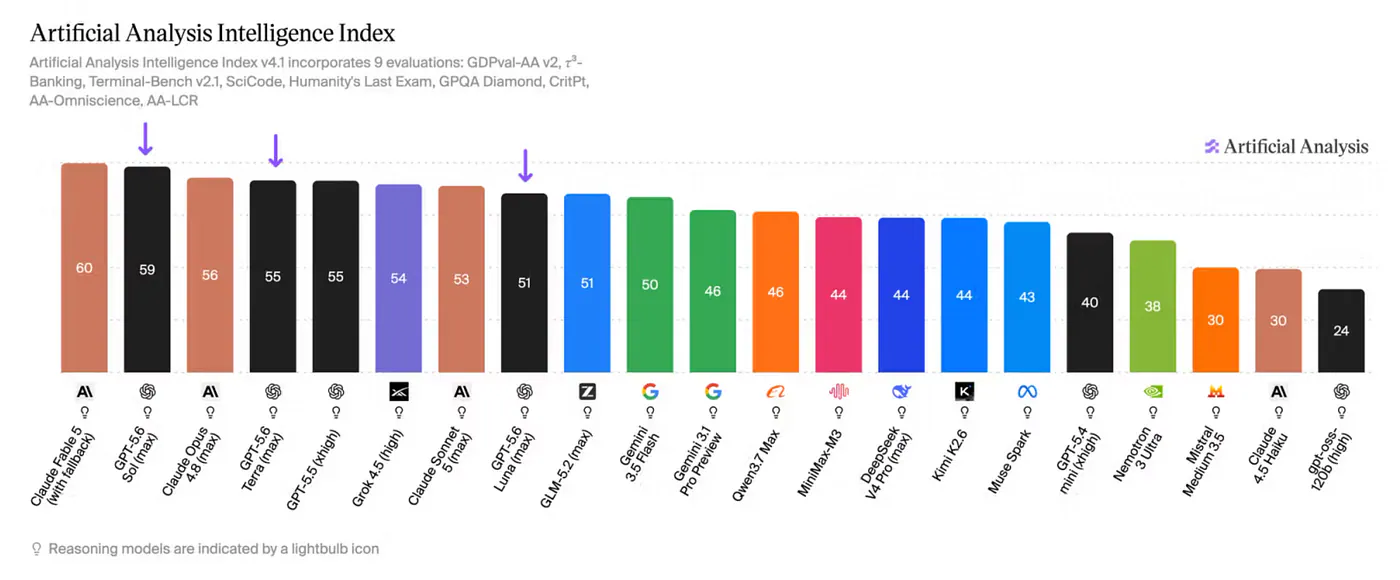
Fable 5 and GPT 5.6 Sol in Artificial Analysis benchmark
Here are three useful results from OpenAI’s published evaluations:
- On the Artificial Analysis Coding Agent Index, Sol scored 80. GPT-5.5 scored 76.4, Fable 5 scored 77.2, and Opus 4.8 scored 72.5.
- On Terminal-Bench 2.1, Sol reached 88.8%, while Sol Ultra reached 91.9%. GPT-5.5 scored 85.6%, Fable 5 scored 83.1%, and Opus 4.8 scored 78.9%.
- On SWE-Bench Pro, Fable 5 remained ahead at 80%. Opus 4.8 scored 69.2%, Sol scored 64.6%, and GPT-5.5 scored 59.4%.
That last result is important. Sol does not automatically beat Claude on every software engineering benchmark.
It appears especially strong on terminal tasks, tool-heavy workflows, and broader agentic coding evaluations. Fable 5 still performs better on some repository-level bug-fixing tests.
Sol also costs $5 per million input tokens and $30 per million output tokens. That places it above Opus 4.8’s $5 and $25 pricing, but below Fable 5’s $10 and $50 pricing.
In practice, I would not choose between them based on one leaderboard. The task, agent harness, reasoning level, and number of tool calls can change the result just as much as the model itself. That is where Claude Code becomes interesting.
Two ways to use Sol inside Claude Code
There are currently two practical methods.
- The first uses OpenAI’s official Codex plugin for Claude Code. Claude remains the main agent, but it can call Codex for reviews, adversarial checks, and rescue tasks.
- The second uses a local proxy. This routes Claude Code’s Anthropic-style requests to OpenAI and makes GPT-5.6 Sol the main model behind the terminal session.
These approaches may look similar from the outside, but they behave very differently.
Option 1: Use the official Codex plugin
For most people, this is the method I would recommend starting with.
OpenAI maintains an official Claude Code plugin called codex-plugin-cc. It adds Codex commands directly to Claude Code without replacing Claude as the primary model.
Before installing it, make sure the following are available:
- Claude Code
- Node.js 18.18 or newer
- A ChatGPT subscription with Codex access or an OpenAI API key
- A recent version of the Codex CLI
OpenAI currently recommends Codex CLI version 0.144.0 or newer for GPT-5.6. Open Claude Code and add the OpenAI plugin marketplace:
/plugin marketplace add openai/codex-plugin-cc
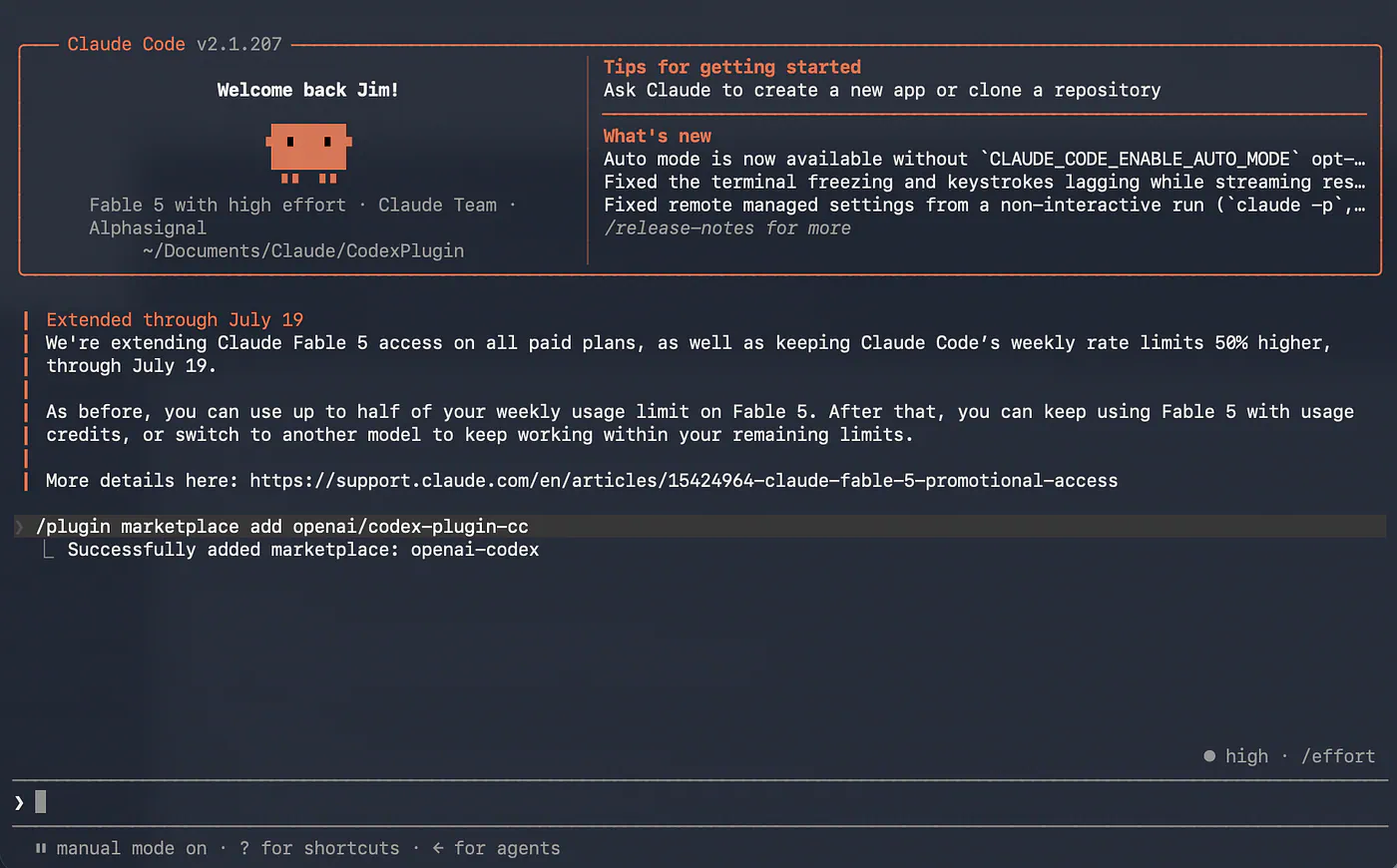
Installing Codex plugin in Claude Code. Image by Jim Clyde Monge
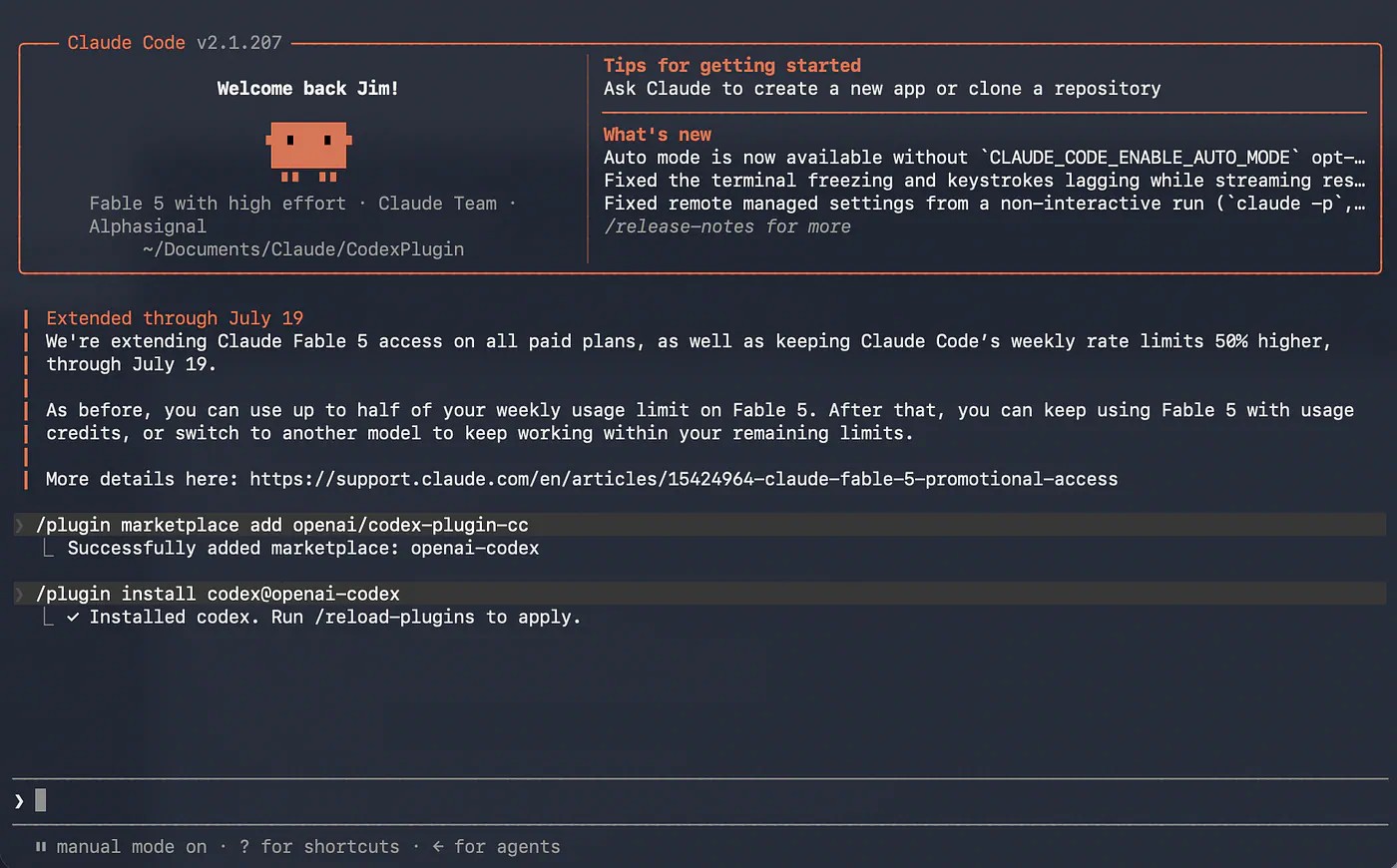
Make sure that you see the “Successfully added marketplace: openai-codex” message before you continue. Next, install the Codex plugin:
/plugin install codex@openai-codex
Installing Codex plugin in Claude Code. Image by Jim Clyde Monge
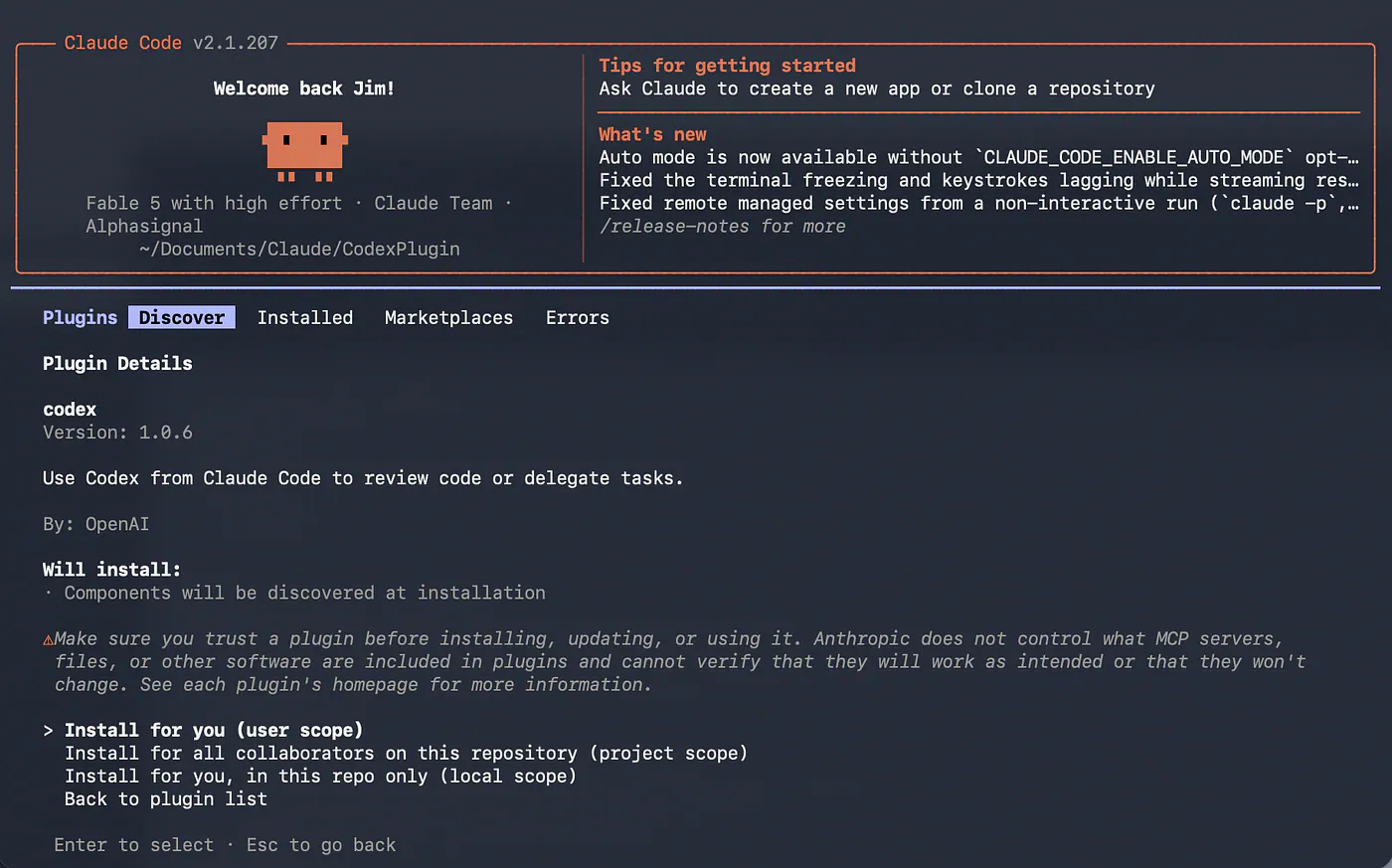
Notice that you will be asked to choose which scope you want the plugin to be installed.
- Install for you (user scope)
- Install for all collaborators on this repository (project scope)
- Install for you, in this repo only (local scope)
In my case, I usually select the user scope so it applies to any of my personal projects in the future.
Installing Codex plugin in Claude Code. Image by Jim Clyde Monge
Again, make sure that you see the “Installed Codex” message before you continue. Reload the installed plugins:
/reload-plugins
Finally, run the setup command:
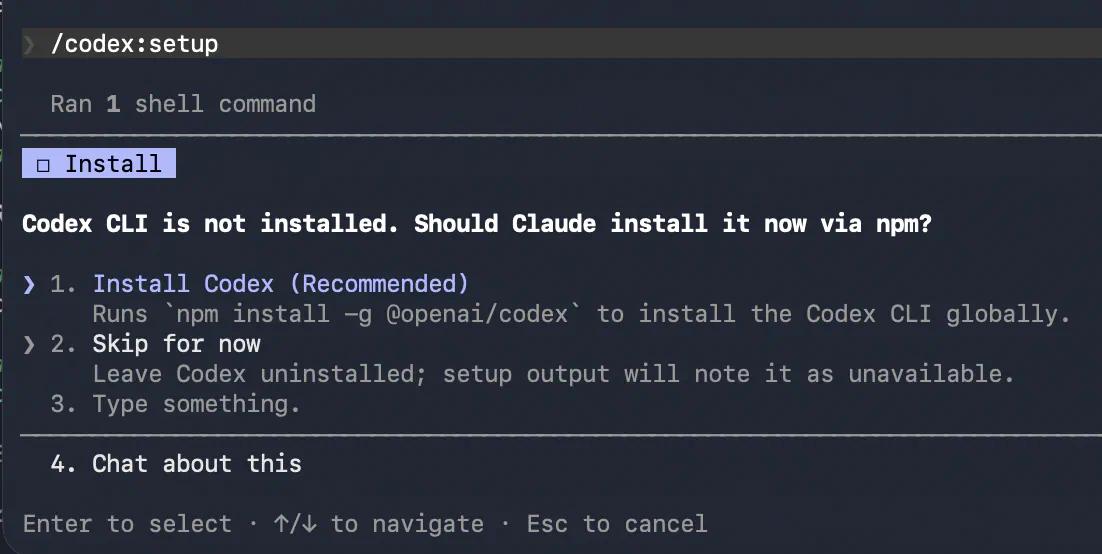
/codex:setup
The setup command checks whether Codex is installed and authenticated. When npm is available, it can also install the required CLI automatically.
Installing Codex plugin in Claude Code. Image by Jim Clyde Monge
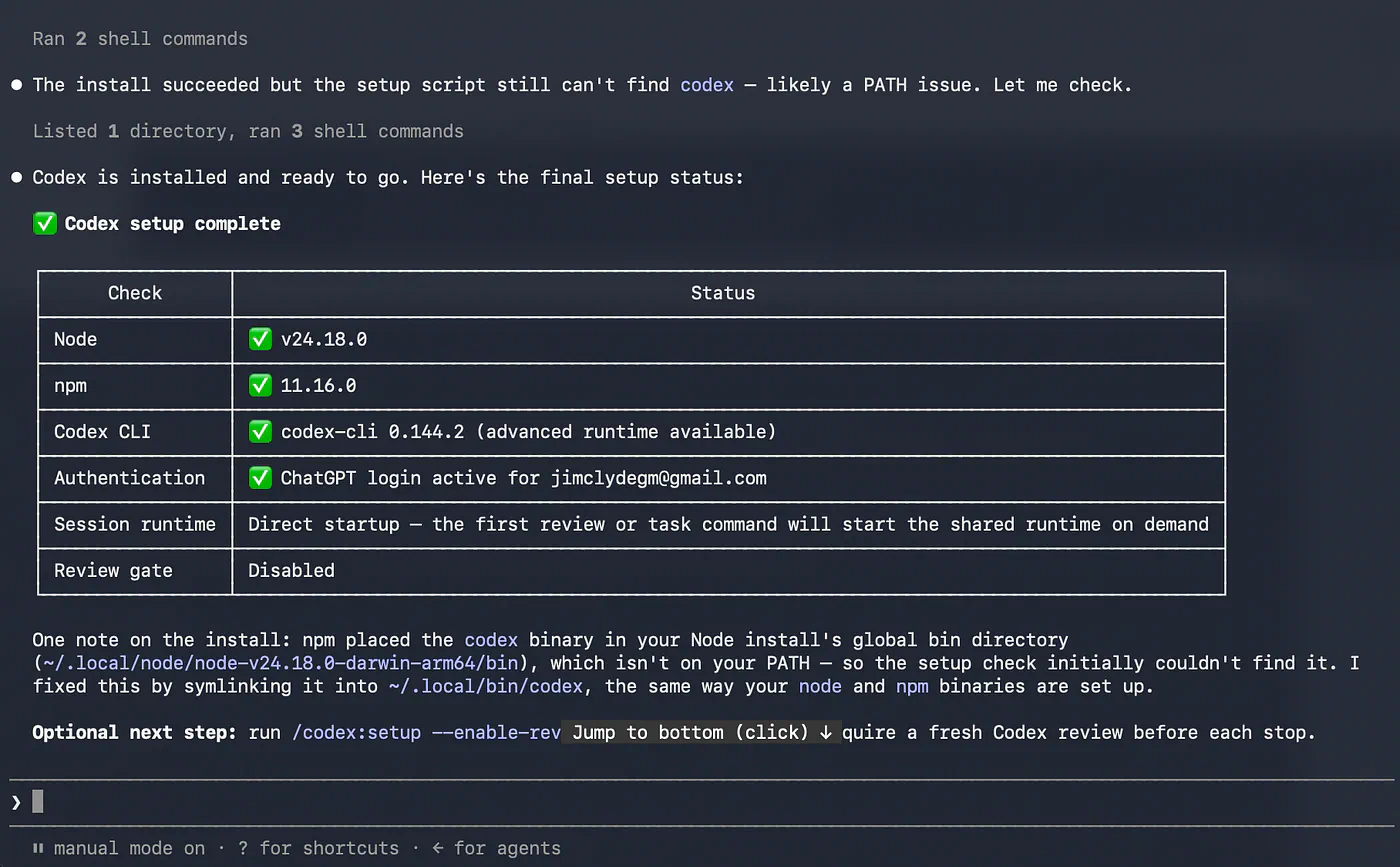
Select “Install Codex” if it is not already installed on your system. Follow the on-screen instructions to properly install Codex on your system. Once done, you should see the messages below.
Installing Codex plugin in Claude Code. Image by Jim Clyde Monge
Confirm that all the checkmarks are green. That’s an indicator that you are ready to go. To install Codex manually, run this command outside Claude Code:
npm install -g @openai/codex
Then return to Claude Code and authenticate through the shell:
!codex login
Once setup is complete, several new slash commands become available.

Running Codex plugin in Claude Code. Image by Jim Clyde Monge
That unlocks /codex:review, /codex:adversarial-review, and /codex:rescue. Claude writes, GPT critiques, you ship.
You can now do something like:
Prompt: Using the Codex CLI (already authenticated on this machine), scaffold a new NextJS web application for my new personal website.
Review Claude’s code with Sol
The simplest command is:
/codex:review
This asks Codex to inspect the current uncommitted changes or compare the branch against its base.
Claude can write the implementation, and Sol can look for bugs, regressions, missing tests, or unsafe assumptions. The review runs in read-only mode, so Codex will not modify the files.
A branch-specific review can be started with:
/codex:review --base main
Longer reviews can also run in the background:
/codex:review --base main --background
You can continue working in Claude Code and check the task later using:
/codex:status
Then retrieve its output with:
/codex:result
Run an adversarial review
For a more aggressive evaluation, use:
/codex:adversarial-review
This is more interactive than the standard review. It is designed to challenge the implementation, question the architecture, and look for problems involving authentication, race conditions, data loss, rollback behavior, and reliability.
I would use this after implementing a feature that touches payments, permissions, migrations, or other sensitive parts of an application.
The value here is not that Sol is always smarter than Claude. It is that a second model may notice assumptions the first model accepted without questioning.
Hand a difficult task to Codex
The rescue command lets Claude delegate an implementation or debugging task directly to Codex:
/codex:rescue
It can also specify the model and reasoning effort:
/codex:rescue --model gpt-5.6-sol --effort high
For a difficult task, I could use:
/codex:rescue --model gpt-5.6-sol --effort max --background
The rescue command is useful when Claude has become stuck, keeps repeating the same fix, or needs a separate investigation.
It also supports resuming an existing Codex thread, starting a fresh thread, waiting for completion, or running in the background.
Enable the optional review gate
The plugin can block Claude from ending the task until Codex has reviewed the changes:
/codex:setup --enable-review-gate
This sounds useful, but I would enable it carefully. When Codex keeps finding new issues, and Claude keeps applying fixes, the session can enter a review loop. That can consume a large amount of both Claude and Codex usage before the task is considered complete.
For most projects, manually running /codex:review before committing gives me more control.
Option 2: Make Sol the main Claude Code model
The official plugin lets Claude delegate tasks to Codex, but Claude still controls the main session.
To make GPT-5.6 Sol the primary model, Claude Code needs to send its requests through a compatible proxy.
A commonly shared setup uses CLIProxyAPI. It provides compatible interfaces for Claude, OpenAI, Gemini, and Codex, and can authenticate with Codex through OAuth.
This is a community-driven method rather than an officially supported Claude Code configuration. It may break when Anthropic or OpenAI changes an API format, authentication flow, or tool schema. I would treat it as an experiment, not as the safest setup for production work.
On macOS, install CLIProxyAPI with Homebrew:
brew install cliproxyapi
Start it as a background service:
brew services start cliproxyapi
Linux users can use the installation script provided by the project, while Windows users can download the executable or use its desktop interface.
Log in to Codex. Run the Codex OAuth login command:
cli-proxy-api --codex-login
Depending on the installation method, the executable may instead be named:
./cli-proxy-api --codex-login
The command opens the OpenAI authorization page in a browser. On a remote server, add --no-browser to print the login URL instead.
Point Claude Code to the proxy. Add the following values to ~/.zshrc on macOS or ~/.bashrc on many Linux installations:
export ANTHROPIC_BASE_URL=http://127.0.0.1:8317
export ANTHROPIC_AUTH_TOKEN=sk-dummy
ANTHROPIC_BASE_URL tells Claude Code to send requests to the local proxy instead of Anthropic.
The token authenticates Claude Code against the local server. It is not the OpenAI API key used by Codex. Use the local token configured by the proxy when authentication is enabled.
Now add the alias:
alias claudex='CLAUDE_CODE_SUBAGENT_MODEL=gpt-5.6-sol \
CLAUDE_CODE_ALWAYS_ENABLE_EFFORT=1 \
CLAUDE_CODE_MAX_TOOL_USE_CONCURRENCY=3 \
ENABLE_TOOL_SEARCH=false \
claude --model gpt-5.6-sol'
Reload the shell configuration:
source ~/.zshrc
Then launch the modified Claude Code session:
claudex
The command still opens the familiar Claude Code terminal interface, but requests are routed through the local proxy to GPT-5.6 Sol. This setup was popularized through community posts showing Sol running as the main model while Claude Code remained the agent interface.
Be careful when copying the alias from social media. It must use normal straight quotes and two regular hyphens in --model.
Curly quotation marks and an en dash may look almost identical, but the shell will not interpret them correctly.
What the environment variables do
CLAUDE_CODE_SUBAGENT_MODEL tells Claude Code to use Sol when it creates subagents. Claude Code officially supports selecting subagent models through environment variables, agent configuration, or per-invocation settings.
CLAUDE_CODE_ALWAYS_ENABLE_EFFORT=1 attempts to keep effort controls enabled for the proxied model. This is an advanced compatibility flag and may cause errors after Claude Code updates.
When subagents fail because of unsupported effort settings, remove that line and test the alias again.
CLAUDE_CODE_MAX_TOOL_USE_CONCURRENCY=3 limits how many tool calls can run simultaneously. This can prevent Sol from creating too many parallel operations and consuming tokens too quickly.
ENABLE_TOOL_SEARCH=false disables Claude Code’s deferred tool-search behavior. Some proxy versions have had trouble translating those tool definitions correctly, so disabling it can avoid request validation errors.
Claude Code also supports effort controls through /effort, command-line flags, environment variables, settings files, and subagent configurations.
What is the point of running Sol inside Claude Code?
This was my first question as well.
OpenAI already has Codex. Why add another layer and run its model through a terminal tool built by Anthropic?
After looking through community discussions and testing how these systems are structured, I think there are several good reasons.
Claude Code has a very good agent harness
A coding model does not operate alone. The surrounding agent decides how files are searched, how plans are updated, when subagents are created, how commands are executed, and how context is compressed.
Developers comparing coding agents repeatedly point out that the harness can have as much impact as the underlying model. Some users report better results from the same model when it is placed inside Claude Code’s more dynamic workflow instead of a simpler plan-and-execute loop.
The proxy approach lets me test Sol’s reasoning while keeping much of Claude Code’s familiar terminal experience.
I still get the project workflow I already know. I can use repository instructions, interact with files, approve commands, and manage the session without learning a completely different interface.
Not every Claude-specific feature is guaranteed to work through a proxy, but the basic experience remains familiar.
Two models can catch different mistakes
The official plugin creates an interesting division of work.
Claude can explore the repository and write the implementation. Sol can review the diff, challenge the assumptions, or take over when Claude becomes stuck.
Using the same model to write and review code can produce correlated mistakes. The reviewer may agree with the same architectural assumption because it reasons in a similar way.
A different model gives me a more independent second opinion.
I especially like this for migrations, authentication flows, caching logic, concurrency, and payment code. These are areas where a change can look correct locally but fail under unusual conditions.
I can route tasks based on difficulty
Not every coding task needs Sol at maximum effort.
Renaming a component, updating copy, or writing a basic unit test does not need four parallel agents. Sol Ultra may finish the task, but it can also burn far more tokens than necessary.
One community test described Sol Ultra as a “token furnace” and used Sol as the planner while delegating smaller tasks to Terra. That kind of model routing is one of the more practical reasons to use Claude Code as the orchestration layer.
I could reserve Sol with maximum effort for architecture, difficult debugging, and repository-wide analysis. Smaller subagents can handle searches, documentation, tests, or routine edits.
This is also possible through the official plugin because /codex:rescue accepts both model and effort settings.
I do not need to leave the terminal
There is also a simpler benefit.
I do not need to copy the same issue into Claude Code, Codex, a browser chat, and another review tool. I can keep the task inside one terminal session and call the second model only when needed.
That reduces context switching and makes the review process easier to repeat.
For me, the strongest workflow is not necessarily Sol replacing Claude. It is Claude and Sol working on different parts of the same task.
Which method should I use?
I would choose the official plugin for most daily work.
It is maintained by OpenAI, takes only a few commands to install, and creates a clean division of responsibility. Claude remains the main coding agent, while Codex becomes a reviewer, adversarial tester, or backup developer.
The proxy is more interesting when I specifically want to test GPT-5.6 Sol inside the Claude Code harness.
It gives Sol more control, but it also introduces more moving parts. Proxy updates, OAuth sessions, unsupported environment variables, and tool-format changes can all cause problems.
Some users have also reported early compaction, lost project grounding, or incorrect assumptions during long Sol sessions. The model may perform extremely well on one task and still need active supervision on another.
For experimentation, that tradeoff may be acceptable. For important client work, I would keep the official workflow available as a fallback.
Final thoughts
GPT-5.6 Sol is one of the best coding models OpenAI has released, particularly for terminal tasks and tool-heavy agent workflows. Based on my experience and also in benchmarks, it does not always beat Claude, but it gives developers another serious option instead of forcing every project into one model ecosystem.
For now, I prefer the official Codex plugin. Claude Code can handle the main implementation, then Sol can review the changes or investigate problems Claude could not solve. The setup is simple, and I keep control over when the second model consumes tokens.
The proxy method is the more exciting experiment because it separates the model from the agent interface. It shows that the best coding setup may not come from one company. I can take the model I prefer, place it inside the workflow I prefer, and choose the right model and effort level for each task.
But this is a nice to know setup. Go try it and compare to your current setup. Who knows, maybe you’ll find this more powerful and useful in your dev workflows.
If you get into errors or you have any questions with the steps above, let me know in the comments.
Sources
- GPT-5.6 Solopenai.com
- Claude Fable 5anthropic.com
- Artificial Analysis Coding Agent Indexartificialanalysis.ai
- Jim Clyde Mongemedium.com


