
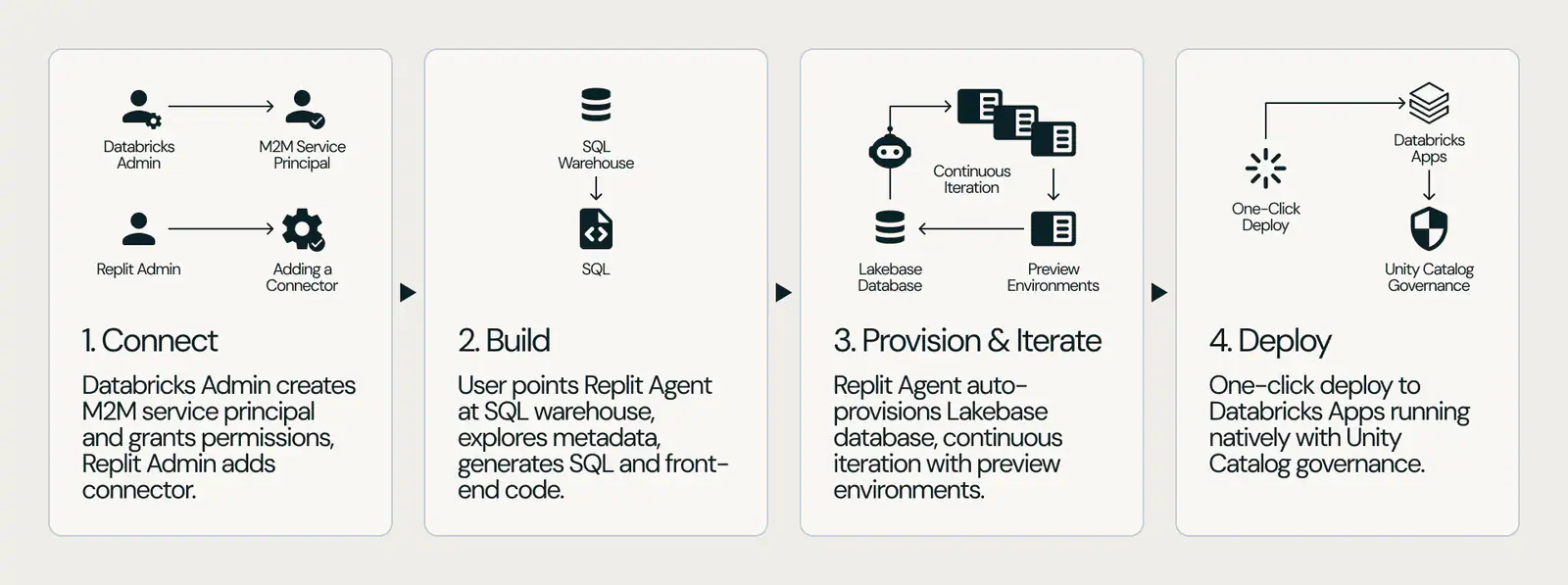
Replit Agent can build an application over governed Databricks data, deploy it as a Databricks App, and automatically provision Lakebase Postgres for application state, according to Databricks. Its new walkthrough puts that path into four steps, with an estimated setup time of 15 minutes. The prerequisites are less casual: two administrators, a Replit Enterprise subscription, and an eligible Databricks workspace.
The October 8, 2026 guide is implementation guidance, not a new product launch. Replit announced general availability with native Lakebase support on September 10, following a public preview introduced in June.
What the October guide adds is a concrete deployment recipe. It identifies who creates the connection, which credentials the builder uses, how the agent reaches a SQL warehouse, and where the finished application runs. Those details matter more than another demonstration of an AI-generated interface: they help enterprise teams assess whether a business user's prompt can become an internal application without bypassing their existing data-access controls.
The 15-Minute Path Starts With Enterprise Prerequisites
Databricks describes getting started as requiring approximately 15 minutes and three roles: a Databricks administrator, a Replit organization administrator, and a Replit Enterprise user who builds the application. One person might hold multiple responsibilities, but the walkthrough still depends on administrative actions in both platforms.
The organization must have Replit Enterprise. This is not a setup path documented for an individual Replit subscription or a free account.
The Databricks requirement is equally important. The walkthrough specifies a standard workspace without a compliance security profile. Teams using such a profile should not assume these instructions apply unchanged, or disable security controls merely to follow the recipe. They need to establish an approved configuration before proceeding.
That restriction is a boundary of the documented walkthrough. It should not be stretched into a claim that every possible Replit integration is incompatible with compliance-enabled workspaces.
The time estimate also needs a narrow reading. Databricks presents it as a getting-started estimate, not an independently measured guarantee that an arbitrary production application can be designed, reviewed, tested, and approved in a quarter of an hour.
The Four Steps Connect Administration to App Creation
The walkthrough uses a service-principal connector for shared access. A service principal is a nonhuman identity with assigned permissions, allowing an application or service to authenticate without using a person's login.
Create the Databricks Service Principal
The Databricks administrator begins in the Account Console. They create the service principal, generate its client ID and secret, and assign it to the target workspace.
The administrator then grants the permissions the connection needs. Databricks identifies access to the SQL warehouse and the relevant catalogs and schemas as typical requirements.
This is the first consequential security decision. Giving the connector access to a narrowly defined dataset creates a different exposure than granting broad workspace access. The guide's requirement for “appropriate permissions” leaves teams responsible for deciding what the agent and application should actually be allowed to reach.
Add the Connector in Replit
The Replit organization administrator adds a Databricks service-principal connector in the organization's connector settings and enters the client ID and secret created in the first step.
Databricks also describes optional role-based access controls for deciding which Replit users can use that connector.
These permissions govern a different boundary from the Databricks grants. Databricks determines what the service identity can access; Replit's connector controls determine which builders can use that identity. Restricting only one side would leave the other decision unresolved.
Activate the Connection in a Project
The Replit Enterprise user activates the Databricks connector in their project and supplies the SQL warehouse's HTTP path and server hostname.
This connects the project to the warehouse that will serve governed analytical data. It is separate from the Lakebase database used for the application's own persistent state.
That separation is useful when planning an app. A warehouse might supply sales figures or operational metrics, while the application needs somewhere else to store comments, approval decisions, or workflow progress. The integration combines those two needs rather than treating the analytical warehouse as the destination for every application write.
Prompt, Preview, and Deploy
The builder describes the application in plain language, naming the warehouse and data it should use. Databricks says Replit Agent then explores the schema, generates queries, and builds the front end.
The guide instructs users to test in the preview environment before deploying to Databricks Apps with a single action. Lakebase provisioning happens automatically when the application is deployed.
Replit's September announcement says its automated preview deployments create a separate environment that keeps test data isolated from live business data. It also describes a supervised migration flow requiring team approval before database changes are pushed live. Those are vendor-described safeguards, not evidence that every generated application has been independently validated.
The deployment destination is worth emphasizing: the finished application runs as a Databricks App, rather than merely remaining a Replit-hosted interface connected to a remote warehouse.
Shared Credentials and User Identity Are Different Choices
The guide documents two connection models. Its walkthrough uses machine-to-machine authentication through a shared service principal, while the alternative user-to-machine connector uses each builder's Databricks identity and permissions.
The distinction changes whose authority governs access during development.
With a shared connector, the service principal's grants define the available data. Replit's optional connector restrictions can limit which builders use it, but those restrictions do not turn the shared identity into each builder's personal Databricks identity.
With a user-to-machine connector, access follows the individual builder's Databricks permissions. That may be the more suitable starting point where different employees are entitled to different datasets. The walkthrough does not provide the same step-by-step treatment for that option.
Production users introduce another identity question. Databricks says deployed Apps inherit authentication, access controls, and integration with Unity Catalog. Its franchise-performance example describes passing through each production user's token so franchise owners can see only data they are authorized to access.
Teams should distinguish that runtime behavior from the credentials used to build the app. A shared development connector does not, by itself, demonstrate that every generated application's queries will enforce the intended restrictions for every production user.
A useful acceptance test is therefore specific: sign in as users with different entitlements and verify what each can read and change. The existence of platform authentication is not a substitute for confirming that the generated application uses the intended identity at the data-access boundary.
Lakebase Gives the App Somewhere to Store Its Own State
The integration's practical value extends beyond generating a dashboard. Databricks describes Lakebase Postgres as managed transactional storage for app-specific information, including user inputs and execution state.
Sources
- October 8, 2026 guidedatabricks.com
- general availability with native Lakebase supportreplit.com