
Anthropic’s Claude Code, OpenAI’s Codex and Cursor can use Shpyrd to deploy applications, inspect logs and metrics, and manage releases through the same commands a developer would use, according to its product documentation. The beta targets the step after an AI coding agent gets an application working locally: putting it online and keeping it running.
Shpyrd combines hosting with TLS, an application sign-in layer, Postgres, Valkey, persistent storage and rollback controls. Developers can use its managed cloud or run the MPL-2.0 open-source platform on their own Kubernetes infrastructure.
This is a deployment product for AI-built applications. Its usefulness depends on whether an existing coding agent can reliably operate a defined set of infrastructure tools; it makes no promise that AI can autonomously manage every cloud problem.
There are limits to that offer. Shpyrd is explicitly in beta, its documented self-hosting support is narrower than its broad cloud positioning suggests, and its founder says moving existing applications from other providers is not yet easy.
The Agent Gets Deployment Tools, Not a New Cloud Brain
Shpyrd gives an existing coding agent access to application operations through its CLI and MCP layer. MCP, or Model Context Protocol, lets assistants call external tools. Here, those tools connect the assistant that built an application to the platform running it.
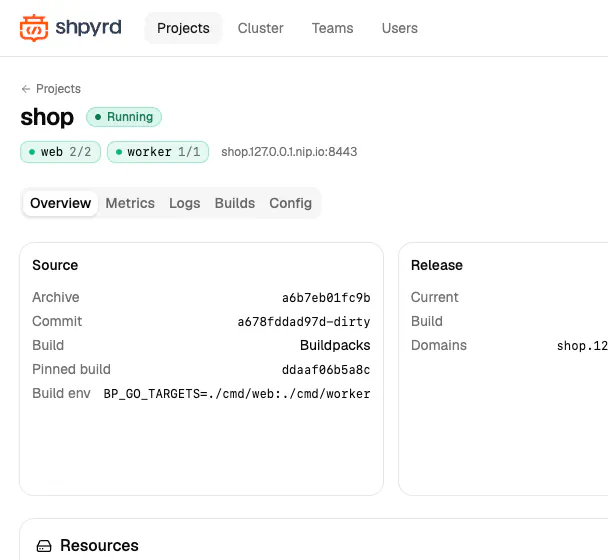
The GitHub repository describes a conventional PaaS underneath: Kubernetes infrastructure, buildpack and Dockerfile builds, releases, configuration variables, logs, metrics and a dashboard. With defined operations available, the agent can invoke them, inspect their results and decide what to do next without inventing a deployment process each time. A human can perform the same operations through the CLI or dashboard.
Deployments can start from a local project or a Git repository. Buildpacks support application stacks without a custom Dockerfile; projects needing their own container build can supply one. The documentation says Git-based buildpack deployments can rebuild automatically when new commits arrive on the configured branch.
A documented CLI sequence illustrates the workflow:
shpyrd projects create "My Service" --save
shpyrd deploy
shpyrd logs -f --process web
shpyrd releases
shpyrd rollback 2
The final command re-releases version 2. It does not automatically select whichever release immediately preceded the current one. In the agent workflow, natural-language instructions sit above these identifiable deployment actions.
Separate web and worker processes, scaling, configuration changes and one-off commands are also supported. Shpyrd can therefore serve applications with background jobs and operational tasks, extending its scope beyond publishing a static page.
Hosting Includes Identity, Databases and Observability
Shpyrd’s built-in sign-in layer is particularly relevant to internal tools created with AI. New projects require visitors to sign in, and access can be granted to named people or teams before requests reach the application.
The repository documents identity headers and a signed JWT that applications can verify. Developers can also make an application public. For sharing a tool with colleagues, this provides a useful starting point without first building a complete login system.
The sign-in layer is still only an access gate. Application-specific permissions, input handling and data exposure remain separate security questions.
Postgres, Valkey and persistent volumes can live alongside the application in the same project. Attaching a database or cache injects connection details such as DATABASE_URL and REDIS_URL, reducing the configuration work between provisioning a service and using it.
Shpyrd says its observability covers requests, response times, errors, CPU and memory for web processes and workers, with releases marked on the charts. An assistant can use that evidence to investigate whether a slowdown or error spike followed a deployment.
The homepage illustrates an agent comparing latency before and after a release, checking logs and proposing a rollback. This is a vendor demonstration of the intended workflow, not an independently measured incident or performance result. Having deployment history and operational evidence in one place is useful, but it does not establish that an agent will correctly diagnose every failure.
Rollback Restores a Release, Not Necessarily Your Data
The repository specifies that rollback restores a release’s build and configuration variables. Attached resource connection details are also recorded in releases and restored by rollback.
An operator can return to a known application build and its associated configuration, giving recovery a more concrete path than asking an assistant to edit code until the application works again.
Database recovery needs a separate plan. Do not assume that a documented release rollback reverses a schema migration, restores deleted records or undoes external actions performed by a worker.
Automatic repair deserves similar caution. In the Show HN discussion, the founder, posting as patricknegri, said the deployment workflow could use AI to fix code and add required configuration or databases.
One commenter, xhampsme, reported deploying through Claude Code with a simple prompt and said Claude resolved a deployment problem. That remains an attributed early-user anecdote, not independent validation of general repair capability or a representative account of user experience.
A sensible initial trial would deploy a small application, introduce a controlled failure, inspect the logs and verify what rollback restores. Successful deployment alone does not establish safe ongoing operation.
Free Hosting Has a Tight Memory Budget
Shpyrd’s published pricing separates a limited free tier from paid plans with monthly minimums and usage billing.
| Managed tier | Monthly minimum | Published limits or distinguishing features |
|---|---|---|
| Free | $0 | Four projects, two CPU cores and 256 MiB of total memory; sleeps after 10 idle minutes |
| Starter | $5 | Unlimited projects within resource ceilings, custom domains and email support; sleeps after 15 idle minutes |
| Pro | $49 | Custom sleep settings, daily backups, priority support, SSO and audit logs |
| Business | $499 | Hourly backups, private network applications, VPC peering and support with an SLA |
The paid minimum covers usage up to that amount, Shpyrd says. Above it, customers pay the usage amount; the minimum is not an additional subscription fee on top of all usage.
Starter lists CPU at $0.09 per used core-hour, memory at $0.02 per reserved GiB-hour while awake, storage at $0.17 per GiB-month and egress at $0.05 per GiB. Higher tiers publish lower usage rates.
The free tier’s most consequential constraint is its 256 MiB total memory allowance, more so than its four-project limit. The repository documents a 256 MiB memory floor for each Postgres database. Under those published figures, a database alone would consume the free workspace’s memory allowance, leaving no headroom for an application.
Sources
- product documentationshpyrd.io
- GitHub repositorygithub.com
- Show HN discussionnews.ycombinator.com
- published pricingshpyrd.io