
Charles Chen published a guide to role-based agent teams on October 27, 2026, explaining how he configures Paseo to coordinate coding agents with less human prompting. The central technique is straightforward: write agent profile notes as instructions to the lead agent about whom to select, what to ask, and where responsibility ends.
This is implementation guidance, not a model release or a newly announced Paseo feature. Paseo already supports launching and coordinating agents across providers. Chen’s contribution is a more prescriptive way to use those capabilities, combining profiles, reusable instructions, task-specific briefs and completion gates.
The useful distinction is between making delegation available and making delegation predictable. Comparing Chen’s approach with Paseo’s documentation shows which parts are supported product behavior and which are his own workflow choices.
Configure Profiles for the Agent Doing the Delegating
Paseo’s official documentation describes profiles as saved bundles of provider, model, mode, thinking level and available feature settings. They also contain notes explaining when an orchestrating agent should choose them.
To create one:
- Open Settings → your host → Agents → Agent profiles.
- Select New profile and name the specialty, such as Planning, UI Work or Review.
- Choose the provider, model, mode and other available settings.
- Fill in When to use with the work that profile should handle.
- Save it on the host where the agents will run.
Chen takes the notes field beyond a simple specialty label. His architectural-adviser example tells the lead to request design alternatives and research, while explicitly keeping that worker away from implementation:
“DO NOT CODE; only research, ideate, expand solution space, provide feedback.”
That wording matters because the lead agent is the immediate audience. Through Paseo’s list_profiles tool, it can inspect available profiles and their notes before choosing how to launch a worker. Chen uses those notes to influence both the selection and the assignment the lead constructs.
The official documentation supports that mechanism, but it stops short of prescribing Chen’s detailed instruction style. Its boundary is explicit:
“Notes guide that choice; put the worker's actual assignment in its task prompt.”
My view is that this separation is the strongest part of the guide. A reusable profile can describe how to involve an architectural adviser without accumulating every project’s requirements. The actual task, files and acceptance criteria belong in the launch brief.
Two operational details are easy to miss: profiles are saved per host, and changing one affects future selections, not agents already launched. Updating a profile is therefore not a way to redirect a worker already halfway through an assignment.
Put Shared Rules Above Task-Specific Briefs
Chen’s workflow uses three instruction layers:
- Profile notes: when to select a specialist and how to brief it.
- Shared instructions: coordination rules that should apply across assignments.
- Launch prompts: the concrete job, scope, teammates and completion conditions for one worker.
A shared prompt should contain stable rules, not the current feature specification. For example, this is an illustrative adaptation of the workflow, not a verbatim prompt from Chen:
Before delegating, inspect the available profiles and their notes.
Choose a profile that fits the work.

Give every worker a concrete objective, an allowed scope,
completion gates, and a reporting destination.

Keep research-only assignments separate from implementation.
Ask workers to report blockers and failed checks explicitly.
These instructions tell the lead how to organize work. They do not supply a worker’s actual objective or prove that the resulting work is correct.
Paseo has a host-level shared prompt represented as appendSystemPrompt. The third-party profile-pack plugin’s documentation describes how it preserves and transfers that prompt, and says shared-prompt changes affect agents when sessions start or restart. The plugin is optional; it is useful evidence about configuration handling, not a prerequisite for Chen’s approach.
That timing has a practical consequence: after changing shared instructions, start a fresh session or restart the relevant one before evaluating the new behavior. Otherwise, a comparison may mix old instructions with new profile settings.
Give Every Worker a Brief and a Finish Line
Chen publishes a structured briefing pattern covering role, lead role, objective, details, scope, team, gates and communications.
Those fields answer different questions. Role describes the worker’s function. Scope limits its assignment. Gates define what must happen before it reports completion. Communications specify where results and blockers go.
Here is a task-specific example built from that structure:
Role: Reviewer.
Lead role: Implementation coordinator.
Objective: Review the proposed settings-page change.
Details: Check error handling, accessibility, and test coverage.
Scope: Inspect the diff; do not edit files.
Team: An implementation worker owns code changes.
Gates: Report findings with file references. Identify missing checks
       and distinguish confirmed problems from open questions.
Communications: Send the review and unresolved issues to the lead.
This example does not execute anything or create an agent. It shows the information a lead could include when launching a reviewer.
The completion gate is especially useful. “Review this change” leaves the output format and stopping point open. Requiring file references, missing checks and unresolved questions makes the handoff more inspectable.
For an implementation worker, a gate could instead require named tests and a report of their results. The lead should distinguish a worker’s claim that checks passed from the supporting tool output.
Scope instructions also need the right interpretation. “Do not edit files” is a behavioral instruction, not a permission boundary. If preventing writes is essential, use appropriate tool permissions or isolation. Paseo’s profile notes should not be mistaken for access controls.
I’d start with a small team: an implementer, an independent reviewer and, when needed, a research-only adviser. Each extra role creates another briefing and handoff. A specialist earns its place when it has a distinct question to answer or responsibility to own.
Enable Tools, Then Treat Compaction as a Tuning Choice
Chen recommends enabling Paseo tools, browser tools and orchestration skills. He also suggests a 300,000-token autocompact threshold for Anthropic models in multi-agent use. These recommendations have different levels of support in the opened documentation.
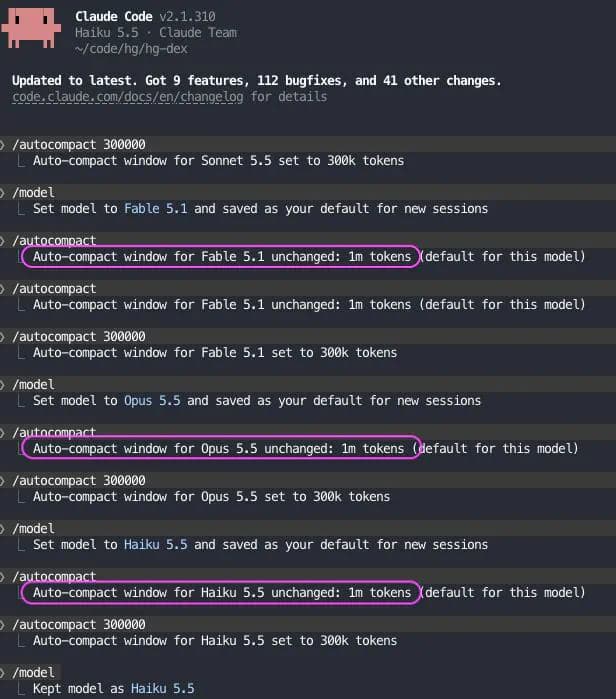
| Component | Documented capability | Chen’s additional guidance |
|---|---|---|
| Paseo tools | Expose profiles and support delegation | Use profile notes to shape worker selection and briefing |
| Orchestration skill | Instructs agents to inspect profiles before delegating | Make it part of the configured workflow |
| Browser tools | Paseo includes browser functionality | Enable browser tools for the agent team |
Frequently Asked Questions
3 questions
1Do Paseo Profile Notes Become the Worker’s Assignment?
No. The notes guide the orchestrator’s choice of profile. The worker’s concrete assignment belongs in its task prompt.