FoundationForecast Unifies Time-Series AI Models | Zeniteq
Loading
Loading article
FoundationForecast Unifies Time-Series AI Models
The Python library gives forecasting teams one interface for comparing models, running backtests, detecting anomalies and supplying known-future variables.
The TimeCopilot team released FoundationForecast, an Apache-2.0 Python library that unifies diverse time-series foundation models like Chronos, TimesFM, and Timestral under a single API. By standardizing data input via a pandas DataFrame, the library simplifies forecasting, cross-validation, and anomaly detection workflows.
Crucially, the library streamlines the comparison of models that support exogenous variables, though practitioners must verify checkpoint-specific compatibility. While the unified interface reduces adapter overhead, users must still account for varying model licenses and ensure that historical backtests correctly distinguish between realized and forecasted future inputs to avoid evaluation bias.
FoundationForecast puts Amazon Chronos, Google TimesFM, Mistral Timestral and other time-series foundation models behind one Python API. The Apache-2.0 library, developed by the TimeCopilot team, provides a shared data format and three core methods: forecast, cross_validation and detect_anomalies. Its GitHub documentation also lists prediction intervals, checkpoint-specific support for exogenous variables and automatic GPU execution when available.
For forecasting practitioners, the useful change is the comparison workflow. A team evaluating demand, electricity consumption or another time-dependent signal can prepare one dataset and try multiple model wrappers without rebuilding the surrounding application for each provider.
My view is that this is the library’s strongest proposition: it makes switching candidates cheaper. Whether that produces a fair comparison still depends on the checkpoint, information available to each model and evaluation setup.
One Data Contract for Competing Models
FoundationForecast expects a pandas DataFrame with three core columns:
Column
Meaning
Practical requirement
unique_id
Identifies an individual time series
Keep identifiers consistent across the dataset
ds
Holds timestamps
Use a datetime dtype or correctly formatted ISO-8601 strings
y
Contains the observed target
Supply the historical values to forecast
The shared structure lets multiple series live in one table. A retailer, for example, could assign each product-location combination its own unique_id.
Timestamp handling deserves attention before any model comparison. The README recommends proper datetime values or ISO-8601 strings so sorting works correctly. It says the library infers frequency from regular timestamps when freq is omitted, and advises passing freq explicitly when intervals are irregular. Cross-validation and anomaly detection also convert timestamps internally where needed. These are documented behaviors in the repository’s quick-start instructions.
A common format removes a substantial amount of adapter work. It also makes preprocessing easier to inspect: the same target values and timestamps can reach every selected wrapper.
Work with Zeniteq
Promote your app with us
Reach readers exploring AI tools and workflows. Discover sponsorship and advertising options for your app.
That consistency has limits. Two models may consume different amounts of history or support different auxiliary information. A shared DataFrame is the starting point for comparison, not the complete experimental design.
Forecast, Cross-Validate and Detect Anomalies
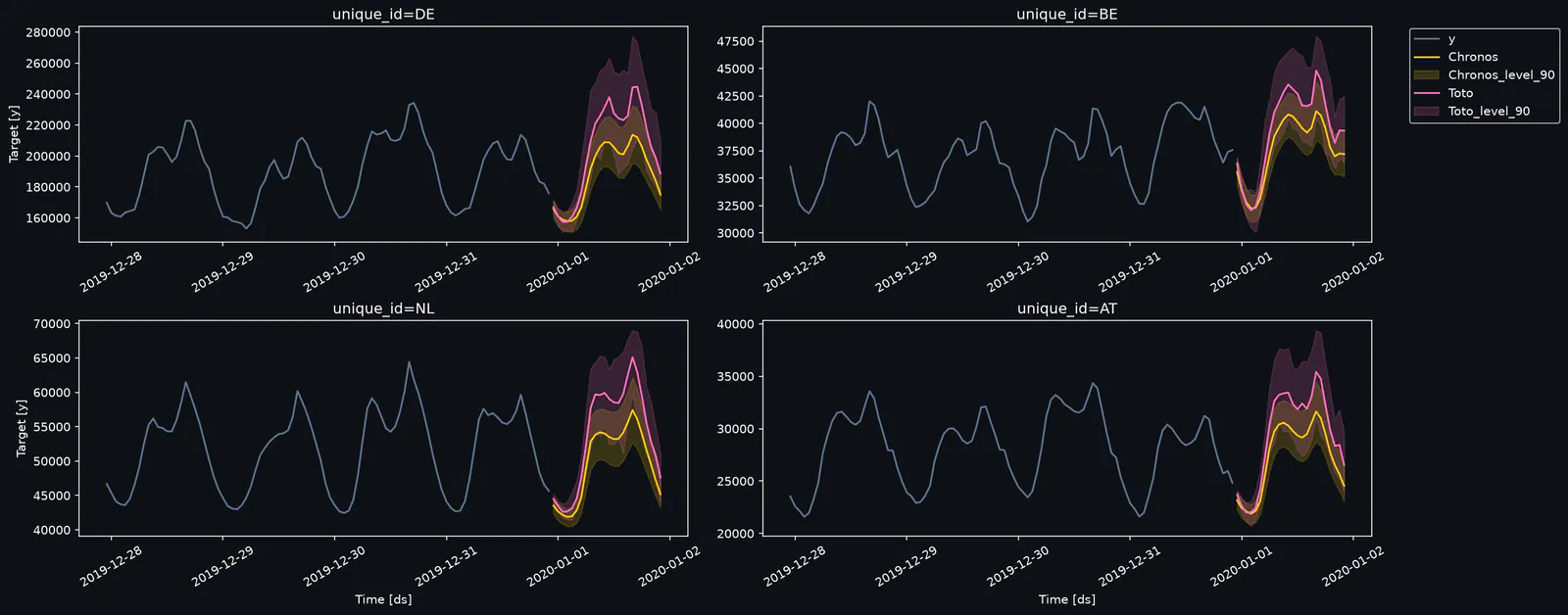
The repository’s quick-start example combines Chronos and Toto in one FoundationForecast object. The following code follows that documented pattern:
This is a documented usage example, not a result from testing performed for this article. It loads the project’s example dataset, selects two model wrappers and invokes all three core operations. The model-specific configuration remains visible: Chronos uses a particular Hugging Face checkpoint, while Toto receives a context length of 512. See the original example.
Forecasting Uses Steps, Not Fixed Time Units
The h=24 argument requests a 24-step forecast. With hourly observations, that corresponds to the next 24 hours. With daily observations, it covers 24 days.
That distinction matters when comparing results across datasets. “A 24-step forecast” says little about operational difficulty until the sampling frequency is known.
The level=[90] argument requests a 90% prediction interval. An interval describes uncertainty around a forecast; it is not a claim that the model is “90% accurate.” Teams should check how often observations actually fall inside those intervals on held-out data.
Cross-Validation Makes Historical Comparison Easier
The cross_validation method provides the shared entry point for historical backtesting. The practical purpose is to evaluate forecasts against observations that became available after a historical forecast cutoff.
For a useful comparison, I would hold the horizon and evaluation periods constant before interpreting a winner. Otherwise, a change in historical coverage can look like a model improvement.
The quick-start example does not specify the full window configuration, scoring pipeline or all evaluation defaults. A production comparison should record those settings alongside the selected checkpoints.
Anomaly Detection Shares the Interface
The README says every listed model supports anomaly detection through detect_anomalies, and its example passes level=99. That creates another common entry point for applications that need both forecasts and unusual-observation flags.
The overview provides less detail about anomaly calibration than it does about basic usage. Treat the returned flags as candidates for investigation, then assess false positives and missed events against the application’s needs.
Exogenous Support Depends on the Checkpoint
FoundationForecast accepts known-future covariates through X_df in forecast. For cross_validation, exogenous columns belong in the historical DataFrame. The README lists native support for Chronos-2, TimesFM-3, TimeGPT, T0, TimeH2O, TiRex-2 and Timestral, subject to the selected checkpoint.
These variables supply information beyond the target’s own history. Examples include:
Holiday calendars: dates known before the forecast is made.
Planned prices: prices already scheduled for the forecast period.
Promotions: campaigns whose timing is available at prediction time.
Weather inputs: forecasts available at the cutoff, with their own uncertainty.
The checkpoint qualification is consequential. The quick-start uses amazon/chronos-bolt-tiny, while the documentation identifies Chronos-2 checkpoints for native exogenous support. Similarly, the listed TimesFM support points to google/timesfm-3.0-pytorch, and TimeH2O support applies to h2oai/timeh2o-v1, excluding the tiny variant.
Selecting a model family therefore is not enough. The specific checkpoint determines whether the intended workflow is available.
There is also an evaluation trap here. Suppose a demand forecast uses weather. Giving a historical backtest the weather that actually occurred supplies information a live system would not have possessed. A more realistic comparison uses the weather forecast available at that historical cutoff, or explicitly labels the experiment as using realized weather.
That is a practical implication of “known-future” support: the interface can standardize the input, but the team must establish when that input became knowable.
Model Capabilities and Licenses Still Differ
The library’s support table lists forecasting, cross-validation, anomaly detection and prediction intervals across its model wrappers. Native exogenous support and checkpoint terms vary.
FoundationForecast’s Apache-2.0 license covers the library. The model weights or hosted service retain their own terms. The repository explicitly advises checking the model card for the chosen repo_id, so the table should be treated as a selection aid, not legal clearance.
I would filter candidates by permitted use and required inputs before spending time on benchmark rankings. A model with unsuitable deployment terms, or without the covariates an application needs, may be a poor fit regardless of its average score.
Execution also needs a little unpacking. The project describes the library as GPU-native, with automatic GPU use when available and no model-specific device configuration. Its model list also includes TimeGPT under hosted API terms. The shared interface therefore spans different execution arrangements; teams should check where each selected model runs and what data it receives.
What the $37 GIFT-Eval Claim Actually Says
FoundationForecast’s README reports a GIFT-Eval replication covering 16 models and 97 dataset configurations per model, completed in approximately 34 GPU-hours for $37. It says every model with an official submission came within 2% of its leaderboard MASE/CRPS, and identifies TimesFM 3 as the most accurate model in that reported exercise, at under $8.
These are the project’s own reported results and costs. They were not independently reproduced for this article, and the opened overview does not provide enough cost detail to turn $37 into a general budget for another team. The claims appear in the repository’s benchmark highlights.
The scope is still worth understanding. Sixteen models across 97 configurations amounts to 1,552 model-configuration pairings. It suggests a broader compatibility exercise than a demonstration on one favorable dataset.
The two named metrics assess different things:
MASE, mean absolute scaled error, evaluates point-forecast error on a normalized scale.
CRPS, continuous ranked probability score, evaluates probabilistic forecasts.
The reported 2% agreement concerns proximity to official leaderboard metrics. It is not a claim of 2% forecasting error, and it does not imply equivalent performance on a company’s own data.
For practitioners, I find that replication claim more useful as evidence about wrapper fidelity than as a model recommendation. If an integration roughly reproduces an upstream submission, it offers some reassurance that the wrapper preserves important behavior under that benchmark’s conditions.
Regression Checks Address a Different Risk
The README says benchmark checks run in continuous integration on every change. It identifies two tracks:
GIFT-Eval: MASE and CRPS checks using Modal GPU execution.
fev-bench:test_error checks on known-dynamic tasks.
A wrapper can keep accepting the same method calls while its numerical behavior changes. Dependency updates, preprocessing changes or model-loading changes can all affect results without producing an obvious API failure.
Comparing outputs against published reference results gives maintainers a way to catch some of those regressions. It remains a benchmark-specific safeguard. Business-specific validation still has to cover the actual forecast horizon, data quality, available covariates and consequences of error.
How I Would Structure a Comparison
FoundationForecast makes it practical to separate evaluation into two passes.
First, run a target-history comparison using the same series, historical cutoffs, forecast horizon and scoring procedure. Record the exact checkpoints and relevant context settings. This establishes how the candidates behave with a common information set.
Second, run a workflow comparison that includes the inputs genuinely available in production. That may mean enabling known-future covariates for supported checkpoints and evaluating the cost of providing those features reliably.
The distinction helps explain a result. A model might win because its forecasting behavior is better suited to the data, because it received additional useful information, or because both factors helped. Combining those explanations into one leaderboard obscures the deployment choice.
I would also record latency, peak memory, execution environment and hosted-service charges alongside forecast quality. The project’s aggregate benchmark bill cannot answer those questions for a particular workload.
That is the practical value of a shared API: teams can spend less effort translating inputs and more effort designing comparisons that answer the decision they actually face.
Frequently Asked Questions
3 questions
1
Which Models Does FoundationForecast Support?
The documentation lists Chronos, TimesFM, Timestral, TimeH2O, TimeGPT, Toto, Moirai and other families. Capabilities depend on the wrapper and selected checkpoint.
2
Can Every Supported Model Use Exogenous Variables?
No. Native known-future support is checkpoint-specific. Examples include Chronos-2 and TimesFM-3; the README marks other supported families and relevant restrictions.
3
Does the $37 Benchmark Predict My Running Costs?
No. It is the project’s reported cost for its GIFT-Eval replication. Your model choices, hardware, dataset sizes, forecast frequency and hosted API usage determine your own costs.