Offcut lets DIY woodworkers describe a cabinet, desk or shelving unit to Anthropic’s Claude or OpenAI’s ChatGPT and have the assistant build a project from boards with dimensions, materials and joints. The design stays editable in a browser-based 3D workspace, with a cut list that carries the plan toward the workshop.
The connection uses an MCP connector, giving the assistant access to Offcut’s project tools. According to Offcut’s product page, assistant actions become ordinary project steps that users can inspect, change or undo. Users can also skip AI and draw the furniture themselves.
That structured project is the consequential part. A convincing furniture image leaves someone to work out panel sizes, material thicknesses and assembly details. Offcut gives an assistant a model containing those details, then uses it to produce sheet layouts and numbered cuts. It offers a more useful starting point for fabrication, although a detailed plan still needs a builder’s checks.
Offcut’s undated product page is the primary source for the features described here. It presents the service as free today, with no card required, and says the editor runs in a browser on a Mac or PC.
From a Furniture Brief to Editable Boards
Offcut’s AI workflow starts with a description of the piece. The user supplies the intended furniture and its constraints; the assistant creates boards and joints inside the project.
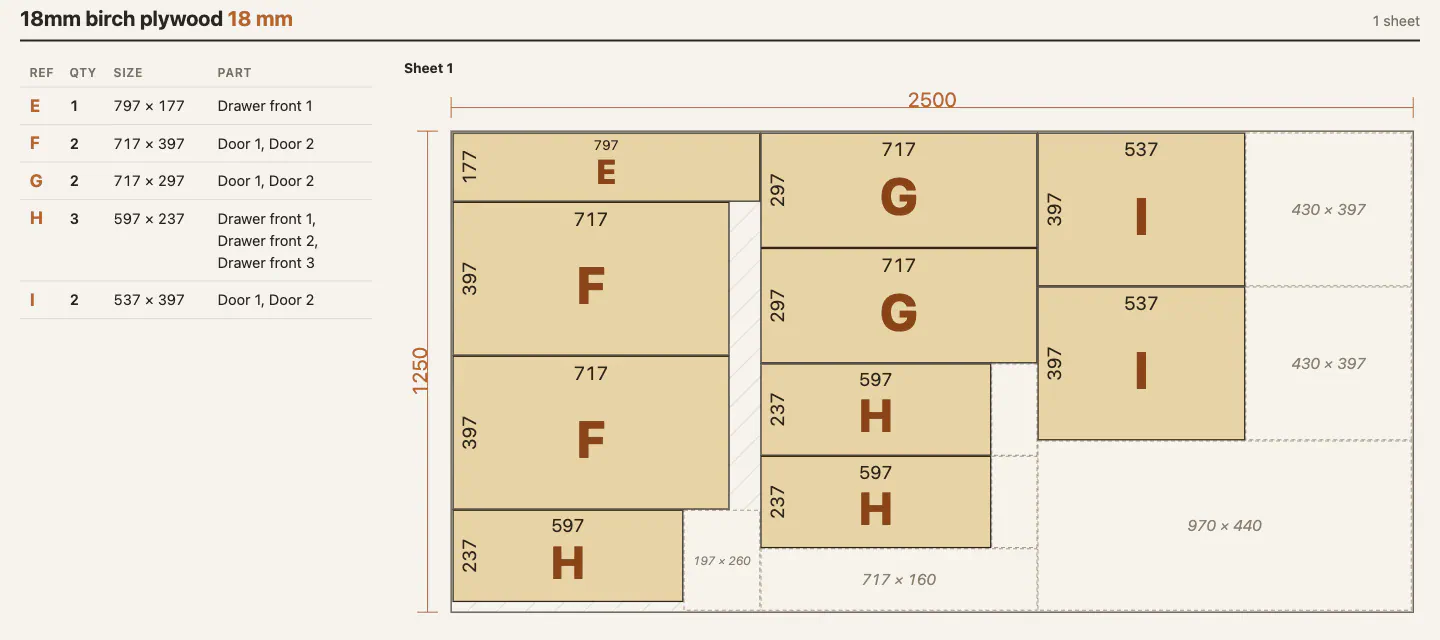
The site illustrates this with a workshop kitchen brief: a 600 mm base cabinet with three drawers, an 800 mm cabinet with two doors, a tall open shelving unit and wall cabinets above. Its example shows the assistant placing cabinet recipes and rendering the result. Offcut presents the finished example as five cabinets containing 66 boards, with the fronts allocated to one 2,500 × 1,250 mm birch plywood sheet. This is a vendor demonstration, not an independently reproduced build. Offcut’s example shows the intended workflow.
Recipes provide a structured starting point for common pieces, including cabinets, drawer boxes, shelving and fronts. Users set dimensions, and the recipe produces boards and joints. The assistant can use those building blocks instead of treating every cabinet as a completely new drawing exercise.
The result also remains accessible outside the conversation. Offcut lists Rectangle, Push/Pull, Move and Rotate tools, using a workflow it compares with SketchUp. Boards retain information about their material, grain and edge banding as the design is edited.
I’d put more weight on that editability than on the quality of the first prompt. Furniture plans usually change after someone checks a wall, measures an appliance or decides where a drawer needs clearance. An assistant-generated design is more useful when those corrections can happen directly in the project, without having to regenerate the whole thing through chat.
The undo history matters for the same reason. Offcut says AI changes land as normal project steps, so a user can reverse a change a step at a time.
How to Connect Claude or ChatGPT
Offcut describes a short connection process:
- Open Offcut in a browser. The site says no installation is needed.
- Add its MCP address to your assistant:
offcut.diy/mcp. - Sign in to Offcut and authorize the connection.
- Describe the furniture and inspect the project the assistant creates.
MCP, short for Model Context Protocol, provides the connection between the assistant and Offcut’s tools. In this workflow, the assistant can make changes to a structured design instead of returning only a written set of instructions.
Offcut names Claude and ChatGPT as compatible assistants and says other apps that accept MCP connectors can also work. Its connection instructions do not specify minimum app versions, eligible subscription tiers or the exact connector menus in each assistant. Check that your particular app and account can add the connector before planning around that route.
A useful brief should include more than the name of the furniture. For a first cabinet, I’d specify:
- Finished outside dimensions, with units stated explicitly.
- Material and thickness, including different materials for backs or fronts.
- Available tools, so the proposed joinery matches the workshop.
- Functional requirements, such as shelf count, drawers and doors.
- Installation constraints, including skirting boards, wall obstructions or an existing opening.
These are suggested inputs, not a guarantee that the assistant will resolve every constraint correctly. Their purpose is to reduce ambiguity before the project starts accumulating parts.
For example, “make a 600 mm cabinet” leaves several decisions unresolved. It might refer to outside width, clear internal width or an opening the cabinet must fit. Stating which dimension you mean makes the resulting model easier to audit.
What the Cut-List Optimizer Adds
Offcut connects the furniture model to a material-planning workflow. Its product page lists sheet layouts, numbered cuts, measured offcuts, edge-banding totals and grain handling. It also describes solid-wood glue-up plans and using material already in the shop first.
| Documented output | What it helps the builder do |
|---|---|
| Parts arranged on standard sheet sizes | Plan which sheets to buy and where parts fit |
| Numbered guillotine cuts | Follow a proposed cutting sequence |
| Measured offcuts | Identify remaining pieces for later use |
| Edge banding recorded per edge, with totals | Plan which edges need covering and estimate banding |
| Grain kept along the length | Preserve the intended material direction |
| Solid-wood glue-up plans | Plan panels assembled from multiple pieces |
The optimization method has an important qualification. Offcut says it tries several orders and keeps the one that requires buying the least material. That describes a search among candidate layouts, not a published guarantee of the mathematically best possible result. The page provides no comparative benchmark or measured percentage saving. These are Offcut’s stated capabilities, so there is no basis here for promising a particular reduction in waste.
The numbered guillotine cuts are a practical detail. A guillotine-style layout divides a sheet or remaining rectangular section with straight cuts across it. That can provide a clearer sequence for breaking down sheet goods than a drawing that merely packs shapes tightly together.
Grain handling also changes the calculation. A rectangular part may fit into a gap if it is turned through 90 degrees, but that rotation can put the grain in the wrong direction. Keeping grain aligned restricts the available layouts. Edge banding adds another layer: two panels with the same length and width may need different finishing work because different edges will remain visible.
My view is that these material details are a stronger reason to consider Offcut than the promise of designing by conversation alone. Board placement, grain direction and edge treatment are the information that turns a general design into a useful preparation document.
Check the Dimensions Before Optimizing the Wrong Parts
A cut-list optimizer can arrange an incorrect part very efficiently. That is the central limitation to keep in mind when moving from an AI-generated model to physical material.
Offcut’s product page provides no published accuracy or safety testing for generated dimensions or joinery. Treat its output as a design to review, not as verified engineering.
A simple cabinet-width calculation shows why the review needs to go beyond looking at the 3D model. Suppose a cabinet has an outside width of 600 mm and two 18 mm side panels. If a horizontal panel sits between those sides, its width would be:
600 − 18 − 18 = 564 mm
That is an illustrative calculation, not an Offcut result. It is valid only for that arrangement. A different joint, an overlapping top or a panel seated in grooves changes the required dimension. The outside cabinet can look similar while its cut list changes.
The practical lesson is to trace a few important dimensions all the way through the design:
- Outside size to internal space: confirm which panels sit between others and which overlap.
- Nominal thickness to actual stock: measure the material you intend to use.
- Opening size to moving parts: check door, drawer and hardware clearances.
- Joint geometry to finished part size: account for the chosen assembly method.
- Sheet layout to cutting process: confirm how saw-blade width, trimming and allowances are represented.
The last point is a check to perform, not a claim that Offcut exposes a particular setting. The product page does not document those controls in detail.
Frequently Asked Questions
3 questions
1Is Offcut Free to Use?
Offcut says everything is free to use today, with no card required. Charges or access requirements for a connected AI assistant are separate.