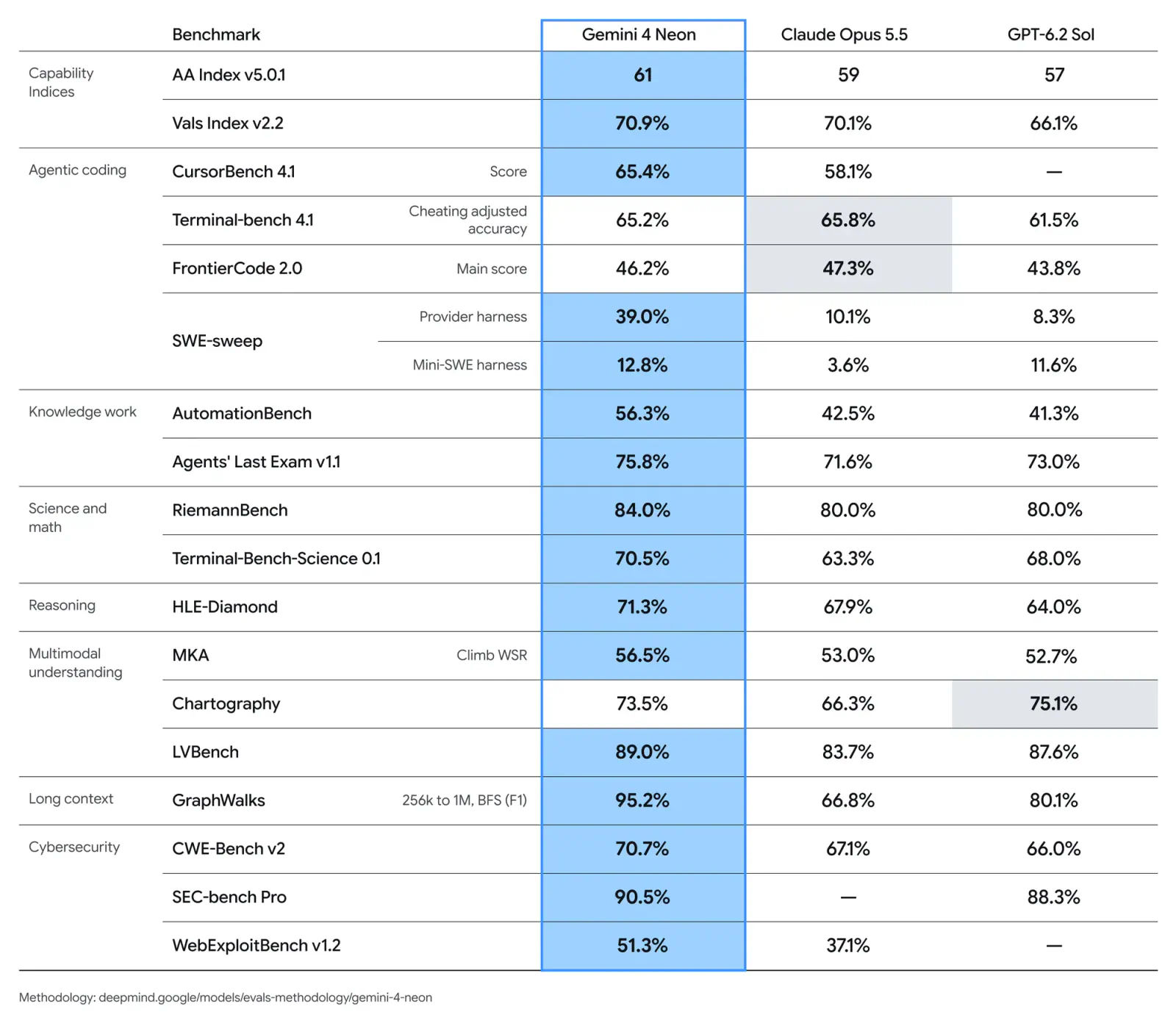
Google introduced Gemini 4 Neon on November 18, 2026, pitching it as a frontier model built to complete complex work quickly. The rollout spans the Gemini API, Google AI Studio, Gemini for business, Google Antigravity, and the Gemini app, with paid-plan requirements on the consumer and developer-agent products. Google’s announcement emphasizes software engineering, document-heavy analysis, and scientific reasoning.
Neon’s intended position is between everyday AI work and tasks that justify larger, slower frontier models. Google is selling that balance through configurable thinking effort, long-running agent support, and a claimed cost-per-task advantage over Gemini 4 Carbon.
The consequential detail is that Neon’s published results depend on both its thinking setting and the software running it. Its headline intelligence score uses xhigh, its default is high, and one coding benchmark rises from 12.8% to 39.0% when paired with Google Antigravity. Those distinctions matter when deciding whether the launch numbers describe the configuration you would actually use.
Where Gemini 4 Neon Is Available
Google says Neon began rolling out through these channels on November 18:
- Gemini API and Google AI Studio: For developers building applications and exploring the model.
- Gemini for business: Through API access and the model dropdown.
- Google Antigravity: For paid Google AI Pro and Ultra subscribers.
- Gemini app: For Pro and Ultra subscribers.
“Rolling out” leaves room for access to appear progressively. Google’s announcement should therefore be read as the start of availability, without assuming every eligible account received the model simultaneously. Source: Google
The separate Gemini 4 Neon for cyber rollout has a narrower audience: trusted defenders receiving access through Fairwind in the coming days. That is distinct from the general Neon rollout.
For developers, the access route also changes what is being evaluated. Calling Neon through an API gives an application access to the model. Using Neon inside Antigravity adds Google’s agent environment, including its tools and workflow management. As the coding results show, those are meaningfully different configurations.
What the $3/$15 Pricing Means
Google lists three API token rates for Neon, alongside a one-million-token context window:
| Usage category | Price per million tokens |
|---|---|
| Input | $3.00 |
| Cached input | $0.15 |
| Output | $15.00 |
The cached-input rate is 95% below the regular input rate, according to the launch announcement. These are token charges, separate from the subscription requirements for accessing Neon in the Gemini app or Antigravity. Source: Google
Consider an illustrative request billed for 100,000 input tokens and 10,000 output tokens:
- Input costs $0.30.
- Output costs $0.15.
- The combined token charge is $0.45.
If all 100,000 input tokens instead qualify for the published cached-input rate, that input component falls to $0.015, producing a combined charge of $0.165. This calculation illustrates the listed token rates, not the complete cost of an agent session with multiple calls or additional services.
Output tokens cost five times as much as uncached input tokens per million. My view is that teams should watch generated volume and repeated agent calls at least as closely as prompt size. A large repository loaded once and reused efficiently can have a different cost profile from an agent that repeatedly produces lengthy intermediate responses.
The million-token window gives Neon room to work across large collections of material. Google says it can combine spreadsheets, PDFs, charts, audio, and video within that context. Capacity still needs to be separated from accuracy: fitting a document collection into a request does not guarantee that every relevant detail will be retrieved or interpreted correctly.
Four Thinking Levels, With High as the Default
Google says Neon supports four thinking levels that let teams adjust capability and token spending to the workload. Two settings are identified in the published launch results:
highis the default, used for the cited FrontierCode 2.0 result and Google’s cost-per-task comparison with Carbon.xhighis the setting behind the headline Artificial Analysis Intelligence Index score of 61.
The available launch excerpt does not enumerate the other two labels or provide API configuration syntax, so there is no basis here for inventing a complete settings menu or a working SDK example. Source: Google
Thinking levels are best understood as a workload-control mechanism. A routine transformation and a difficult repository investigation need different amounts of reasoning effort. Google’s stated aim is to make those steps more gradual, allowing teams to choose how much model effort a task deserves.
At the default high setting, Google claims Neon delivers a 32% lower cost per task than Carbon in its cited Artificial Analysis comparison. That is a conditional evaluation result, not a 32% reduction in every customer’s bill. Task length, retries, output volume, caching, and agent behavior all affect the eventual spend.
I’d use the default setting as the starting point for an application evaluation, then increase thinking effort on tasks where it produces a measurable improvement. Starting every request at the setting used for a headline benchmark could erase part of the economic benefit Google is promoting.
What the Benchmark Claims Actually Show
Google cites results from evaluation organizations including Artificial Analysis, Vals, and Arena. Those organizations are separate from Google, but the evidence available here consists of Google’s announcement and Google’s published comparison table, not separately inspected evaluator reports. The distinction is between Google’s own tests and Google’s reporting of third-party results; this article independently verifies neither set of measurements.
In the announcement, Google reports:
- Artificial Analysis Intelligence Index: 61 at
xhigh, ranking third overall. - Vals Index: 70.9%, ranking second.
- Artificial Analysis Coding Agent Index: 58.6, ranking first.
- Arena’s Agent Arena Index: 1336, ranking second across more than 4,200 agent sessions.
Those rankings describe the cited evaluations at launch. They are useful signals of where Neon may be strong, without becoming universal rankings for every coding, business, or scientific task. Source: Google
Google’s Gemini model comparison page provides a more revealing picture than the headline placements alone:
| Benchmark | Gemini 4 Neon | Claude Opus 5.5 | GPT-6.2 Sol |
|---|---|---|---|
| Terminal-Bench 4.1, cheating-adjusted accuracy | 65.2% | 65.8% | 61.5% |
| FrontierCode 2.0 | 46.2% | 47.3% | 43.8% |
| AutomationBench | 56.3% | 42.5% | 41.3% |
| Agents’ Last Exam v1.1 | 75.8% | 71.6% | 73.0% |
| RiemannBench | 84.0% | 80.0% | 80.0% |
| Chartography | 73.5% | 66.3% |
Frequently Asked Questions
4 questions
1Where Can I Access Gemini 4 Neon?
Google says it is rolling out through the Gemini API, AI Studio, Gemini for business, Antigravity for paid Pro and Ultra subscribers, and the Gemini app for Pro and Ultra subscribers.