
Google is adding temporary threads to AI Mode in Search, giving users a way to ask conversational search questions without saving the exchange to their account history or influencing future personalization. The feature was announced on November 17, 2026 and is rolling out globally on desktop and mobile browsers across every language AI Mode supports.
The control works at the thread level. Google says the temporary session is detached from your account, its responses do not draw on your past preferences, and its contents do not shape future personalization. Close the thread, and you return to searching as usual.
That makes this useful for more than keeping an awkward query out of history. It also gives people a way to research a one-off topic without treating that topic as an ongoing interest. The important boundary is that Google describes account history and personalization behavior, while leaving some underlying data-handling details unspecified.
How to Start a Temporary Thread
Google’s setup instructions are short:
- Open AI Mode in Google Search in a desktop or mobile browser.
- Click or tap the temporary threads icon in the upper-right corner.
- Start asking your questions in the temporary thread.
- Close the thread when you finish to return to searching as usual.
Google says no settings adjustment is required. You do not have to change a broader account preference before starting a temporary conversation.
The practical choice happens before you ask the question. If you already know you want a topic kept out of your account history and personalization, open the temporary thread first. The announcement describes starting a separate session, so it should not be read as a tool for retroactively making earlier searches temporary.
Availability is still subject to the rollout. Google names desktop and mobile browsers in its announcement; it does not provide a separate availability schedule for native apps. If you are looking for the control on a phone, the mobile browser is an explicitly supported place to check.
What Account Detachment Changes
Google calls the session “completely detached from your account.” Its announcement identifies three consequences, each addressing a different part of a personalized search experience.
| Google’s stated behavior | What it means for the session |
|---|---|
| Responses are not informed by past preferences | The temporary thread does not use your previous preferences to tailor its answers. |
| The thread does not affect future personalization | Exploring a topic there should not change how Google personalizes later experiences. |
| The thread is not saved to history | The exchange is excluded from your account history. |
These are related effects, but they solve different problems. Keeping a query out of history concerns whether you can find it in the account’s activity record. Preventing future personalization concerns whether that query influences what you see later. Excluding past preferences concerns the answers you receive right now.
That last point creates a tradeoff worth noticing. A temporary thread offers separation from your established interests, but it also gives up the convenience of having those preferences inform the response. If a particular constraint matters, such as a budget or a recipient’s interests, include it in the question instead of expecting the system to infer it from previous activity.
My view is that this two-way personalization boundary is the most useful part of the update: previous preferences stay out of the temporary exchange, and the temporary exchange stays out of future personalization. A history-only control would address a narrower concern.
The Gap Between Gemini and Search
TechCrunch’s November 18 report places the feature alongside temporary chats in the standalone Gemini chatbot. Gemini already offered a temporary-chat option, the publication reported, while Search’s conversational AI Mode lacked an equivalent control.
That distinction matters because a feature available in one Google AI product is not automatically available in another. Someone asking questions through AI Mode previously lacked this particular in-product option, even if they were familiar with temporary conversations elsewhere.
TechCrunch described the addition as an incognito-like feature for AI Mode. That is a useful shorthand for its purpose: enter a separate session, ask questions without adding them to account history, then leave. It is not enough to establish that browser incognito windows, Gemini temporary chats and AI Mode temporary threads have identical technical behavior or data policies.
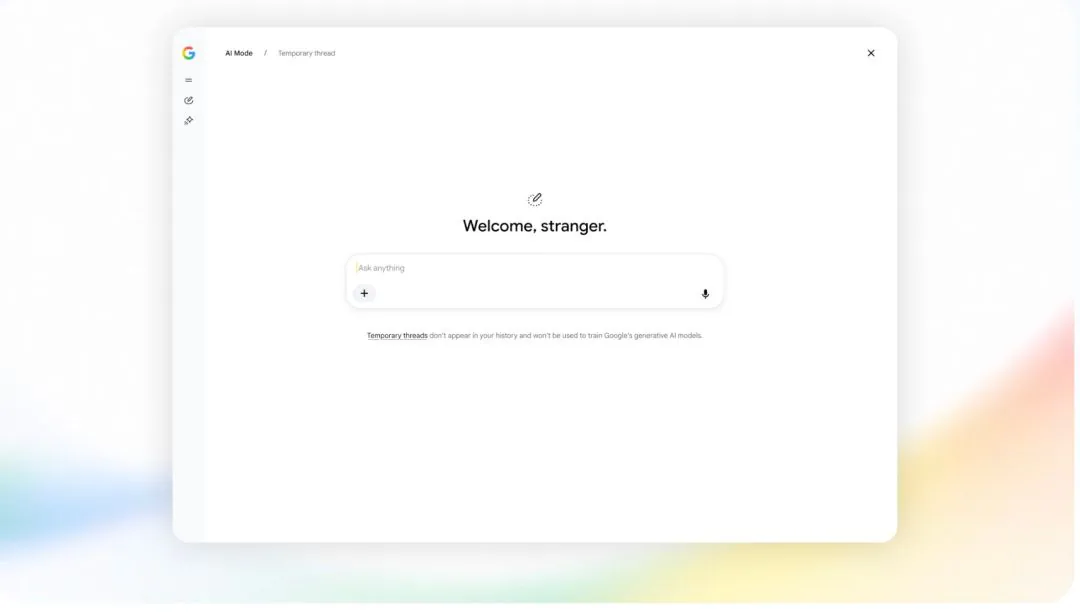
The specific change here is a control inside the conversational Search interface. Users can choose a temporary thread at the point where they are about to ask a question, without first changing account-wide settings.
When a Temporary Thread Makes Sense
Google gives surprise-gift research as one example in its announcement. The reasoning is straightforward: researching something for someone else does not necessarily mean you want that subject reflected in your own history or recommendations.
The same logic applies to other one-off searches. You might be comparing equipment for a project you are helping with, researching a destination for a friend, or exploring an unfamiliar hobby for a single purchase. Those are examples of how the documented personalization boundary could be useful, not results from testing the feature.
I would choose a temporary thread based on whether I wanted the conversation to become part of my ongoing account context. If the answer is no, the new control provides a direct way to express that choice.
Frequently Asked Questions
3 questions
1Do I Need to Change My Google Account Settings?
No. Google says you can start a temporary thread directly from the icon in the upper-right corner of AI Mode without adjusting settings.


