
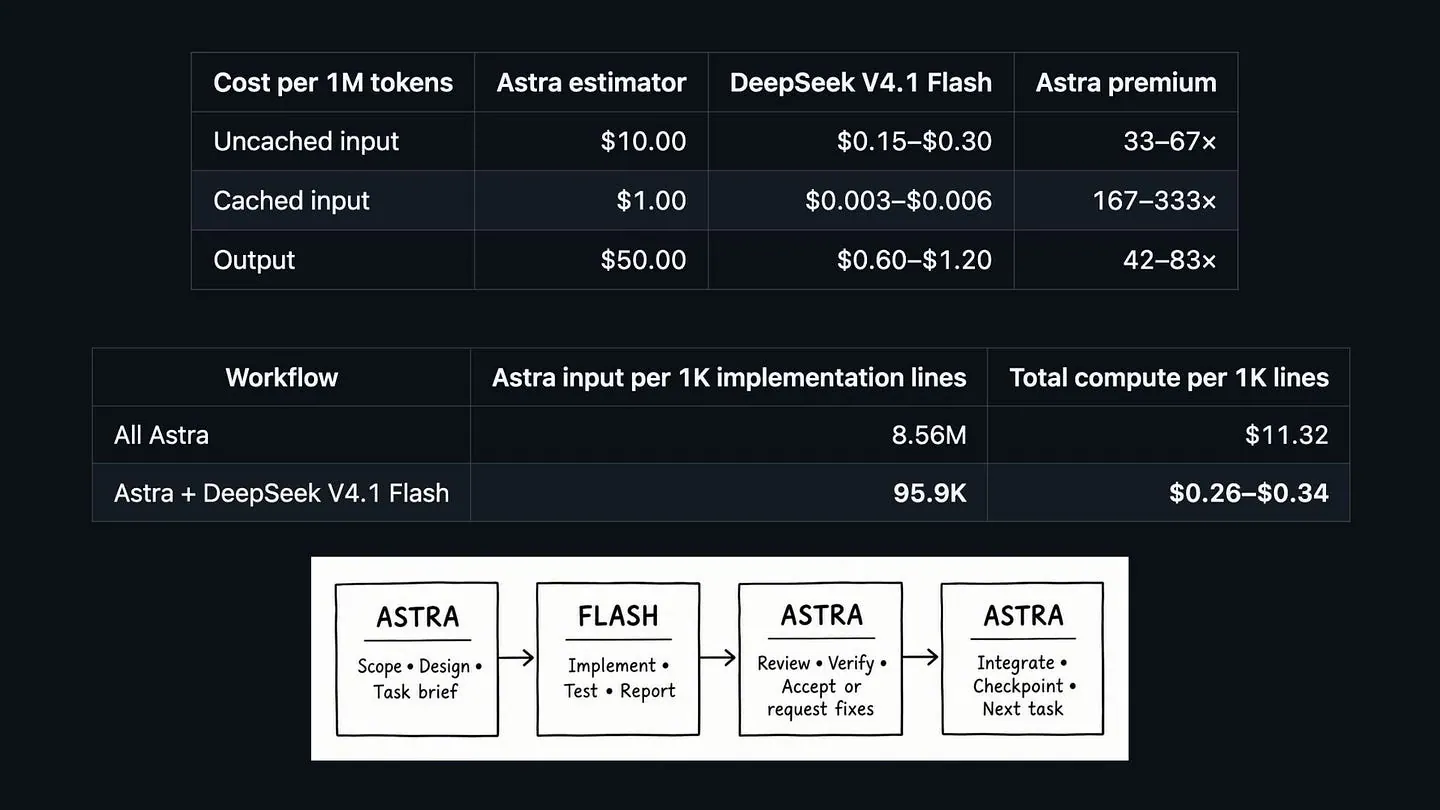
OpenAI’s latest and most capable model, GPT 6 Astra, has proved to be really good in terms of coding. I’ve used it over the past couple of days to build features for my own products, and I like how it handles difficult decisions and reviews its work.
My problem is how quickly it uses my Codex allowance.
From my experience, I usually burn through my five-hour usage window in about 30 minutes. That’s frustrating when I’m in the middle of a project and still have plenty to do.
Then I came across a Reddit post about an orchestration package that reduced the author’s Astra usage by roughly 98% during a substantial build. The idea behind it is pretty straightforward: let Astra make the important decisions, then give the longer implementation work to a cheaper model.
There are a few details you need to get right, particularly the model route. Let’s go through them.
What’s in the orchestration package?
The package is called Astra Flash Orchestrator. It uses GPT-6 Astra as the main Codex agent and DeepSeek V4.1 Flash as a coding subagent.
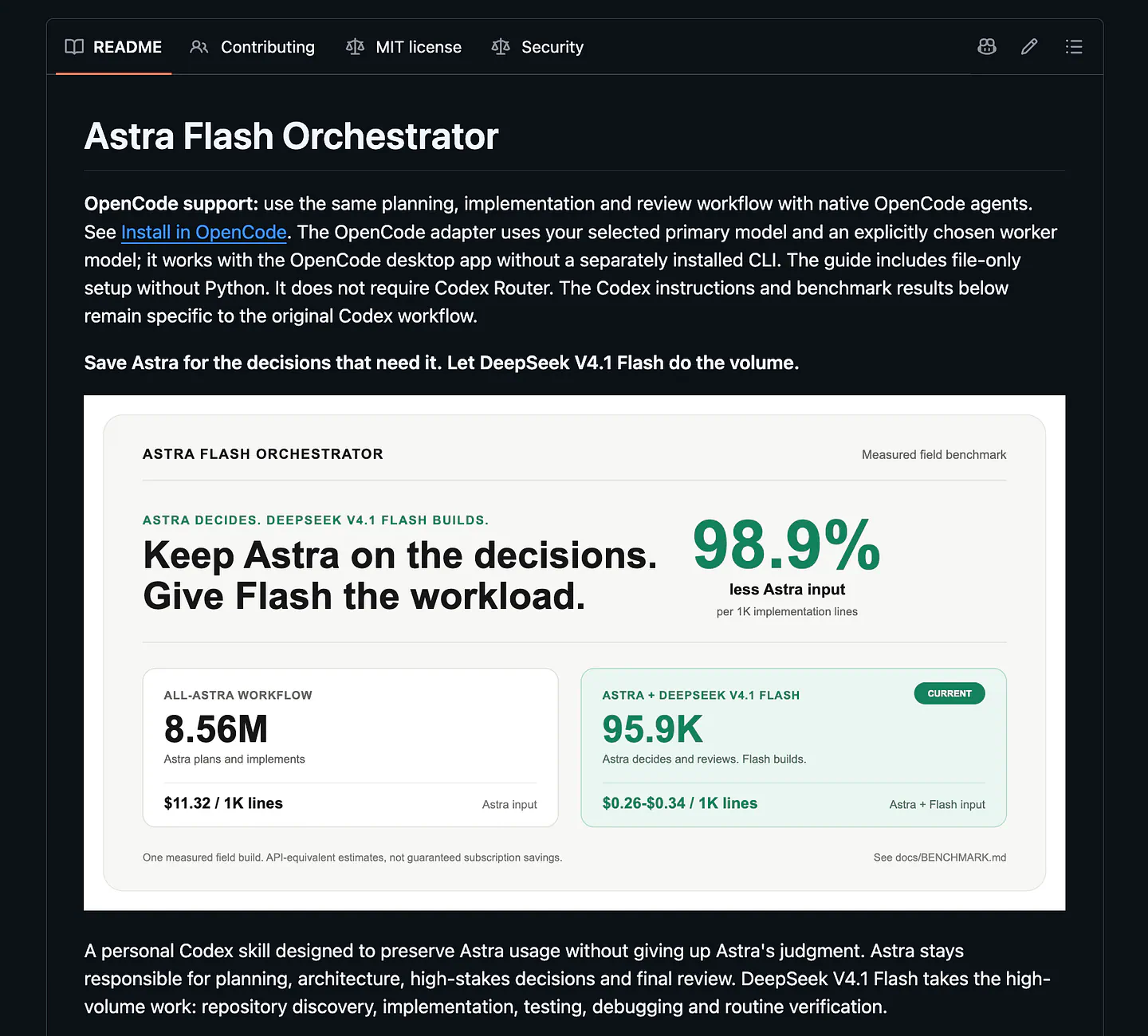
Astra Flash Orchestrator. Image by Jim Clyde Monge
Flash is a Codex subagent. Once Astra gives it a task, Flash can read the code, implement the feature, run tests, fix errors, and report back. Astra then checks the changes and decides whether to accept them or ask for fixes.
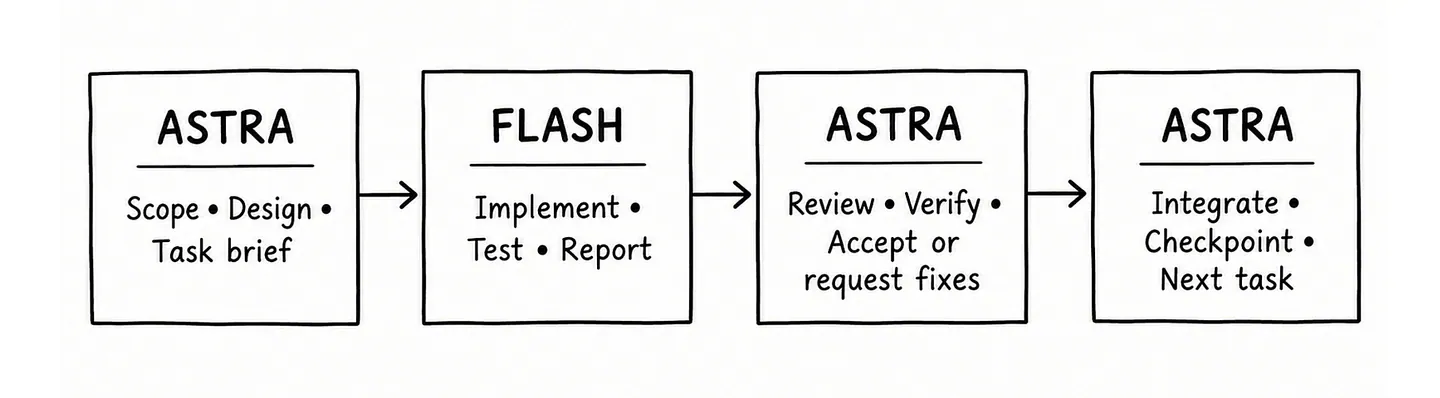
What’s very interesting here is that Astra doesn’t need to participate in every step. On a long build, the steps stack up really fast. The Flash model handles them, while Astra stays available for the parts where I most want its help.
The package installs a skill that tells Codex how to run this workflow and a custom Flash agent that uses the DeepSeek route you’ve configured. It also adds instructions so Astra knows when to hand off a substantial coding task.
In the project’s benchmark notes, the measured reduction is 98.9% less Astra input per 1,000 lines of implementation and test code.
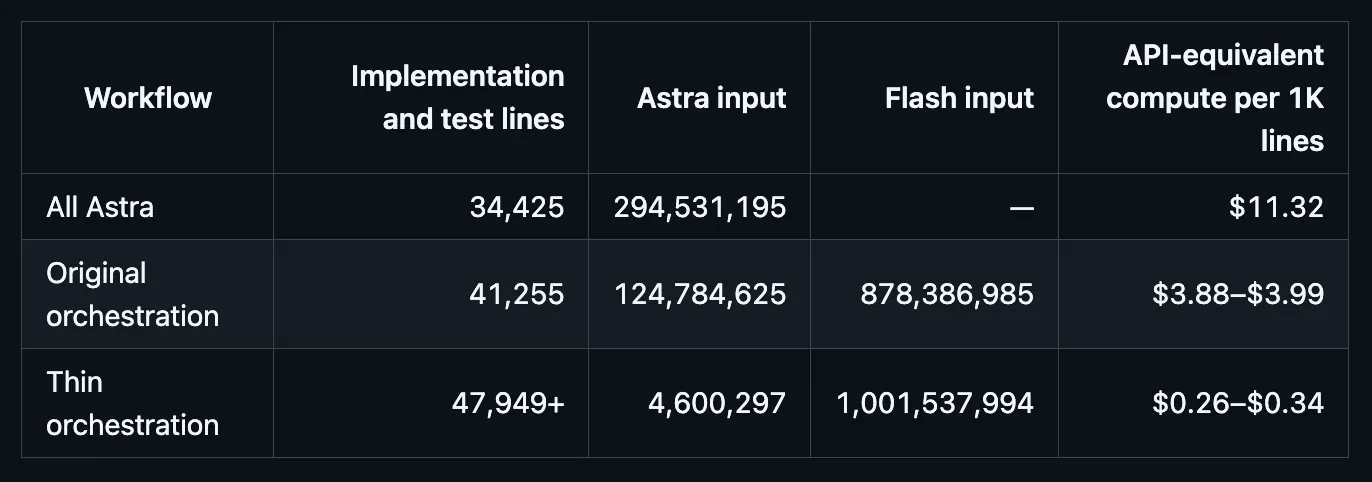
Astra Flash Orchestrator benchmarks. Image by Jim Clyde Monge
Compared with the all-Astra phase, thin orchestration used 98.9% less Astra input per 1,000 implementation lines and had 97.0–97.7% lower total API-equivalent compute cost per 1,000 lines. It produced 39% more measured implementation and test lines in the observed phase.
Flash still uses tokens, and its API usage is billed separately. The win here is that far less of the build uses your Astra allowance.
Setting up the project
For this walkthrough, I’m using OpenRouter to access DeepSeek V4.1 Flash. The project also supports a direct DeepSeek API connection, but you need to use the matching route if you choose that option.
Before installing, here’s a list of things that you need:
- A Codex client that supports native subagents and standalone custom agent TOML files under
$CODEX_HOME/agents/. - GPT-6 Astra selected as the root model.
- Python 3.11 or newer. No third-party Python dependencies are needed.
- An existing Codex Router installation, configured and authenticated for the reviewed DeepSeek V4.1 Flash route below.
- A local Codex model catalog advertising that exact route with
multi_agent_version: "v2".
Step 1. Download Astra Flash Orchestrator
Head over to the GitHub project and clone the project to your local disk.
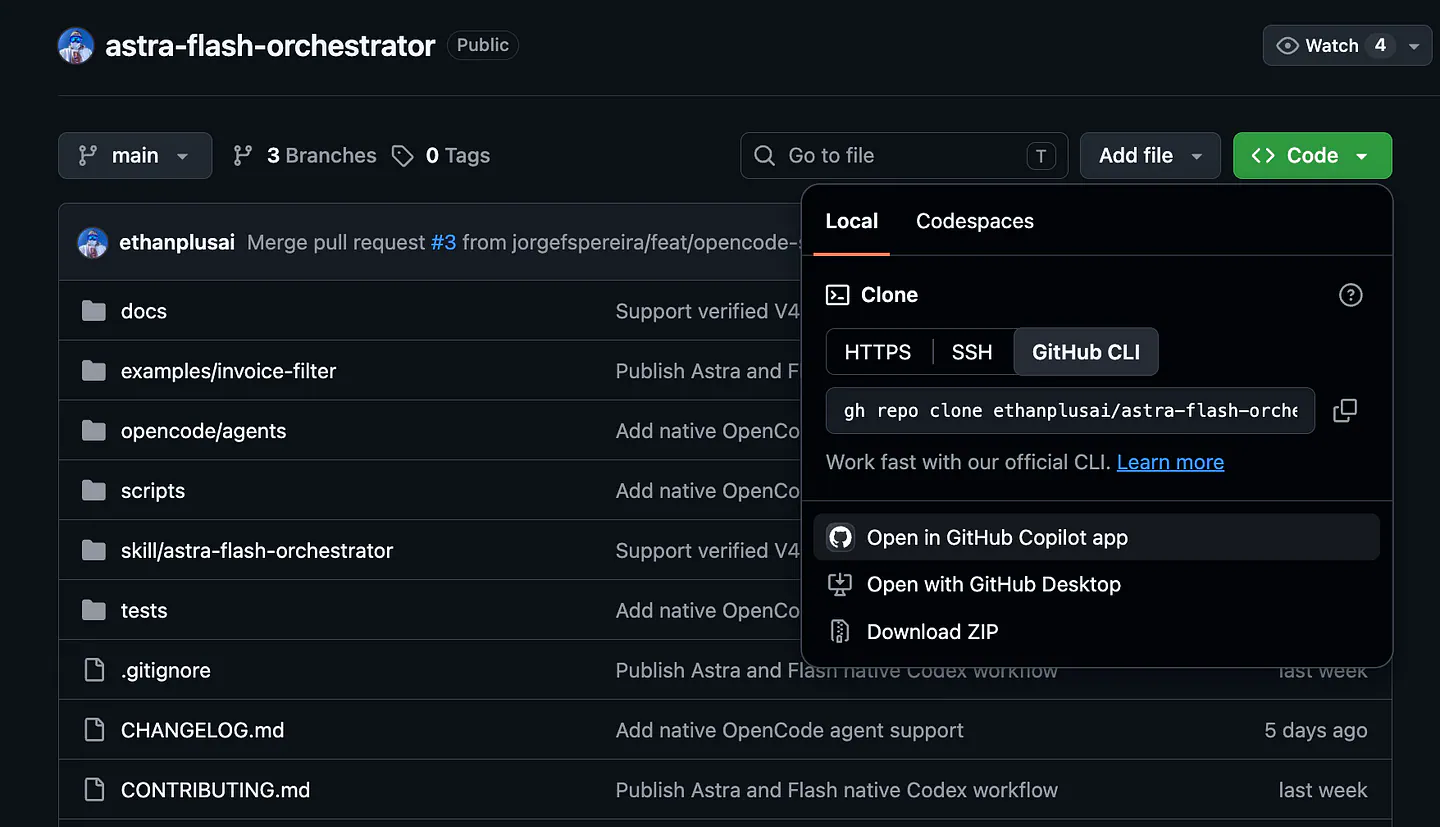
Astra Flash Orchestrator GitHub. Image by Jim Clyde Monge
You can also open a terminal and clone the project:
git clone https://github.com/ethanplusai/astra-flash-orchestrator.git
cd astra-flash-orchestrator
python3 --version
Check that Python reports version 3.11 or newer. If python3 on your computer is older, use an installed 3.11+ version for the installer commands below.
2. Set up Codex Router
To configure a Codex Router Installation, open a terminal, go to the astra-flash-orchestrator project, and run the command below:
curl -fsSL https://raw.githubusercontent.com/duolahypercho/codex-router/main/install.sh \
  | sh -s -- --target codex --guided --with-tray
In the checklist, choose a provider that would give you access to a DeepSeek V4.1 Flash route.
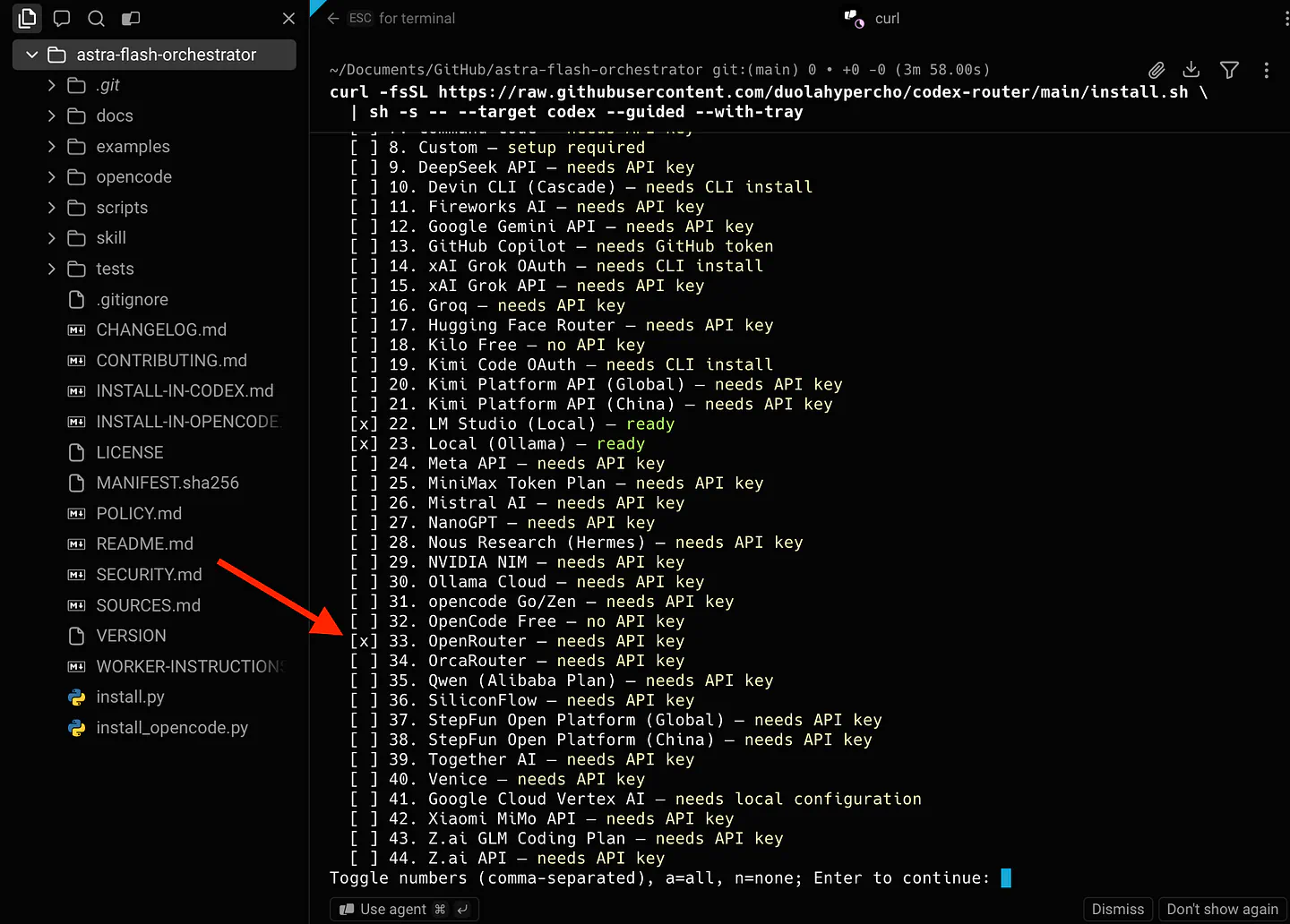
Adding OpenRouter as a provider. Image by Jim Clyde Monge
In our case, select OpenRouter, then choose DeepSeek V4.1 Flash when you reach the model selection step.
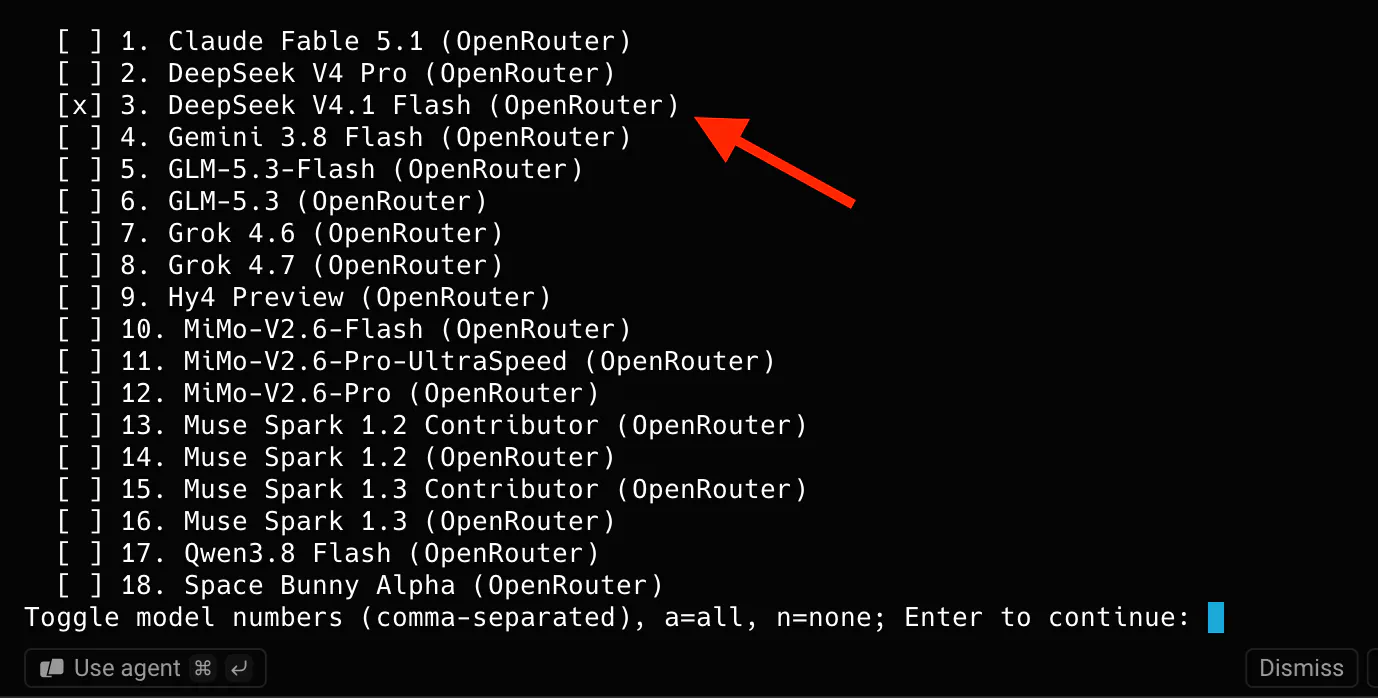
Adding DeepSeek V4.1 Flash model. Image by Jim Clyde Monge
Take note that you’ll need an OpenRouter API key. To get one, head over to OpenRouter’s API key tab and create a new key.
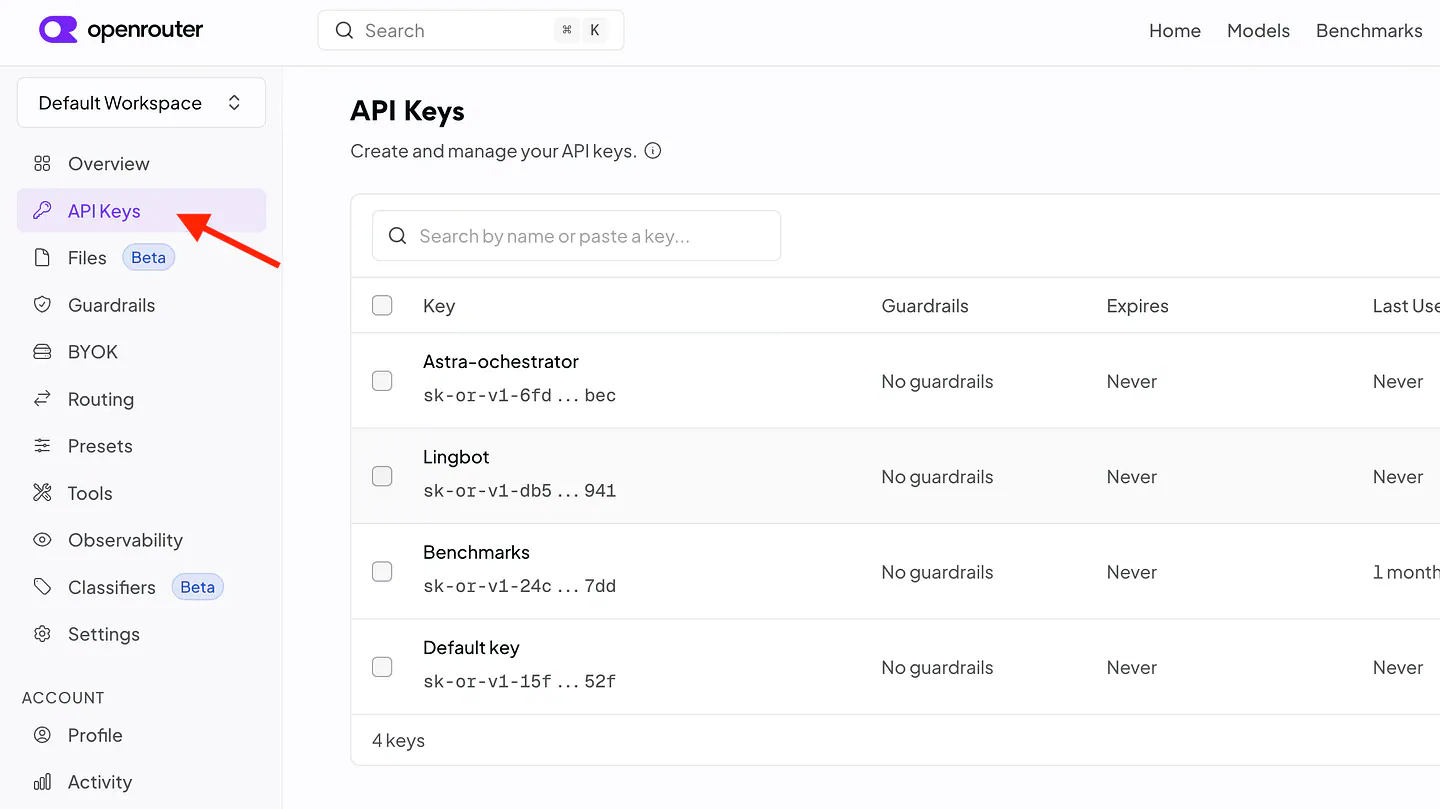
Getting API key on OpenRouter. Image by Jim Clyde Monge
If you see it, go to your codex-router checkout and save your OpenRouter key through Router’s hidden prompt:
cd /path/to/codex-router
./bin/provider-key openrouter set
./bin/setup --guided
Replace /path/to/codex-router with the folder where you installed Router. Once the setup finishes, OpenRouter should show as ready. You don’t need a separate key for openrouter-decisions; it uses the same OpenRouter credential.
Step 3. Fix the authentication error if it appears
If you encounter this error while configuring Router:
Selected providers need persistent authentication: openrouter, openrouter-decisions. Run ./bin/setup --guided.
codex-router setup: install exited with status 1.
codex-router: setup failed; the managed source checkout was restored to xxx.
Re-run this installer to retry the update from main.
If you see it, go to your codex-router checkout and save your OpenRouter key through Router’s hidden prompt:
cd /path/to/codex-router
./bin/provider-key openrouter set
./bin/setup --guided
Replace /path/to/codex-router with the folder where you installed Router. Once the setup finishes, OpenRouter should show as ready. You don’t need a separate key for openrouter-decisions; it uses the same OpenRouter credential.
Make sure that you already have the OpenRouter API key because the command above will ask for it. Once the setup is finished, you should see the OpenRouter option status become “ready.”
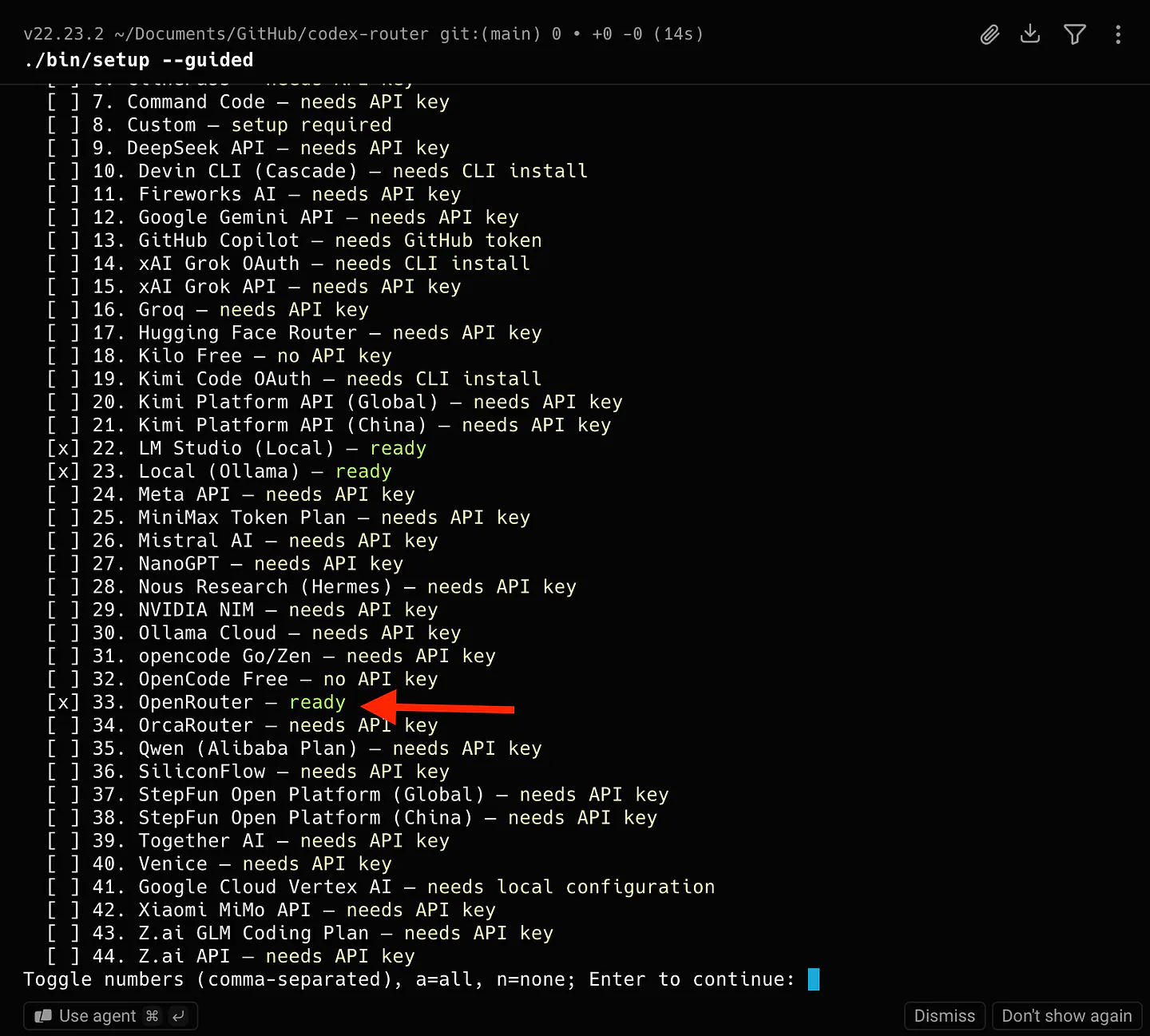
Go back to the astra-flash-orchestrator project and continue the setup.
Step 4. Install the orchestrator
Go back to your astra-flash-orchestrator folder. The first command previews the installation. The second applies it:
python3 -B install.py --worker-route openrouter/deepseek-v4.1-flash
python3 -B install.py --worker-route openrouter/deepseek-v4.1-flash --apply
Read the preview before running --apply. If it says the Flash route is missing or unavailable for subagents, finish that part of the Router setup first.
When installation is done, run the project’s check:
python3 -B skill/astra-flash-orchestrator/scripts/doctor.py
Then fully quit and reopen Codex so it loads the new agent and skill. Select Astra as your main model and try the workflow on a feature you already planned:
$astra-flash-orchestrator Implement the feature in docs/plan.md.
Let Flash handle the coding and tests. Review the finished changes
before accepting them.
Change the plan path to match your project, or describe the feature in the prompt. For your first task, check Router’s request details to make sure the coding subagent actually used the OpenRouter Flash route.
That’s it! Here’s a quick summary of what’s changed in your environment.
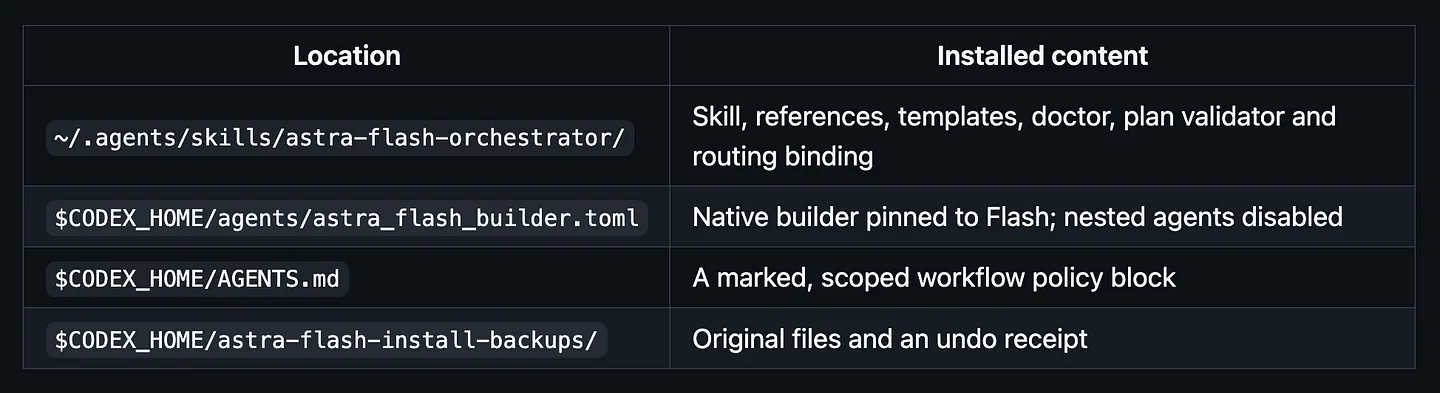
Summary of what’s changed in your environment. Image by Jim Clyde Monge
CODEX_HOME defaults to ~/.codex. An existing nonempty AGENTS.override.md receives the policy instead of AGENTS.md. Other instructions are preserved.
Does it really work?
The DeepSeek V4.1 Flash integration is what makes the whole orchestrator work. The model is extremely cheap overall and insanely cheap compared to Astra. Its coding abilities and ability to handle long tasks are what make it so useful.
Check out the results below:
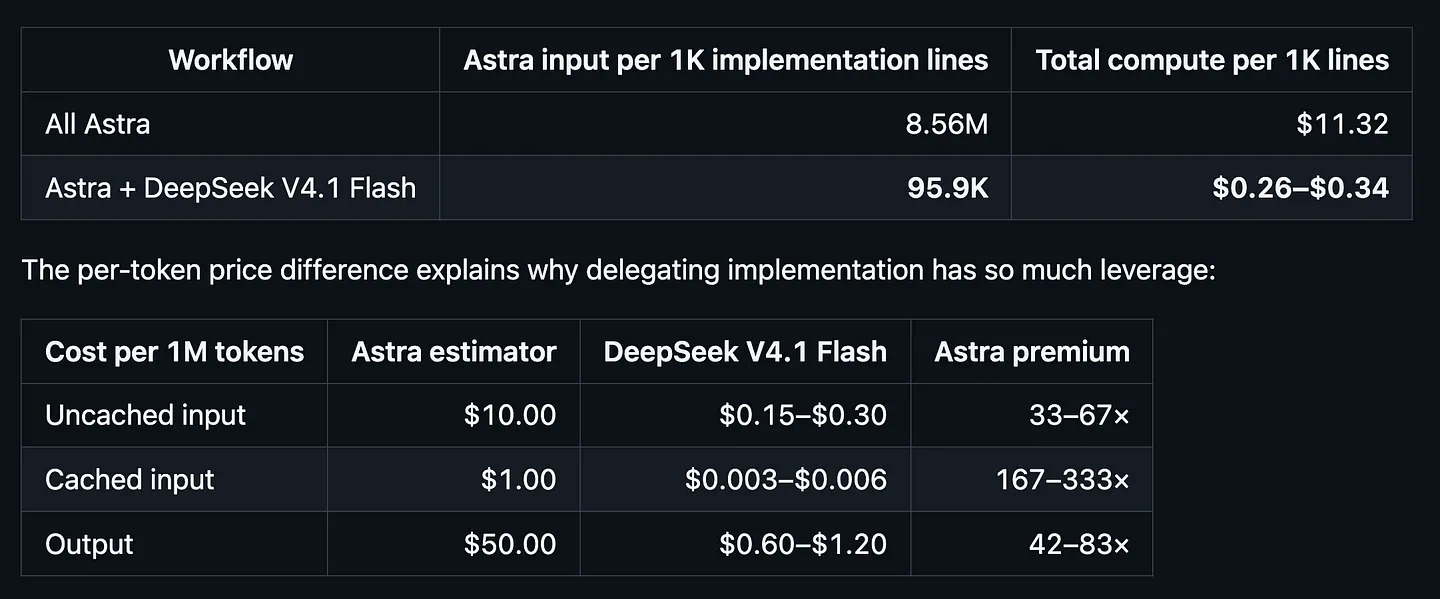
Astra Flash Orchestrator cost reduction result. Image by Jim Clyde Monge
Think of a feature that touches several files and needs repeated edits, tests, and fixes. Those are exactly the steps I don’t want Astra spending my five-hour usage allowance on all afternoon.
Here’s a good review from a Reddit commenter:
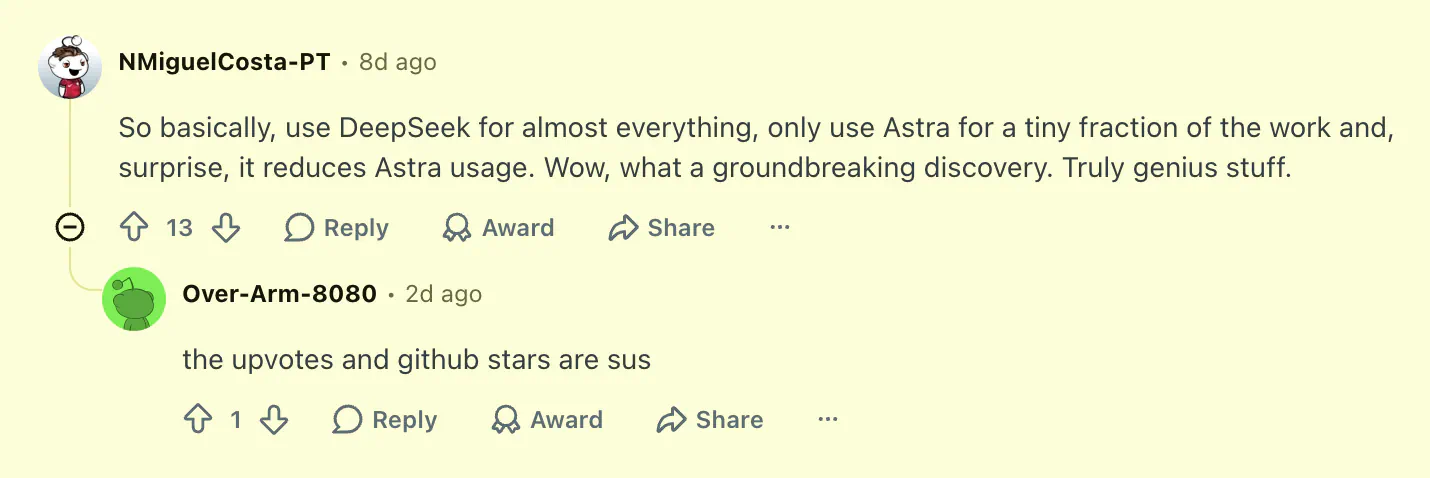
Astra Flash Orchestrator Reddit comment. Image by Jim Clyde Monge
It makes less sense if you ask it to solve very simple problems.
If you need to fix one line or ask a quick question, use Astra directly. I also want to review the final code changes, especially for work involving payments, login, or anything that could break a live product. The package keeps that final review with Astra.
Another thing to note is the fact that DeepSeek Flash usage isn’t free. It’s very cheap, but not free. I’d keep an eye on both the Astra token consumption and the DeepSeek V4 Flash’s API usage.
If I’m rarely hitting my Codex limit, I may have no reason to add another cost. If Astra keeps stopping halfway through a build, this becomes much more appealing.
Final Thoughts
There you have it. I hope this helps if Astra’s usage has been interrupting your coding sessions too. Paying for a subscription and then having to stop midway through a project is annoying.
The orchestration package gives us a practical way to save Astra for planning and review while Flash handles more of the long build process. Just note that the 98% result is the author’s measured outcome, so I encourage you to try and set up on my own side before expecting the same figure.
I’d also like to thank the Redditor who built and shared it. I’ve seen plenty of advice about conserving tokens, but this is one of the more useful and technically involved approaches I’ve come across. I appreciate that the repository shows how the number was measured and where the comparison has limits.
If you try it and get stuck on Router, the OpenRouter key, or the Flash route, ask me in the comments. I’d also like to hear how it performs on your projects, including the provider cost and the quality of the finished code.
Sources
- Reddit postreddit.com
- Astra Flash Orchestratorgithub.com
- Jim Clyde Mongemedium.com
- benchmark notesgithub.com
- Codex Router installationgithub.com
- OpenRouter’s API key tabopenrouter.ai
- built and shared itreddit.com


