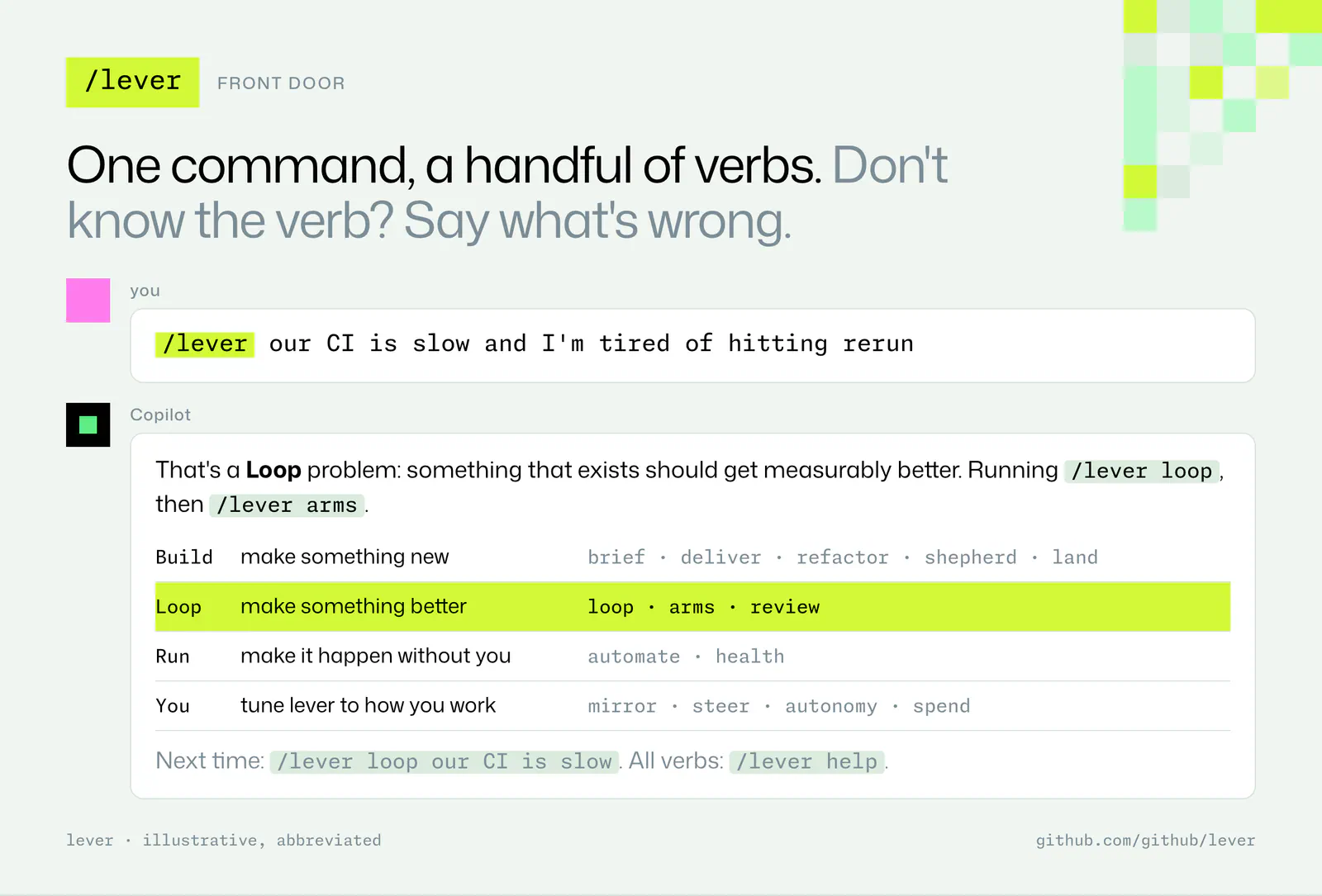
GitHub has published Lever, an MIT-licensed Copilot plugin that packages feedback loops, parallel experiments, pull-request maintenance and automation setup into a single command interface. Its central idea is practical: give a coding agent a measurable target and a way to check progress before asking it to work independently. The commands and installation instructions are available in the official repository.
GitHub says the plugin draws on its internal engineering workflows, including CI improvements, a five-day crate split and weeks of unattended delivery. Those are vendor-described examples, not independent measurements of Lever’s effectiveness.
Lever is early, and this article analyzes its documentation rather than hands-on results. Repository metadata lists its creation as October 25, 2026; the README provides no formal release date.
Install Lever in Copilot
The documented CLI installation adds GitHub’s repository as a plugin marketplace, then installs Lever:
copilot plugin marketplace add github/lever
copilot plugin install lever@lever
These commands register and install the plugin. GitHub instructs users to start a new session afterward. In the Copilot app, the equivalent route is Customize → Plugins → Add marketplace, followed by github/lever.
The interface exposes /lever, with the following word selecting a workflow. You can also describe a problem in ordinary language and let Lever choose the appropriate command.
Individual workflows live as skills in the repository’s skills/ directory. Read-only advisory skills can load when a request fits, while actions that push changes, file issues, open pull requests or schedule runs require /lever or an explicit request. That distinction gives developers a way to explore a problem before authorizing repository activity, according to the README.
Loop Cards Make “Feels Slow” Testable
The /lever loop command turns an imprecise complaint into a Loop Card. The card records four essentials:
- Metric: the quantity to improve.
- Measurement method: how to collect it.
- Noise: how much measurements vary.
- Success bar: what qualifies as an improvement.
A first request could look like this:
/lever loop our CI is slow. card only, no code changes
This illustrative prompt asks for a measurement plan without authorizing implementation. GitHub’s documented read-only starting flow produces a card without pushing, filing or merging anything.
The noise field is especially consequential. Suppose a team wants shorter CI runs. A lower duration could come from a code change, but it could also reflect a warm cache, different runner conditions or fewer tests being selected. A useful card needs a measurement procedure that makes those distinctions visible.
My view is that this is Lever’s strongest design choice. An agent can repeatedly optimize whatever number it receives; deciding whether that number represents the real goal is the harder engineering task. Writing down measurement conditions and a success threshold makes that choice inspectable before the agent starts iterating.
The card is still a plan, not proof that its proposed metric is valid. Developers should check that faster results preserve the behavior they care about, such as test coverage and correctness. Lever supplies a structure for that discussion through its documented Loop Card workflow.
Parallel Arms Compare Ideas Against a Control
Lever separates defining an experiment from trying possible solutions. Its /lever arms command assigns one agent to each idea and compares the experimental arms against a control.
That creates a useful progression: define the target, identify candidate changes, then evaluate those candidates against a shared reference. For CI work, that could mean comparing several optimization ideas without combining all their effects into one patch.
The control matters because a faster final run alone says little about which change helped. My practical recommendation would be to settle the measurement procedure before launching parallel arms. Otherwise, more agents can produce more results without producing a clearer answer.
Lever also offers /lever review. The README describes several models reviewing blind, with only agreed findings surfaced. This adds a consensus filter: the reported findings are those supported by multiple reviewers.
That filter has a tradeoff. Agreement may help prioritize findings, but models can share blind spots, and a genuine issue noticed by only one reviewer may be excluded. I would treat cross-model agreement as a triage signal, while keeping tests and repository review requirements in place. The documentation specifies the review mechanism; it provides no independent accuracy measurement.
For related coverage of coding-agent evaluation at repository scale, see SnowPR Tests Coding Agents on a 43M-Line Monorepo.
PR Shepherding Has Explicit Authority Limits
Lever’s /lever shepherd command keeps a pull request or stack green until it lands. Separate commands cover planning merges, running delivery lanes and coordinating large refactors.
These workflows address the work that continues after an initial patch: keeping changes ready for integration and moving them toward completion. Whether the agent can complete that last step depends on its autonomy setting.
The README describes an L0–L5 autonomy scale, with these reference points:
| Level | Documented authority | Practical consequence |
|---|---|---|
| L0 | Propose only | The agent recommends work without carrying it through. |
| L2 | Get PRs green; the user merges | The agent prepares changes, with a human merge decision. |
| L5 | Land, release and watch | The agent can carry work through release and monitoring, subject to repository rules. |
These are selected documented levels, not a complete definition of every intermediate setting. GitHub recommends starting at L2 and increasing autonomy as trust develops.
The personal setting lives in ~/.copilot/lever.yml. Teams can use .github/lever.yml for repository configuration, with an example supplied under config/.
Repository branch protection still takes precedence. Selecting a higher autonomy level does not grant an exception to repository requirements. That is the important boundary between permission to attempt a merge and authority to complete one under the project’s rules. GitHub documents both the autonomy controls and branch-protection constraint.
For a team’s first rollout, I’d keep the human merge gate. It lets developers assess whether Lever’s measurement plans and maintenance actions are useful before also delegating integration decisions.
Automations Start Paused
The /lever automate workflow turns a repeatable task into a paused Copilot Automation. The repository’s automation recipes install through the GitHub MCP server.
Paused creation separates configuring recurring work from enabling it. Developers get a chance to inspect the proposed automation before allowing it to run. A repository shepherd, for example, can become a recurring workflow after its task and authority have been considered.
Frequently Asked Questions
3 questions
1Can Lever Start Without Changing Code?
Yes. Its documented read-only Loop Card flow defines the metric and success conditions without pushing, filing or merging changes.