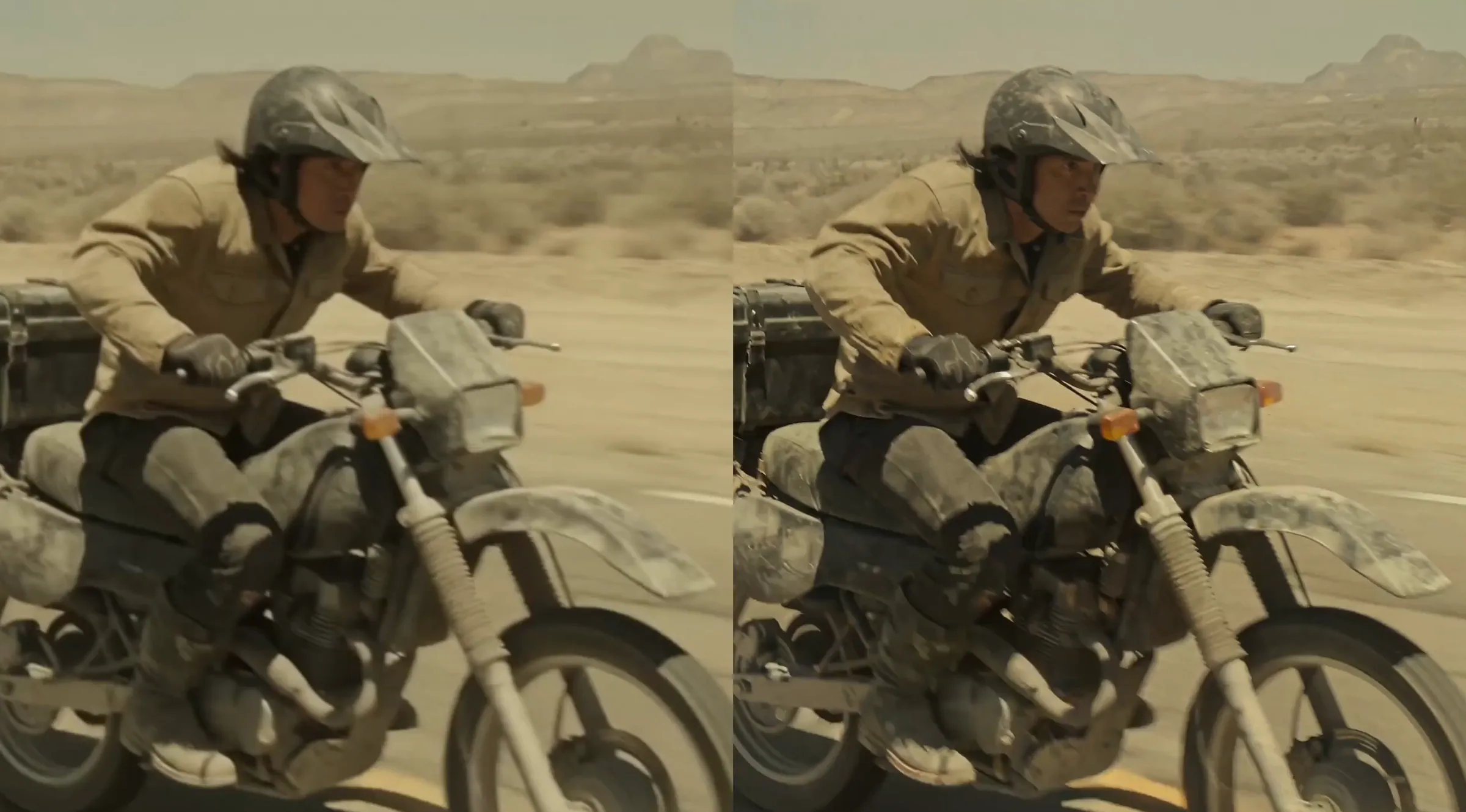
Black Forest Labs released FLUX Video Upscale on August 20, 2026, giving creators a direct route from lower-resolution footage to 2K- and 4K-class output. The AI video tool regenerates frames at higher resolution, targeting soft faces, damaged textures, and background details that conventional enlargement can leave blurry or distorted.
The release fills an important gap in the FLUX 3 production workflow. FLUX 3 Video generates clips up to 20 seconds long with native audio, initially offering HD output and Full HD through upscaling. FLUX Video Upscale extends that finishing stage toward 1440p and 4K while remaining available as a standalone tool for footage created outside FLUX.
That external-video support makes this more than a companion button for one model. Developers can place it after another AI video generator, use it on traditional footage, or integrate it into an automated post-production pipeline through the BFL API.
FLUX Regenerates Detail Instead of Simply Enlarging Pixels
Basic resizing methods can increase a frame’s dimensions, but they cannot recover visual information that is absent from the source. They interpolate between existing pixels, which often leaves faces looking waxy, foliage indistinct, and fine patterns covered in ringing or grid-like artifacts.
FLUX Video Upscale takes a generative approach. Black Forest Labs says the model can repair imperfections as it raises the resolution, including smudged faces and repetitive artifacts in textures such as grass and water. The intended result is not merely a larger file, but a cleaner reconstruction with more plausible high-frequency detail.
Its connection to FLUX 3 is particularly relevant for generated footage. BFL describes the upscaler as understanding FLUX 3 output natively, with the goal of preserving the original model’s broad style range, realistic movement, and natural visual character. A stylized animation should not suddenly acquire unwanted photorealistic textures, while a documentary-like clip should avoid the polished artificial finish that some enhancement tools impose.
“Regeneration” also introduces a limitation. Newly visible pores, fabric fibers, leaves, or architectural features are model-generated interpretations of the source, not recovered ground truth. That is useful for entertainment and advertising, but inappropriate when footage requires forensic or documentary accuracy.
Precise and Creative Modes Solve Different Problems
FLUX Video Upscale offers two processing modes rather than treating every clip as the same restoration task.
| Mode | API setting | Steps | Price | Best suited to |
|---|---|---|---|---|
| Precise | creativity: 0 | 4 | $0.07 per MP per second | Faces, products, logos, references, and identity-sensitive footage |
| Creative | creativity: 1 | 8 | $0.10 per MP per second | Stronger repair, richer textures, and heavily degraded AI video |
Precise mode is the faster and less expensive option. It stays closer to the input, making it the safer choice when a person’s identity, a product’s shape, or a reference image must remain recognizable.
Creative mode uses twice as many processing steps and gives the model more freedom to reconstruct detail. It may produce better-looking hair, foliage, surfaces, or distant backgrounds, but BFL warns that it can alter or replace identity details. The API currently uses Creative as its default behavior, so developers handling branded or character-driven content should set creativity to 0 explicitly.
The API also accepts an optional prompt describing the clip. That prompt can steer the type of detail added during enhancement, while leaving it empty requests a neutral upscale. A restrained description such as “natural skin texture, realistic fabric detail, soft film grain” is more useful than asking the model to make the entire video “better.”
Reaching 2K or 4K Depends on the Source Resolution
FLUX Video Upscale uses a scaling factor instead of a fixed target-resolution selector. The factor can range from 1.5x to 3x, and the output retains the source aspect ratio.
For a standard 1280 × 720 HD input, the resolution mapping is straightforward:
| Upscale factor | Output from 720p | Common label |
|---|---|---|
| 1.5x | 1920 × 1080 | Full HD |
| 2x | 2560 × 1440 | 1440p or roughly 2K |
| 3x | 3840 × 2160 | 4K UHD |
BFL uses “2K” as a broad description for the 1440p-class result produced by doubling a 720p source. In cinema specifications, 2K more commonly refers to a width around 2048 pixels, so teams should work from the actual output dimensions rather than the label alone.
The phrase “up to 4K” is equally important. A 480p source cannot reach 4K in one 3x pass; it will land around 1440p, depending on its exact dimensions. Reaching 3840 × 2160 requires an appropriate source, such as a 1280 × 720 clip processed at 3x.
According to the FLUX Video Upscale API reference, input frames can be up to 2560 × 1440, while output frames are capped at 13.75 megapixels. The service may therefore apply less than the requested factor to a large source. It accepts an MP4 as a base64 string of up to 50MB or an HTTP URL, and processes up to the first 20 seconds of the video.
Developers Can Add Upscaling With One API Request
The endpoint follows BFL’s asynchronous API pattern. A client submits the input video and settings, then receives a task ID and polling URL. Webhook callbacks are also supported for production systems that should not poll continuously.
A minimal request body looks like this:
{
  "input_video": "https://example.com/input.mp4",
  "prompt": "Natural facial detail and realistic fabric texture",
  "creativity": 0,
  "upscale_factor": 3,
  "safety_tolerance": 2
}
The request is sent to:
POST https://api.bfl.ai/v1/flux-tools/video-upscale-v1
The response can include the estimated cost, input megapixels, output megapixels, job ID, and result URL for polling. The endpoint’s short-duration limit makes it best suited to shot-based AI video pipelines. Longer projects will need to be divided into clips, processed separately, and assembled afterward.
FLUX Video Upscale is also available through the BFL playground, allowing creators to compare modes without writing code. BFL uses pay-as-you-go pricing, with the total determined by video duration, output pixel count, and the selected mode.
Better Resolution Does Not Guarantee a Better Video
FLUX Video Upscale is most compelling when the source is already structurally sound. It can sharpen a slightly soft face or rebuild unclear background texture, but it cannot reliably correct poor choreography, broken physics, inaccurate lip-syncing, abrupt cuts, or inconsistent characters.
Creative mode may also introduce attractive details that drift across frames. Hair strands, clothing patterns, facial marks, typography, and small product features deserve close frame-by-frame inspection, especially in shots with fast movement or strong compression.
The same caution applies to external footage. An old recording, compressed export, or clip from another AI model can be submitted, but the quality of the reconstruction will depend on what remains visible in the source. Upscaling cannot restore information with historical certainty, and 4K output does not turn weak source material into native 4K photography.
BFL is positioning its integrated process as a faster alternative to separate third-party upscaling workflows. However, the launch materials do not include a named competitor comparison, standardized quality evaluation, or latency table. For now, the speed and quality claims should be tested against the footage and delivery requirements of each production.
Final Thoughts
The useful part of FLUX Video Upscale is not the 4K label by itself. It is the separation between source-faithful enhancement and generative repair, combined with a direct path from FLUX 3 generation to higher-resolution delivery.
Precise mode should fit identity-sensitive production, while Creative mode gives creators a controlled way to repair the texture problems common in generated video. The 20-second input limit keeps this focused on individual shots rather than complete films, but that aligns with how most AI video is assembled today. Its real test will be temporal consistency: added detail only improves a video when it remains stable in motion.
Frequently Asked Questions
4 questions
1What is FLUX Video Upscale?
FLUX Video Upscale is an AI video super-resolution tool from Black Forest Labs. It regenerates lower-resolution footage at up to 4K-class resolution while attempting to sharpen faces, clean textures, and improve background detail. It is optimized for FLUX 3 Video output but is also available as a standalone endpoint for other footage.