
Coding agents can read, create, and update Figma’s new Specs documents alongside the design canvas. These written requirements give agents more explicit instructions than a visual design alone, while keeping the reasons behind design decisions accessible to the people making them.
In its October 15 release notes, Figma announced Specs in open beta on paid plans and moved Code Layers, which puts running code on the design canvas, into a rolling open beta. The Config India announcements also include a native Payload backend for Figma Make and expanded connections to external AI tools.
Together, the features connect requirements, design rules, working prototypes, and backend infrastructure so agents have more information about what a team intends to build. Availability varies, though: the release spans available features, gradual rollouts, closed betas, and previews. Teams need to check those boundaries before reorganizing their workflows.
Specs Gives Design Intent an Agent-Editable Home
Specs is a native document format that can exist as a standalone Figma file or sit inside a Figma Design file or FigJam board. Teams can place requirements next to the work they describe, giving agents a written account of behavior they might otherwise have to infer from a screen.
According to Figma’s Specs guide, the editor supports headings, lists, to-dos, quotes, code blocks, images, and Figma file embeds. Users can insert blocks through a slash menu, with Markdown shorthand available for some block types. It is a Markdown-like document editor; describing Specs as simply a plain-text Markdown file would be inaccurate.
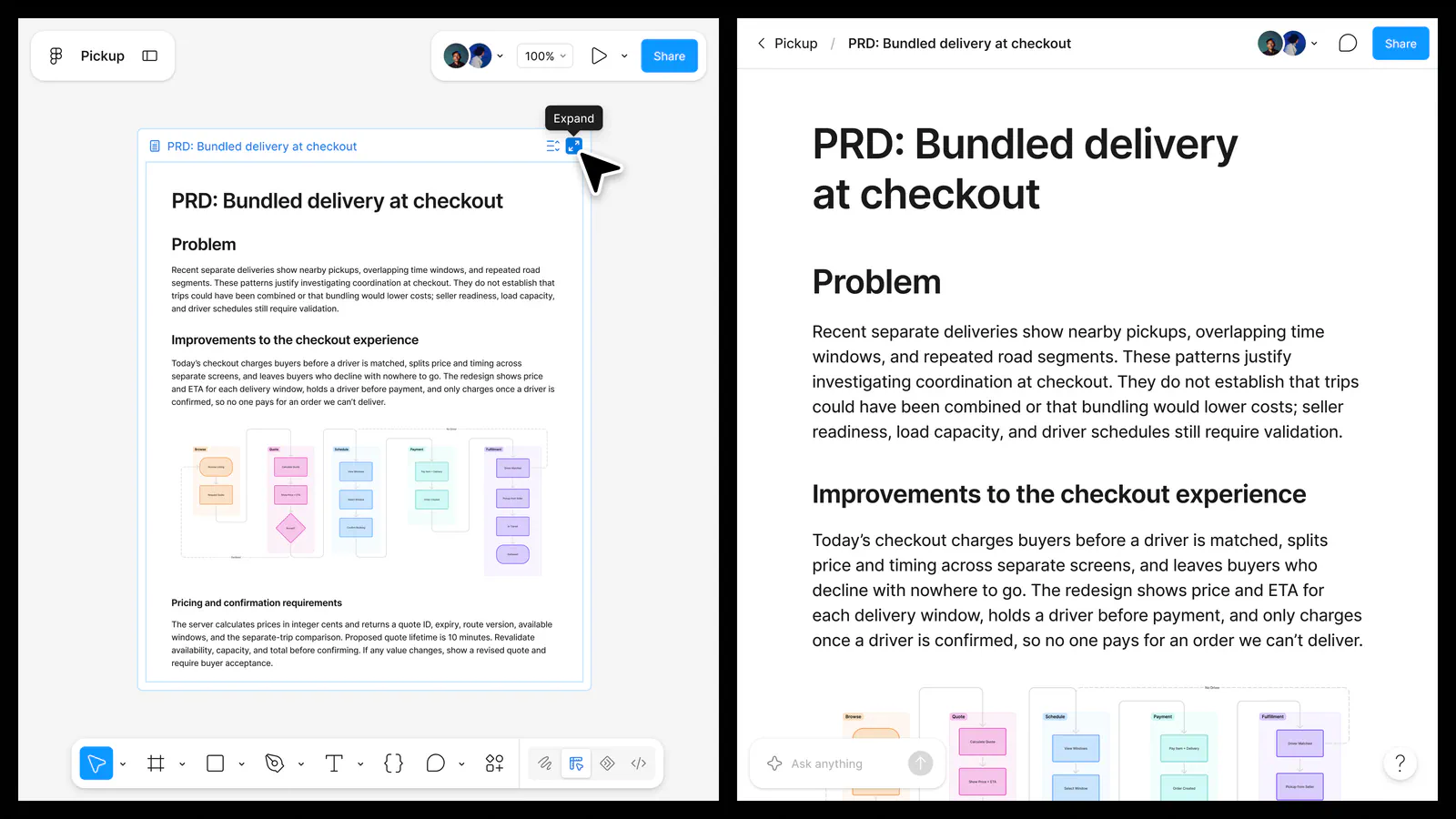
Coding agents connected through Figma’s MCP server can use the figma-spec skill to read, create, and update both standalone Specs and those embedded in design files or boards. This agent connection is the more consequential part of the release. Figma says edits are targeted and preserve the attachment between comments and their text.
Figma also documents workflows for bringing external context into a Spec, such as codebase information through a GitHub connector or analytics from HEX. Context can move outward too, for example to update Linear issues or a GitHub repository.
A team could describe a requirement, explore it visually, generate an implementation, and revise the requirement when the exploration exposes a problem. Agents can now participate in updating that shared document, instead of only consuming a prompt copied from it.
A Spec is still not an executable contract. Written requirements need interpretation and verification, and an agent’s ability to access a rule is no evidence that it followed the rule correctly.
Directly writing and editing Specs does not consume AI credits. Using Figma’s agent with Specs does, with consumption varying by task and context.
Code Layers Brings Running Prototypes Onto the Canvas
Code Layers puts real, running code inside Figma Design. Teams can place interactive prototypes on the canvas and iterate on them with the agent, going beyond linked screens to demonstrate behavior.
Figma describes four starting points:
- Convert existing design frames into a code layer.
- Capture a webpage using the Figma Chrome extension.
- Clone a connected GitHub repository.
- Start with an empty code layer and prompt the agent to build.
Specs records what should happen and why; a code layer lets collaborators examine an implementation of that behavior. A team could, for example, document a form’s validation requirements in a Spec and use a running prototype to check the interaction against them.
The open beta is rolling out across plans, so it will not appear for every account immediately. Figma’s Config India availability guide says access may arrive at different times for people on the same team or organization. A Code icon will appear in the Figma Design toolbar when it reaches a user’s account.
Creating and editing code within a code layer is free on paid plans through November 4, 2026. The introductory pricing does not cover every action in an agent prompt: if a request includes other agent work, those tasks can still consume credits.
After November 4, Code Layers tasks will use AI credits, with consumption depending on factors including task complexity. Teams evaluating the feature should assess both the prototype and the cost of repeated iteration.
MCP Extends the Workflow Beyond Figma’s Own Agent
The expanded Model Context Protocol support connects these artifacts to external agent tools. Figma says its MCP improvements are available now and add support for 20 new partners. TechCrunch’s reporting names additions including Open Code, Dia, Meta Muse, and Sarvam.
The updated MCP server supports reading, writing, and creating Specs, as well as generating interactive code layers on the canvas. It also adds html_to_figma, which turns agent-generated HTML into editable design layers, and generate_image, which accesses Figma’s image models from an external AI tool.
An external agent can therefore work with requirements and contribute artifacts back into Figma, extending the workflow beyond exporting a design for implementation. Teams that already prefer a coding agent outside Figma could use the same shared context.
Access depends on the setup. Figma says MCP usage limits and availability vary by plan and seat type, and users need a supported client. The image-generation tool also consumes Figma AI credits.
Figma claims the MCP improvements complete tasks faster and more reliably while using fewer tokens. Its launch documentation does not provide a comparative benchmark for that claim. Teams should evaluate it against their own tasks before treating it as a measured productivity gain.
Payload Adds a Backend, Not Just More Context
An interactive frontend is not necessarily an application with persistent data, authentication, and content management. Payload addresses that separate limitation.
Figma Make now natively scaffolds a Payload backend. Figma describes the integration as providing a database, media and file storage, authentication, access control, APIs, and an administration interface. It is rolling out across all plans, with the help documentation covering its use in both Make and Code Layers.
For prototypes that need real content or user accounts instead of mocked responses, Payload supplies the supporting infrastructure. It also gives agents more to build and maintain beyond the visual interface.
Figma positions Payload as a route to production-ready applications. That is a capability claim, not assurance that a generated application has passed a team’s security, privacy, or operational requirements. A backend makes those reviews more important, especially once an app stores real user data.
Adding Payload also increases agent credit usage, according to Figma, because the agent loads additional guidance, writes more code, and carries that context into subsequent calls. Existing Supabase-backed Make apps will continue working, and Supabase remains available as a third-party connection.
Sources
- October 15 release notesfigma.com
- Specs guidehelp.figma.com
- Config India availability guidehelp.figma.com
- TechCrunch’s reportingtechcrunch.com