
AWS’s Well-Architected Agent offers cloud teams two paths to an architecture review: inspect deployed infrastructure or upload infrastructure as code before deployment. It produces prioritized recommendations and remediation instructions, but the preview does not autonomously apply fixes.
In its October 1, 2026 preview announcement, AWS says the agent connects resource configurations, utilization metrics, and application topology with business goals. Findings can come with console instructions, CLI commands, or infrastructure-code changes.
Access requires an AWS Support plan. AWS also warns that generated recommendations can contain errors or incomplete information. The public preview is not an independently validated replacement for architecture review. A bounded pilot gives cloud teams a way to assess whether its findings are verifiable and its proposed changes safe to approve.
Preview Access Requires an AWS Support Plan
AWS says Well-Architected Agent is delivered through AWS Support and is available to customers with an AWS Support plan. The announcement does not specify tier-by-tier eligibility or a separate price for the agent. Teams should confirm access and commercial terms with their AWS Support contacts.
The preview’s access Regions are:
- US East (N. Virginia)
- US East (Ohio)
- US West (Oregon)
These are the Regions where customers access the agent and its recommendations. Workloads can be onboarded from any commercial AWS Region, according to AWS, so they do not have to run in one of those three Regions to be included.
Setup begins in the AWS Well-Architected console. An agent profile defines the accounts, Regions, optimization focus, and goals to analyze. For deployed-environment inspection, customers must also provision customer-managed IAM roles that let the agent read resource configurations, utilization metrics, and application topology. Teams should review that access scope before the first scan.
The Preview Inspects Deployed Resources and Uploaded IaC
For deployed environments, AWS says the agent correlates signals across more than 65 AWS services and evaluates them against Well-Architected best practices. The inputs cover what resources are configured to do, how they are being used, and how they relate within an application.
These inputs provide different kinds of evidence. Configuration alone may reveal a questionable setting; utilization and application context can help establish whether changing it makes sense. The service count, however, does not prove that every feature or architectural dependency receives equivalent scrutiny.
Resource and application recommendations are generated within 24 hours after profile creation, according to AWS, and updated periodically. Neither statement establishes real-time detection. The 24-hour statement should not be treated as a completion guarantee for every uploaded architecture review.
For pre-deployment analysis, teams can upload a ZIP file containing a Terraform, AWS CloudFormation, or AWS Cloud Development Kit (CDK) project or repository, then select a Well-Architected lens for the review.
Code can expose intended infrastructure, but it cannot by itself demonstrate actual production utilization or application behavior. An uploaded project supports review of a proposed design; a deployed system adds operational signals.
Business Goals Shape the Recommendation Queue
The agent’s configurable focus areas are cost optimization, performance, resilience, and security. AWS says customers declare goals for those areas, and the agent prioritizes recommendations by impact and effort against those goals.
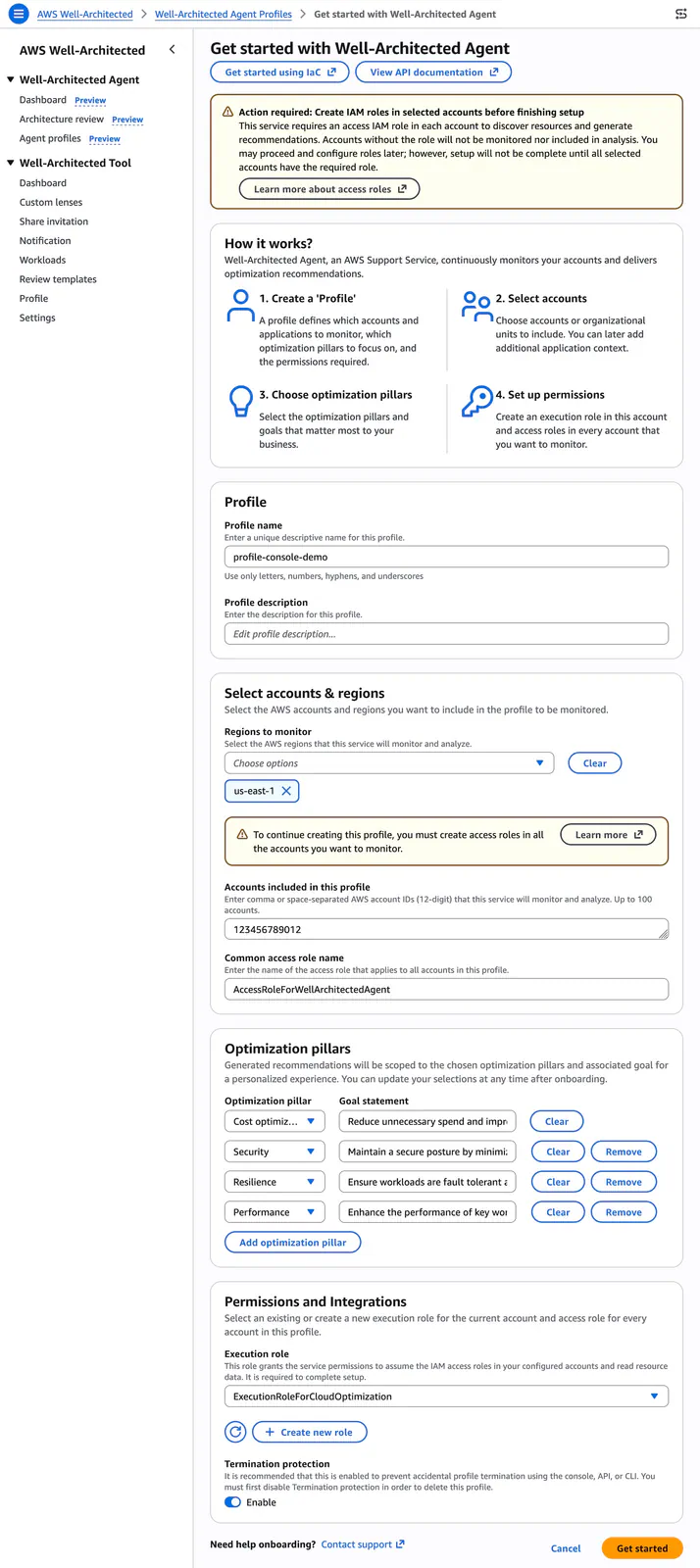
Teams can add application context, including accounts, Regions, services, tags that narrow resource scope, and application details. A technically valid recommendation may still be wrong for a particular workload.
For example, reducing spare capacity might deserve attention in a cost-focused development environment but require much closer examination in a production service with demanding availability requirements. This is an illustrative trade-off, not a reported result from testing the preview.
AWS describes three levels of output:
- Resource findings with step-by-step remediation and dollar impact where applicable.
- Consolidated findings across multiple resources within an application.
- Broader architectural recommendations with IaC changes intended to align the design with Well-Architected practices.
The existing AWS Well-Architected Tool supports guided self-review, documented decisions, identified risks, and improvement tracking. AWS presents the two services as complementary: the agent generates recommendations from infrastructure and code, while the Tool remains useful for structured reviews and governance.
A Remediation Package Includes Evidence, Not Just Code
According to AWS’s recommendation-viewing documentation, each recommendation has a detail page explaining what was detected, why the finding was generated, and which resources are affected.
The page includes priority, optimization pillar, fix effort, detection date, and recommendation source. AWS lists Trusted Advisor as an example source. Supporting signals can reference specific resource ARNs and configuration states, giving engineers concrete evidence to investigate.
Impact estimates appear where available. Teams can also inspect cross-pillar benefits and trade-offs, including risk descriptions and mitigation guidance, to assess whether an apparently attractive cost change affects performance, security, or resilience.
After reviewing a finding, users can choose a remediation path:
- Console walkthroughs provide step-by-step instructions.
- Updated IaC provides changes to incorporate into the infrastructure codebase.
- AWS CLI commands provide another implementation route.
The console’s “Start remediation” action opens this guided workflow; it does not give the agent permission to change infrastructure autonomously. AWS describes customers rolling out the instructions and verifying the result themselves.
Recommendations are also available through APIs, allowing teams to connect them to existing development and operations workflows. That integration can make findings easier to route and track. Engineering review, change control, and execution remain separate responsibilities: generated remediation is not an approved deployment.
A Useful First Pilot Follows One Finding Through Delivery
A large recommendation count tells teams less than following a finding from detected evidence to an approved change. The useful test is whether engineers can make that journey without having to reconstruct the finding’s reasoning.
A practical pilot could follow this sequence:
-
Choose a bounded scope. Start with one application or a limited account-and-Region selection. Check the customer-managed IAM roles before allowing deployed-resource inspection. For an IaC review, choose a project whose intended architecture the reviewing team understands.
-
Provide meaningful context. State the optimization goals and describe the application. Include relevant account, Region, service, and tag information; do not expect the agent to infer every business constraint.
Frequently Asked Questions
3 questions
1Does AWS Well-Architected Agent automatically apply fixes?
No. The documented preview provides console instructions, CLI commands, and IaC changes for customers to evaluate and implement. Selecting “Start remediation” opens a guided workflow without autonomously changing infrastructure. AWS says customers remain responsible for evaluating AI-generated recommendations and implementing appropriate oversight and safeguards before acting.
2
Sources
- preview announcementaws.amazon.com
- AWS Well-Architected Tooldocs.aws.amazon.com
- recommendation-viewing documentationdocs.aws.amazon.com