
AWS published an implementation walkthrough on October 30, 2026 showing how developers can open a web app running inside a Bedrock AgentCore Runtime session. Its sample keeps a Vite development server beside a coding agent, allowing a browser preview to update as the agent edits the site.
The mechanism is a Session endpoint: an authenticated HTTPS URL that routes requests to explicitly allowed ports inside one runtime session. The coding agent and its development environment still need to run in AgentCore, but the app being reviewed needs no separate hosting deployment.
That separation is the useful part of this product update. Developers can inspect the software where the agent is building it, without copying each revision to another environment. The practical work shifts to configuring network access, browser authentication and the lifetime of the preview.
AWS’s October release notes list Session endpoints among the month’s Runtime additions. The October 30 post supplies the worked example; AWS’s developer guide supplies the configuration rules below.
Two Endpoints Serve Different Jobs
A runtime endpoint and a Session endpoint sound similar, but they address different things.
| Detail | Runtime endpoint | Session endpoint |
|---|---|---|
| Main purpose | Invoke the agent | Reach applications running inside its session |
| Form | Named pointer to an agent version, such as DEFAULT | Authenticated HTTPS URL for one session |
| Version behavior | Selects the agent version callers reach | Uses the version already running in that session |
| Destination | Agent serving port and invocation path | Ports permitted by allowedPorts |
| Lifetime | Exists until deleted | Tied to the session’s lifecycle |
According to the developer guide, a Session endpoint is not a separate resource. Runtime returns its URL when an invocation starts or reuses a suitably configured session.
AWS’s sample makes the distinction concrete. The agent runs on port 8080, while Vite serves the website on 8090. Prompts reach the agent through InvokeAgentRuntime. Browser requests reach Vite through the Session endpoint. Vite’s hot-reload WebSocket carries updates back to the browser.
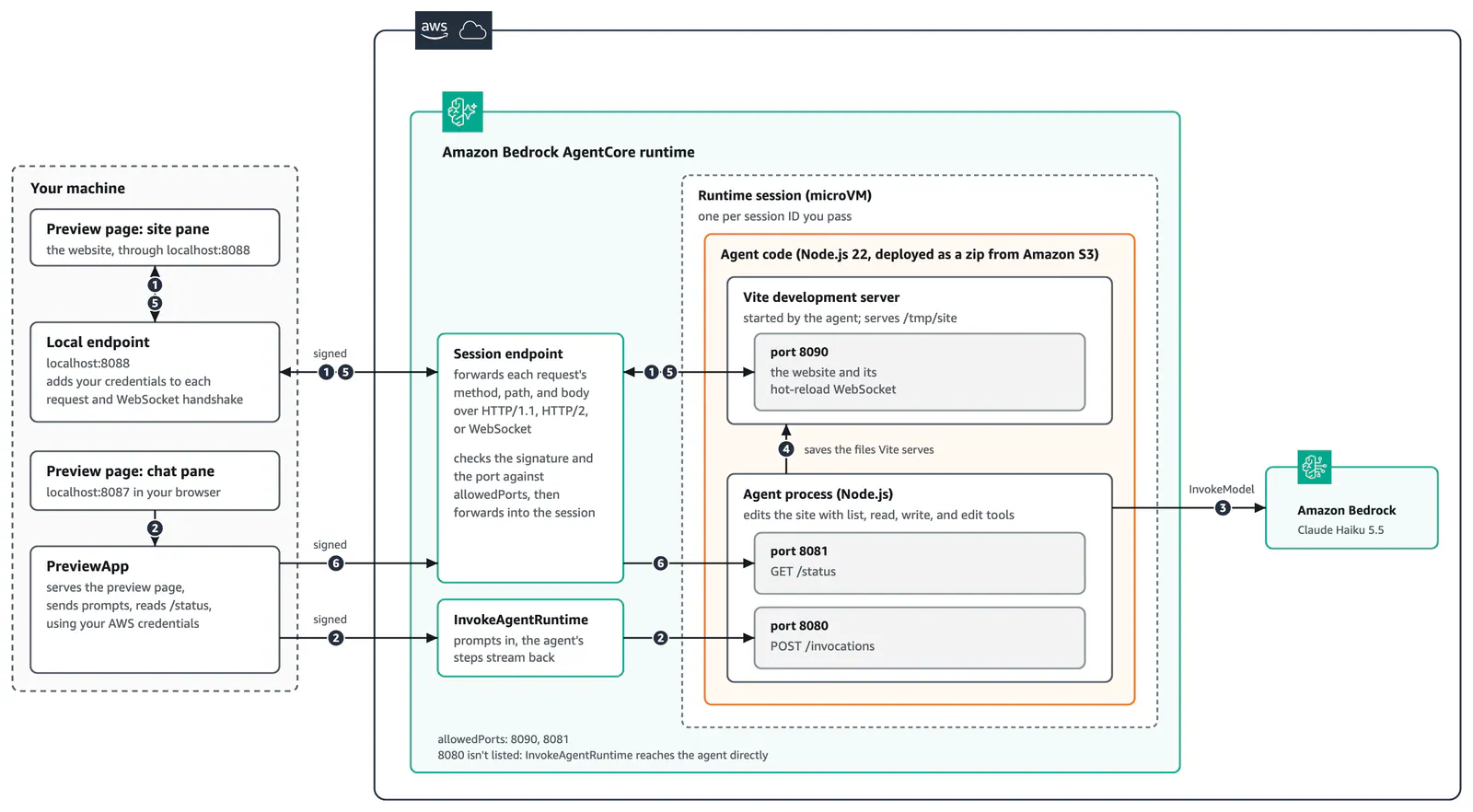
The distinction matters when debugging. A successful agent invocation does not prove that the preview server is listening, that its port is allowed, or that its host validation accepts the forwarded request. Those are separate checks.
Session endpoints support HTTP/1.1, HTTP/2, server-sent events, gRPC and WebSockets. AWS’s walkthrough demonstrates HTTP/1.1 and WebSockets; it is not a test of every supported protocol.
Configure Ports Before Opening the Preview
Set allowedPorts in the CreateAgentRuntime request to define which container ports a Session endpoint may reach. AWS documents these rules:
- Include one to five entries, each specifying a single port or a port range.
- Keep ports and range boundaries within 8000–12000, inclusive.
- Use unique, non-overlapping entries.
- Exclude reserved platform ports, including 8443. A range containing a reserved port is rejected.
- Start the application server yourself and bind it to
0.0.0.0.
Five entries does not mean a maximum of five individual ports: an entry can contain an inclusive range. Even so, I’d allow only the ports a preview actually needs. A narrow list makes the intended access clearer and leaves fewer services reachable through the endpoint.
Allowing a port does not start a server. A Vite process listening only on loopback also fails AWS’s documented requirement to bind to 0.0.0.0. Port policy and application startup need to agree.
The browser-facing connection uses HTTPS port 443. A hostname prefix selects the destination port inside the session:
https://8090--<session-endpoint-id>.runtime.bedrock-agentcore.<region>.on.aws/index.html
https://8081--<session-endpoint-id>.runtime.bedrock-agentcore.<region>.on.aws/status
These documented URL shapes route to ports 8090 and 8081 respectively. They do not instruct the client to connect directly to those external ports.
This gives developers three distinct settings to check: the agent’s serving port, the application’s listening port, and the session’s allowed-port policy. Changing one does not configure the others.
AWS also documents a deployment boundary: Session endpoints support microVM runtimes, not instances using capacity providers. They use public HTTPS ingress, and AWS PrivateLink ingress is unsupported. Public ingress still requires authentication, but it may be incompatible with a team’s private-network requirements. See the Session endpoint guide before choosing this preview architecture.
Handle the Internal Host Header
The proxy preserves the HTTP method, path, query string and request body. For example, a request for /preview/index.html reaches that application route. The agent’s protocolConfiguration.path setting does not prepend or rewrite the path of Session endpoint requests.
The hostname behaves differently.
AWS says the application receives an internal Runtime hostname in its Host header. The public Session endpoint hostname is not forwarded, and there is no X-Forwarded-Host header. The internal value can also change.
That produces two practical failure modes:
- Host validation can reject an otherwise valid request. The development server must accept the host Runtime supplies.
- Generated absolute URLs can point somewhere unreachable. A redirect or asset URL built from the incoming
Hostheader can send the browser toward the internal hostname.
AWS’s documented configuration examples include:
- Vite: set
server.allowedHoststotrue. - webpack-dev-server: set
devServer.allowedHoststo'all'. - Django: configure its corresponding
ALLOWED_HOSTSsetting to accept the forwarded requests.
These are preview-environment settings, not a reason to remove host validation from an unrelated production deployment.
I’d check host handling early if a preview server starts successfully but the page remains unusable. It is an easy detail to miss because the public URL looks like the address the application should see. AWS explicitly documents otherwise.
Use relative URLs for links, assets and redirects where possible. The browser can then resolve them against the address it actually opened, without relying on an internal hostname.
Bridge Browser Requests With the SDK Client
Runtime returns the Session endpoint URL in the InvokeAgentRuntime response header named:
X-Amzn-Bedrock-AgentCore-Runtime-Session-Endpoint-Url
SDKs that model this value expose it as sessionEndpointUrl. Receiving the URL gives the client a destination, not authorization.
Frequently Asked Questions
3 questions
1Does Sharing the Preview URL Grant Access?
No. Every request needs authentication. IAM-based access also requires the relevant bedrock-agentcore:InvokeAgentRuntimeProxy permission; JWT-authorized runtimes require a bearer token.