

Microsoft announced on November 20, 2026, that OpenAI’s GPT-6.2 Sol and GPT-6.2 Astra are rolling out across Microsoft Copilot. Sol has the broader distribution: eligible users can access it in Copilot Chat, Copilot Cowork, Copilot Studio, Excel, PowerPoint, and Word. Astra is coming to Cowork and Studio, with access in Chat and those three Office apps reserved for Frontier users, according to Microsoft’s announcement.
The distinction matters for anyone planning a deployment. Access to Astra in one Copilot product does not automatically mean access in every other product. Microsoft also describes a rollout, with availability varying by region and organization, and administrators controlling access.
Where Each GPT-6.2 Model Is Available
Microsoft’s announcement gives the following access map. Every entry remains subject to eligibility, organizational settings, regional availability, and rollout timing.
| Copilot Surface | GPT-6.2 Sol | GPT-6.2 Astra |
|---|---|---|
| Copilot Chat | Rolling out to eligible users | Frontier users |
| Copilot Cowork | Rolling out to eligible users | Rolling out to eligible users |
| Copilot Studio | Rolling out to eligible users | Rolling out to eligible users |
| Copilot in Excel | Rolling out to eligible users | Frontier users |
| Copilot in PowerPoint | Rolling out to eligible users | Frontier users |
| Copilot in Word | Rolling out to eligible users | Frontier users |
Source: Microsoft Copilot Blog, November 20, 2026.
Astra appearing in Cowork but missing from Word can be consistent with the announced rollout. Cowork and Studio have a different access condition from Chat, Excel, PowerPoint, and Word, where Microsoft specifically names Frontier users.
The announcement does not provide a qualifying-license matrix, detailed Frontier enrollment requirements, or a country-by-country rollout schedule. Its worldwide language describes the rollout’s intended reach, not simultaneous availability for every account.
For deployment planning, I’d treat Sol as the more broadly distributed option across these six surfaces. Astra access needs a separate check for each intended application, especially when a workflow moves between Cowork and Office.
What Sol and Astra Are Intended to Do
OpenAI positions Sol for everyday coding, writing, and multistep work, while Astra targets harder projects and complex reasoning. Its GPT-6.2 product guidance, dated November 17, 2026, gives examples such as turning meeting notes into a brief with Sol and building a presentation from a report and template with Astra.
Those are OpenAI’s product recommendations, not independent measurements of performance inside Microsoft Copilot. Microsoft’s announcement provides the distribution details, but no side-by-side Copilot benchmark or application-specific performance results.
That makes access the immediate practical difference. A team interested in Astra for presentation work should first establish whether its users qualify for Astra in PowerPoint. Availability in Cowork alone is insufficient evidence.
Admin Controls Add Another Access Check
Microsoft says administrators can manage access and configure organizational availability through the Microsoft 365 admin center. The announcement does not supply a detailed settings path, so it should not be read as a step-by-step configuration guide.
Copilot Studio has additional documented dependencies. Its model availability documentation says model choices depend on:
- The organization’s region.
- Its AI provider settings.
- The Power Platform administrator’s environment configuration.
For GPT models, the documentation also distinguishes who operates the model: Microsoft or OpenAI. The OpenAI subprocessor setting controls access to GPT models operated by OpenAI. That distinction is worth checking before assuming every GPT option follows the same provider configuration.
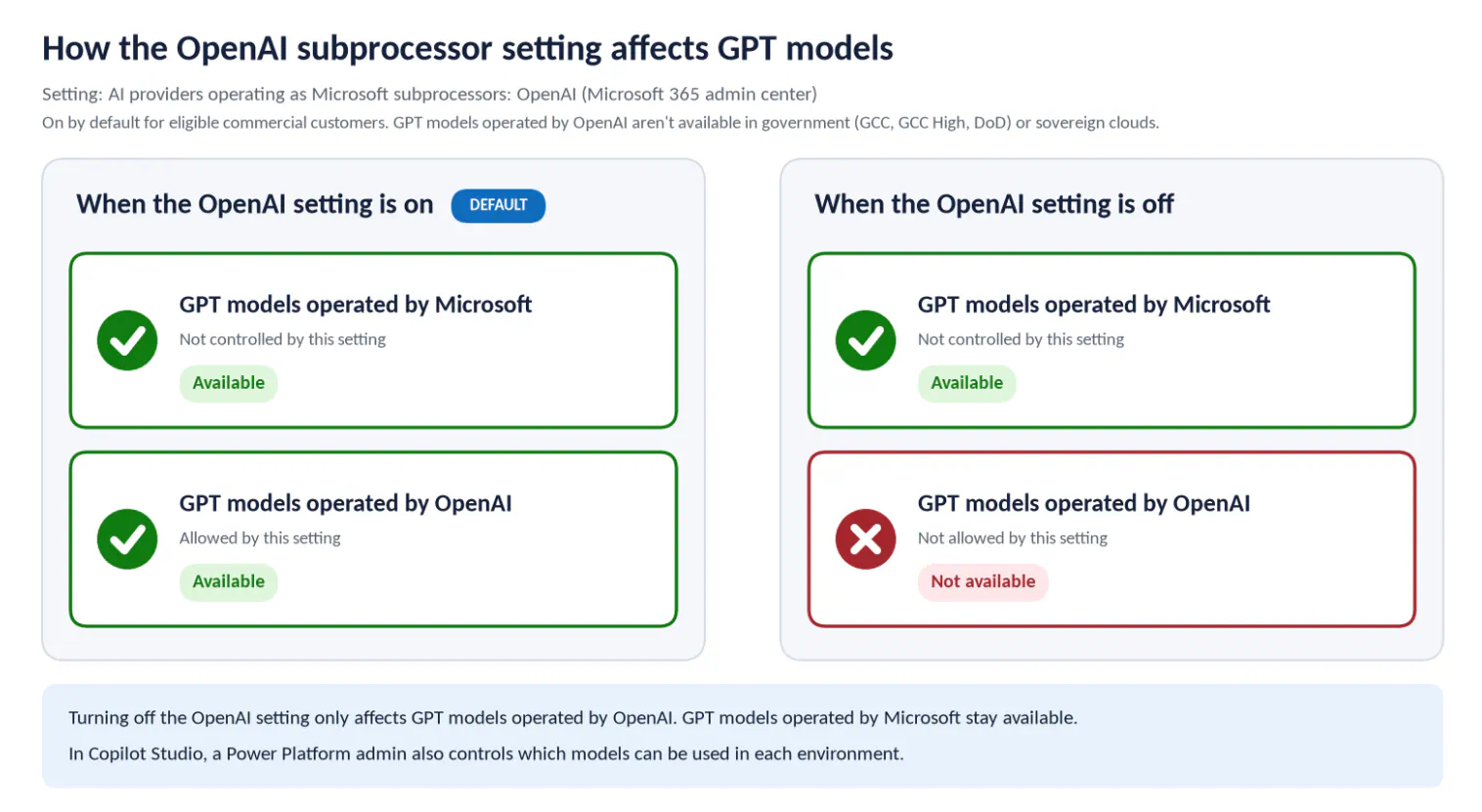
A useful troubleshooting order follows from these documents:
- Check the product. Astra has different access conditions in Studio and Cowork than in Chat and Office.
- Check user eligibility. The announcement’s eligible-user wording is a condition, not a promise to every account.
- Check organizational controls. Review Microsoft 365 availability settings and, for Studio, the relevant provider and environment configuration.
- Check rollout status. Microsoft directs customers to its Copilot Roadmap and release notes for current information.
This separates several possible explanations for a missing model. A product-access restriction, an administrator setting, and an incomplete regional rollout require different responses.
Copilot Studio Lists Both Models as Generally Available
Microsoft’s Copilot Studio model list identifies both GPT-6.2 Sol and GPT-6.2 Astra as generally available, or GA, OpenAI models.
That label has a specific meaning. Microsoft says GA models can be used for scaled and production deployments, while preview and experimental models are not intended for production use. It also notes that GA models can retain limitations, including regional availability.
Read alongside the launch announcement, the documents answer two separate questions:
- Is the model designated for production use in Studio? Both models are listed as GA.
- Can a particular organization use it now? That still depends on eligibility, region, provider settings, environment configuration, and rollout status.
Frequently Asked Questions
3 questions
1Can Everyone Use GPT-6.2 Astra in Word?
No. Microsoft names Frontier users for Astra access in Word, Excel, PowerPoint, and Copilot Chat, subject to organizational and regional availability.


