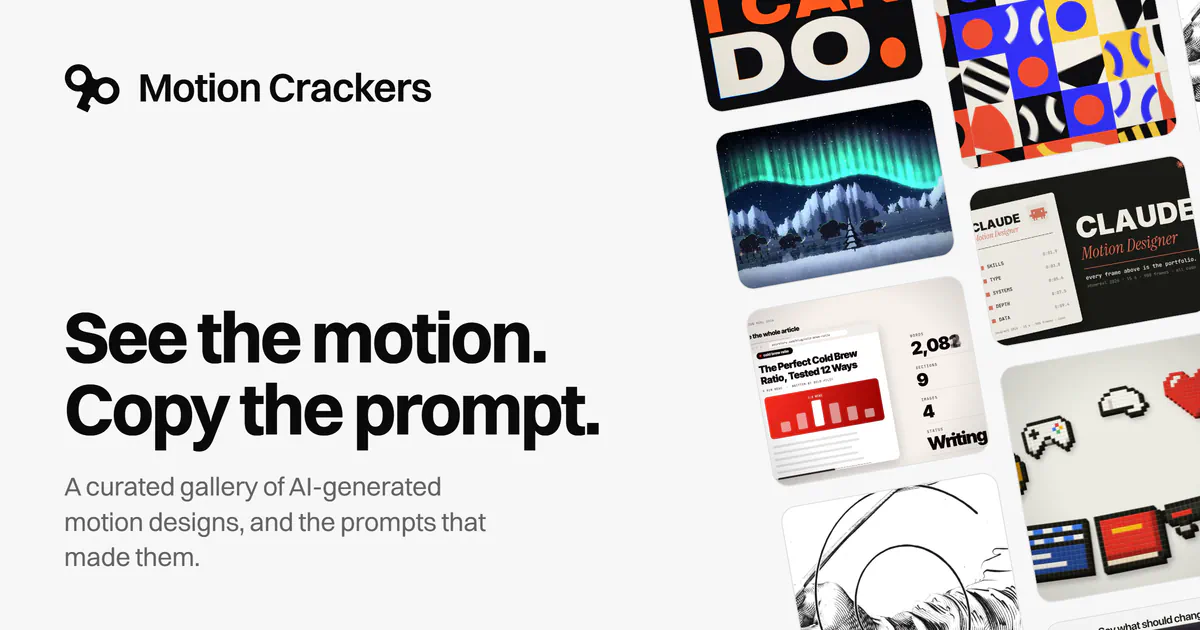
Motion Crackers brings AI-generated motion designs and the prompts behind them into a curated gallery. Its homepage sums up the idea in six words: “See the motion. Copy the prompt.”
That pairing makes the site more useful than a showcase alone. Designers can judge a finished clip before deciding whether its instructions are worth adapting. A prompt gains context when readers can see the motion it is credited with producing, including the pacing, visual density and overall presentation.
The important boundary is that these are creator-attributed community examples, not controlled performance tests. The published gallery does not establish a complete model-and-settings record for every clip. Its homepage also provides no reliable launch timestamp, so the precise opening date remains unverified. The clearest way to understand the product is as a visual prompt reference, with discovery and reuse at its center.
How Motion Crackers Organizes Its Gallery
Motion Crackers calls its motion designs “crackers” and offers three views: Featured, Latest and Most popular. Entries display creator names and clip durations. The homepage includes contributions attributed to people such as Axel Schapmann, Leon Lin, Ajith and Jackson Greathouse Fall. Those credits help readers distinguish individual contributions instead of treating the gallery as one anonymous collection. (Motion Crackers)
Each view provides a different starting point:
- Featured offers the gallery’s selected examples.
- Latest supports discovery through the recency-oriented view.
- Most popular offers a popularity-oriented view, though the opened page does not explain its ranking formula.
Those labels should guide browsing, not serve as quality guarantees. A featured entry reflects selection by the gallery. A popular entry occupies a position in its popularity view. Neither label tells a reader how consistently the associated prompt works.
The visible entries also vary substantially in length. Many are labeled 15 seconds, while others run 30 seconds or longer, including examples marked 4:39 and 5:37. These are clip durations, not generation times or evidence of production effort. That distinction matters when comparing an economical animation loop with a much longer presentation.
The documented navigation establishes browsing by these three views. It does not establish a dedicated keyword-search tool or advanced filters for model, style or production software. For readers looking for a particular kind of motion, the supported workflow starts with finding promising examples in the collection.
How to Find, Compare and Reuse a Prompt
A useful browsing session starts with a specific design need. Looking for a short product introduction is a more actionable task than looking for something impressive. It gives the reader a basis for choosing clips and deciding which prompt details might transfer.
I’d begin with examples close to the intended running time. A 15-second clip has a different storytelling budget from a one-minute explainer: fewer scenes, less readable text and less room for an extended opening. Matching duration first makes the subsequent visual comparison more useful.
Compare Specific Motion Decisions
Once a few candidates look relevant, compare them on concrete features:
- Pacing: How quickly does the clip introduce its subject, change scenes and resolve?
- Typography: How much text appears, and how long does it remain readable?
- Transitions: Do scenes cut, dissolve, transform or share moving elements?
- Composition: What stays fixed, and what moves through the frame?
- Ending: Does the animation stop, resolve into a final layout or return to its opening state?
These are suggested evaluation criteria, not claims about features built into Motion Crackers. They help turn a gallery visit into a design exercise.
The next step is to inspect the accompanying prompt for instructions that could explain those visible choices. A useful question is whether the text specifies timing and structure, or mainly names an aesthetic. That distinction affects how much of the example’s behavior a reader can deliberately carry into a new project.
Adapt the Structure Before the Subject
When reusing a prompt, preserve the parts relevant to the task and replace details tied to the original creator’s project. Depending on what the prompt contains, that could mean keeping a scene sequence while changing the product, or retaining a timing instruction while rewriting the text.
For an initial attempt, I’d avoid changing every dimension at once. If the subject, duration, visual style and scene order all change, it becomes harder to understand which part of the borrowed prompt helped. This is a suggested way to evaluate reuse, not a test performed on the gallery.
Keep a copy of the original instructions beside the adapted version. That simple record makes later comparisons more meaningful than relying on memory.
The Missing Metadata Behind a Finished Clip
A prompt describes a request. It is only one part of the process that produces a finished animation.
The receiving model, its version, the surrounding toolchain and any subsequent editing can all affect how instructions become an output. The practical issue is therefore broader than whether the wording is detailed enough: readers need to know what else shaped the published result.
Before treating an example as a reproducible recipe, look for the following information:
| Production detail | Why it matters |
|---|---|
| Model and version | Identifies the system that interpreted the instructions. |
| Generation settings, where applicable | Records controls beyond the prompt text. |
| Reference assets or other inputs | Reveals material the prompt may depend on. |
| Follow-up instructions and revisions | Distinguishes an initial request from an iterative process. |
| Rendering, editing or finishing steps | Helps explain how the generated material became the final clip. |
This is a reproducibility checklist, not a list of fields Motion Crackers promises to provide. The available homepage evidence does not establish those details for every entry.
The consequence is straightforward: a creator’s clip can demonstrate a published outcome without showing the likelihood of obtaining that outcome again. It also cannot reveal, by itself, how many attempts or revisions preceded publication.
That is why featured examples should not be read as benchmarks. A meaningful model comparison would require comparable tasks and documented conditions. A curated collection of community submissions answers a different question: what have individual creators chosen to share?
Frequently Asked Questions
3 questions
1What Is Motion Crackers?
Motion Crackers is a curated gallery of AI-generated motion designs and their associated prompts. Its homepage offers Featured, Latest and Most popular views.