Momentic Launches Mo, a Parallel AI QA Agent | Zeniteq
Loading
Loading article
Zeniteq is now available on mobile for iPhone, iPad and Apple Watch.Download nowLearn more
Momentic Launches Mo, a Parallel AI QA Agent
Momentic’s exploratory testing agent coordinates browsers and mobile devices, with a company-run benchmark showing higher bug recall at a higher cost per discovery.
Momentic has launched Mo, an autonomous AI agent designed for exploratory software testing across web and mobile platforms. Unlike standard regression tools, Mo utilizes a self-organizing agent graph to parallelize tasks, employing specialized planners and locators to navigate applications. While Momentic’s internal benchmarks indicate Mo achieves higher bug recall than competitors like Codex, this performance comes at a significantly higher cost per discovery. Because Mo’s parallel execution can cause state interference, it uses cooperative resource leases to manage concurrent actions, making it a powerful, albeit expensive, complement to traditional, deterministic regression testing suites.
Momentic launched Mo on November 2, 2026, introducing an AI QA agent that autonomously plans and explores web, iOS, and Android apps. The company says Mo reports bugs with reproduction steps, logs, and video replays, giving developers evidence they can use to investigate a failure. Every new signup receives $250 in Mo spending credit, according to the founders’ launch announcement.
Mo’s job is exploratory testing: investigating an application, branching into different product areas, and looking for unexpected behavior. That makes it a potential companion to repeatable regression checks, which verify known requirements before a release.
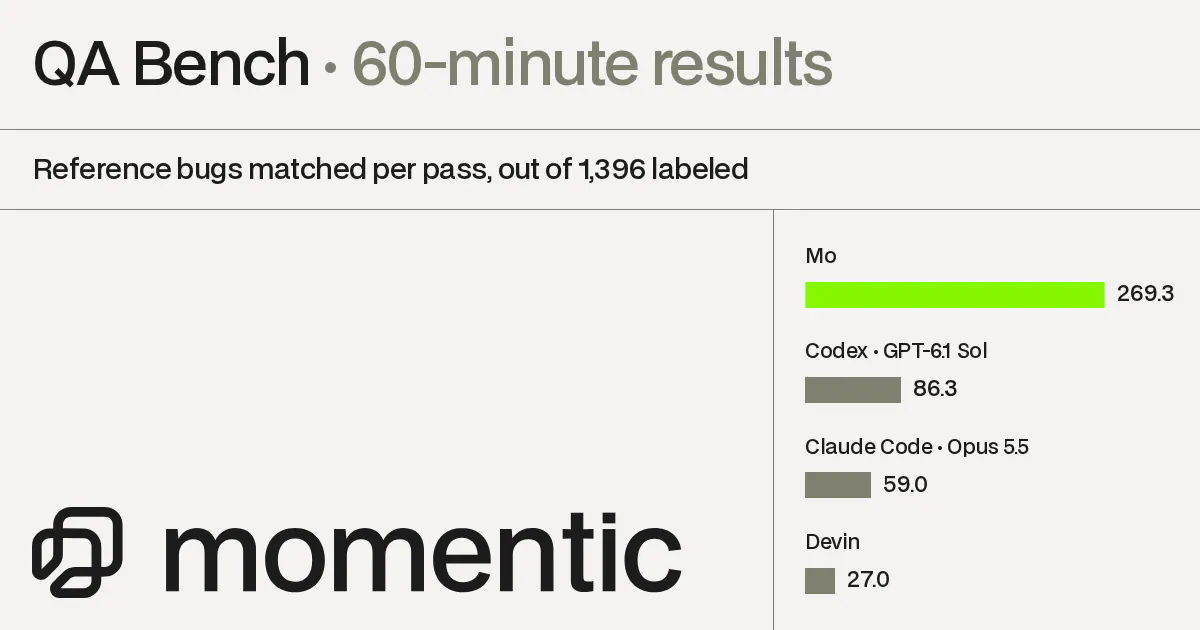
Momentic also published unusually concrete performance and cost figures. In its own 60-minute benchmark, Mo matched roughly 269 labeled bugs, compared with 86 for the highlighted Codex configuration. Mo’s cost per matched bug was $2.67 against Codex’s $0.80. The useful question for teams is whether that additional discovery justifies the extra spending.
How Mo Splits Exploration Across Agents
Mo uses what Momentic calls a self-organizing agent graph. As exploration proceeds, it builds a directed acyclic graph, or DAG, of work. Large product areas can branch into parallel sub-agents, each with its own browser or device. Momentic says a single bug bash can launch hundreds of concurrent browsers and devices. These are company-described capabilities, not independently measured capacity figures. (Launch announcement)
The architecture divides tasks between specialists:
Planner agents reason over screenshots and video to decide what to explore.
Locator agents inspect page structure to resolve interaction targets described in plain English.
Other specialized agents handle tasks including image analysis, video understanding, and audio generation.
That separation matters because deciding what to test and locating the right control are different problems. A planner might decide to investigate account permissions; a locator then needs to identify the relevant settings controls in the current interface.
Parallel exploration also introduces shared-state problems. Two agents changing the same account or fixture can interfere with each other and produce misleading failures. Momentic says Mo coordinates through cooperative resource leases: multiple agents may claim they are “using” a resource, but only one “modifying” claim can be active for that resource at a time.
I’d treat that coordination detail as more consequential than the headline browser count. Adding workers is useful only when their actions remain interpretable. Leases provide a mechanism for managing overlapping work, although the announcement does not show that they eliminate every form of interference.
Momentic’s YC profile describes support for web, iOS, and Android exploration. Physical-device support and desktop testing were still forthcoming in the launch discussion, so mobile support should not be read as a promise of generally available real-device testing.
The Benchmark Shows a Cost and Recall Tradeoff
Momentic’s QA Bench tests agents against 1,396 human-labeled bugs across 20 product areas in four open-source applications: Gitea, Metabase, Twenty, and Saleor.
Each agent tested a product area in its own sandbox, with the same brief and time limit. Applications used pinned commits and seeded data. Agents could not read application source code, bug labels, or earlier reports. Codex and Claude Code used hosted Browserbase browsers; Devin used its native browser; Mo used Momentic’s hosted browsers.
The following results are from the company’s 60-minute evaluation dated November 2, 2026:
Agent configuration
Matched bugs
Recall
Precision
Cost per matched bug
Mo, high effort
269.3
19.3%
84.2%
$2.67
Codex, GPT-6.1 Sol + Playwright MCP
86.3
6.2%
86.0%
$0.80
Codex, GPT-6.1 Terra + Playwright MCP
82.7
5.9%
81.6%
$0.53
Claude Code, Opus 5.5 + Playwright MCP
59.0
4.2%
79.5%
$4.09
Devin, native browser, default settings
27.0
1.9%
84.4%
$3.89
Source: Momentic QA Bench. Each product area’s count is averaged across three runs, except Devin, which ran once. Fractional bug counts reflect those averages.
Recall measures how much of the labeled bug set an agent found. Precision measures how much of its reported output was scored as valid. Those metrics answer different questions: an agent can produce mostly valid findings while still overlooking most available bugs.
Momentic designed and ran the benchmark, using an LLM judge with human review, according to its launch post. The results have not been independently reproduced. They also measure source-free, browser-based exploration of these four applications, not every way a coding agent might debug software.
The cost accounting deserves attention too. The benchmark page calculates comparison costs using token spending at list prices plus Browserbase time, while Mo’s figure uses billed session spending. These are published usage-cost measures, not a complete accounting of setup, report triage, or engineering time.
Equal Time Is Not Equal Budget
Mo found about 3.1 times as many matched bugs as the highlighted Codex Sol configuration, while costing about 3.3 times as much per matched bug. Those ratios are calculated from Momentic’s published figures.
That combination shows a throughput-versus-efficiency tradeoff. Mo found substantially more within the time window, but parallelism did not make each discovery cheaper. A fixed-budget comparison could produce a different purchasing decision from a fixed-deadline comparison.
The additional Codex Terra row also matters. Its 82.7 matched bugs were close to Sol’s 86.3, at $0.53 per matched bug. Teams optimizing discovery cost should examine the full configuration table, not only the launch post’s headline pairing.
Mo continued finding more bugs with additional time: its matched count rose from 176.7 at 30 minutes to 269.3 at 60 minutes, approximately a 52% increase. Codex Sol with Playwright MCP rose from 74.7 to 86.3, approximately 16%. That supports Momentic’s claim that longer exploration helped Mo in this test; it does not establish how gains continue beyond an hour.
Even Mo’s leading result covered less than one-fifth of the labeled set. My reading is that the benchmark supports trying a specialized discovery tool, while leaving plenty of reason to retain other testing methods.
Where Mo Fits in a Release Workflow
Momentic describes Mo’s exploratory testing as intentionally nondeterministic. Different exploration paths can uncover different failures, but that variability makes it a poor substitute for a required check that must verify the same critical behavior on every change. (Launch discussion)
A practical division of work is:
Regression checks: Verify established requirements, such as permissions, checkout totals, or successful sign-in.
Exploratory sessions: Investigate changed product areas and unexpected combinations of actions.
Follow-up regression coverage: Turn confirmed, important discoveries into repeatable checks.
Momentic’s existing testing platform supports plain-English steps and assertions in version-controlled YAML, alongside CLI exit codes for CI checks. That provides useful context: the company offers structured flow verification as well as open-ended exploration.
The founders also announced PR testing for Vercel and Cloudflare deploy previews. For teams already creating isolated preview deployments, that offers a natural place to evaluate Mo before considering broader release use.
What to Check During the $250 Trial
Momentic offers free signup without a credit card, while the launch post promises $250 in Mo spending credit. The company also provides a tunnel to expose private sites and local apps to its hosted agents and infrastructure. (QA Bench; launch announcement)
I’d start with a bounded product area and disposable test data. That makes findings easier to verify and reduces the consequences of exploratory actions. For a useful evaluation, record:
Which reported bugs reproduce and warrant a fix.
How much engineering time report review takes.
What Mo discovers beyond existing checks.
Total session spending and the infrastructure capacity available on the plan.
The launch credit is a spending allowance, not a promised number of discoveries. Dividing $250 by the benchmark’s cost per bug would not reliably predict results on another application.
The Hacker News discussion also raised questions about open-source alternatives, self-hosting, determinism, and vendor lock-in. Company representatives acknowledged some lock-in from the proprietary platform. Those are concerns from one discussion, not a consensus, but they suggest another worthwhile trial criterion: whether the reports and reproduction evidence remain useful outside Momentic.
Frequently Asked Questions
3 questions
1
What Evidence Does Mo Return?
Momentic says Mo produces bug reports with reproduction steps, logs, and video replays.
2
Can Mo Test a Private or Local App?
Momentic provides a tunnel that makes private sites and local applications accessible to its hosted agents.
3
How Much Launch Credit Is Available?
The founders announced $250 in Mo spending credit for every new signup. The site also advertises free signup without a credit card.