Claude Code is running in production across multi-million-line monorepos, decades-old legacy systems, distributed architectures spanning dozens of repositories, and at organizations with thousands of developers. That's not marketing copy. That's the actual deployment surface Anthropic is supporting right now.
These environments present challenges that smaller, simpler codebases don't, whether that's build commands that differ across every subdirectory or legacy code spread across folders with no shared root. Getting Claude Code to perform well at that scale requires deliberate infrastructure choices, not just handing out API keys.
The biggest risk isn't the AI underperforming. It's launching without the foundation that keeps agentic work reliable in production: defined workflows, enforceable governance, and integration into day-to-day engineering practices. This guide covers what that foundation looks like in practice.
Why Agentic Search Beats RAG at Scale
Before getting into configuration, it's worth understanding why Claude Code's navigation model is architecturally different from most AI coding tools.
RAG-powered AI coding tools work by embedding the entire codebase and retrieving relevant chunks at query time. At large scale, those systems can fail because embedding pipelines can't keep up with active engineering teams. By the time a developer queries the index, it reflects the codebase as it previously existed weeks, days, or even hours before. Retrieval then returns a function the team renamed two weeks ago, or references a module that was deleted in the last sprint, with no indication that either is out of date.
There's no embedding pipeline or centralized index to maintain as thousands of engineers commit new code. Each developer's instance works from the live codebase. The tradeoff is that Claude needs enough starting context to know where to look — which is exactly what the harness provides.
The Harness Is the Product
The core insight is that the harness around the model matters more than the model itself. Most teams focus on prompt quality. The teams that actually succeed at scale focus on infrastructure.
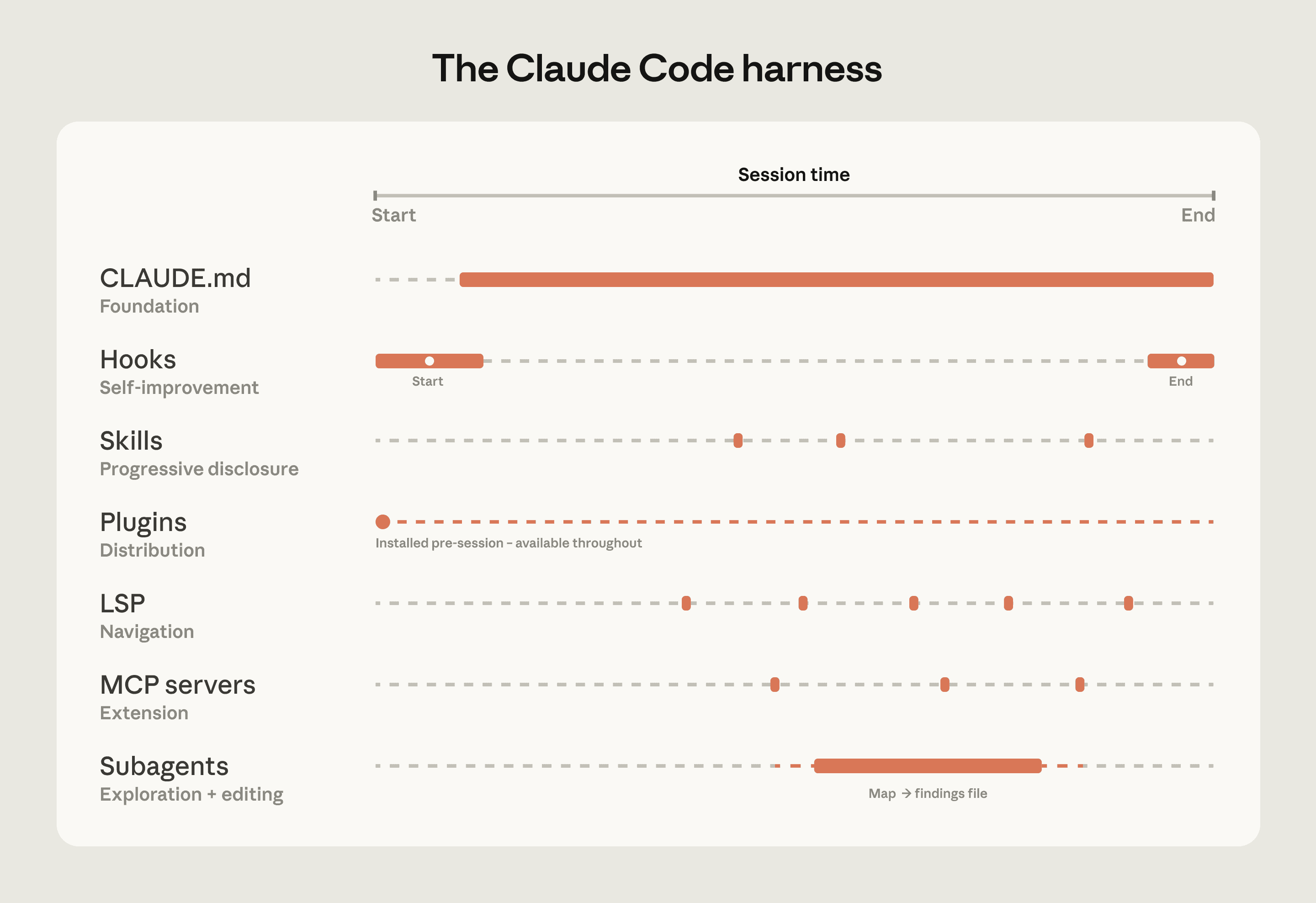
Key components include: CLAUDE.md context files (layered from root to subdirectory), hooks for self-improvement and automation, skills for on-demand expertise loading, plugins for distributing working setups org-wide, LSP integrations for symbol-level navigation, MCP servers for internal tool access, and subagents for splitting exploration from editing.
Each of these is a lever. Pull the wrong ones and you get a slow, confused agent. Pull the right ones and you get something that can navigate a 10-million-line codebase without getting lost.
Configuring CLAUDE.md Files That Actually Work
CLAUDE.md is where most teams either win or waste their time. Creating a CLAUDE.md at the repo root as the "project README for agents" means your guidance reliably frames the session.
Include: tech stack and versions, repo map, standard commands, test strategy, style/lint rules, branch/PR etiquette, "do not touch" zones, and security/compliance notes.
The layering behavior matters at scale. Deploy CLAUDE.md files to system directories for company-wide standards, or create repository-specific files for project architecture and contribution guidelines. Claude Code references these automatically.
Keep them lean. A CLAUDE.md bloated with irrelevant context eats into the context window before any real work begins. Practical guidance covers keeping CLAUDE.md files lean, scoping commands per subdirectory, using .ignore files, building codebase maps, and running LSP servers.
LSP Integration and MCP Servers
Two infrastructure investments consistently separate successful deployments from struggling ones: Language Server Protocol (LSP) integration and Model Context Protocol (MCP) servers.
Most large-codebase IDEs already have an LSP running, powering "go to definition" and "find all references." Surfacing this to Claude gives it symbol-level precision: it can follow a function call to its definition, trace references across files, and distinguish between identically named functions in different languages. Without it, Claude pattern-matches on text and can land on the wrong symbol.
One enterprise software company deployed LSP integrations org-wide before their Claude Code rollout, specifically to make C and C++ navigation reliable at scale. For multi-language codebases, this is one of the highest-value investments.
MCP servers extend Claude's reach into your internal tooling. MCP is a great way to give Claude Code more information, such as connecting to ticket management systems or error logs. Anthropic recommends that one central team configures MCP servers and checks a .mcp.json configuration into the codebase so that all users benefit.
Context Management and Subagents
Most best practices are based on one constraint: Claude's context window fills up fast, and performance degrades as it fills. Claude's context window holds your entire conversation, including every message, every file Claude reads, and every command output.
A fresh session in a monorepo typically consumes a baseline of 15-25K tokens before you start working. That baseline grows fast in active sessions.
Subagents are the primary tool for managing this. Subagents run in separate context windows and report back summaries. The subagent explores the codebase, reads relevant files, and reports back with findings, all without cluttering your main conversation.
For large refactoring tasks, chunking is essential. Large refactoring operations should be broken into manageable chunks that compile and test independently. Aim for batches of 5-20 files that represent a logical, self-contained unit.
Governance, Review Workflows, and Model Selection
Repository and review practices need to adapt. AI-generated commits should be clearly tagged. In many cases, they should be reviewed by engineers who understand both the codebase and how the agent behaves. Workflows should vary based on risk: stricter review paths for critical systems and lighter ones for internal tooling.
Model selection is an underrated cost lever. Using Opus for everything is slow and expensive. Using Haiku for everything produces shallow results on complex tasks. Match the model to the job. According to enterprise routing data, simple code edits routed to Haiku can cut costs by up to 90% compared to Opus, with no meaningful quality drop for those task types.
Deploying Claude Code across dozens or hundreds of engineers creates operational problems that individual use cases never surface: unchecked spending on API calls, complete lack of cost attribution by developer, governance gaps, and the risk of relying on a single AI provider. An AI gateway sitting between developers and the Claude provider resolves these issues by intercepting all requests, managing spending limits, capturing usage metrics, and intelligently routing work.
On the infrastructure side, Claude Code deploys through AWS Bedrock, Google Vertex AI, or Azure, integrating with your existing IAM, CloudTrail logging, and VPC configurations. All data stays within your control and complies with SOC 2 Type II standards.
For model version stability, if you deploy through Bedrock, Vertex AI, Foundry, or Claude Platform on AWS, pin specific model versions using the relevant environment variables. Without pinning, model aliases resolve to the latest version, which may not yet be enabled in your account when Anthropic releases an update. Pinning lets you control when your users move to a new model.
Organizational Patterns That Stick
Successful rollouts invest in infrastructure before broad access, assign dedicated ownership (sometimes an "agent manager" role), and establish cross-team coordination.
Anthropic's Applied AI team works directly with enterprises to tailor deployments, ensuring the tool delivers maximum value regardless of the complexity of the codebase. For teams considering adoption, Anthropic recommends periodic reviews of configurations to adapt to evolving AI capabilities and maintain peak performance.
Scaling AI-powered development across enterprise teams requires more than just giving everyone access to Claude Code. Without proper governance, standardization, and onboarding processes, teams end up with inconsistent code quality, security vulnerabilities, and development bottlenecks that defeat the purpose of using AI assistance.
Final Thoughts
The pattern I keep seeing in failed Claude Code rollouts is the same: teams treat it like a smarter autocomplete and skip the infrastructure work. They give developers access, watch adoption plateau, and conclude the tool doesn't work at scale. It does work at scale — but only when the harness is built correctly. CLAUDE.md files, LSP integration, MCP servers, subagent patterns, and governance workflows are not optional extras. They're the product.
What I'd watch closely going forward is how Anthropic evolves the plugin and skills system. While Claude Code's underlying AI model is powerful, Anthropic emphasizes that its "harness" determines much of its effectiveness. This includes hooks, skills, plugins, and MCP servers, all of which enable integration and task-specific customization. As those primitives mature, the gap between well-configured and poorly-configured deployments will only widen.
If you're in the planning phase, start with the official enterprise deployment docs and invest in CLAUDE.md and LSP before you roll out to more than a handful of developers. What's your current setup? Drop your thoughts in the comments.
Frequently Asked Questions
5 questions
1What is CLAUDE.md and why does it matter at scale?
CLAUDE.md is a configuration file that gives Claude Code project-specific context before a session starts. At scale, it acts as a shared knowledge base for the agent — covering tech stack, coding standards, test commands, and off-limits zones. Without it, Claude navigates your codebase with no starting map.