
Google introduced Gemini Omni 1.1 Flash on August 27, 2026, giving developers a more controlled way to generate and edit video. The model can extend scenes, generate motion between specified first and last frames, accept video references, produce inexpensive 360p drafts, and upscale selected outputs to 1080p or 4K.
The important change is not resolution alone. Gemini Omni 1.1 Flash turns video generation into a more iterative process, with separate tools for drafting, directing motion, preserving references, continuing a scene, and preparing the final export. Google has also moved the Gemini API version from preview to general availability.
That still does not make Omni 1.1 a deterministic video editor. The model must infer the movement between keyframes and the continuation of a scene, and Google’s launch material focuses on demonstrations rather than standardized quality benchmarks. The new controls reduce uncertainty, but they do not eliminate it.
Gemini Omni 1.1 Flash Is Built for Iteration
The stable Gemini API model ID is gemini-omni-1.1-flash. According to the official Gemini Omni Flash model page, it accepts text, images, and video as input and returns video clips between three and 10 seconds long at 24 frames per second. Available output resolutions include 360p, 720p, 1080p, and 4K.
Its main controls correspond to recognizable stages of a video-production workflow:
- Scene extension continues an existing clip.
- First-and-last-frame interpolation constrains where a shot begins and ends.
- 360p output provides a faster, cheaper draft.
- 1080p and 4K upscaling prepares a higher-resolution export.
- Video references supply motion, appearance, or character guidance.
Developers can combine those controls with the Interactions API, which supports conversational editing across multiple turns. A generated clip can become the input for a follow-up instruction, letting an application treat video generation as an editable session rather than an isolated request.
Scene Extension and Keyframes Give Developers More Control
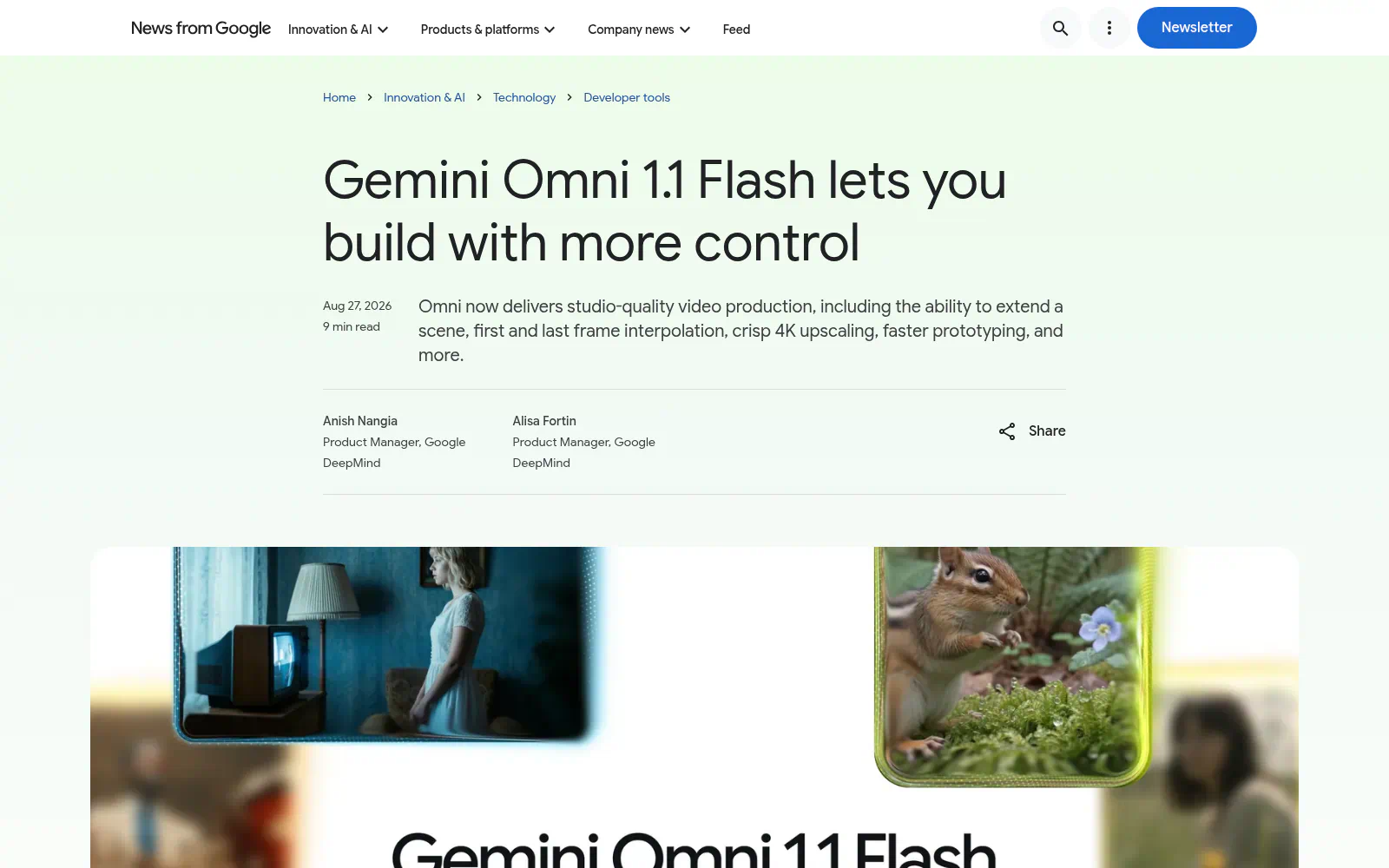
Screenshot: Build with Gemini Omni 1.1 Flash.
Scene extension lets Omni 1.1 inspect up to 10 seconds of preceding footage before generating the continuation. Google says earlier versions referred to only the final second, so the larger context should help the model preserve characters, movement, audio, and narrative direction. Clips can be extended in 10-second increments until they reach a cumulative length of 40 seconds.
Here's how a clip can be extended:
from google import genai

client = genai.Client()

interaction = client.interactions.create(

    model="gemini-omni-1.1-flash",

    previous_interaction_id=previous_video_interaction.id,

    input=[

        {"type": "text", "text": "Continue the scene."}

    ],

    response_format={

        "resolution": "360p",

    },

)
That is long enough for short advertisements, product sequences, social videos, visual explainers, and multi-beat scenes. A developer could generate an opening shot, review it, and then describe the next action instead of asking the model to produce the entire sequence correctly in one attempt.
First-and-last-frame interpolation addresses a different problem. Developers provide two images representing the desired endpoints and describe the transition between them. Omni 1.1 then generates the intervening motion, which can be used for camera orbits, zooms, environmental transitions, and looping clips. The API’s prompt syntax also includes <FIRST_FRAME> and <LAST_FRAME> tags for assigning those roles explicitly.
The endpoints remain constraints rather than a frame-by-frame motion plan. The model still decides how objects, subjects, and the camera move between them. Even so, anchoring both ends of a shot is considerably more useful than repeatedly regenerating an unconstrained clip and hoping it finishes on the right composition.
360p Drafts and 4K Output Create a Practical Pipeline
Google says 360p generation can run up to 60% faster, based on system throughput, while costing one-third as much as the default 720p mode. That makes it suitable for testing prompts, camera instructions, scene timing, and alternate compositions before paying for a high-resolution result.
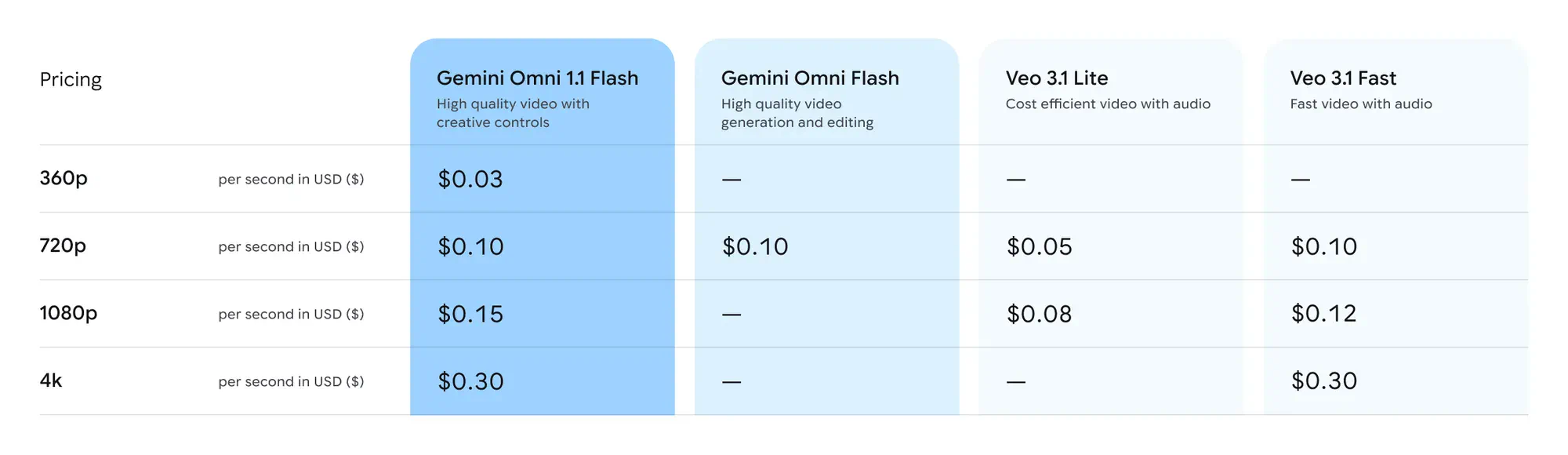
The launch pricing table lists approximate video-output rates of $0.03 per second for 360p, $0.10 for 720p, $0.15 for 1080p, and $0.30 for 4K. A 10-second clip therefore costs approximately $0.30, $1, $1.50, or $3 at those respective resolutions, excluding any additional applicable input charges. Google’s token-based pricing documentation produces nearly identical effective rates.
The economics become meaningful when an application generates several candidates. Four 10-second drafts at 360p followed by one 10-second 4K export would cost about $4.20 in video output. Generating all five versions at 4K would cost $15. That workflow saves approximately $10.80 while reserving the most expensive rendering step for the selected clip.
There is an important quality caveat: 720p is the default generation resolution, while the resolution documentation describes 1080p and 4K as upscaled outputs. Developers should treat 4K as a delivery option, not evidence that the model natively reasons about four times as much visual detail. Upscaling can produce a sharper export, but it cannot automatically repair incorrect motion, continuity errors, or malformed objects.
Video References Make Multimodal Prompts More Useful
Gemini Omni 1.1 Flash can use video clips as references alongside text and images. Google’s documentation permits up to three reference clips of up to three seconds each, providing a way to communicate movement or likeness that would be difficult to describe precisely in a written prompt. Audio contained in reference videos is ignored.
A creative application could use one reference for a performer’s motion, an image for the character that should perform it, and another image for the environment. Google demonstrates the idea with separate dance references assigned to generated characters, all brought together in one continuous shot.
The most useful interpretation is “motion and appearance guidance,” not conventional timeline editing. Google warns that broader reasoning across multiple videos is not supported and may produce degraded or unexpected results. Applications will need clear media roles, concise prompts, and a review step rather than assuming that Omni can reliably combine every detail from several source clips.
The Production Label Comes With Practical Limits
Google calls the Gemini API release generally available, but its developer documentation identifies restrictions that will affect real products:
- Uploaded videos for editing or extension generally cannot exceed 10 seconds.
- Extension can append footage only at the end, not before or within a clip.
- An uploaded video containing dialogue cannot be extended with additional dialogue, although speech is supported when extending model-generated clips through a multi-turn interaction.
- Editing and extending uploaded videos are unavailable in the European Economic Area, Switzerland, and the United Kingdom.
- Voice editing, uploaded audio references, provisioned throughput, system instructions, and common sampling controls are not supported.
Every generated video includes Google’s invisible SynthID watermark, and both inputs and outputs pass through content-safety filters. Google also notes that generation time varies with duration, selected resolution, and current API demand.
Those constraints do not prevent useful applications, but they rule out some obvious assumptions. Omni 1.1 is not yet a general-purpose nonlinear editor, a long-form video generator, or a drop-in replacement for production software that requires exact control over every frame and audio track.
Availability and Pricing Depend on the Google Entry Point
Developers can use the stable gemini-omni-1.1-flash model through the Gemini API or experiment with it directly in Google AI Studio. Google’s release notes say the earlier gemini-omni-flash-preview endpoint will be deprecated on September 30, 2026, so existing applications should plan to migrate.
Google also offers Omni 1.1 through the Gemini Enterprise Agent Platform, although its Cloud documentation uses the separate preview ID gemini-omni-1.1-flash-preview. Teams should therefore verify the model name, launch status, quota system, pricing, and regional support for their chosen platform instead of assuming that every Google entry point has identical deployment terms.
The API itself supports explicit tasks including text_to_video, image_to_video, reference_to_video, edit, and extend. Google recommends starting with natural-language prompting and adding the task parameter only when the model fails to infer the intended operation, because an explicit task can impose additional constraints.
The Best Products Will Expose the Controls
The release is particularly well suited to storyboard-transition tools, prompt-variation workspaces, product-video generators, interactive scene continuations, automated B-roll systems, and applications that transfer reference motion onto new characters.
The strongest implementations will expose those operations as separate controls instead of presenting users with one large prompt box. A creator should be able to choose draft resolution, assign media roles, compare variants, lock the first and last frames, extend the preferred result, and upscale only when the sequence is ready. Google’s own concepts include a transition generator and a “Draft Room” for comparing several 360p variations side by side.
Final Thoughts
The headline feature may be 4K output, but the cheaper draft-and-refine workflow is more consequential. Scene extensions, endpoint frames, reference clips, and conversational editing give developers several ways to reduce the randomness that has limited practical AI video tools.
Gemini Omni 1.1 Flash still depends on model inference, and its 4K mode is upscaled rather than native. Its value will therefore depend less on isolated showcase clips and more on whether it can preserve motion, characters, audio, and composition across repeated edits. Google has supplied a credible production workflow; independent testing now needs to establish how reliably that workflow holds together.
Frequently Asked Questions
4 questions
1What Is Gemini Omni 1.1 Flash?
Gemini Omni 1.1 Flash is Google’s generally available model for fast video generation and conversational editing through the Gemini API. It accepts text, image, and video inputs and can generate clips with audio, extend scenes, interpolate between first and last frames, use reference videos, and return output from 360p through upscaled 4K.


