Download ChatGPT and Claude through vendor-controlled channels, verify where the complete package came from, and treat unexpected DLLs beside a signed executable as a reason to stop. Those checks address the central trick in a Yoba malware campaign disclosed by Check Point Research on October 27, 2026: attackers bundled legitimate OpenAI and Anthropic binaries with malicious code in fake GitHub releases.
The projects advertised supposed desktop apps called GPT-5.6 Sol, GPT-6 Astra and Claude Opus. Launching the genuine executable caused it to load an attacker-supplied library, starting a multistage infection.
The signed binaries were legitimate; the surrounding downloads were malicious. Check Point’s account describes third-party impersonation, with no reported compromise of OpenAI or Anthropic’s official distributions.
For anyone who already ran one of these packages, deleting the ZIP is insufficient. The reported chain establishes persistence and retrieves another payload. Isolate a suspected device from the network and involve your security team, or use trusted incident-response support, before treating it as clean.
GitHub Hosted the Lure and the Download
Check Point says the attackers combined GitHub repositories with GitHub Pages sites describing the fake software. Download buttons led directly to malicious ZIP files hosted as GitHub releases. That gave the campaign a continuous path from a convincing product page to a download on familiar infrastructure.
The researchers identified three release uploads:
- August 30, 2026:
sol-setup.zip, associated with GPT-5.6 Sol. - August 31, 2026:
Setup-Claude.zip, associated with the Claude-themed project. - September 4, 2026:
GPT-6-Astra-Setup.zip, associated with GPT-6 Astra.
The first repository dated to July, but the malicious releases arrived later. Check Point reported tracking the campaign over roughly two months.
The repositories showed no evidence of artificially inflated stars or forks. They nevertheless appeared prominently in Google results observed by the researchers. Check Point assessed the search-targeted pages and download tactics as consistent with SEO poisoning, where attackers optimize malicious pages to reach people searching for software. These observations come from the original research report.
That distinction matters when evaluating a download. A repository does not need a large, manipulated following to attract victims through external search. GitHub hosting proves where a file is stored, not who authorized its distribution.
I’d use the vendor’s own website as the starting point for an AI-app download, even when a search result points to GitHub. The useful verification is whether the vendor directs users to that specific repository and release. A familiar hosting domain alone leaves the campaign’s impersonation tactic intact.
Why a Valid Signature Did Not Protect the Package
The ChatGPT-themed packages included a legitimate, signed OpenAI Setup.exe. The Claude package used a legitimate, signed Claude executable. Alongside those files, the attackers placed a malicious winmm.dll, according to Check Point’s campaign summary.
A DLL is a library of code that another program can load. In this attack, the executable loaded the attacker’s nearby DLL through DLL sideloading. The trusted program became the entry point for untrusted code.
A valid executable signature can help verify the publisher and integrity of that signed file. It does not extend that assurance to every neighboring file in a ZIP archive.
| Evidence a user might check | What it can establish | What remains unchecked |
|---|---|---|
| A valid OpenAI or Anthropic executable signature | The identity and integrity of the signed executable | Whether adjacent DLLs are legitimate |
| A release hosted on GitHub | Where the release is hosted | Whether the AI vendor authorized it |
| A matching file hash | That a file matches the chosen reference | Whether the reference itself is trustworthy |
| A vendor-controlled download link | A stronger connection between publisher and package | Whether later execution shows suspicious behavior |
The practical lesson is to verify the package’s provenance, not merely its most recognizable executable. If a vendor publishes hashes, compare against values obtained through a trusted vendor-controlled channel. A checksum supplied by the same impostor page only confirms that its download matches its own claim.
For defenders, the next question is which libraries the process actually loads and from which paths. A valid certificate on Setup.exe cannot answer that.
An adjacent DLL is not automatically malicious. Legitimate applications routinely ship libraries. The useful signal is an unexpected combination of executable, DLL, directory and behavior, especially when it came from an unverified installer.
Yoba Persists Beyond the Initial Installer
Check Point divides the infection into two main components: YobaDropper, which establishes the next stage, and YobaLoader, which retrieves and runs the eventual payload.
The dropper checks that it is running under the expected Setup.exe process. A failed check triggers a lengthy delay intended to complicate analysis. It also performs regional language checks and requires administrator privileges before continuing, according to Check Point’s technical summary.
An administrator prompt is therefore a consequential decision in this chain. Granting elevation lets the malicious installer proceed past a documented execution condition. It should not be treated as routine approval simply because the visible executable has a familiar publisher.
Once its checks pass, the dropper places YobaLoader beside a legitimate Windows executable and creates a scheduled task to relaunch the chain after startup.
SOCtember’s detailed account of Check Point’s findings identifies the persistence arrangement as:
- A copy of Windows Media Player’s
WMPDMC.exeunderProgramData\WMProcess. - A malicious loader named
wmpdui.dllin that directory. - A scheduled task configured to run as Local System, delayed three minutes after boot.
The task reportedly used “Microsoft Corporation” as its author text. That label is descriptive metadata, not a code-signing verification.
These details explain why removing the original download is an incomplete response. A later execution path exists elsewhere on disk and can run after a reboot. Investigators need to inspect the scheduled task, copied executable and side-loaded DLL together.
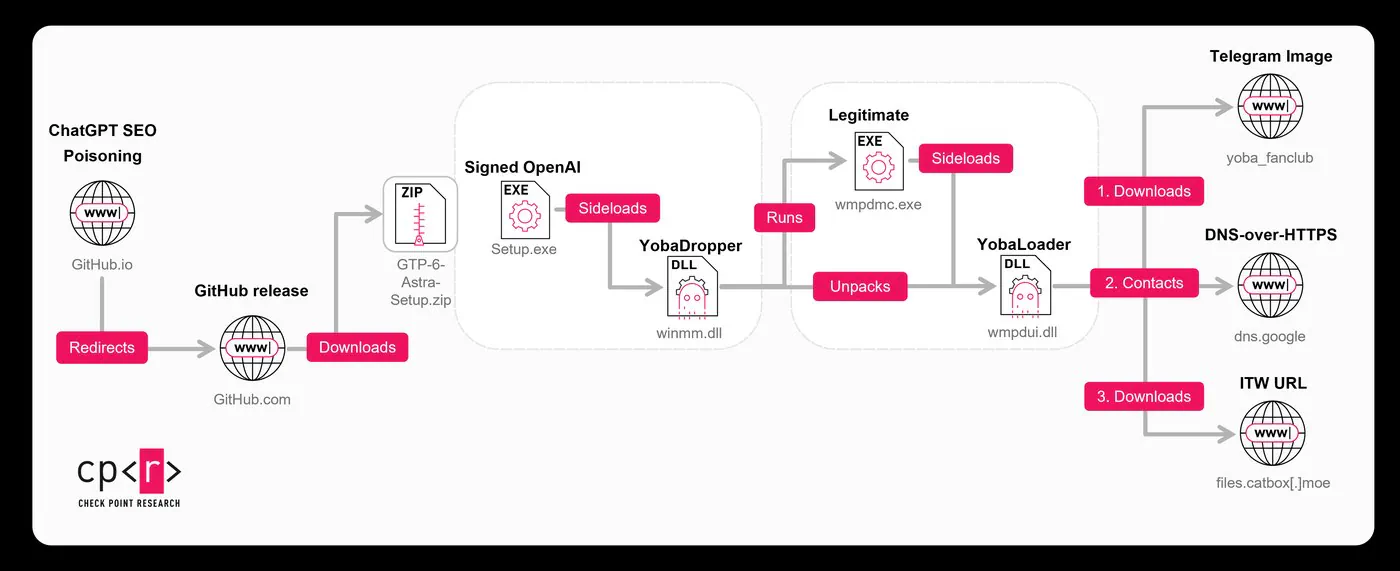
The behavior described here comes from Check Point’s published analysis and SOCtember’s secondary summary; it has not been independently reproduced for this article.
Telegram and DNS Help Deliver the Next Payload
YobaLoader uses several legitimate internet services to locate and retrieve its next stage. Check Point describes the sequence as follows:
- Retrieve a Telegram channel’s profile image. Data in the image helps generate a domain name.
- Query Google’s DNS-over-HTTPS service. The loader requests a DNS TXT record associated with that domain.
Frequently Asked Questions
3 questions
1Were OpenAI or Anthropic compromised?
Check Point reports attackers repackaging genuine signed binaries in malicious third-party downloads. Its account does not report a compromise of either vendor’s official software distribution.