Google’s new browser-based control layer lets developers monitor and steer long-running Antigravity sessions without rebuilding their development environment elsewhere.
Last updated on
Google has released Remote Control for Antigravity, giving developers a browser interface for AI agent sessions running on laptops, desktops, and servers.…
AI Summary
Google released Remote Control for Antigravity, a browser interface for monitoring and steering AI agent sessions running on laptops, desktops, and servers.
Announced August 21, 2026, after Antigravity 2.9.1 began rolling out, the feature lets developers inspect progress, answer prompts, review plans and artifacts, execute commands, start tasks, switch among machines, and receive push notifications. Work remains on the original host, preserving its files, dependencies, tools, environment variables, credentials, and runtime context; background tasks continue if the browser disconnects, provided the host stays awake, online, and running Antigravity or its headless daemon. Remote Control is rolling out gradually, with Google AI Ultra subscribers receiving priority access; Antigravity also has a $0 individual tier.
The convenience raises security concerns because Google’s public documentation does not yet detail encryption, session revocation, device approval, or audit logging. Developers should use conservative Deny, Ask, and Allow permissions, especially for credentials, destructive commands, and production systems.
Google has released Remote Control for Antigravity, giving developers a browser interface for AI agent sessions running on laptops, desktops, and servers. The announcement landed on August 21, 2026, one day after Antigravity 2.9.1 began rolling out with the feature and related performance improvements.
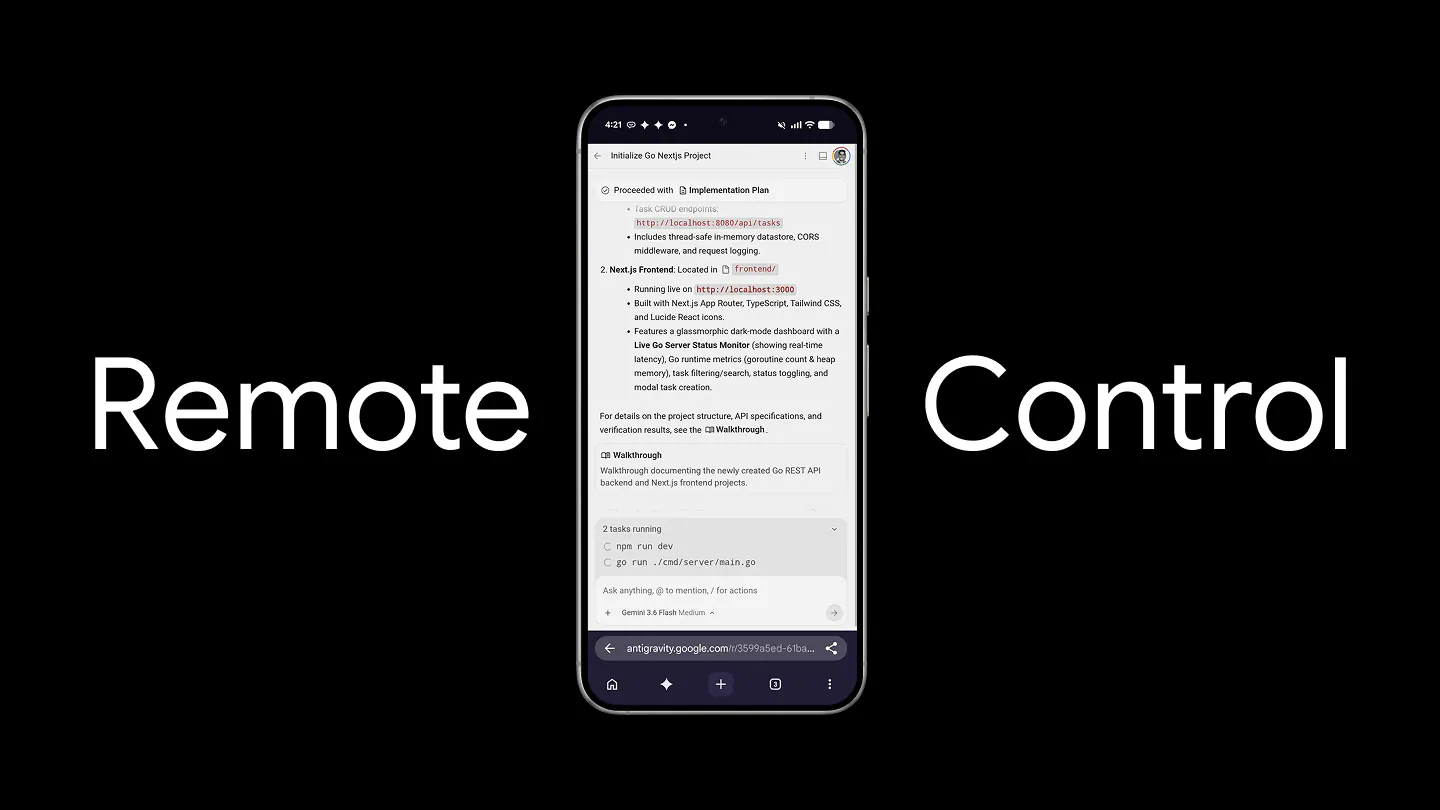
The practical problem is simple. Agentic coding tasks can keep running through refactors, test suites, dependency migrations, and build failures long after a developer wants to leave the desk. Remote Control lets that developer inspect progress, answer prompts, review plans, and issue further instructions from another device.
This is not just a mobile companion for chat. It turns the machine hosting Antigravity into a remotely managed AI development environment, which is useful precisely because the files, tools, credentials, and runtime context remain on that machine. That also makes security and permission design central to the feature.
Remote Control Extends Antigravity’s Agent-First Design
Google launched Antigravity 2.0 in May as a standalone application built around asynchronous agents rather than a conventional code editor. It can group conversations into projects, work across multiple folders, manage parallel agents, schedule tasks, and present artifacts such as implementation plans and changes for review. Remote Control adds a browser-facing layer to that architecture instead of moving the workload into a second environment.
See available Antigravity machines and switch between them
Open active conversations or start new agent tasks
Review implementation plans, changes, and generated artifacts
Execute commands and provide input when an agent pauses
Receive push notifications when work finishes or input is needed
The host can be a personal workstation, a separate development box, or a server. A developer might keep UI work on a laptop, run heavier builds on a Linux machine, and use one browser to supervise both.
The Browser Controls the Existing Host Environment
The key distinction is where execution happens. Remote Control does not recreate the repository in a browser container or ask the developer to synchronize a second toolchain. The Antigravity session continues to run on its original host, using that machine’s workspace, installed dependencies, build tools, environment variables, and credentials. The browser acts as a window into the live session.
That approach removes a familiar source of friction in remote development: reproducing a complicated environment just to check an agent’s work. It also preserves session continuity. If the browser connection drops, Google says background agent tasks and shell commands continue as long as the host itself remains connected to the internet.
There is an operational limit. The desktop host must stay awake, online, and running Antigravity. Remote Control does not turn a sleeping laptop into cloud infrastructure, and it does not eliminate the need to maintain the underlying machine.
Multi-Instance Management Makes Long Tasks More Practical
Antigravity’s AI agents are increasingly designed for work measured in minutes or hours rather than keystrokes. Remote Control addresses the awkward gap between autonomous execution and the moments when the system still needs a human decision. A notification can bring the developer back only when an agent completes a turn, requests input, or needs clarification.
The instance switcher is equally important. Teams and individual developers often divide work across operating systems or hardware profiles. Remote Control provides one place to move among those sessions without copying repositories or opening each machine through a conventional remote desktop. On mobile, the dashboard can be installed as a web app so push notifications can arrive outside the browser tab.
A phone remains a poor place for deep code review, however. The feature is best suited to monitoring, approving clearly scoped actions, checking artifacts, and redirecting work. Complex diffs and risky commands still deserve a full-size screen and deliberate review.
Setup Covers Desktop Sessions and Headless Servers
For a normal Antigravity 2.0 installation, setup is short. The user opens Settings, goes to Account, enables Remote Control, and optionally assigns the machine a recognizable nickname. From another device, the user opens the dashboard and signs in with the same Google Account. Antigravity then lists the available instances associated with that account.
Google also provides a headless daemon for Linux, macOS, and Windows. This is the more consequential option for developers who want an always-available build server or a machine without the Antigravity desktop interface. Installation includes a separate one-time terminal sign-in, after which the service can authenticate again following reboots.
There are OS-specific details. The service starts at boot and can keep running after sign-out on Linux and Windows. On macOS, it starts when the user logs in and stops after sign-out. Windows requires an Administrator Command Prompt, not PowerShell, for installation and removal. The daemon can also be named, restarted, uninstalled, and configured for automatic updates.
These differences matter because Remote Control is only as dependable as the host process behind it. Anyone planning unattended jobs should verify startup, crash recovery, sleep settings, and network behavior before relying on it for critical work.
Remote Access Raises the Security Stakes
Google describes Remote Control as a secure window into the workspace, but its public Remote Control documentation does not yet provide a detailed account of connection encryption, session revocation, device approval, or audit logging. That absence does not establish a vulnerability. It does mean security teams have limited public information for evaluating the remote channel itself.
The existing Antigravity permission system remains the main visible control boundary for agent actions. It evaluates sensitive operations through Deny, Ask, and Allow lists, with Deny taking precedence. Rules can cover file access, commands, websites, browser actions, Model Context Protocol tools, and unsandboxed execution. Within an active project, workspace file reads and writes are generally auto-allowed, while many external or unconfigured operations default to asking for approval.
Remote Control should therefore be treated more like an administrative interface than a harmless notification app. It can expose a session that already has access to source code, secrets, build systems, and deployment tooling. Sensible deployment practices include:
Limiting each project to the folders it genuinely needs
Denying access to SSH keys, credential stores, and sensitive system paths
Keeping destructive commands and production actions in Ask mode
Using narrowly scoped MCP and browser permissions
Securing the connected Google Account with strong authentication
Separating experimental agents from production-capable hosts
Remote approval also changes human behavior. A high-impact action reviewed on a phone may receive less scrutiny than the same request displayed beside a complete diff and terminal history. The technical controls matter, but so does resisting the urge to approve a blocked action simply to keep the agent moving.
Availability Is Broad, but the Rollout Is Prioritized
Remote Control is still rolling out, and Google says Google AI Ultra subscribers receive priority access. The company has not listed a separate fee for the feature. Its Antigravity plan documentation says the baseline includes access to product features, while the pricing page offers a $0 individual tier alongside Google AI Pro, Google AI Ultra, and an organization option through Google Cloud.
Because Antigravity versions roll out gradually, some eligible users may not see the Remote Control toggle immediately. The current documentation is tied to Antigravity 2.0 version 2.9.1, so updating the desktop application should be the first troubleshooting step.
This Release Solves an Orchestration Problem, Not a Coding Problem
Remote Control does not make Google’s models more capable, improve benchmark scores, or guarantee that an agent will finish a complex refactor correctly. Its value is operational. As AI coding systems become more autonomous, developers need ways to supervise several long-running processes without dedicating a screen and chair to each one.
That makes the feature a logical extension of Antigravity’s agent-first approach. The desktop app supplies local context and execution, the browser supplies reach, and notifications reconnect the human at decision points. This model can reduce idle time and make better use of powerful local or remote machines, especially for tests, migrations, and parallel project work.
The tradeoff is that convenience expands the attack surface and may encourage casual approvals. Google has solved the location problem more clearly than it has explained the remote security architecture. For individual developers, that calls for conservative permissions. For enterprises, it calls for fuller documentation and policy controls before broad deployment.
Final Thoughts
Remote Control is one of the more practical additions Google could make to Antigravity because it matches how agentic work actually behaves: tasks run in the background, then intermittently demand judgment. Keeping the real environment on the host avoids the cost and fragility of rebuilding it elsewhere.
The feature will be most useful when developers use it to supervise agents rather than rubber-stamp them. If Google pairs the browser interface with transparent connection security, strong session management, and enterprise-grade auditing, Remote Control could become a core part of Antigravity rather than a convenience for checking jobs away from the desk.
Frequently Asked Questions
4 questions
1
What is Google Antigravity Remote Control?
Google Antigravity Remote Control is a browser interface for monitoring and steering Antigravity 2.0 sessions running on another machine. It lets users open conversations, start tasks, inspect plans and artifacts, respond to agents, and switch among multiple connected computers while the actual files, tools, and commands remain on the host machine.
2
Does Antigravity Remote Control work on a phone?
Yes. Antigravity Remote Control works through a web browser on mobile and desktop devices. Google also lets mobile users install the dashboard as a web app on their home screen, which enables push notifications when an AI agent completes work or needs input. Detailed code review may still be more practical on a larger display.
3
Does the host computer need to stay on?
Yes. The host computer must remain awake, connected to the internet, and running either Antigravity 2.0 or the Remote Control headless daemon. If the browser disconnects, active background tasks can continue, but a sleeping or offline host will not remain available through the dashboard.
4
How do I enable Remote Control in Antigravity?
Open Antigravity 2.0 Settings, select Account, turn on Enable Remote Control, and optionally give the machine a nickname. Then open the Remote Control dashboard in another browser and sign in with the same Google Account. The feature is rolling out gradually, with Google AI Ultra accounts receiving priority access.