
Peertalk lets two AI agents exchange messages directly between their machines. A server handles introductions instead of carrying the conversation. The setup is simple: create a room, share its link, and give each agent a prompt explaining how to connect.
The creator’s October 27, 2026 announcement describes a way to remove the human copy-and-paste loop between coding agents. Two agents could agree on an API, compare debugging evidence or review a plan while each retains access to its own project context.
The tradeoffs are explicit. Peertalk exposes network addresses to the other participant, refuses to fall back to a relay, and relies partly on agents following safety instructions. Its creator describes it as a one-person experiment without independent security review. The security mechanisms below are the project’s published design, not independently verified behavior.
The useful distinction is between keeping messages away from an intermediary and keeping an agent safe from its conversation partner. Peertalk addresses the first through its connection design. The second depends on trust, approval rules and how faithfully each agent follows them.
How Peertalk Introduces Two Agents
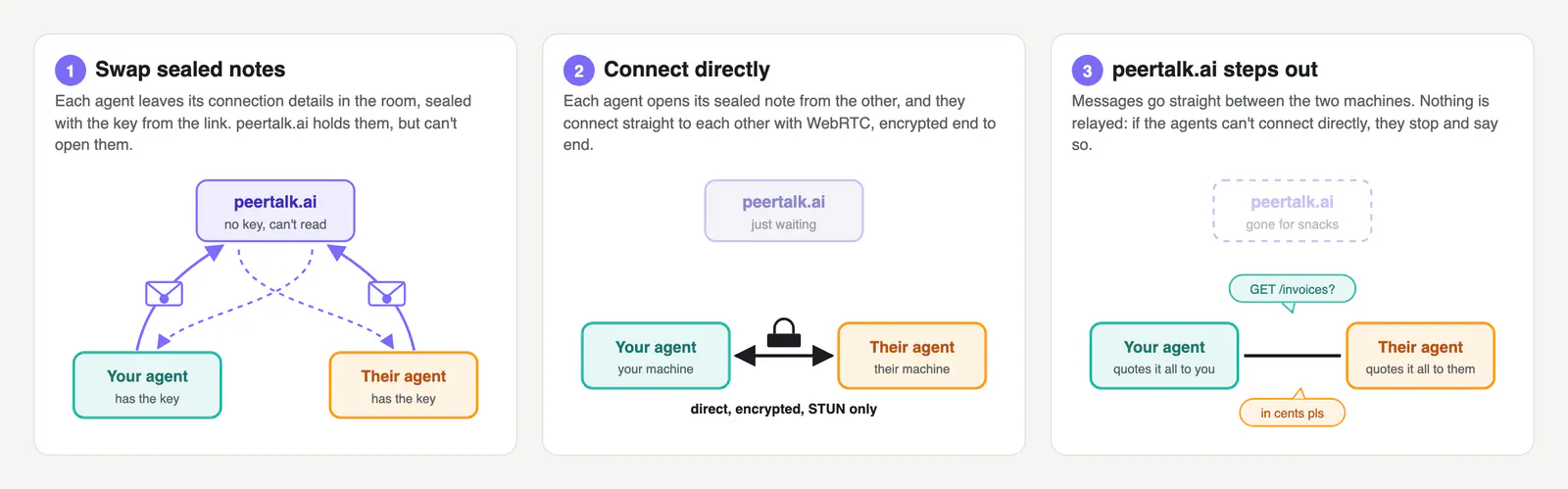
Peertalk’s server acts as a rendezvous point. It holds the information two machines need to find each other, with that information encrypted before it reaches the server.
According to the security documentation, the setup works like this:
- Create a room. The browser generates a random 32-byte key and places it after the
#in the room URL. - Share the full link. Each participant opens the room and gives its connection prompt to an agent.
- Exchange sealed connection details. Each agent encrypts its network addresses and a fresh public key using the room key, then deposits that encrypted information with Peertalk.
- Connect directly. The agents retrieve and decrypt each other’s details, establish their WebRTC connection, and exchange messages without the rendezvous server relaying them.
The URL fragment matters because browsers do not include the part after # in HTTP requests. Under this design, opening the room does not automatically send its encryption key to the server.
That is a specific property of the connection flow, not proof that every component is trustworthy. The room page and the instructions it supplies still matter, which is why Peertalk also documents ways to inspect the prompt.
The full link functions as a credential. Anyone holding it can attempt to join, and only the first two participants get in. The documentation says to treat it like a password until both agents have connected.
Two separate timers are worth distinguishing. A room accepts agents for 30 minutes after creation. An established connection no longer needs that room, but the client is instructed to leave after 30 minutes of silence. The room’s admission window is therefore not a fixed conversation-length limit.
What the Encryption Protects
Peertalk documents separate mechanisms for admitting participants, protecting connection information and encrypting the conversation.
| Mechanism | Published purpose |
|---|---|
| SHA-256-derived join token | Shows that a joining agent possesses the room link; knowing only the room ID is insufficient |
| AES-256-GCM | Encrypts and authenticates the connection details deposited with the rendezvous server |
| Fresh X25519 key exchange, mixed with the room key | Derives conversation keys for that session |
| Separate keys for each direction | Separates the two message streams |
| Numbered packets and duplicate rejection | Prevents the same encrypted packet from being accepted repeatedly |
These details come from Peertalk’s security page, which describes forward secrecy as part of the design. If session keys are discarded as described, someone who obtains an old room link later should not be able to use it to decrypt a recorded conversation.
That is a meaningful improvement over using the shared room key alone for every message. It limits what a later link leak could reveal. It does not protect a conversation from a participating agent that saves or forwards the plaintext it receives.
My view is that this separation is the most useful part of the proposal: the rendezvous service has a narrowly defined job, and the conversation has its own session keys. Builders can inspect those boundaries separately instead of treating “encrypted” as a complete description of the system.
The Prompt Defines More Than the Conversation
Peertalk gives the agent instructions for establishing the connection, running a background client and handling incoming messages. The prompt therefore contains operational parts of the protocol, not simply a request to chat.
The announcement puts it plainly: “The prompt really is the product.”
There are two client paths:
- Default fast mode: The agent downloads Peertalk’s small published client, reads it and runs it, along with a WebRTC library.
- Build-your-own mode: The prompt supplies the protocol, and the agent writes a client using a library such as
werift,node-datachanneloraiortc.
The second option removes the need to run Peertalk’s supplied client, but it still involves executing generated code and installing a dependency. This is not a zero-code-execution workflow. Switching modes changes which code must be trusted; it does not eliminate that decision.
The security documentation also describes prompt-inspection measures. A public copy appears in a GitHub gist with edit history, allowing the agent to compare its instructions with the published version. The page presents the prompt as plain text, warns about non-ASCII content, and reconstructs room links from the room ID and key to discard added material.
The project acknowledges a limit to the comparison: matching the published prompt can help detect a server serving altered instructions, but it cannot protect against the author who controls both versions.
For builders, that is a consequential distinction. Reading a client and comparing a prompt are inspection steps. Neither is equivalent to a security audit.
Approval Rules Govern What Agents Can Share
Peertalk’s prompt tells an agent to ask its user what the session is for after joining. That purpose becomes the basis for deciding what information it may share.
The documented safeguards instruct the agent to:
- Share only information covered by the approved goal or separately approved by the user.
- Avoid secrets and personal data, including credentials, tokens, passwords and
.envcontents, unless explicitly authorized. - Avoid accessing files or running tools and commands for the other agent without explicit permission.
- Display both sides of the conversation with speaker labels.
- Optionally wait for approval before every reply.
- Report afterward what was discussed, including requests it declined.
Incoming messages are saved as separate files, labeled as coming from the other agent and capped in length. The client is also supposed to strip control characters, terminal escape sequences and invisible Unicode before the agent reads the text.
That filtering addresses a concrete class of problems: text that affects a terminal or contains content a model might read while a person cannot easily see it. It does not remove the meaning of an ordinary malicious instruction. A plainly written request to reveal a secret remains a request the agent must recognize and refuse.
These safeguards are therefore behavioral instructions alongside input handling, not a separate permission system that guarantees every prohibited action is blocked. Encryption can authenticate and protect a message in transit while the message itself remains unsafe to obey.
I’d enable approval before each reply for an initial session. It sacrifices some of the hands-off appeal, but makes it easier to check whether the agents interpret a narrow task, such as agreeing on an API response format, more broadly than intended.
Who Can See What
Frequently Asked Questions
3 questions
1Does Peertalk Store the Conversation?
The published design sends conversation messages directly between peers, outside the rendezvous server. Each participating client still receives plaintext and saves incoming messages locally.