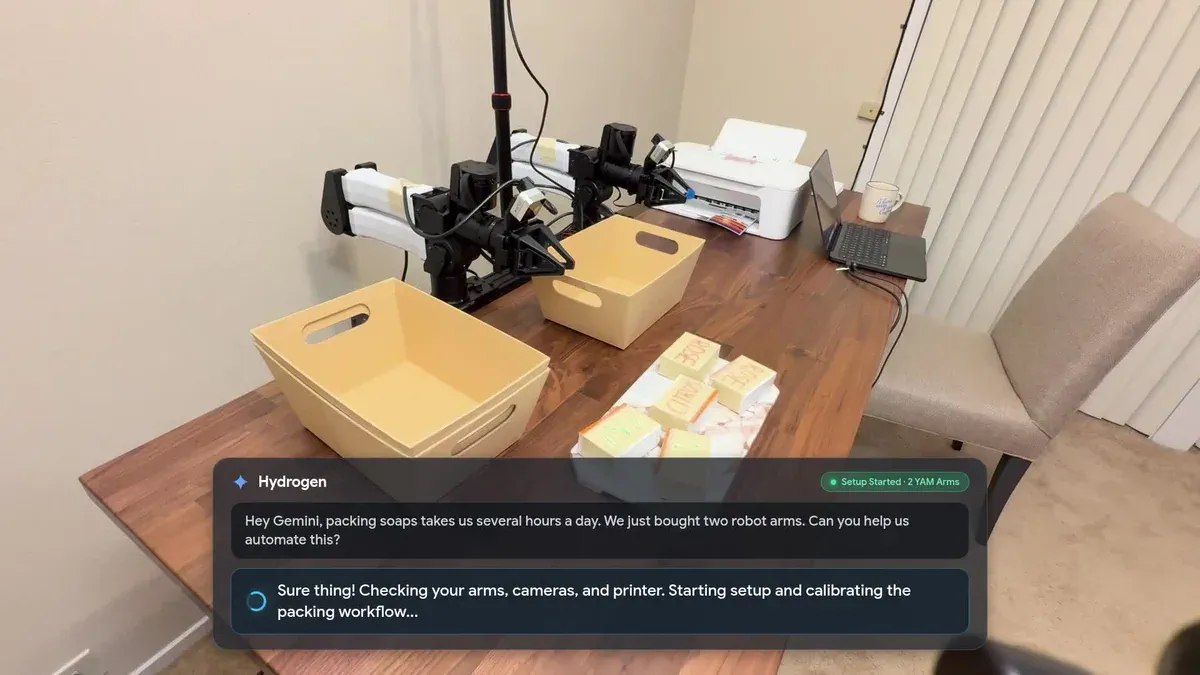
Google launched a Robotics plugin for Antigravity on November 17, 2026, packaging robot setup, simulation, perception and control into reusable skills for Gemini 4 Hydrogen. The release gives developers a more connected path from plugging in a robot arm to building an application around it, according to Google’s announcement.
The new product is the plugin, not the underlying model. Hydrogen’s model card was published on November 12, five days earlier. That distinction matters: this announcement is about turning a general-purpose model into a usable robotics development environment.
Google says the combination can take a developer from an unboxed robot to a working application in an afternoon. Its demonstrations make the intended workflow concrete, but they are vendor examples, not an independently established setup-time guarantee.
What the Robotics Plugin Adds
The Robotics plugin packages four groups of skills that Gemini can use inside Antigravity. Google describes them as covering the work that otherwise requires developers to connect drivers, calibration scripts, simulation tools, perception code and an application interface:
- Robot bring-up: Install drivers, discover cameras, calibrate the arm and verify safe motion, starting from a USB connection.
- MuJoCo simulation: Build, inspect and preview simulated scenes and assets inside Antigravity before moving physical hardware.
- Perception and control: Find objects, plan grasps and adjust robot actions using visual feedback.
- Application building: Generate the controller and simulation needed for a real-to-simulation-to-real development workflow.
Hydrogen supplies the reasoning and code generation. The plugin supplies the implementation skills that connect those capabilities to a robotics project.
Google says a developer can provide a natural-language goal and a camera view, after which Hydrogen plans the task, writes and runs control code, and adjusts execution in a closed loop. In practical terms, closed-loop control means subsequent actions can respond to observations of what actually happened, instead of relying entirely on an initial plan.
My view is that the integration is the more consequential announcement here. A model’s ability to identify an object is useful, but connecting that observation to calibration, a simulated grasp and executable controller code addresses a much larger share of the development work. Whether those connections hold up across different hardware remains the important practical question.
How to Install It and Choose an Access Route
Google’s installation path uses Antigravity’s interface:
- Open Google Antigravity.
- Select
gemini-4-hydrogenas the model. - Open Customizations.
- Search for Robotics on the Build With Google shelf and install the plugin.
Antigravity access requires a paid Google AI Pro or Ultra subscription. Hydrogen is also available for robotics work through the Gemini API and Google AI Studio, according to the launch announcement.
These routes serve different purposes. Antigravity is the packaged workbench described in the announcement, with the Robotics skills available inside the development environment. API access provides a route for developers integrating Hydrogen into their own software. AI Studio provides another interface for working with the model.
Access to Hydrogen through the API or AI Studio should not be read as access to the complete Antigravity plugin workflow. The model and the workbench are separate parts of the offering.
For a developer evaluating the launch, I’d start by checking whether the packaged skills cover the intended arm and camera. A convenient installation path has limited value if the first substantial task is writing unsupported hardware integration code.
From USB Setup to Simulation and Physical Control
Google’s first demonstration connects an I2RT YAM arm and an external depth camera to a laptop. The developer asks Hydrogen to bring up the robot, and the plugin installs software, finds the camera, calibrates the arm and runs test motions. Google reports that the arm is ready for tasks in about 10 minutes.
The company also shows bring-up flows for the SO-ARM101 and FR3 Duo. These are demonstrated examples, not a published compatibility guarantee for every configuration of those products or for other robot arms.
Once the hardware is moving, the workflow shifts to MuJoCo. Google says the plugin can construct simulation assets from descriptions, links, documents and workspace photos. Developers can adjust object shapes, positions and physical properties through chat, then examine reaching and grasping before deploying to hardware. These steps are described in the official walkthrough.
That simulation stage is worth separating from simple scene generation. A convincing-looking object is only one part of a useful robotics simulation. Its geometry, position and physical properties also affect whether a planned interaction makes sense.
The snack sorter shows the intended development loop
Google’s snack-sorting example starts with a whiteboard sketch of a conveyor carrying mixed snacks. Hydrogen builds an interactive MuJoCo scene from the task description and images of the real setup, then tests the grasping policy across multiple simulation runs before deployment to the physical robot.
Google presents the result as a working sorter built in about an hour. It also describes subsequent adjustments, including gripper closure force and sorting rules.
The useful lesson is the sequence: observe the real workspace, model it, test a policy, deploy it, then refine it using physical results. Simulation provides a place to iterate before every change becomes a hardware experiment.
Successful simulation still depends on how closely its assumptions match the real setup. The need to tune gripper force after deployment illustrates that boundary. Developers should treat the real-to-sim-to-real loop as a way to organize validation, not as permission to skip physical checks.
What the Benchmark Numbers Actually Support
Google reports that Hydrogen scores 58 on Artificial Analysis Robotics 0.1, a benchmark involving a real six-axis arm performing eight tabletop tasks, including pouring a drink and packing blocks. It describes the result as similar to Gemini 4 Argon at a lower cost per token. Google also reports stronger embodied-reasoning results than Gemini Robotics ER 2 on public ERQA tasks. Those comparisons appear in Google’s announcement and should be read as vendor-reported evidence.
Separate reporting adds context to the robotics score:
| Model | Reported AA-Robotics v0.1 score | Evidence available here |
|---|---|---|
| Gemini 4 Hydrogen | 58 | Google’s announcement; also reported by Servospace from Artificial Analysis |
| Gemini 4 Argon | 55.3 | Servospace’s account of Artificial Analysis’s earlier results |
| GPT-6.2 Astra | 79 | Servospace’s account of Artificial Analysis’s November 17 update |
Servospace reports that Hydrogen ranks no higher than sixth among the AA-Robotics results it identifies. That is secondary reporting of Artificial Analysis data, not a benchmark reproduced for this article, and it places Google’s result in a less promotional context: Hydrogen is competitive with Argon, but it is not the reported leader.
Frequently Asked Questions
4 questions
1Is this a new Gemini model launch?
No. Hydrogen’s model card was published on November 12, 2026. The November 17 announcement introduces the Antigravity Robotics plugin.