Nekot gives Claude Code and OpenAI Codex users an iPhone dashboard for checking usage limits before a coding session hits a cap. The app displays quota percentages, reset countdowns and usage history, with notifications at 80% and 95% usage and when a window resets.
The app comes from Jeman, not Anthropic or OpenAI. Its official product page explicitly says Nekot is independent and is not affiliated with, endorsed by or sponsored by either provider.
Jeman also describes a client-only privacy model: credentials stay in the device’s Keychain, requests go directly to providers over HTTPS, and no Nekot server handles credentials or usage data. Optional Pro syncing uses the owner’s iCloud.
The useful distinction is between seeing a limit and changing it. Nekot provides visibility into provider-reported usage. Its advertised features do not increase a subscription’s allowance or bypass a cap.
Quota Percentages and Reset Times Share One Screen
Nekot supports Claude Code and Codex, showing their usage windows together with gauges and reset countdowns. Its overview includes a seven-day timeline of upcoming resets, while platform-specific screens provide additional detail.
That combination matters because a percentage alone leaves out the timing. A nearly exhausted window that resets shortly presents a different planning problem from one that will remain constrained for hours. Nekot’s product page illustrates Claude Code’s five-hour window and pairs usage indicators with the time remaining until reset.
The app’s documented notification behavior includes:
- A warning when usage crosses 80%.
- Another warning when it crosses 95%.
- A notification when a usage window resets.
- One heads-up per threshold crossing, intended to avoid repeated alerts for the same event.
For someone alternating between Claude Code and Codex, a shared view can make it easier to decide which service has room for another task. The percentages still belong to separate provider allowances, however. They should not be treated as a common token balance or a guarantee that two equally full windows can handle the same amount of work.
My view is that the reset countdown is at least as useful as the gauge. It turns a usage figure into a scheduling signal: continue cautiously, switch services or leave the next substantial task until the window recovers.
Nekot also supports manually entered subscription-renewal dates and local renewal reminders. Those are separate from quota resets: a billing renewal and a usage-window reset need not represent the same event.
How Nekot’s Privacy Model Works
Jeman describes Nekot as a pure client with no developer-operated account system, server or usage analytics. The product page displays an App Store privacy label of “Data Not Collected.”
The documented data path has three main parts:
| Component | What Jeman says happens |
|---|---|
| Credentials | Stored in the device’s Keychain |
| Provider requests | Sent directly to each provider over HTTPS, without a Nekot proxy |
| Optional syncing | Platforms, settings and history sync through the user’s iCloud; credentials sync through iCloud Keychain |
Jeman says credentials synced through iCloud Keychain are end-to-end encrypted and never pass through its infrastructure. With sync disabled, the advertised model keeps credentials and history on the device.
That architecture removes a specific exposure: a separate Nekot backend holding users’ provider tokens and usage records. It does not eliminate the need to trust the installed app with the credentials it uses, and Anthropic or OpenAI still receives the requests needed to retrieve usage information. Enabling iCloud Sync also introduces Apple’s services into the storage path.
I’d distinguish those boundaries when evaluating the privacy claim. “No developer server” is a meaningful design choice, but it is narrower than saying information never leaves the phone under any circumstances.
These are the developer’s published descriptions and privacy-label statements, not findings from an independent security audit.
Connecting an Account Still Requires Credentials
Nekot lists account sign-in, an in-app web login for Codex and token pasting as connection methods. The product page presents pasted tokens as an option across supported platforms; it does not provide a detailed authentication matrix for every provider.
A practical starting point is the sign-in method offered for the selected service, with token entry available as another route. A manually supplied token is still an account credential, even if the app stores it locally.
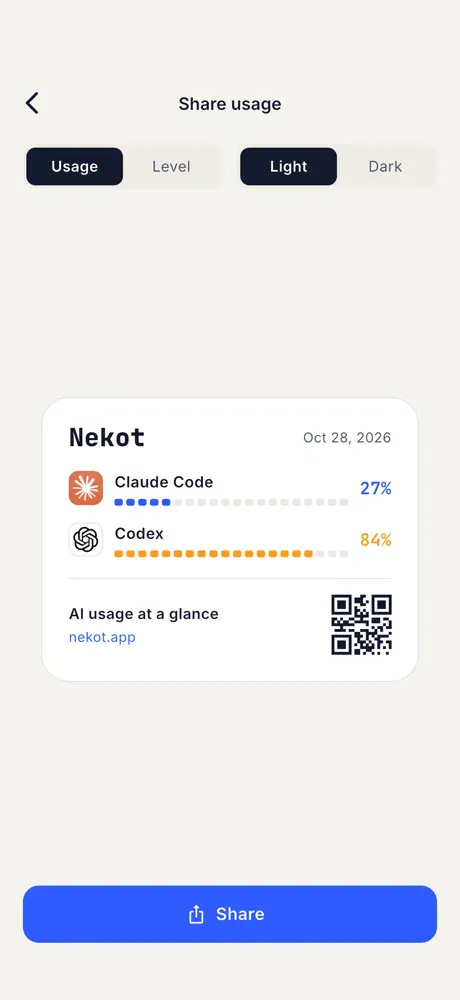
For sharing usage screenshots, Nekot offers a dedicated share card. Jeman says that card contains percentages without account details, making it a more targeted way to share quota status than an account-settings screen.
Free vs Pro: The Core Alerts Are Included
Nekot’s free tier includes the central monitoring features. Live usage, threshold warnings, reset notifications and a Home Screen widget do not require Pro.
The official feature comparison separates the tiers as follows:
| Feature | Free | Pro |
|---|---|---|
| Live usage | Included | Included |
| Threshold and reset notifications | Included | Included |
| Home Screen widget and share card | Included | Included |
| Statistics ranges | 24 hours and 7 days | Also 30 days and 12 weeks |
| Usage history | 7 days | Full year with heatmap |
| Burn prediction | Not included | Included |
| Accounts per platform | One | Multiple |
| iCloud Sync | Not included | Included |
| Dynamic Island monitoring | Not included | Included |
| Lock Screen widgets | Not included | Included |
| Reset alarms | Not included | Included, requiring iOS 26 or later |
| Usage coach and CSV export | Not included | Included |
The difference between reset notifications and reset alarms deserves attention. Ordinary reset notifications are free. The separately advertised alarm feature requires both Pro and iOS 26 or later. The app itself runs on iOS 17 or later, so installing Nekot on a supported older version of iOS does not unlock every Pro capability.
Pro also separates historical analysis from immediate awareness. Seven days of free history can show recent patterns; longer retention and CSV export offer more scope for comparing usage over time. Multiple accounts are another clear dividing line: the free allowance is one account per platform, not one account total.
Burn prediction may help users judge whether their current pace will exhaust a window, but the product page does not explain its calculation method or publish accuracy measurements. I’d treat that feature as a planning estimate, with the provider-reported quota and reset time as the firmer reference points.
Frequently Asked Questions
4 questions
1Is Nekot Made by Anthropic or OpenAI?
No. Nekot is an independent app from Jeman. Its official page explicitly disclaims affiliation, endorsement or sponsorship by Anthropic and OpenAI.