FoundationForecast puts Amazon Chronos, Google TimesFM, Mistral Timestral and other time-series foundation models behind one Python API. The Apache-2.0 library, developed by the TimeCopilot team, provides a shared data format and three core methods: forecast, cross_validation and detect_anomalies. Its GitHub documentation also lists prediction intervals, checkpoint-specific support for exogenous variables and automatic GPU execution when available.
For forecasting practitioners, the useful change is the comparison workflow. A team evaluating demand, electricity consumption or another time-dependent signal can prepare one dataset and try multiple model wrappers without rebuilding the surrounding application for each provider.
My view is that this is the library’s strongest proposition: it makes switching candidates cheaper. Whether that produces a fair comparison still depends on the checkpoint, information available to each model and evaluation setup.
One Data Contract for Competing Models
FoundationForecast expects a pandas DataFrame with three core columns:
| Column | Meaning | Practical requirement |
|---|---|---|
unique_id | Identifies an individual time series | Keep identifiers consistent across the dataset |
ds | Holds timestamps | Use a datetime dtype or correctly formatted ISO-8601 strings |
y | Contains the observed target | Supply the historical values to forecast |
The shared structure lets multiple series live in one table. A retailer, for example, could assign each product-location combination its own unique_id.
Timestamp handling deserves attention before any model comparison. The README recommends proper datetime values or ISO-8601 strings so sorting works correctly. It says the library infers frequency from regular timestamps when freq is omitted, and advises passing freq explicitly when intervals are irregular. Cross-validation and anomaly detection also convert timestamps internally where needed. These are documented behaviors in the repository’s quick-start instructions.
A common format removes a substantial amount of adapter work. It also makes preprocessing easier to inspect: the same target values and timestamps can reach every selected wrapper.
That consistency has limits. Two models may consume different amounts of history or support different auxiliary information. A shared DataFrame is the starting point for comparison, not the complete experimental design.
Forecast, Cross-Validate and Detect Anomalies
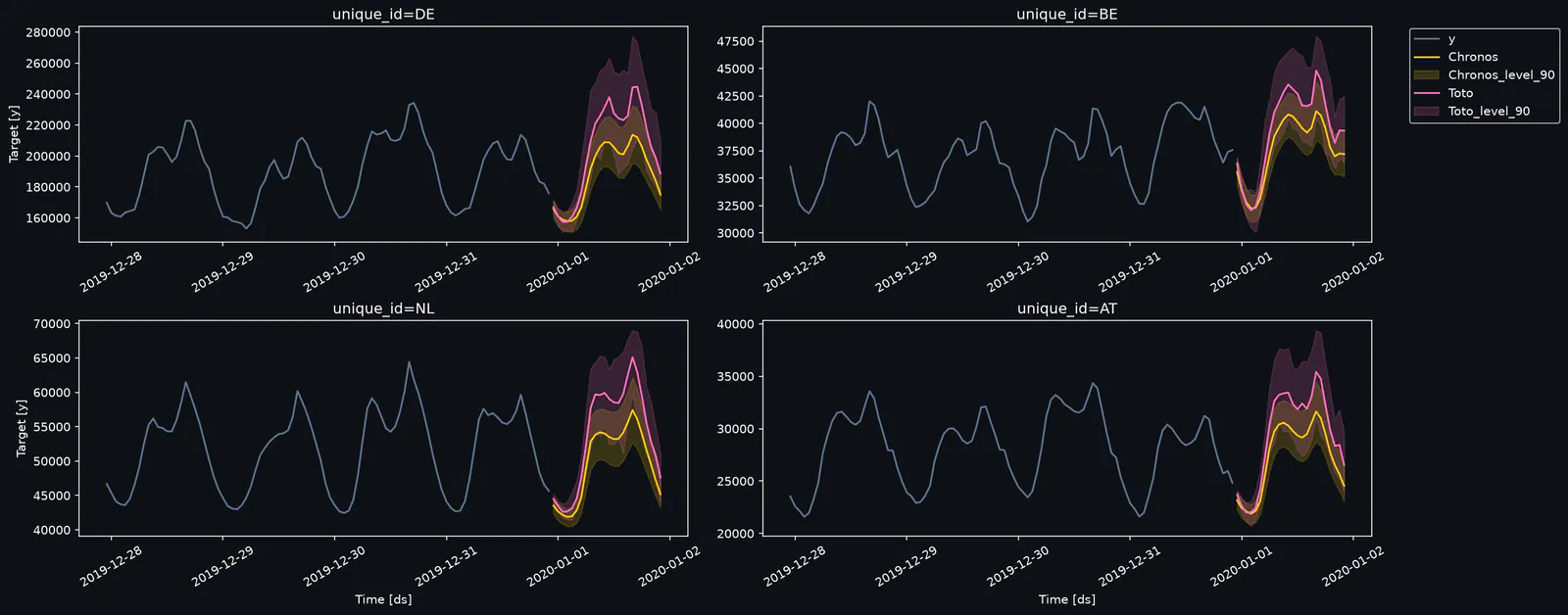
The repository’s quick-start example combines Chronos and Toto in one FoundationForecast object. The following code follows that documented pattern:
import pandas as pd

from foundationforecast import FoundationForecast
from foundationforecast.models import Chronos, Toto

df = pd.read_csv(
    "https://timecopilot.s3.amazonaws.com/public/data/entsoe_4markets_8w.csv",
    parse_dates=["ds"],
)

ff = FoundationForecast(
    models=[
        Chronos(
            repo_id="amazon/chronos-bolt-tiny",
            alias="Chronos",
        ),
        Toto(
            context_length=512,
            alias="Toto",
        ),
    ]
)

forecast_df = ff.forecast(df, h=24, level=[90])
cv_df = ff.cross_validation(df, h=24, level=[90])
anomalies_df = ff.detect_anomalies(df, level=99)
This is a documented usage example, not a result from testing performed for this article. It loads the project’s example dataset, selects two model wrappers and invokes all three core operations. The model-specific configuration remains visible: Chronos uses a particular Hugging Face checkpoint, while Toto receives a context length of 512. See the original example.
Forecasting Uses Steps, Not Fixed Time Units
The h=24 argument requests a 24-step forecast. With hourly observations, that corresponds to the next 24 hours. With daily observations, it covers 24 days.
That distinction matters when comparing results across datasets. “A 24-step forecast” says little about operational difficulty until the sampling frequency is known.
The level=[90] argument requests a 90% prediction interval. An interval describes uncertainty around a forecast; it is not a claim that the model is “90% accurate.” Teams should check how often observations actually fall inside those intervals on held-out data.
Cross-Validation Makes Historical Comparison Easier
The cross_validation method provides the shared entry point for historical backtesting. The practical purpose is to evaluate forecasts against observations that became available after a historical forecast cutoff.
For a useful comparison, I would hold the horizon and evaluation periods constant before interpreting a winner. Otherwise, a change in historical coverage can look like a model improvement.
The quick-start example does not specify the full window configuration, scoring pipeline or all evaluation defaults. A production comparison should record those settings alongside the selected checkpoints.
Anomaly Detection Shares the Interface
The README says every listed model supports anomaly detection through detect_anomalies, and its example passes level=99. That creates another common entry point for applications that need both forecasts and unusual-observation flags.
The overview provides less detail about anomaly calibration than it does about basic usage. Treat the returned flags as candidates for investigation, then assess false positives and missed events against the application’s needs.
Exogenous Support Depends on the Checkpoint
FoundationForecast accepts known-future covariates through X_df in forecast. For cross_validation, exogenous columns belong in the historical DataFrame. The README lists native support for Chronos-2, TimesFM-3, TimeGPT, T0, TimeH2O, TiRex-2 and Timestral, subject to the selected checkpoint.
These variables supply information beyond the target’s own history. Examples include:
- Holiday calendars: dates known before the forecast is made.
- Planned prices: prices already scheduled for the forecast period.
- Promotions: campaigns whose timing is available at prediction time.
- Weather inputs: forecasts available at the cutoff, with their own uncertainty.
The checkpoint qualification is consequential. The quick-start uses amazon/chronos-bolt-tiny, while the documentation identifies Chronos-2 checkpoints for native exogenous support. Similarly, the listed TimesFM support points to google/timesfm-3.0-pytorch, and TimeH2O support applies to h2oai/timeh2o-v1, excluding the tiny variant.
Selecting a model family therefore is not enough. The specific checkpoint determines whether the intended workflow is available.
There is also an evaluation trap here. Suppose a demand forecast uses weather. Giving a historical backtest the weather that actually occurred supplies information a live system would not have possessed. A more realistic comparison uses the weather forecast available at that historical cutoff, or explicitly labels the experiment as using realized weather.
That is a practical implication of “known-future” support: the interface can standardize the input, but the team must establish when that input became knowable.
Model Capabilities and Licenses Still Differ
The library’s support table lists forecasting, cross-validation, anomaly detection and prediction intervals across its model wrappers. Native exogenous support and checkpoint terms vary.
This selection summarizes the documented model table:
| Model family | Native known-future exogenous support | Listed default checkpoint license or terms |
|---|---|---|
| Chronos | Supported on Chronos-2 checkpoints | Apache-2.0 |
| TimesFM | Supported on TimesFM-3 | Apache-2.0 |
| Timestral | Supported | Modified MIT |
| TimeH2O | Supported on the listed non-tiny checkpoint | H2O.ai noncommercial terms |
| TimeGPT | Supported | Nixtla API terms |
| Toto | Not marked as supported |
Frequently Asked Questions
3 questions
1Which Models Does FoundationForecast Support?
The documentation lists Chronos, TimesFM, Timestral, TimeH2O, TimeGPT, Toto, Moirai and other families. Capabilities depend on the wrapper and selected checkpoint.