
Cloudflare launched new personal-agent analytics and access controls on November 4, 2026, giving website owners a way to identify supported AI assistants in their traffic and make separate access decisions for each one.
The update adds a Personal Assistants category to Security Analytics, along with a widget showing which agents visit a site and how many requests they send. Site owners can filter those requests to inspect paths, response codes and originating networks. In Security Settings, they can apply an overall Agents policy and make exceptions for individual supported assistants, according to Cloudflare’s announcement.
The main launch covers traffic analytics and policy controls. Connecting an agent’s login or signup activity to a particular user belongs to Account Abuse Protection, which Cloudflare identifies as early access.
That split determines what a security team can do: investigate and control an assistant across a site, or investigate its activity on a specific account.
Find Personal Assistants in Security Analytics
Cloudflare defines personal agents as intermediaries that turn a person’s instructions into website requests and actions. A shopper might ask one to compare products, find support information or complete a purchase. Each task produces automated traffic, but the business value and risk can differ considerably.
In Security Analytics, the Bot Analysis chart now places Personal Assistants alongside these existing categories:
- Verified Bot
- Likely Human
- Likely Automated
- Automated
Selecting Personal Assistants isolates that category’s traffic over time. Under Top statistics, a new Personal Assistants widget lists identified agents and their request counts. Selecting one agent filters the other widgets to its requested paths, received status codes and originating networks, Cloudflare says.
A practical inspection sequence looks like this:
- Select Personal Assistants to see the overall pattern of agent traffic.
- Choose an individual agent in Top statistics.
- Inspect requested paths to see which parts of the site it reaches.
- Compare response codes to find successful responses and error patterns.
- Review originating networks for additional context about those requests.
The useful change is the connection between identity and behavior. A request count says how active an assistant is; the filtered paths and responses help explain what that activity involves.
For example, requests concentrated on product pages suggest a different workflow from repeated requests to login or checkout paths. Errors concentrated on a particular route could give a site team somewhere specific to investigate.
Those are investigative signals, not proof of intent or task completion. Reaching a checkout path does not prove a purchase succeeded, and repeated errors alone do not prove abuse. The dashboard can help locate a problem, but the site’s own application and transaction records still matter when deciding what happened.
I’d start with those path-and-response patterns before changing access. A high-volume assistant may be performing useful customer-directed work; an assistant sending fewer requests could still be repeatedly failing at a critical step.
Set an Overall Policy, Then Make Agent Exceptions
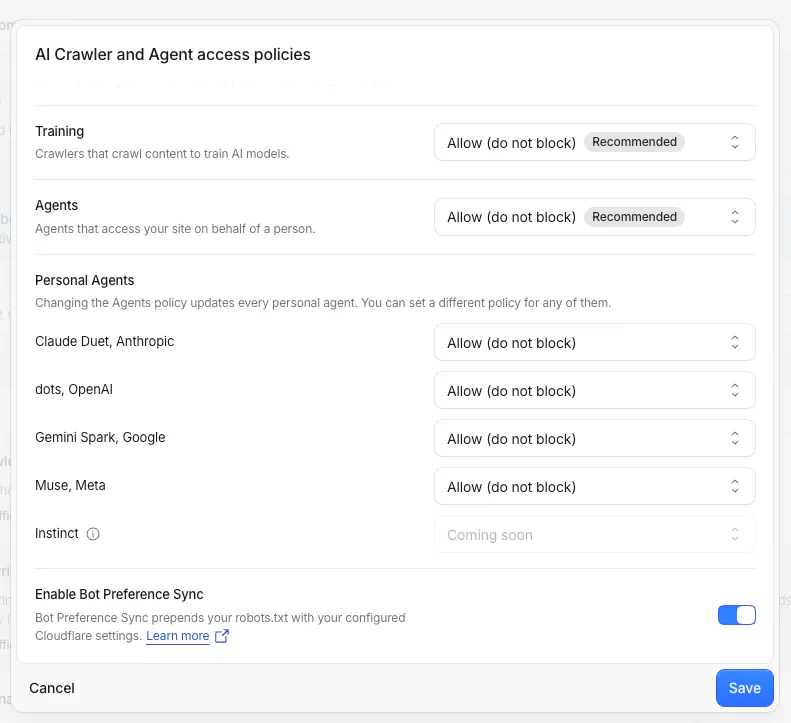
Cloudflare has renamed Configure AI bot policies to AI Crawler and Agent access policies. Its November 4 changelog gives the configuration path:
Security > Settings > AI Crawler and Agent access policies
The existing Agents policy now supports individual choices for supported personal agents. Site owners set the overall policy, then choose a different action for an assistant when needed.
| Policy option | Access decision | Practical use |
|---|---|---|
| Allow (do not block) | Do not block the supported agent through this policy | Welcome an assistant whose access fits the site’s needs |
| Block on pages with ads | Restrict the agent on ad-supported pages | Apply an access boundary tied to advertising |
| Block | Block the supported agent through this policy | Deny that assistant access |
Cloudflare’s example uses Block on pages with ads as the overall Agents policy, with an Allow (do not block) exception for one supported personal agent. Existing Search and Training policies remain unchanged, according to the announcement.
That separation matters. A site can make a new decision about assistants acting for users without also changing its policies for search-oriented or training-oriented AI traffic.
The controls also appear when adding a new Cloudflare zone. During onboarding, Cloudflare asks whether the site monetizes pages with ads and adjusts its recommended policies to that answer. Owners can revisit those choices later in Security Settings.
Match the Policy’s Scope to the Evidence
The three choices cover different access preferences, but they are not a general-purpose menu of every possible restriction. The announced per-agent options do not include a custom request quota or an arbitrary list of permitted routes.
Cloudflare’s opened announcement also does not explain how it determines which pages contain ads. Site owners considering that middle option should check the applicable configuration details before treating it as an exact map of their monetized content.
My view is that per-agent exceptions are the most useful part of this update. They let a site maintain a broad default while making a narrower decision when the analytics justify it. A publisher could restrict agents on ad-supported pages yet welcome one supported assistant; another business could choose a different balance based on how customers use its site.
An Allow selection should still be read according to its label: this policy will not block the agent. It is not a statement that every request is safe or that the person behind it is authorized to perform every action.
The feature also has a defined recognition boundary. Cloudflare describes controls for supported personal agents, and the opened sources do not enumerate that set or claim universal identification of all agent traffic. Plan-specific availability and identification accuracy are not detailed in those sources.
Account Abuse Protection Adds User-Level Context in Early Access
Account Abuse Protection addresses a different question: which user account is associated with an agent’s activity?
Cloudflare says its early-access product adds several views for site owners and fraud teams:
- Population overview: shows which personal agents are active across users and how many accounts use them.
- Login and signup events: indicate whether a personal agent made the request and identify the agent.
- Account filters: let analysts filter by AI-assistant events or number of AI assistants.
- Individual account overview: shows the agents associated with a particular account.
Those views support a more focused investigation. Cloudflare gives the example of comparing an agent that a customer has used for weeks with one appearing on the account for the first time.
A newly observed assistant is a reason to investigate, not a verdict. The useful addition is account history: an analyst can consider the assistant’s appearance alongside the account’s other activity.
Frequently Asked Questions
4 questions
1Where Are Cloudflare’s New Agent Controls?
They are under Security > Settings > AI Crawler and Agent access policies. The analytics appear in Security Analytics through the Personal Assistants category and widget.


